Sn1per
July 4, 2026 · View on GitHub







[Products] [Attack Surface Management] [About Sn1per] [News] [Contact] [Demo] [Pricing] [Shop]
Sn1per — The Offensive-Security Platform for Modern Teams
Recon, scanning, exploitation, and reporting in a single workspace — whether you're a solo pentester or a global SOC.
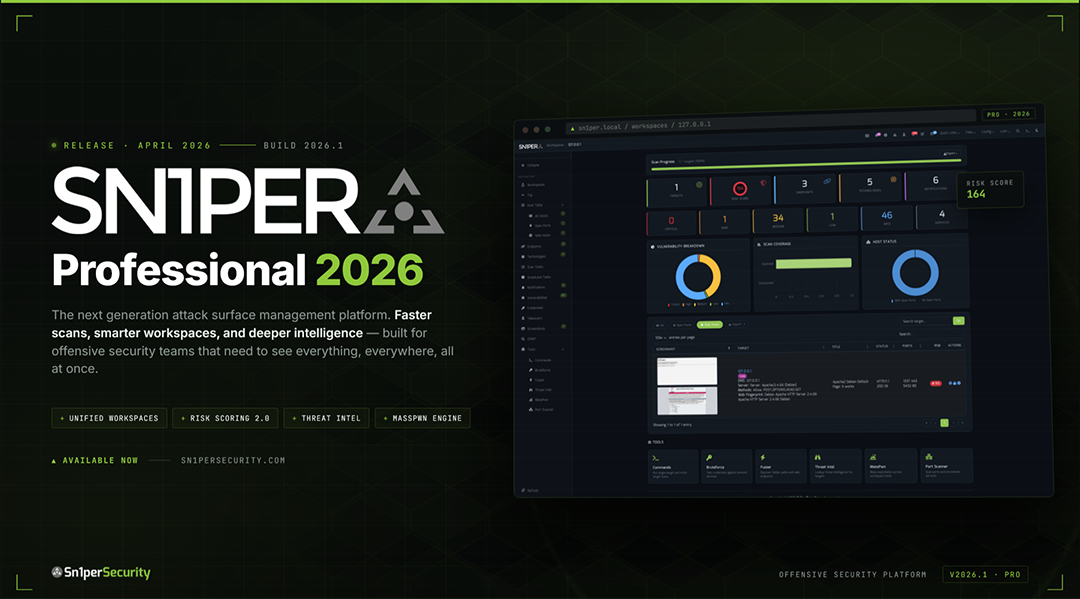
Sn1per Professional 2026 is here
The largest release since v10.0 — Docker-first deployment, Bootstrap 5 / Tabler UI, Workspace Navigator, Workspace + Host Reports with CSV / Excel / PDF export, JSON API v1.0, an Offcanvas Quick Commands sidebar with 13 panels, and expanded modules for ReverseAPK, MassPwn, Threat Intel, Nessus, and Burp.
Table of Contents
- About
- What Sn1per Is For
- What's New in 2026
- Editions & Pricing
- Install
- Quick Start
- Usage
- Scan Modes
- Integrations
- Documentation & Help
- News & Releases
- Community & Support
- Contributing
- License & Legal
About Sn1per
Sn1per is an offensive-security platform that consolidates reconnaissance, vulnerability scanning, exploitation, and reporting into a single workspace. Built by pentesters since 2015, it ships in three editions — a free Community Edition (source-available, custom EULA — see LICENSE.md) in this repository, a paid Professional edition for individual operators and small teams, and an Enterprise edition for global SOCs — all backed by the same core scanning engine.
Sn1per orchestrates 90+ third-party tools, ships with 600+ exploits and 10,000+ detections, and is used by 500+ teams worldwide. Battle-tested by the community. Built by pentesters, for pentesters.
500+ Teams · 90+ Integrations · 10,000+ Detections · 600+ Exploits · Trusted since 2015
What Sn1per Is For
Sn1per ships as one platform that covers the core jobs offensive security teams otherwise stitch together from a dozen tools:
- External Attack Surface Management - continuous discovery, monitoring, and active exploitation of every internet-facing asset your organization owns, including the ones nobody on your team knows about.
- Continuous Attack Surface Management - daily-cadence rescans that diff yesterday's surface against today's so new exposures hit your SOC within hours, not the next quarterly pentest.
- Automated Penetration Testing - 600+ exploits and 10,000+ detections orchestrated as a single workflow, with active verification eliminating the false positives version-only scanners ship as "critical."
- Reconnaissance & Attack Surface Discovery - the full phased recon workflow, from OSINT and subdomain enumeration through live-host discovery and fingerprinting, run as one automated pass.
What's New in 2026
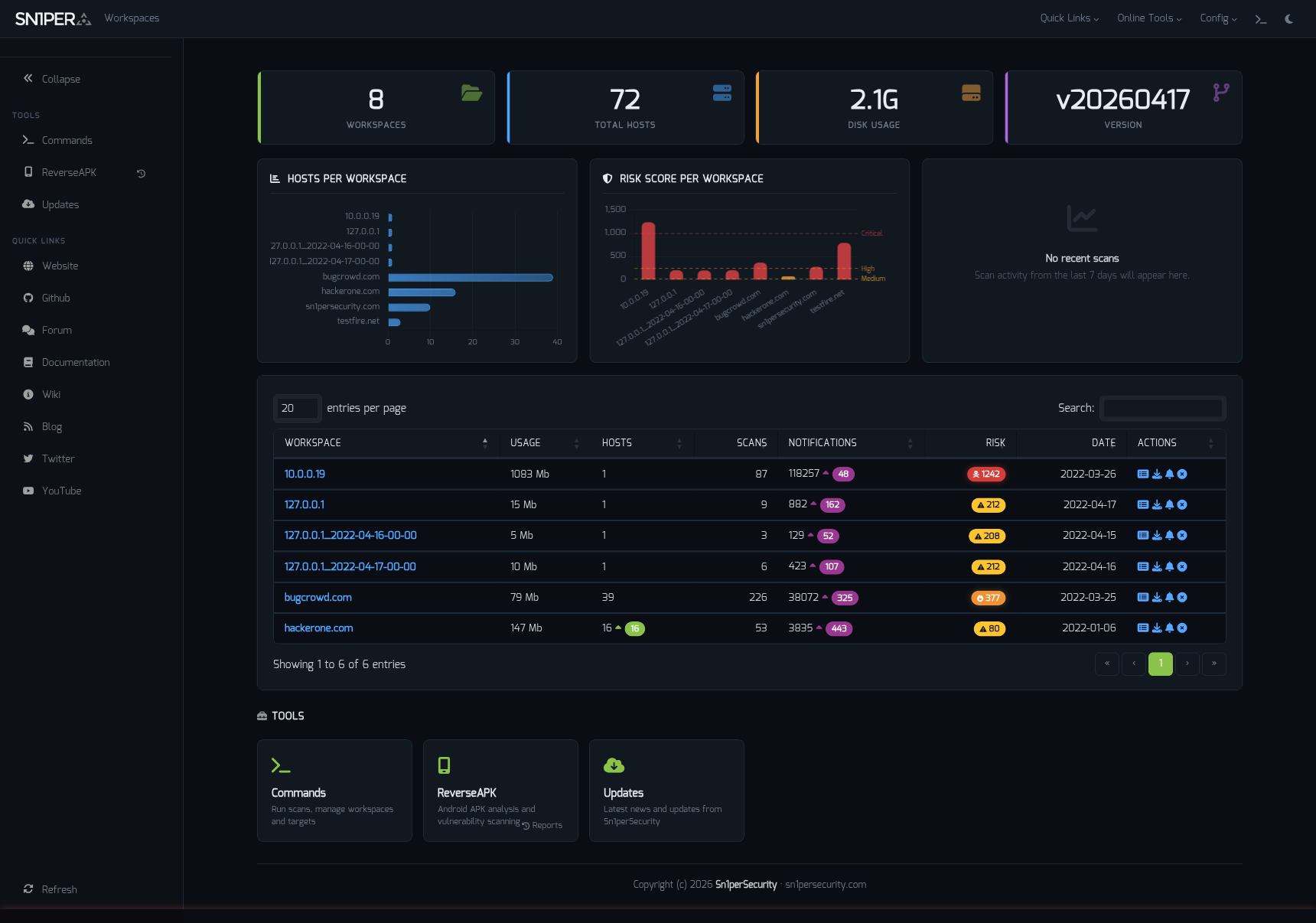
Workspace Navigator — switch contexts across hosts, scopes, and engagements.
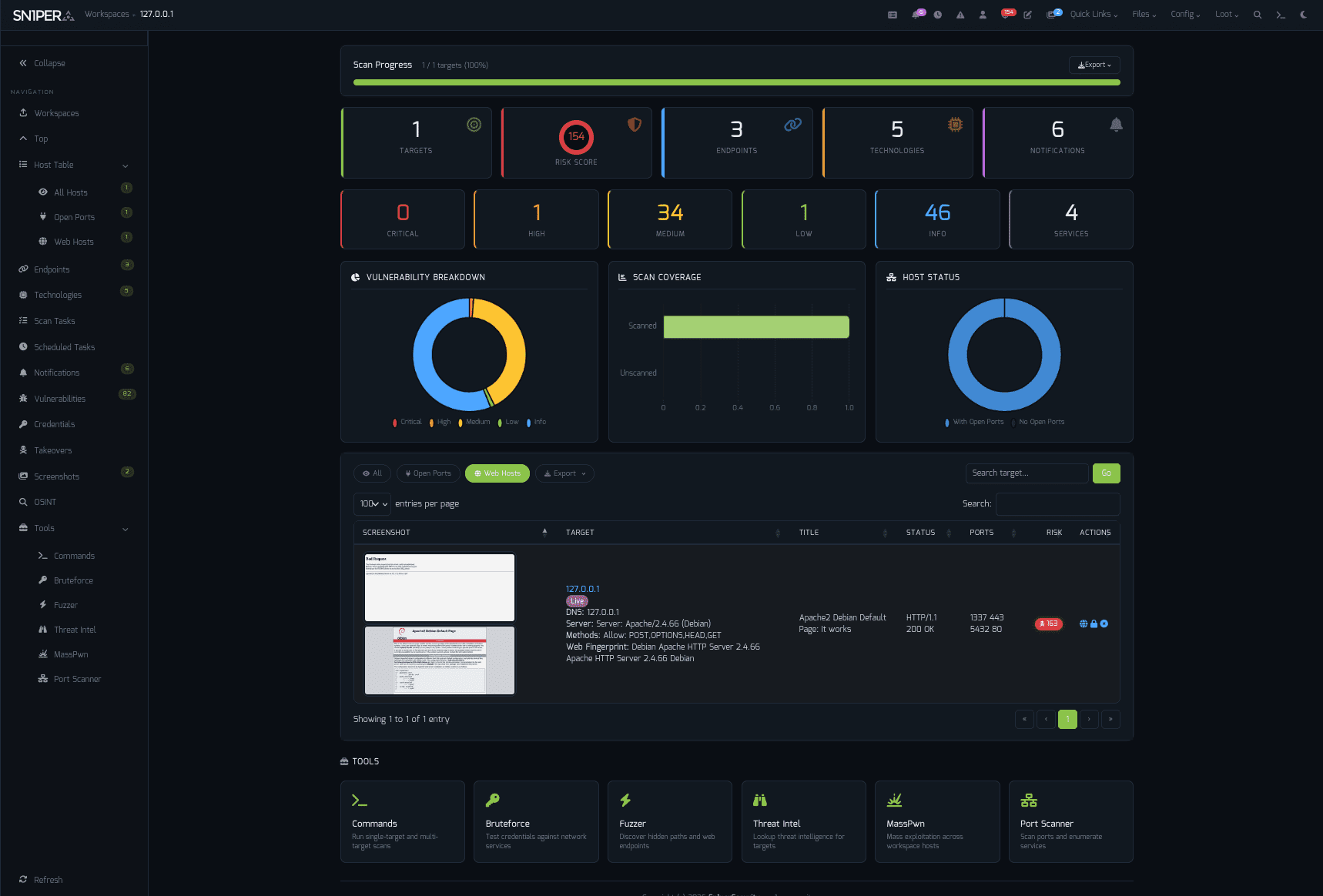
Dashboard — at-a-glance scan posture, top findings, and exploitable assets.
Highlights
- Docker-first deployment — same image, every distro
- Bootstrap 5 / Tabler UI — refreshed responsive interface with light + dark mode
- Workspace Navigator — fast workspace switching with state preservation
- Workspace & Host Reports — CSV, Excel, and PDF export
- JSON API v1.0 — programmatic access for CI / SOAR / SIEM pipelines
- Offcanvas Quick Commands — 13 panels, every common action one click away
- Expanded modules — ReverseAPK, MassPwn, Threat Intel, Nessus, Burp Suite
- Maturing SC0PE framework — more parsers, better noise reduction
- Hardened PHP library stack — modern dependencies, audited components
- New CLI flags —
-v(verbose),-db(debug),-rr(remove resume files)
"Sn1per Professional 2026 is the largest release since the v10.0 line."
Editions & Pricing
The Community Edition is free and lives in this repository. The Professional and Enterprise editions add a Web UI, commercial integrations, and email support.
| Sn1per Professional | Sn1per Enterprise | |
|---|---|---|
| Price | $984 / year (per seat) | Get a quote |
| Subscription | 1 year | 1 year |
| — Included — | ||
| Web UI | Professional Web UI | Enterprise Web UI |
| Scan Engine & UI Updates | ✓ | ✓ |
| All Modules & Integrations | ✓ | ✓ |
| On-Prem (Self Hosted) | ✓ | ✓ |
| Email Support | 1 Year | 1 Year |
| Improved Speed & Scalability | — | ✓ |
| Cutting-Edge Features | — | ✓ |
| — Limits & Quotas — | ||
| Max Scans | Unlimited | Unlimited |
| Max Assets / Workspace | 30 | Unlimited |
| Max Workspaces | 5 | Unlimited |
| Total Assets | 150 | 500+ |
| Licensed Systems | 1 | 1 |
Buy a Sn1per Professional license → · Get an Enterprise quote →
Install
Linux (Kali / Ubuntu / Debian / Parrot)
git clone https://github.com/1N3/Sn1per.git
cd Sn1per
sudo bash install.sh
Sn1per installs to
/usr/share/sniperand requires root. Usesudo bash install.sh forceto skip the confirmation prompt.
Docker
Kali Linux base
sudo docker compose up
sudo docker run --privileged -it sn1per-kali-linux /bin/bash
BlackArch base
sudo docker compose -f docker-compose-blackarch.yml up
sudo docker run --privileged -it sn1per-blackarch /bin/bash
AWS Marketplace (EC2 AMI)
Subscribe via AWS Marketplace:
- Click Continue to Subscribe
- Click Continue to Configuration, choose region/instance type
- Click Continue to Launch
- SSH to the EC2 public IP — Sn1per is preinstalled
Quick Start
sudo bash install.sh
sniper -t example.com -m normal
Results land in /usr/share/sniper/loot/<workspace>/. See Usage for more modes.
Usage
[*] NORMAL MODE
sniper -t <TARGET>

[*] NORMAL MODE + OSINT + RECON
sniper -t <TARGET> -o -re

[*] STEALTH MODE + OSINT + RECON
sniper -t <TARGET> -m stealth -o -re

[*] DISCOVER MODE
sniper -t <CIDR> -m discover -w <WORKSPACE_ALIAS>

[*] SCAN ONLY SPECIFIC PORT
sniper -t <TARGET> -m port -p <portnum>

[*] FULLPORTONLY SCAN MODE
sniper -t <TARGET> -fp

[*] WEB MODE - PORT 80 + 443 ONLY!
sniper -t <TARGET> -m web

[*] HTTP WEB PORT MODE
sniper -t <TARGET> -m webporthttp -p <port>

[*] HTTPS WEB PORT MODE
sniper -t <TARGET> -m webporthttps -p <port>

[*] HTTP WEBSCAN MODE
sniper -t <TARGET> -m webscan

[*] ENABLE BRUTEFORCE
sniper -t <TARGET> -b

[*] AIRSTRIKE MODE
sniper -f targets.txt -m airstrike

[*] NUKE MODE WITH TARGET LIST, BRUTEFORCE ENABLED, FULLPORTSCAN ENABLED, OSINT ENABLED, RECON ENABLED, WORKSPACE & LOOT ENABLED
sniper -f targets.txt -m nuke -w <WORKSPACE_ALIAS>

[*] MASS PORT SCAN MODE
sniper -f targets.txt -m massportscan

[*] MASS WEB SCAN MODE
sniper -f targets.txt -m massweb

[*] MASS WEBSCAN SCAN MODE
sniper -f targets.txt -m masswebscan

[*] MASS VULN SCAN MODE
sniper -f targets.txt -m massvulnscan

[*] PORT SCAN MODE
sniper -t <TARGET> -m port -p <PORT_NUM>

[*] LIST WORKSPACES
sniper --list

[*] DELETE WORKSPACE
sniper -w <WORKSPACE_ALIAS> -d

[*] DELETE HOST FROM WORKSPACE
sniper -w <WORKSPACE_ALIAS> -t <TARGET> -dh

[*] GET SNIPER SCAN STATUS
sniper --status

[*] LOOT REIMPORT FUNCTION
sniper -w <WORKSPACE_ALIAS> --reimport

[*] LOOT REIMPORTALL FUNCTION
sniper -w <WORKSPACE_ALIAS> --reimportall

[*] LOOT RELOAD FUNCTION
sniper -w <WORKSPACE_ALIAS> --reload

[*] LOOT EXPORT FUNCTION
sniper -w <WORKSPACE_ALIAS> --export

[*] SCHEDULED SCANS
sniper -w <WORKSPACE_ALIAS> -s daily|weekly|monthly

[*] USE A CUSTOM CONFIG
sniper -c /path/to/sniper.conf -t <TARGET> -w <WORKSPACE_ALIAS>

[*] UPDATE SNIPER
sniper -u|--update

[*] VERBOSE OUTPUT (NEW IN 2026)
sniper -t <TARGET> -m airstrike -v

[*] DEBUG OUTPUT (NEW IN 2026)
sniper -t <TARGET> -m normal -db

[*] REMOVE RESUME FILES (NEW IN 2026)
sniper -t <TARGET> -m airstrike -v -rr
Scan Modes
| Mode | Description |
|---|---|
normal | Active + passive scan of the target and its open ports |
stealth | Quick, mostly non-intrusive enumeration to avoid WAF / IPS |
flyover | Fast multi-threaded high-level scans of many hosts |
airstrike | Open-port enumeration + basic fingerprinting against a host file |
nuke | Full audit across all targets in a host file |
discover | Walks a CIDR and runs Sn1per on every live host |
port | Targeted scan of a specific port |
fullportonly | Full TCP port scan, results saved to XML |
web | Web app scan on 80/tcp + 443/tcp only |
webporthttp / webporthttps | Web app scan on a specific HTTP / HTTPS port |
webscan | Full HTTP + HTTPS web app scan via Burp Suite + Arachni |
vulnscan | OpenVAS vulnerability scan |
mass* | Multi-target variants of the above (-f targets.txt) |
Integrations
Sn1per ships with native integrations for 90+ tools and services. Featured partners:
| Category | Integrations |
|---|---|
| Vulnerability scanners | Nessus · OpenVAS · GVM 21.x · Nuclei |
| Web app testing | Burp Suite Pro · OWASP ZAP · WPScan |
| Exploitation | Metasploit |
| Reconnaissance | Shodan · Censys · Hunter.io · VirusTotal · Nmap |
| AI / LLM | OpenAI · Claude · Gemini |
| Notifications & DevOps | Slack · GitHub API |
Browse all integrations on the wiki →
Documentation & Help
- Getting Started
- Installation
- Configuration
- Usage
- Architecture
- Integrations
- Troubleshooting
- Wiki — full reference
- Sn1per Documentation Hub
- Passive Reconnaissance Techniques for Penetration Testers
- CVE-2024-21733 — Apache Tomcat HTTP Request Smuggling writeup
Configuration & Templates
- Plugins & Tools
- Scheduled Scans
- Sn1per Configuration Options
- Sn1per Configuration Templates
- Sc0pe Templates
News & Releases
- Sn1per Professional 2026 Released - April 26, 2026
- Introducing SILENTCHAIN AI Community Edition v1.1.3 - February 11, 2026
- Sn1per SE v11.0 Now Available - January 8, 2026
Guides & deep dives (2026)
Reconnaissance
- Reconnaissance Methodology - Sn1per's full recon-to-report workflow, phase by phase, from OSINT to reporting
- Subdomain Enumeration - passive sources, active brute force, and subdomain-takeover checks
- Active Reconnaissance - port scanning, service and technology fingerprinting, and endpoint discovery
Penetration testing
- Automated Penetration Testing - the method, the tooling, and the continuous-testing model
- Best Automated Pentest Tools - the 2026 open-source and all-in-one pentest tooling landscape
- Continuous Penetration Testing (PTaaS) - the always-on model beyond the once-a-year pentest
Attack surface management
- Red Team Attack Surface Management - running Sn1per as a continuous red-team and adversarial-exposure-validation workflow
- Adversarial Exposure Validation - proving which exposures are actually exploitable, not just present
- Continuous Attack Surface Testing - daily-cadence rescans that diff yesterday's surface against today's
- On-Prem External Attack Surface Management - self-hosted, air-gapped ASM with zero data leaving your perimeter
- Open-Source Self-Hosted ASM Tools - the self-hosted attack surface management tooling landscape
- External Attack Surface Management with Sn1per - background reading on the ASM use case
Community & Support
- Bugs: Open an issue
- Twitter: @xer0dayz
- YouTube: Sn1per Security - latest demo: Continuous Attack Surface Testing
- Email (Pro / Enterprise customers): see your license email
Contributing
Pull requests welcome. For substantial changes, open an issue first to discuss the design.
- Mode scripts live in
modes/— one bash file per scan mode - Test changes against a controlled target before opening a PR
- Follow Keep a Changelog format in
CHANGELOG.md
35 contributors and counting. Thank you.
License & Legal
- Code: see
LICENSE.mdandTHIRD_PARTY_LICENSES.md - Notices: see
NOTICE - Trademark: "Sn1per" and the Sn1per logo are trademarks of Sn1perSecurity LLC. Use in derivative works requires permission. Contact: sn1persecurity.com
About Sn1perSecurity
Sn1per is built and maintained by Sn1perSecurity, the team behind the Sn1per attack surface management and automated penetration testing platform. Small team of pentesters shipping offensive-security tooling since 2015. We focus on the workflows we want to use ourselves — fast recon, ergonomic reporting, honest pricing, and a Community Edition that genuinely keeps up with the commercial editions. If that resonates, say hi.
Topics: penetration-testing · offensive-security · attack-surface-management · vulnerability-scanner · recon · osint · red-team · bug-bounty · security-tools