Adblock Syntax for VSCode
July 9, 2026 · View on GitHub

Adblock Syntax for VSCode
Complete adblock filter list support for VSCode
Note: This is a development tool for creating and editing adblock filter lists, not an ad blocker for VSCode.



 AdGuard・
 uBlock Origin・
 AdBlock・
 Adblock Plus
✨ Features
- 🎨 Syntax highlighting — Full support for AdGuard, uBlock Origin, and Adblock Plus filter syntax
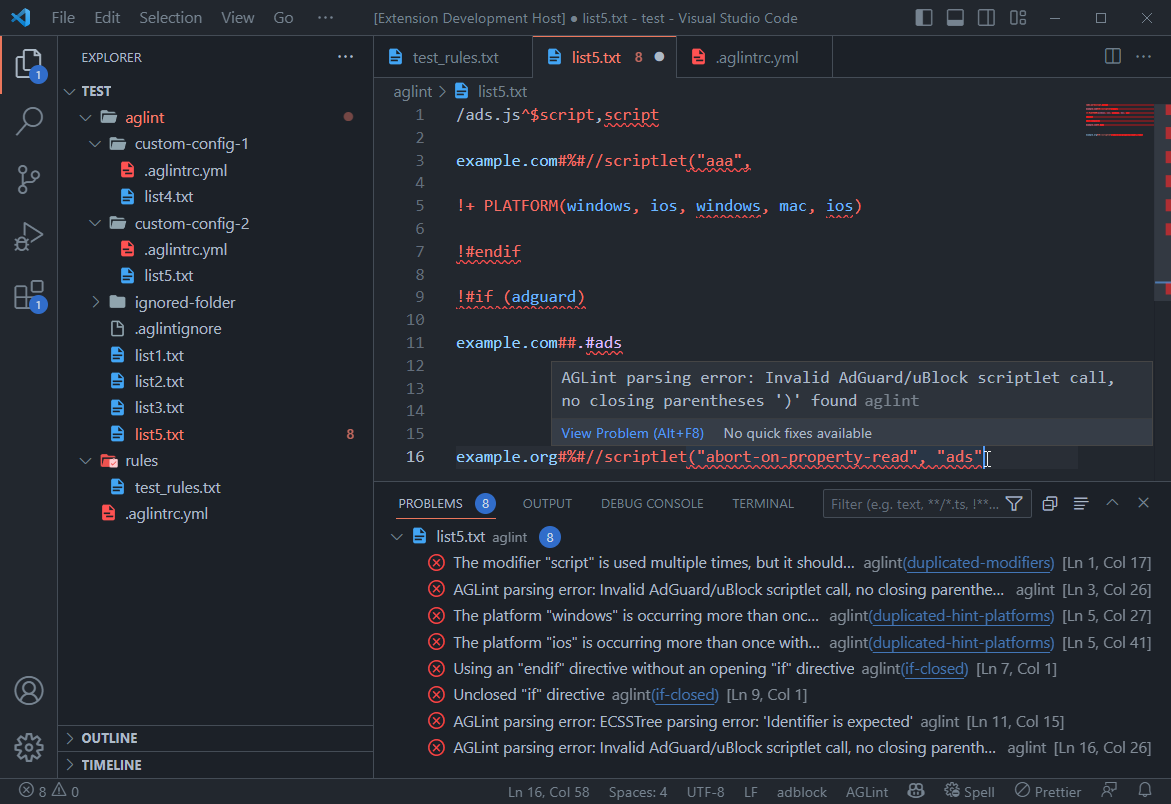
- 🔍 Real-time linting — Powered by AGLint with instant validation and error detection
- 🛠️ Auto-fixing — Automatically fix issues with AGLint's suggestions and quick fixes
- 🌐 Multi-platform validation — Platform-specific compatibility warnings and syntax checks
- 🐙 GitHub integration — Syntax highlighting on GitHub via Linguist
- ⚙️ Flexible configuration — VSCode settings and AGLint config file (
.aglintrc) support - 🚀 Auto-discovery — Automatically finds AGLint in your workspace (local or global)
📷 Screenshot
📦 Installation
Quick Install
- Open VSCode
- Press
Ctrl+P/Cmd+P - Type:
ext install adguard.adblock - Press
Enter
Manual Install
VSCode Marketplace:
- Open VSCode Marketplace
- Click Install
- VSCode will open automatically
Open VSX (for VSCodium, etc.):
- Open Open VSX Registry
- Click Download
- Install the
.vsixfile manually
Verify Installation
- Open any
.txtfile with adblock rules - Add a filter rule:
example.org##.banner - You should see syntax highlighting
Note: AGLint linting requires AGLint to be installed in your workspace or globally. See AGLint Configuration for setup details.
⚙️ Configuration
| Setting | Description | Default |
|---|---|---|
adblock.enableAglint | Enable AGLint linting | true |
adblock.enableInMemoryAglintCache | Cache linting results for performance | false |
💡 Tip: Control AGLint logging via VSCode's built-in log level: Command Palette → Developer: Set Log Level → AGLint
📝 AGLint Configuration
AGLint requires a configuration file to enable linting. The extension will automatically detect AGLint in your workspace.
Quick Setup
Run in your project root:
npx aglint --init
This creates an interactive wizard to generate a configuration file.
Configuration File
Supported file names (YAML recommended):
.aglintrc.yaml/.aglintrc.yml(recommended).aglintrc.json/.aglintrcaglint.config.json/aglint.config.yaml
Example Configuration
# .aglintrc.yaml
root: true
extends:
  - aglint:recommended
Available Presets
aglint:recommended— Recommended rules for most projectsaglint:all— All available rules (strict)
For detailed configuration options, rule customization, and cascading configs, see the AGLint documentation.
🐙 GitHub Support
GitHub uses this extension's grammar file via Linguist for syntax highlighting.
Your filter lists will be automatically highlighted on GitHub if they start with an agent comment
like [Adblock Plus 2.0] or [AdGuard].
🤝 Contributing
Contributions are welcome! Please read our Development Guide for details on how to get started.
📝 License
This project is licensed under the MIT License - see the LICENSE file for details.
🔗 Resources
📚 Filter Syntax Documentation
🎯 Scriptlets & Snippets
🎨 Extended CSS
🛠️ Tools
- AGLint - Adblock filter linter
- Compatibility Tables - Cross-platform feature support
Made with ❤️ by AdGuard