airtable-user-mcp
July 31, 2026 · View on GitHub
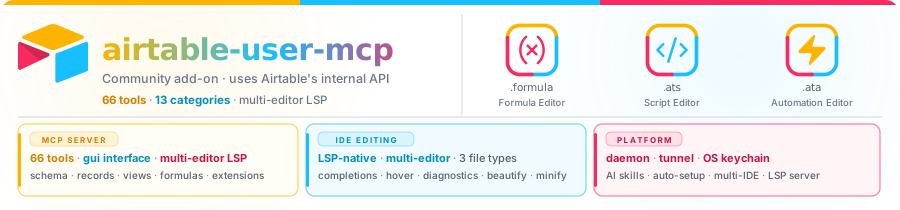
airtable-user-mcp
Community add-on to the official Airtable MCP — 72 tools + manage_tools your AI assistant can't get from the public REST API
| npm · MCP | MCP Registry | MCP Protocol | VS Code Ext. |
|---|---|---|---|
 
|

|

|

|


Not affiliated with Airtable Inc. This is a community-maintained project.
Active development — Breaking changes may land between minor versions. Pin to a version if you need stability.
TL;DR
npx -y airtable-user-mcp login          # one browser login
claude mcp add airtable --scope user -- npx -y airtable-user-mcp
Done. Your AI assistant can now do things like:
"Create a rollup field on Projects called Total Spend that sums
{Amount}from the linked Invoices table, and add a filter to theActiveview that hides rows where Total Spend = 0."
The official Airtable MCP can't — its REST API doesn't expose those surfaces. Run both MCPs side-by-side and your AI client sees every tool from each.
Why this is an add-on, not a replacement
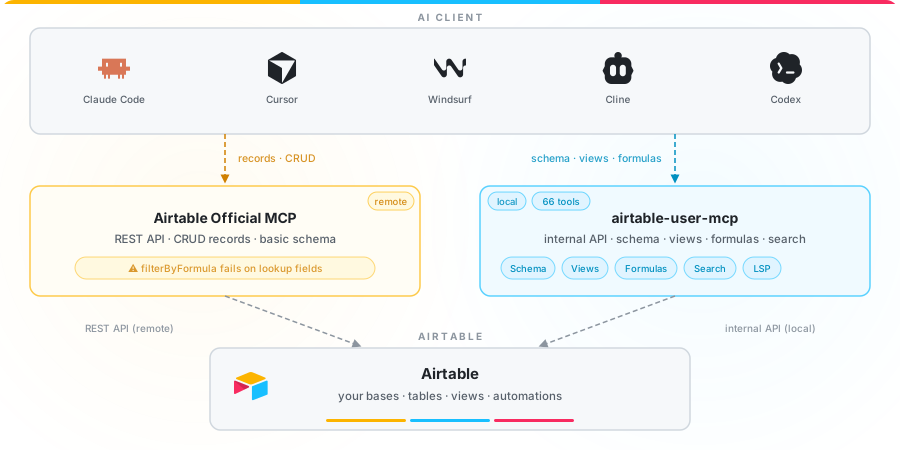
The official Airtable MCP is a thin wrapper over the public Web API. That API — by design — never exposed some of the most-requested automation surfaces in Airtable. airtable-user-mcp uses Airtable's internal API (the same one the web UI calls) to close the gap. The two servers cover different surfaces, so the intended setup is both installed at once — your MCP client sees the union of their tool sets.
Coverage map
| Capability | Official Airtable MCP | airtable-user-mcp |
|---|---|---|
| Total tools | ~17 | 73 (72 + manage_tools) |
| Auth | PAT or OAuth, per-scope | Log in once with your normal account (SSO/2FA supported) |
| Transport | HTTP (remote) | stdio (local, private) |
| Data routing | Through mcp.airtable.com | Direct from your machine |
| Schema read | Partial | Full incl. view state |
| Read records (up to 1 000/call, resolved values) | ❌ | ✅ query_records |
| Search records by text (incl. lookup & rollup fields) | ❌ filterByFormula silently fails on lookup fields | ✅ query_records.search — works on all field types |
| Duplicate records | ❌ | ✅ duplicate_records |
| Create formula fields | ❌ | ✅ |
| Create rollup / lookup / count fields | ❌ UNSUPPORTED_FIELD_TYPE_FOR_CREATE | ✅ |
| Update a formula's text | ❌ | ✅ |
| Validate a formula before apply | ❌ | ✅ |
| Rename / duplicate fields | Limited | ✅ |
| Safe delete with dependency preview | ❌ | ✅ expectedName + viewFilters/Sorts/Groupings summary |
| Create views (7 types) | ❌ API has no endpoint | ✅ grid / form / kanban / calendar / gallery / gantt / list |
| Set/append view filters (nested AND/OR) | ❌ | ✅ |
| Set sorts / grouping / row height | ❌ | ✅ |
| Change column order | ❌ | ✅ |
| Show / hide columns | ❌ | ✅ |
| Duplicate a view with full config | ❌ | ✅ |
| View descriptions, cell wrap, covers, color config, calendar dates, frozen columns | ❌ | ✅ |
| Sidebar sections (create, rename, move, delete) | ❌ | ✅ |
| Record templates (create, pre-fill, duplicate, apply, delete) | ❌ | ✅ |
| Form metadata (description, redirect, attribution, branding) | ❌ | ✅ |
| Extension & dashboard page management | ❌ | ✅ install, enable, rename, duplicate, remove |
| Daemon self-diagnosis (is the session dead, the browser busy, or the daemon gone?) | ❌ | ✅ manage_daemon action=status — plus start / restart / stop / tunnel / token rotation |
| Tool profiles & per-tool toggles | ❌ | ✅ read-only (12 tools) / safe-write (54 tools) / full (72 tools) / custom |
| Install effort | Manual PAT + JSON edit per client | Single claude mcp add or JSON snippet |
| Price | Free | Free, MIT |
Backed by Airtable's MCP docs, the Web API reference, and the rollup-field UNSUPPORTED_FIELD_TYPE_FOR_CREATE thread.
Demo

Quick Start
npx airtable-user-mcp
That's it. Your MCP client connects via stdio and gets access to all 73 tools (72 Airtable tools + manage_tools).
When the daemon is running (started automatically by the VS Code extension, or via npx airtable-user-mcp daemon start),
subsequent npx airtable-user-mcp invocations transparently proxy their stdio to the shared daemon —
so all clients share one Chromium session. To skip the daemon and run in-process: AIRTABLE_NO_DAEMON=1 npx airtable-user-mcp.
Sharing one daemon across clients
A client that attaches to a running daemon runs under that daemon's configuration, not its own.
Only AIRTABLE_NO_DAEMON and AIRTABLE_USER_MCP_HOME are read on the attaching side. Everything else the
client was configured with — AIRTABLE_AUTH_MODE, AIRTABLE_HTTP_CLIENT, browser channel, idle-park tuning —
belongs to the process that actually executes the tool calls, which is the daemon. Since the VS Code extension
now starts a daemon whenever an MCP tool call needs one, a daemon.lock exists on essentially every session,
and a standalone client (Claude Desktop, Cursor, Cline, Amp) on the same machine will normally attach to it.
This is deliberate. Airtable's persistent browser profile is single-owner: a second process driving its own Chromium against it crashes (Chrome exit 21, which surfaces confusingly as "session dead"). One shared browser is what prevents that, so refusing the attach would trade a configuration surprise for a crash loop.
What you get instead is a notification. On attach, the client prints one stderr line naming every setting that differs, for example:
[airtable-mcp] attached to the daemon already running at pid 41233 (port 8723); it was started with a
different configuration, and ITS settings apply, not this client's: authMode=browser (you configured byo).
Daemon configDir=/home/you/.airtable-user-mcp. To run under your own settings instead, set
AIRTABLE_NO_DAEMON=1 for this client, or stop the daemon (`npx airtable-user-mcp daemon stop`) and let it
restart from your env.
To check after the fact which settings are actually in force, GET /daemon/health or manage_daemon
action=status both report the daemon's effective authMode, httpClient and configDir.
Two ways to opt out: set AIRTABLE_NO_DAEMON=1 for that client (it runs in-process under its own
settings — do not do this while another browser-mode daemon is live), or stop the daemon and let it restart
from the environment you want.
Run alongside the official Airtable MCP
airtable-user-mcp is designed to add capabilities, not replace anything. The official Airtable MCP handles records over HTTP with PAT/OAuth; this one handles schema, formulas, views, and extensions locally via Airtable's internal API. Register both in your MCP client so your AI assistant sees the union of their tool sets.
Add this entry to your mcpServers block:
{
  "mcpServers": {
    "airtable-user-mcp": {
      "command": "npx",
      "args": ["-y", "airtable-user-mcp"]
    }
  }
}
Then register the official server following Airtable's setup guide. The two servers are independent and share nothing — they just coexist under different names in your MCP client.
Supported Clients
Works with any MCP-compatible client. Tested with:
 |  |  |  |  |  |
|---|---|---|---|---|---|
| Claude Desktop | Claude Code | Cursor | Windsurf | Cline | Amp |
Advanced GUI
For a visual management experience, install the Airtable Formula VS Code extension. It bundles this MCP server and adds:
- One-click MCP registration for Cursor, Windsurf, Claude Code, Cline, and Amp
- Dashboard with session status, version info, and setup wizard
- Airtable login with credentials in OS keychain and auto-refresh
- Formula editor with syntax highlighting, IntelliSense, and beautify/minify
Claude Quick Start (no VS Code extension)
Five commands take you from zero → a working Airtable MCP in Claude Desktop or Claude Code. Everything below runs from a normal terminal.
Prerequisites
- Node.js 18 or newer —
node -vto check. Install from nodejs.org if missing. - An Airtable account (personal, team, or enterprise — anything you can log into at airtable.com).
1. Check what's already on your machine
npx -y airtable-user-mcp@latest doctor
doctor prints your Node version, platform, config dir, and whether the browser engine is installed. If Patchright: not installed appears, continue to step 2. If it says installed, skip to step 3.
2. Install the browser engine (one-time, ~170 MB)
npx -y airtable-user-mcp install-browser
This downloads Patchright (a stealth Chromium fork used only for the login flow). You only need to run this once per machine. If you already have Chrome, Edge, or Chromium installed and prefer not to download another browser, see Browser Choice below.
3. Log in to Airtable
npx -y airtable-user-mcp login
A browser window opens on airtable.com/login. Sign in like you normally would — password, SSO, 2FA, whatever your account uses. The window closes automatically when login is detected. Your session is stored in ~/.airtable-user-mcp/.chrome-profile/ and reused by every tool call.
Verify the session landed:
npx -y airtable-user-mcp doctor
You should see Session: signed in as usrXXXXXXXXXXXXXX. doctor actually probes Airtable, so it is the command that can tell you whether you are signed in.
status is a quick inventory of what is on disk (Browser profile: present, Daemon: …) and deliberately makes no claim about the session — the files exist whether or not the login completed.
4. Configure your Claude client
Claude Desktop
Open claude_desktop_config.json:
| OS | Path |
|---|---|
| macOS | ~/Library/Application Support/Claude/claude_desktop_config.json |
| Windows | %APPDATA%\Claude\claude_desktop_config.json |
| Linux | ~/.config/Claude/claude_desktop_config.json |
Tip: in Claude Desktop, Settings → Developer → Edit Config opens this file.
Add the airtable entry to mcpServers:
{
  "mcpServers": {
    "airtable": {
      "command": "npx",
      "args": ["-y", "airtable-user-mcp"]
    }
  }
}
Save, then fully quit and reopen Claude Desktop (closing the window is not enough). A hammer/plug icon in the chat input confirms the server is connected — click it to see all 73 tools.
Claude Code
Use the built-in claude mcp add command:
# Add for all projects on this machine:
claude mcp add airtable --scope user -- npx -y airtable-user-mcp

# OR — add to the current project only (creates .mcp.json, safe to commit):
claude mcp add airtable --scope project -- npx -y airtable-user-mcp
Verify:
claude mcp list
You should see airtable: npx -y airtable-user-mcp - ✓ Connected. Start a Claude Code session in that directory and all 73 tools are available.
5. Try it out
Ask your Claude client:
"List all tables in my Airtable base
appXXXXXXXXXXXXXX."
It will call list_tables and return the names and IDs.
Troubleshooting
| Symptom | Fix |
|---|---|
doctor reports Session: NOT signed in | Re-run npx -y airtable-user-mcp login |
Session invalid (0): airtable.com could not be reached | Network/TLS/proxy, not an expired login — behind a TLS-inspecting proxy set NODE_EXTRA_CA_CERTS, else check HTTPS_PROXY/NO_PROXY |
DIRECT_LOGIN_UNVERIFIED (auth mode direct-login) | The login flow finished and a session cookie exists, but airtable.com then served no signed-in user — a cookie alone does not prove a completed login. Usually an incomplete SSO or 2FA step: check AIRTABLE_EMAIL / AIRTABLE_PASSWORD / AIRTABLE_TOTP_SECRET, or use AIRTABLE_AUTH_MODE=browser |
[airtable-mcp] attached to the daemon already running at pid … on stderr | Not an error — this client attached to a daemon started by another app (usually VS Code) and that daemon's auth mode / HTTP client apply, not this client's. See Sharing one daemon across clients |
Your configured AIRTABLE_AUTH_MODE / AIRTABLE_HTTP_CLIENT seems ignored | Same cause as above — you are attached to someone else's daemon. AIRTABLE_NO_DAEMON=1 runs under your own settings; manage_daemon action=status or /daemon/health reports whose settings are actually in force |
| Login window never loads | Check network / firewall, then doctor |
| Browser download fails on Windows | Run PowerShell as Admin once, then retry install-browser |
| Tools don't appear after config change | Fully quit and reopen Claude Desktop (not just the window) |
command not found: npx | Install Node.js from nodejs.org |
Run npx -y airtable-user-mcp doctor at any time for a full diagnostic.
Browser Choice
If you already have Chrome, Edge, or a system Chromium and want to skip the 170 MB download:
# point the server at an existing Chromium-family browser
export AIRTABLE_BROWSER_PATH="/Applications/Google Chrome.app/Contents/MacOS/Google Chrome"   # macOS
# or on Windows (PowerShell):
$env:AIRTABLE_BROWSER_PATH = "C:\Program Files\Google\Chrome\Application\chrome.exe"
Useful environment variables
| Variable | Purpose |
|---|---|
AIRTABLE_USER_MCP_HOME | Override config dir (default: ~/.airtable-user-mcp) |
AIRTABLE_NO_BROWSER | Skip Patchright entirely — uses cached cookies only (CI/headless) |
AIRTABLE_HEADLESS_ONLY | Run the browser without a visible window |
AIRTABLE_LOG_LEVEL | debug | info | warn | error |
AIRTABLE_NO_DAEMON | Skip daemon; run in-process stdio directly (backwards-compatible mode). Also opts a standalone client out of attaching to another app's daemon — see Sharing one daemon across clients |
AIRTABLE_BROWSER_IDLE_PARK_MS | Idle time in milliseconds before the browser is parked to reclaim its ~300–600 MB. Default 30 minutes. Only an explicit, well-formed 0 disables parking; anything unparseable (30m, 1_800_000) falls back to the default rather than switching parking off |
Installation
Via npx (recommended)
Already covered above — the claude mcp add command or the mcpServers JSON entry both use npx -y airtable-user-mcp under the hood.
Via VS Code / Windsurf / Cursor
Install the Airtable Formula extension — it bundles this server and registers it automatically across all your IDEs. Login and status live in a visual dashboard.
Global install
npm install -g airtable-user-mcp
airtable-user-mcp login
Then reference the binary directly in any MCP config:
{ "mcpServers": { "airtable": { "command": "airtable-user-mcp" } } }
From source
{
  "mcpServers": {
    "airtable": {
      "command": "node",
      "args": ["/path/to/airtable-user-mcp/src/index.js"]
    }
  }
}
All CLI commands
npx airtable-user-mcp                  Start MCP server (stdio)   ← what your Claude client runs
npx airtable-user-mcp login            Log in to Airtable via browser
npx airtable-user-mcp logout           Clear saved session
npx airtable-user-mcp status           Show what's on disk (makes no session claim)
npx airtable-user-mcp doctor           Run diagnostics + probe whether you're signed in
npx airtable-user-mcp install-browser  Download Chromium (~170 MB)
npx airtable-user-mcp --version        Print version
npx airtable-user-mcp --help           Show this help
npx airtable-user-mcp daemon start     Start the shared background daemon
npx airtable-user-mcp daemon stop      Stop the running daemon
npx airtable-user-mcp daemon status    Show daemon status and port (JSON)
Tools (72 + manage_tools)
72 tools are gated by the active tool profile (read-only / safe-write / full / custom) and grouped by category below. manage_tools — list profiles, switch the active profile, toggle individual tools/categories — is a meta-tool always available regardless of profile, so a connected client's tools/list returns 73 tools total under the default full profile.
Schema Read (11)
| Tool | Description |
|---|---|
get_base_schema | Full schema of all tables, fields, and views in a base |
list_tables | List all tables in a base with IDs and names |
get_table_schema | Full schema for a single table |
list_fields | All fields in a table with id, name, and type (lightweight); pass includeOptions: true for full typeOptions |
list_views | All views in a table with IDs, names, and types |
get_view | Read a single view's full state — filters, sorts, grouping, visibility, description |
validate_formula | Validate a formula expression before applying |
list_view_sections | List sidebar sections for a table with their view membership |
list_record_templates | List record templates (saved row scaffolds) for a table |
download_formula_field | Download a formula field to a local .formula file with an AT: metadata header — field refs resolved to real {Field Name} syntax. Pass outputPath to save; omit to read inline. |
download_base_formulas | Download all formula fields in a base to .formula files, organised into per-table subfolders — field refs resolved to real {Field Name} syntax. Each file includes the AT: header for one-click upload. |
Record Read (1)
Reads resolved record data via Airtable's internal readQueries endpoint — bypasses the REST API
filterByFormula limitation that silently fails on lookup and rollup fields.
| Tool | Description |
|---|---|
query_records | Fetch up to 1 000 records from a view with all field values already resolved (lookup fields return the linked record's display string, not a raw ID). Pass search for case-insensitive substring matching across every field value including lookups, rollups, formula fields, and multi-select arrays. Increase limit (max 1 000) to widen the search window. |
Why query_records instead of the Official MCP's record search
// ❌ REST API filterByFormula — silently fails for lookup fields
//    FIND() operates on the raw cell value, not the resolved display string
filterByFormula: "FIND('John Smith', {Name Lookup})"   // returns 0 results

// ✅ query_records.search — works on all field types
{ "search": "john smith", "limit": 500 }   // matches any field containing "john smith"
Record Write (4)
| Tool | Description |
|---|---|
duplicate_records | Duplicate one or more existing records within the same table. Pass sourceRowIds array; returns the new record IDs. |
create_records | Create one or more records in a table. Each item supplies cellValuesByColumnId (computed fields are read-only and must be omitted). Returns created record IDs; a failing row is reported, not fatal. |
update_records | Update primitive / single-select cells of existing records via cellValuesByColumnId. Array cells (multi-select, links, attachments) are not set here. Per-row isolation. |
upload_attachment | Upload attachments into an attachment cell by URL — Airtable's servers fetch each URL directly (bytes are never proxied through this server). The only way to set multipleAttachments fields; update_records cannot. Appends to the cell (calling twice adds two). |
Record Destructive (1)
| Tool | Description |
|---|---|
delete_records | Delete one or more records from a table in a single batch call. The returned deleted count equals rowIds.length (optimistic) — already-deleted rows are silently skipped by the server. |
Table Management (3)
| Tool | Description |
|---|---|
create_table | Create a new table with default fields |
rename_table | Rename a table |
delete_table | Delete a table (requires expectedName safety guard) |
Field Management (9)
| Tool | Description |
|---|---|
create_field | Create a field — auto-maps url / email / phone / dateTime aliases, plus formula, rollup, lookup, count |
create_formula_field | Create a formula field (shorthand) |
update_formula_field | Update the formula text of an existing field |
update_field_config | Update configuration of any computed field |
rename_field | Rename a field with pre-validation |
delete_field | Delete with safety guards and a compact dependency summary |
delete_fields | Bulk-delete multiple fields in 1–2 API calls. Takes a fields array of {fieldId, expectedName} pairs; validates names before deleting. Use force: true to override dependency blocks. Optional checkpointFile writes progress after each batch so interrupted runs can resume. |
duplicate_field | Clone a field, optionally copying cell values |
update_field_description | Set or update a field's description text |
View Configuration (20)
| Tool | Description |
|---|---|
create_view | Create grid, form, kanban, calendar, gallery, gantt, or list view |
duplicate_view | Clone a view with all configuration |
rename_view | Rename a view |
delete_view | Delete a view (cannot delete last view) |
update_view_description | Set or clear a view's description |
update_view_filters | Set or append filter conditions (AND/OR, nested groups, isEmpty/isNotEmpty auto-normalized for text/formula(text)/lookup/rollup) |
reorder_view_fields | Change column order — accepts a partial map and merges with current order |
show_or_hide_view_columns | Toggle visibility for an explicit list of columns |
apply_view_sorts | Set or clear sort conditions |
update_view_group_levels | Set or clear grouping. For Kanban views, "stack by" is implemented as a single group level |
update_view_row_height | Change row height (small / medium / large / xlarge) |
set_view_columns | One-shot: hide all + show a curated list in left-to-right order + optional frozen-column count |
show_or_hide_all_columns | Bulk hide-all / show-all primitive |
move_visible_columns | Move column(s) to a target index in the visible-only ordering |
move_overall_columns | Move column(s) to a target index in the overall (visible + hidden) ordering |
update_frozen_column_count | Set the frozen-column divider position |
set_view_cover | Set or clear cover-image field and fit vs crop (Kanban + Gallery) |
set_view_color_config | Apply a color config (currently selectColumn type — cards colored by a single-select field's choice colors) |
set_view_cell_wrap | Toggle whether long cell values wrap or truncate |
set_calendar_date_columns | Set Calendar dateColumnRanges (single-date or range; multiple overlays supported) |
Sidebar Sections (4)
| Tool | Description |
|---|---|
create_view_section | Create a new sidebar section in a table |
rename_view_section | Rename a sidebar section |
move_view_to_section | Move view INTO a section, OUT to ungrouped, reorder within a section, or reorder sections among each other |
delete_view_section | Destroy a section. Contained views are auto-promoted to ungrouped at the section's former position |
Record Templates (8)
Saved row scaffolds Airtable surfaces under "+ Add record" and the row-create extension. Cell values can be static, linked rows, or references to other templates.
| Tool | Description |
|---|---|
create_record_template | Create a new record template (client-side rtp... ID) |
rename_record_template | Rename a template |
update_record_template_description | Set or clear a template's description |
set_record_template_cell | Set a cell value — static (text/number/select), linkedRows, or linkedTemplates |
set_record_template_visible_columns | Choose which columns the template surfaces in its UI |
duplicate_record_template | Clone an existing template |
apply_record_template | Apply a template to create a new record using its cell defaults |
delete_record_template | Delete a template |
Form Metadata (2 — legacy form views only)
| Tool | Description |
|---|---|
set_form_metadata | Bundled tool for description, afterSubmitMessage, redirectUrl, refreshAfterSubmit, shouldAllowRequestCopyOfResponse, shouldAttributeResponses, isAirtableBrandingRemoved |
set_form_submission_notification | Per-user email-on-submit toggle |
Extension Management (7)
| Tool | Description |
|---|---|
create_extension | Register a new extension/block in a base |
create_extension_dashboard | Create a new dashboard page |
install_extension | Install an extension onto a dashboard page |
update_extension_state | Enable or disable an installed extension |
rename_extension | Rename an installed extension |
duplicate_extension | Clone an installed extension |
remove_extension | Remove an extension from a dashboard |
Base Sync (1)
| Tool | Description |
|---|---|
sync_base | Copy a base's schema, views, and records to another base. mode=plan/diff/status are read-only; mode=apply mutates the destination and, with policy=mirror plus the confirmation flags, can delete tables, fields, views, sections and records; mode=reconcile updates local mapping state. mode=diff compares two bases and classifies every difference as drift (sync enforces), best-effort (sync applies, not guaranteed), or not-synced (view sections). Returns a token-budgeted digest (verdicts + class counts + driftSample); drill in with detail="<table>". Verdicts: identical or converged. mode=plan snapshots both bases and produces a curatable changeset — each action has a stable changeId (<op>|<table>|<target>), a class, and an apply:true flag. New direction param (to-dest default | to-source) selects which base is written. mode=apply executes a saved plan — creates tables, reconciles the primary field, creates scalar/link/computed fields with source→dest reference remapping and formula validation, applies non-destructive field updates, retypes a matched scalar field whose type diverges from source when confirmRetypes:true (non-scalar retypes — computed/link/attachment on either side — stay out of scope, reported as RETYPE_DEFERRED), syncs collaborative views (idempotent; personal views skipped; orphan views reported), then launches background record sync and returns a jobId immediately. Accepts a skip:[changeId] list (or apply:false entries in the changeset) to exclude specific changes; skipped dependencies degrade to UNRESOLVABLE_REF. Record sync: Pass 1 writes scalar + select cells (computed fields never written) and builds a persisted rec→rec id map; Pass 2 writes linked-record cells (unresolved targets reported); then attachments (download→re-upload, deduped by filename+size); then restores record-referencing view filters. Throttling via per-request 429 backoff; resumable (records journal, per-chunk persist); continue-on-failure. mode=status polls the background job by planId (running/done/failed + live count). mode=reconcile prunes dead record-id-map entries (existence-prune) and grows the map via natural-key re-match — matches dest↔source records by the naturalKeys key field's value, add-only and ambiguity-safe (never overwrites an existing mapping or claims an already-mapped dest row); does not de-duplicate. Schema orphans (dest-only tables/fields/views/sidebar sections) are deleted after mode=apply's field/view sync, gated separately from record deletion. Drift-guarded and resumable via an on-disk journal. New params: policy (mirror|overlay|preserve, default overlay) — reconciliation preset: mirror deletes dest-only records/fields/views/sections and lets source win conflicts; overlay keeps dest-only data and lets source win (default); preserve keeps dest-only data and never overwrites dest edits. policyOverrides ({ [tableName]: preset }) overrides the global preset per table. confirmDeletions (boolean) — safety gate for record and field/view/section deletion under mirror: without it, deletions are reported as DELETION_GATED and nothing is deleted; set true to apply. confirmTableDeletions (boolean) — separate gate required to drop a whole dest-only table (confirmDeletions alone never does). confirmRetypes (boolean) — safety gate to retype a matched scalar field; without it the field is kept and reported as RETYPE_GATED. naturalKeys ({ [tableName]: fieldName }) — match dest↔source records by a stable key field's value instead of only by row-creation identity; use a field that never changes across bases (name, email, an injected ID) — not an autoNumber, which renumbers per base. fieldMappings ({ [tableName]: { sourceField: destField } }) — inject a source field's value (including computed sources like autoNumber) into a different writable scalar dest field; validated pre-flight with fail-fast abort on error (FIELD_MAP_INVALID); mode=plan/mode=diff run as dry-check and return fieldMappingErrors. Example: { "Games": { "Code": "InjectID" } } injects a source autoNumber into a dest text field so a dest formula can reconstruct original identity. |
Typical diff → curate → apply workflow:
mode=diff— compare bases, review the digest. Verdictconvergedmeans no drift;identicalmeans nothing to do.mode=plan— generate the full changeset. Editapply:falseon anychangeIdentries you want to skip, or collect their IDs. Whendirection=to-source, the plan is persisted under the swapped base pair, so applying it requires callingmode=applywithsourceAppIdanddestAppIdswapped accordingly.mode=apply skip=[...]— execute the plan minus excluded changes.
Daemon Control (1)
Administers this server's own process — no Airtable API surface. full profile only, and
the daemon category defaults to off for existing custom profiles.
| Tool | Description |
|---|---|
manage_daemon | Inspect and control the MCP daemon this server runs in. action=status is read-only (it never launches a browser or rewrites the lockfile) and is the first thing to check when tools start failing: daemon running / am-I-the-holder, transport, port, uptime, version and build provenance, tunnel URL, plus the live session state — sessionDead, the last circuit-breaker trip including Airtable's own response body (a bare 403 hides whether it was permission, CSRF or rate limiting), and the browser/auth busy queue. Control actions: start (idempotent — attaches to a healthy daemon rather than starting a second one), restart, stop, tunnel_enable, tunnel_disable, token_rotate. stop/restart answer first and exit afterwards, so the call returns normally; stop writes ~/.airtable-user-mcp/daemon.stopped so the VS Code extension does not silently respawn what you just stopped. token_rotate and tunnel_* are loopback-only and are refused for callers arriving over the tunnel; status is answered for them with host-identifying fields blanked. The bearer token is never returned to anyone. Interactive tunnel setup (cloudflared login, creating a named tunnel) is deliberately not here — use daemon setup-tunnel named on the CLI or the VS Code dashboard. |
Usage Examples
Inspect a base schema
Tool: list_tables
Args: { "appId": "appXXXXXXXXXXXXXX" }
Create and validate a formula
Tool: validate_formula
Args: { "appId": "appXXX", "tableId": "tblXXX", "formulaText": "IF({Price}>0,{Price}*{Qty},0)" }

Tool: create_formula_field
Args: { "appId": "appXXX", "tableId": "tblXXX", "name": "Total", "formulaText": "IF({Price}>0,{Price}*{Qty},0)" }
Search records (including lookup fields)
Tool: query_records
Args: {
  "appId": "appXXXXXXXXXXXXXX",
  "tableId": "tblXXX",
  "viewId": "viwXXX",
  "search": "john smith",
  "limit": 500
}
Returns every record in the view where any field value contains "john smith" — including fields
whose value comes from a lookup, rollup, or formula. The Official Airtable MCP's filterByFormula
with FIND() or SEARCH() silently fails on lookup fields; query_records does not.
Configure view filters
Tool: update_view_filters
Args: {
  "appId": "appXXX",
  "viewId": "viwXXX",
  "filters": {
    "filterSet": [
      { "columnId": "fldXXX", "operator": "isNotEmpty" }
    ],
    "conjunction": "and"
  }
}
Safety
- Destructive operations (
delete_table,delete_field,delete_fields,delete_view,remove_extension) include built-in safety guards delete_table,delete_field, and each entry indelete_fieldsall require anexpectedNamethat must match the current field name exactly — prevents accidentally deleting the wrong object after a renamedelete_fieldchecks for downstream dependencies and returns a compact summary (viewGroupings,viewSorts,viewFilters,fields) before committing; setforce: trueto delete anywaydelete_fieldsis the preferred tool for bulk deletion (dozens to hundreds of fields). It uses Airtable's native batch endpoint, so N fields from the same table cost 1–2 API calls instead of N×3. Setforce: trueto delete even fields with downstream dependencies.- Formula validation is available and recommended before creating/updating formulas
- All tools accept
debug: truefor raw response inspection
ID Format Reference
| Entity | Prefix | Example |
|---|---|---|
| Base / App | app | appXXXXXXXXXXXXXX |
| Table | tbl | tblXXXXXXXXXXXXXX |
| Field | fld | fldXXXXXXXXXXXXXX |
| View | viw | viwXXXXXXXXXXXXXX |
| Block | blk | blkXXXXXXXXXXXXXX |
| Block Installation | bli | bliXXXXXXXXXXXXXX |
| Dashboard Page | bip | bipXXXXXXXXXXXXXX |
Transport Modes
airtable-user-mcp supports three transport modes. The default behaviour is automatic — MCP clients
do not need to change their configuration when the daemon is present.
| Mode | How to use | When to use |
|---|---|---|
| stdio standalone | AIRTABLE_NO_DAEMON=1 npx airtable-user-mcp | Backwards-compatible; one process per client; no daemon |
| stdio-proxy | npx airtable-user-mcp (default when daemon lock exists) | Transparent; stdin/stdout bridged to the running daemon |
| HTTP (daemon direct) | http://127.0.0.1:{port}/mcp with Authorization: Bearer {token} | VS Code extension and other HTTP-capable clients |
The daemon stores its port and bearer token in ~/.airtable-user-mcp/daemon.lock.
Clients that cannot send an Authorization header — e.g. claude.ai custom connectors, which
only support OAuth or no-auth — can pass the token in the URL instead:
https://<tunnel-host>/mcp?token={token}. The URL then IS the secret: share it only with the
client, and rotate via manage_daemon action=token_rotate if it leaks.
Protocol
| Transport | stdio + HTTP (StreamableHTTPServerTransport) |
| MCP Version | 2025-11-25 |
| SDK | @modelcontextprotocol/sdk v1.27.1 |
Find Us
| Registry | Link |
|---|---|
| npm | airtable-user-mcp |
| VS Code Marketplace | Nskha.airtable-formula |
| GitHub | Automations-Project/VSCode-Airtable-Formula |
| MCP Registry | io.github.automations-project/airtable-user-mcp |
| Glama | glama.ai/mcp/servers |
| PulseMCP | pulsemcp.com |
| MCP.so | mcp.so |
Related
- Official Airtable MCP — Airtable's first-party remote server for records over HTTP; this add-on runs alongside it
- Airtable Formula VS Code Extension — Dashboard, formula editor, MCP installer, and AI skills
- Model Context Protocol — The open standard for AI tool integration
Support This Project
This project is built and maintained with the help of AI coding tools. If you find it useful and want to support continued development (new tools, updates, bug fixes), you can contribute by gifting Claude Code credits — the primary tool used to build this project.
Interested? Open an issue or reach out to discuss feature requests and sponsorship.