Azure Maps Geolocation Control module
April 10, 2025 · View on GitHub
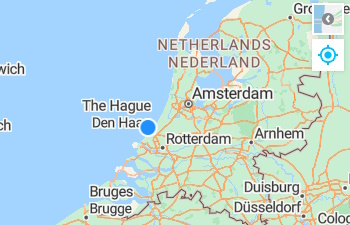
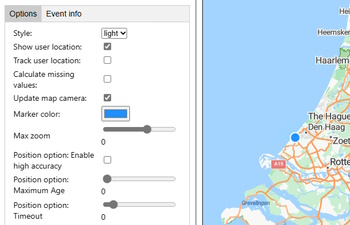
An Azure Maps Web SDK module that provides a control that uses the browser's geolocation API to locate the user on the map. This control uses the browsers geolocation API to locate the user and show their position on a map.
Note that not all devices support geolocation and some users may choose not to share their location. Due to the sensitive and private nature of user locaiton data, many modern browsers require sites to be served over HTTPS in order to access the geolocation API. If the browser or device does not support getting the user location, the geolocation control will not appear on the map.
Samples
Getting started
Download the project and copy the azure-maps-geolocation-control JavaScript file from the dist folder into your project.
Usage
//Create an instance of the geolocation control.
var gc = new atlas.control.GeolocationControl({
    style: 'auto'
});

//Optionally, add events to monitor location changes and errors when get geolocation.
map.events.add('geolocationsuccess', gc, function(arg){
    //Do something.
});

map.events.add('geolocationerror', gc, function(arg){
    //Do something.
});

map.events.add('compassheadingchanged', gc, function(heading){
    //Do something.
});

//Add the geolocation control to the map.
map.controls.add(gc, {
    position: 'top-right'
});
You can check to see if the device supports getting the users location by using the static GeolocationControl.isSupported method.
atlas.control.GeolocationControl.isSupported().then(isSupported => {
    //Do something.
});
API Reference
GeolocationControl class
Implements: atlas.Control
Namespace: atlas.control
A control that uses the browser's geolocation API to locate the user on the map.
Contstructor
GeolocationControl(options?: GeolocationControlOptions)
Methods
| Name | Return type | Description |
|---|---|---|
dispose() | Doisposes the control. | |
getLastKnownPosition() | atlas.data.Feature<atlas.data.Point, GeolocationProperties> | Get sthe last known position from the geolocation control. |
getOptions() | GeolocationControlOptions | Gets the options of the geolocation control. |
setOptions(options: GeolocationControlOptions) | Sets the options of the geolocation control. |
Static Methods
| Name | Return type | Description |
|---|---|---|
isSupported() | Promise<boolean> | Checks to see if the geolocation API is supported in the browser. |
Events
| Name | Return type | Description |
|---|---|---|
compassheadingchanged | GeolocationControlEventArgs | Event fired when the compass heading changes. Returns a compass heading in degrees where North = 0, East = 90, South = 180, West = 270. This event may be fired a lot and is throttled by default at 100ms. |
geolocationerror | GeolocationControlEventArgs | Event fired when an error has occured. Returns the error from the geolcation API as per the GeolocationPositionError specificaiton. |
geolocationsuccess | GeolocationControlEventArgs | Event fired when user position is successful captured or updated. |
GeolocationControlEventArgs interface
Event arg object for the Geolocation control.
| Name | Return type | Description |
|---|---|---|
type | 'geolocationerror' | 'geolocationsuccess' | 'compassheadingchanged' | The type of event that fired. |
error | GeolocationPositionError | Error information from the Geolocation API. |
feature | atlas.data.Feature<atlas.data.Point, GeolocationProperties> | The position of the user. Set on geolocation success. Last known value will be included with the compass heading changed event. |
compassHeading | number | The compass heading. Set when the compass heading changes or when there is a last known compass heading when there is a geolocation success. |
GeolocationControlOptions interface
Options for the GeolocationControl.
Properties
| Name | Type | Description |
|---|---|---|
calculateMissingValues | boolean | Specifies that if the speed or heading values are missing in the geolocation position, it will calculate these values based on the last known position. Default: false |
compassEventThrottleDelay | number | The delay in milliseconds between compass events. The compass heading value can change very rapidly with the slightest movement of a device which can negatively impact applications where heavy computations or UI changes occur due to the event. This options throttles how frequently the event will fire. Only values greater or equal to 100 are accepted. The marker direction updates independantly of this option. Default: 100 |
enableCompass | boolean | Specifies if the compass should be enabled, if available. Based on the device orientation. Default: true |
markerColor | string | The color of the user location marker. Default: DodgerBlue |
maxZoom | number | The maximum zoom level the map can be zoomed out. If zoomed out more than this when location updates, the map will zoom into this level. If zoomed in more than this level, the map will maintain its current zoom level. Default: 15 |
positionOptions | PositionOptions | A Geolocation API PositionOptions object. Default: { enableHighAccuracy: true, maximumAge: Infinity, timeout: 10000 } |
showUserLocation | boolean | Shows the users location on the map using a marker. Default: true |
style | atlas.ControlStyle | string | The style of the control. Can be; light, dark, auto, or any CSS3 color. When set to auto, the style will change based on the map style. Overridden if device is in high contrast mode. Default light. |
syncMapCompassHeading | boolean | Specifies if the map should rotate to sync it's heading with the compass. Based on the device orientation. Default: false |
trackUserLocation | boolean | If true the geolocation control becomes a toggle button and when active the map will receive updates to the user's location as it changes. Be sure to set the maximumAge of the postionOptions to a smaller number to increase the update frequency. Default: false |
updateMapCamera | boolean | Specifies if the map camera should update as the position moves. When set to true, the map camera will update to the new position, unless the user has interacted with the map. Default: true |
GeolocationProperties interface
Properties of returned for a geolocation point.
Properties
| Name | Type | Description |
|---|---|---|
accuracy | number | The accuracy attribute denotes the accuracy level of the latitude and longitude coordinates. |
altitude | number | null | The altitude height of the position, specified in meters above the [WGS84] ellipsoid. |
altitudeAccuracy | number | null | The altitudeAccuracy attribute is specified in meters. |
compassHeading | number | null | The heading value of the compass based on the device orientation. |
heading | number | null | The heading attribute denotes the direction of travel of the hosting device and is specified in degrees, where 0° ≤ heading < 360°, counting clockwise relative to the true north. This will be either from the geolocation API, and fallback to a calculated value if in user tracking mode with calculateMissingValues set to true. |
headingType | 'calculated' | 'geolocation' | null | Specifies if the heading value came from the geolocation API or was calculated. Null when there is no heading value. |
latitude | number | The latitude position. |
longitude | number | The longitude position. |
speed | number | null | The speed attribute denotes the magnitude of the horizontal component of the hosting device's current velocity and is specified in meters per second. |
timestamp | Date | The timestamp attribute represents the time when the GeolocationPosition object was acquired. |
_timestamp | number | The timestamp in milliseconds from 1 January 1970 00:00:00. |
Related Projects
- Azure Maps Web SDK Open modules - A collection of open source modules that extend the Azure Maps Web SDK.
- Azure Maps Web SDK Samples
- Azure Maps & Azure Active Directory Samples
- List of open-source Azure Maps projects
Additional Resources
Contributing
We welcome contributions. Feel free to submit code samples, file issues and pull requests on the repo and we'll address them as we can. Learn more about how you can help on our Contribution Rules & Guidelines.
You can reach out to us anytime with questions and suggestions using our communities below:
This project has adopted the Microsoft Open Source Code of Conduct. For more information, see the Code of Conduct FAQ or contact opencode@microsoft.com with any additional questions or comments.
License
MIT
See License for full license text.