Agent Maestro
December 28, 2025 · View on GitHub
Turn VS Code into your compliant AI playground! With Agent Maestro, spin up Cline or Roo on demand and plug Claude Code, Codex, or Gemini CLI straight in through an OpenAI/Anthropic/Gemini-compatible API.
Key Features
Turn VS Code into your compliant AI playground with powerful API compatibility and one-click setup:
- Universal API Compatibility: Anthropic (
/messages), OpenAI (/chat/completions), and Gemini compatible endpoints - use Claude Code, Codex, Gemini CLI or any LLM client seamlessly - One-Click Setup: Automated configuration commands for instant Claude Code, Codex, and Gemini CLI integration
- Headless AI Agent Control: Create and manage tasks through REST APIs for Roo Code and Cline extensions
- Comprehensive APIs: Complete task lifecycle management with OpenAPI documentation at
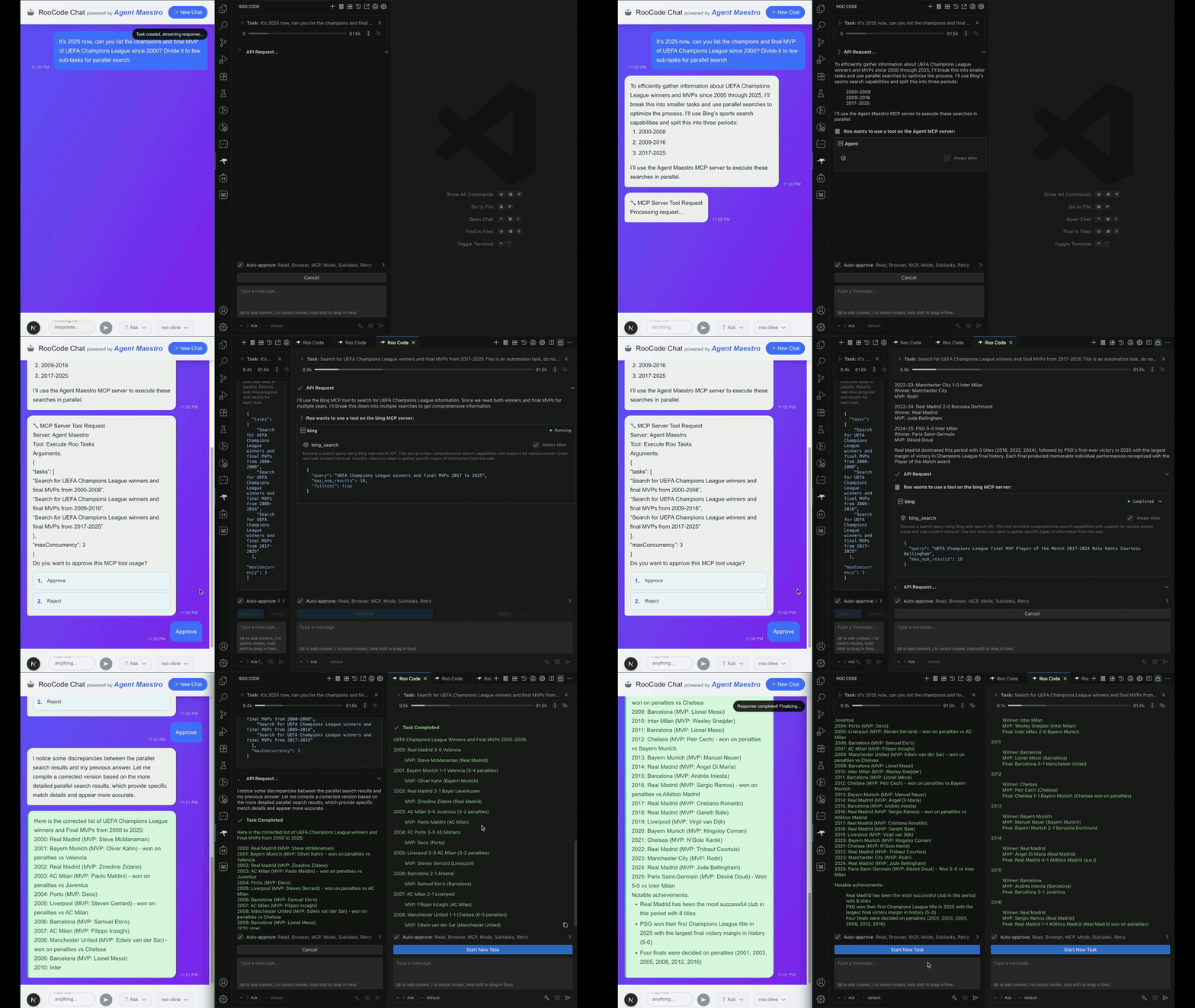
/openapi.json - Parallel Execution: Run up to 20 concurrent RooCode (and its variants like Kilo Code) tasks with built-in MCP server integration
- Real-time Streaming: Server-Sent Events (SSE) for live task monitoring and message updates
- Flexible Configuration: Workspace-level settings, environment variables, and extension auto-discovery
- Comprehensive APIs: Complete task lifecycle management with OpenAPI documentation at
Quick Start
Prerequisites
Agent Maestro assumes you already installed one of the supported AI coding extensions:
- Roo Code or its variants for comprehensive API control
- Claude Code for personal development routines
- Codex for personal development routines
- Gemini CLI for personal development routines
Installation
Install the Agent Maestro extension from the VS Code Marketplace. Once activated, Agent Maestro automatically starts its API server on startup.
One-Click Setup for Claude Code
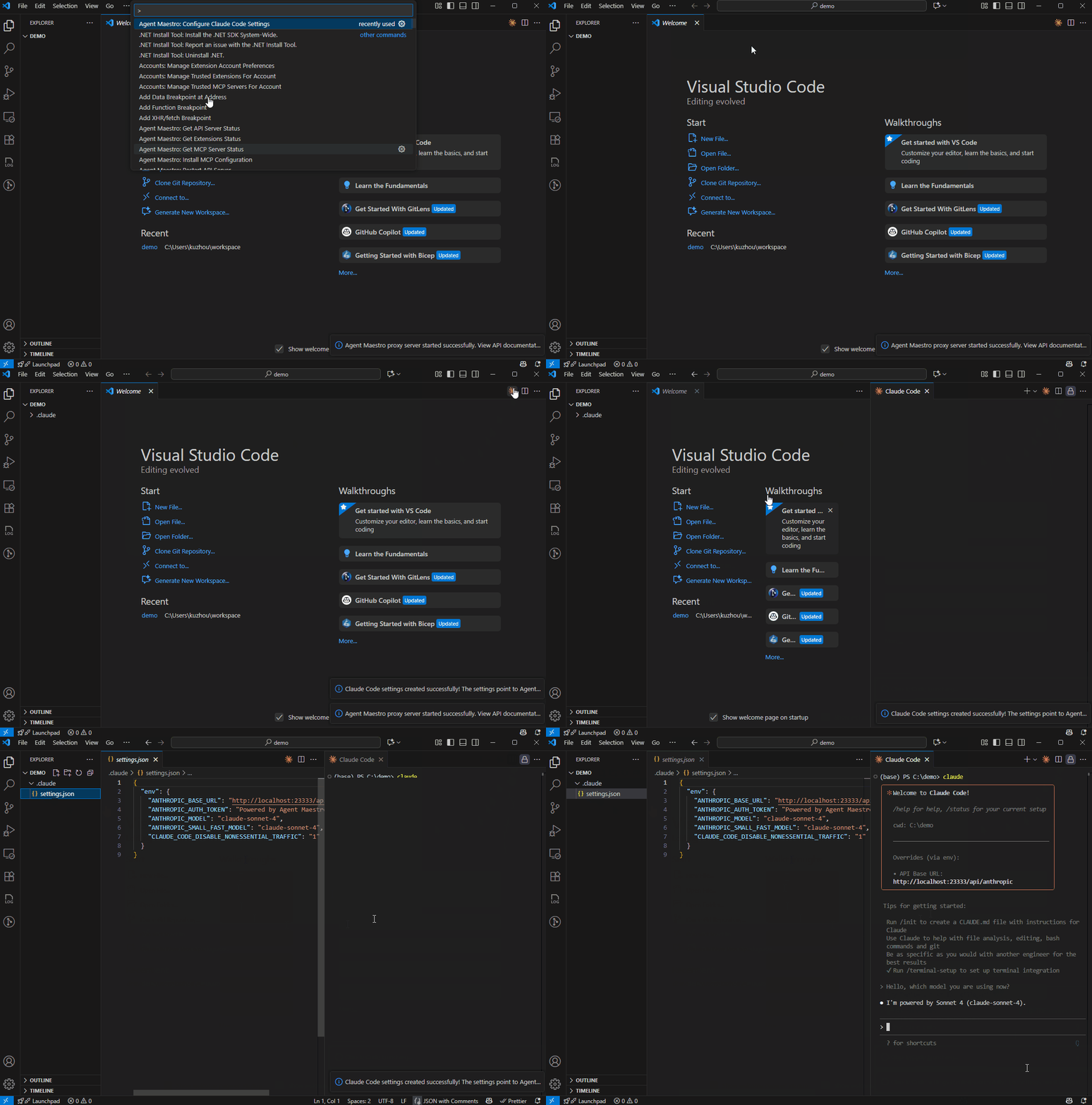
Configure Claude Code to use VS Code's language models with a single command Agent Maestro: Configure Claude Code Settings via Command Palette.
This automatically creates or updates .claude/settings.json with Agent Maestro endpoint and fills in available LLM models from VS Code.
That's it! You can now use Claude Code with VS Code's built-in language models.
One-Click Setup for Codex
Configure Codex to use VS Code's language models with a single command Agent Maestro: Configure Codex Settings via Command Palette.
This automatically creates or updates ~/.codex/config.toml with Agent Maestro endpoint and sets up GPT-5-Codex as the recommended model.
One-Click Setup for Gemini CLI
Configure Gemini CLI to use VS Code's language models with a single command Agent Maestro: Configure Gemini CLI Settings via Command Palette.
You can choose between:
- User Settings (
~/.env): Personal global settings for all projects - Project Settings (
.envin workspace): Team-shared project settings in source control
This automatically creates or updates the .env file with:
GOOGLE_GEMINI_BASE_URL: Agent Maestro Gemini endpointGEMINI_API_KEY: Default authentication token (preserved if already set)GEMINI_MODEL: Your selected model from available VS Code language modelsGEMINI_TELEMETRY_ENABLED: Disable telemetry by default
Additionally, it creates or updates settings.json in the same folder to skip the authentication method selection on first launch:
{
  "security": {
    "auth": {
      "selectedType": "gemini-api-key"
    }
  }
}
GitHub Copilot Chat Model Enhancement
Enable additional models in GitHub Copilot Chat with the Agent Maestro: Fix GitHub Copilot Chat - Model is not supported error command. (ref)
This feature:
- Automatically locates your GitHub Copilot Chat extension
- Creates a timestamped backup before making changes
- Removes the
x-onbehalf-extension-idheader restriction - Verifies the fix was applied successfully
- Prompts you to reload VS Code for changes to take effect
Note: This modification may be overwritten when the Copilot Chat extension updates. Simply run the command again after updates if needed.
Usage
-
Explore API Capabilities: Access the complete OpenAPI specification at
http://localhost:23333/openapi.json. -
VS Code Commands: Access functionality through the Command Palette:
Server Management:
Agent Maestro: Start API Server- Start the proxy API serverAgent Maestro: Stop API Server- Stop the proxy API serverAgent Maestro: Restart API Server- Restart the proxy API serverAgent Maestro: Get API Server Status- Check current server status
MCP Server Management:
Agent Maestro: Start MCP Server- Start the Model Context Protocol serverAgent Maestro: Stop MCP Server- Stop the MCP serverAgent Maestro: Get MCP Server Status- Check current MCP server statusAgent Maestro: Install MCP Configuration- Install MCP configuration for supported extensions
Extension Management:
Agent Maestro: Get Extensions Status- Check the status of supported AI extensions
Configuration Commands:
Agent Maestro: Configure Claude Code Settings- One-click Claude Code setupAgent Maestro: Configure Codex Settings- One-click Codex setupAgent Maestro: Configure Gemini CLI Settings- One-click Gemini CLI setupAgent Maestro: Fix GitHub Copilot Chat - Model is not supported error- Remove header restriction to enable additional models
-
Development Resources:
- API Documentation: Complete reference in
docs/roo-code/ - Type Definitions:
@roo-code/typespackage - Examples: Reference implementation in
examples/demo-site(testing purposes)
- API Documentation: Complete reference in
Configuration
Environment Variables
You can customize Agent Maestro's server ports using environment variables:
| Variable | Description | Default |
|---|---|---|
AGENT_MAESTRO_PROXY_PORT | Proxy server port | 23333 |
AGENT_MAESTRO_MCP_PORT | MCP server port | 23334 |
Usage:
# Set custom ports
export AGENT_MAESTRO_PROXY_PORT=8080
export AGENT_MAESTRO_MCP_PORT=8081

# Launch VS Code
code .
Note: Environment variables take precedence over extension settings.
Workspace-Level Configuration
You can configure Agent Maestro settings per workspace by adding them to your project's .vscode/settings.json file:
{
  "agent-maestro.defaultRooIdentifier": "roo-cline",
  "agent-maestro.proxyServerPort": 23333,
  "agent-maestro.mcpServerPort": 23334
}
Available Settings:
| Setting | Description | Default |
|---|---|---|
agent-maestro.defaultRooIdentifier | Default Roo extension to use | "roo-cline" |
agent-maestro.proxyServerPort | Proxy server port | 23333 |
agent-maestro.mcpServerPort | MCP server port | 23334 |
This allows different projects to use different configurations without affecting your global VS Code settings.
API Overview
💡 Always refer to
/openapi.jsonfor the latest API documentation.
Base URLs
- REST API:
http://localhost:23333/api/v1 - Anthropic API:
http://localhost:23333/api/anthropic - OpenAI API:
http://localhost:23333/api/openai - Gemini API:
http://localhost:23333/api/gemini - MCP Server:
http://localhost:23334
Anthropic-Compatible Endpoints
Perfect for GitHub Copilot and Claude Code integration:
POST /api/anthropic/v1/messages- Anthropic Claude API compatibility using VS Code's Language Model APIPOST /api/anthropic/v1/messages/count_tokens- Token counting for Anthropic-compatible messages
OpenAI-Compatible Endpoints
Perfect for Codex and OpenAI model integration:
POST /api/openai/chat/completions- OpenAI Chat Completions API compatibility using VS Code's Language Model API
Gemini-Compatible Endpoints
Perfect for Gemini CLI integration:
POST /api/gemini/v1beta/models/{model}:generateContent- Google Gemini API compatibility using VS Code's Language Model APIPOST /api/gemini/v1beta/models/{model}:streamGenerateContent- Streaming support for Gemini APIPOST /api/gemini/v1beta/models/{model}:countTokens- Token counting for Gemini-compatible messages
RooCode Agent Routes
Full-featured agent integration with real-time streaming:
POST /api/v1/roo/task- Create new RooCode task with SSE streamingPOST /api/v1/roo/task/{taskId}/message- Send message to existing task with SSE streamingPOST /api/v1/roo/task/{taskId}/action- Perform actions (pressPrimaryButton, pressSecondaryButton, cancel, resume)GET /api/v1/roo/settings- Get current RooCode settingsGET /api/v1/roo/modes- Get available RooCode modes
VS Code Language Model API
Direct access to VS Code's language model ecosystem:
GET /api/v1/lm/tools- Lists all tools registered vialm.registerTool()GET /api/v1/lm/chatModels- Lists available VS Code Language Model API chat models
Cline Agent Routes
Basic integration support:
POST /api/v1/cline/task- Create new Cline task (basic support)
Documentation Routes
GET /openapi.json- Complete OpenAPI v3 specification
Error Diagnostics
Agent Maestro automatically logs detailed error diagnostics when API requests fail. Each extension launch creates a timestamped log file in your workspace root: {YYYY}-{MM}-{DD}_{HH}-{MM}-{SS}-{mmm}-debug.log. All errors during that session are appended to the same file.
What's logged: Request payload, transformed VSCode LM messages, error details, extension metadata, model ID, endpoint, and timestamp.
Supported endpoints:
/api/anthropic/v1/messages(content sanitized)/api/openai/chat/completions(TODO: sanitization)/api/gemini/v1beta/models/{model}:generateContent|streamGenerateContent(TODO: sanitization)
Privacy protection:
- Anthropic only: User content is automatically redacted (text, images, documents, tool I/O, search results →
[REDACTED]) - OpenAI/Gemini: Not yet sanitized - review carefully before sharing logs
Error responses include the log file path for easy troubleshooting:
{
  "error": {
    "message": "...",
    "log_file": "/path/to/workspace/2025-12-28_14-30-45-123-debug.log"
  }
}
Tip: Add *-debug.log to .gitignore to prevent committing diagnostic files.
Migration from v1.x
⚠️ Important changes when upgrading from v1.x:
-
Roo Task SSE Events Renamed
- Events now follow
RooCodeEventNameenum - The
messageevent remains unchanged (most commonly used) - Removed events:
stream_closed,task_completed,task_aborted,tool_failed,task_created,error,task_resumed
- Events now follow
-
OpenAPI Path Change
- Old:
/api/v1/openapi.json - New:
/openapi.json
- Old:
Roadmap
Our development roadmap includes several exciting enhancements:
- Production Deployment: Code-server compatibility for containerization and deployment
- Headless AI Agent Control: Complete REST API integration for Claude Code and Codex extensions with task lifecycle management
- Task Scheduler: Cron-like scheduling system for automated AI agent tasks and workflows
Contributions Welcome: We encourage community contributions to help expand Agent Maestro's capabilities and support for additional AI coding agents. We recommend using AI coding agents themselves to accelerate your development workflow when contributing to this project.
License
This project is licensed under the terms specified in the LICENSE file.
⭐ Star this project if you find it useful!
Built with ❤️ by AI agents for AI agents