Box4Magisk / KernelSU / APatch
April 5, 2026 · View on GitHub
This project is a Magisk / KernelSU / APatch module designed to deploy various proxy cores on Android devices, including clash, mihomo, sing-box, v2ray, xray, and hysteria.
Supported transparent proxy modes:
- REDIRECT: TCP only
- TPROXY: TCP + UDP (default priority)
- TUN: TCP + UDP (provided by the core; only supported by sing-box, clash, mihomo, and xray)
- Hybrid mode: REDIRECT (TCP) + TUN (UDP)
This project essentially combines a proxy core launcher with AndroidTProxyShell to implement transparent proxying.
Disclaimer
This project is not responsible for device bricking, data corruption, or any other hardware/software issues.
Important Warning: Please ensure your configuration file does not cause traffic looping, otherwise it may lead to infinite device reboots!
If you are not familiar with proxy configuration, it is recommended to first use user-friendly apps (such as ClashForAndroid, sing-box for Android, v2rayNG, SagerNet, etc.) to learn the basic concepts.
Installation
- Download the latest module ZIP package from Releases.
- Install it in Magisk Manager, KernelSU Manager, or APatch Manager.
- Online update is supported (changes take effect immediately without rebooting after update).
Note: The module does not include any proxy core binary files.
After installation, please manually download the core executable files for your device architecture and place them in the /data/adb/box/bin/ directory.
Configuration
Selecting the Proxy Core
Core working directory: /data/adb/box/<core_name>
The core is determined by the bin_name variable in /data/adb/box/scripts/box.config. Available options:
sing-box(recommended, default)clashmihomoxrayv2rayhysteria
Tip: mihomo and sing-box come with default configuration files that are pre-configured to work with transparent proxy. It is recommended to directly edit the proxy-providers or outbounds sections to add your nodes.
For advanced configuration, please refer to the official documentation:
The module will automatically check the validity of the configuration file, with results saved in /data/adb/box/run/check.log.
Main Configuration Options
The following are the key options in /data/adb/box/scripts/tproxy.conf. Pay special attention to correctly configuring the *_INTERFACE variables (e.g., MOBILE_INTERFACE="rmnet_data+", WIFI_INTERFACE="wlan0", HOTSPOT_INTERFACE="wlan2", USB_INTERFACE="rndis+") to match your device's actual interface names (check with ifconfig or ip link).
| Configuration Item | Default Value | Description |
|---|---|---|
CORE_USER_GROUP | root:net_admin | User and group under which the proxy core runs. Advanced users can customize this (requires setcap support). Must be consistent with the box_user_group variable in box.config |
PROXY_TCP_PORT / PROXY_UDP_PORT | 1536 | Transparent proxy listening port |
PROXY_MODE | 0 | Proxy mode: 0=auto (TPROXY preferred), 1=TPROXY, 2=REDIRECT, any other value (only start the core to support native TUN) |
DNS_HIJACK_ENABLE | 1 | DNS hijacking (0=disable, 1=enable TPROXY, 2=enable REDIRECT; no need to change unless necessary) |
DNS_PORT | 1053 | DNS listening port |
MOBILE_INTERFACE | rmnet_data+ | Mobile data interface name |
WIFI_INTERFACE | wlan0 | WiFi interface name |
HOTSPOT_INTERFACE | wlan2 | Hotspot interface name |
USB_INTERFACE | rndis+ | USB tethering interface name |
PROXY_MOBILE | 1 | Whether to proxy mobile data traffic (1=proxy, 0=do not proxy; supports any combination with other interfaces) |
PROXY_WIFI | 1 | Whether to proxy WiFi traffic (1=proxy, 0=do not proxy; supports any combination with other interfaces) |
PROXY_HOTSPOT | 0 | Whether to proxy hotspot traffic (1=proxy, 0=do not proxy; supports any combination with other interfaces; MAC filtering takes effect when enabled) |
PROXY_USB | 0 | Whether to proxy USB tethering traffic (1=proxy, 0=do not proxy; supports any combination with other interfaces) |
PROXY_TCP / PROXY_UDP | 1 / 1 | Whether to proxy TCP/UDP traffic (1=proxy, 0=do not proxy) |
PROXY_IPV6 | 0 | Whether to proxy IPv6 (1=proxy, 0=disable; in REDIRECT mode, the module will automatically check kernel support for IP6_NF_NAT and IP6_NF_TARGET_REDIRECT. If not supported, IPv6 proxy will be disabled) |
APP_PROXY_ENABLE | 0 | Enable per-app proxy (1=enable) |
APP_PROXY_MODE | blacklist | blacklist (bypass specified apps) or whitelist (proxy only specified apps) |
BYPASS_APPS_LIST / PROXY_APPS_LIST | empty | App list, format: "userID:packageName" (multiple entries separated by spaces, e.g. "0:com.android.systemui 10:com.tencent.mm") |
BYPASS_CN_IP | 0 | Whether to bypass mainland China IPs (1=enable, 0=disable; requires kernel support for ipset. The module will check automatically; if not supported, the feature will be disabled. When enabled, IP lists will be downloaded from the specified URL) |
MAC_FILTER_ENABLE | 0 | Enable MAC address filtering (1=enable, 0=disable; only effective when PROXY_HOTSPOT=1) |
MAC_PROXY_MODE | blacklist | blacklist (bypass specified MACs) or whitelist (proxy only specified MACs) |
BYPASS_MACS_LIST / PROXY_MACS_LIST | empty | MAC address list (multiple entries separated by spaces, e.g. "AA:BB:CC:DD:EE:FF 11:22:33:44:55:66") |
For other configuration options, please refer to AndroidTProxyShell.
Usage
Normal Usage (Recommended)
- The service is enabled by default on boot.
- Enable/disable the module via Magisk / KernelSU / APatch Manager to start/stop the service in real time (no device reboot required).
Per-App Proxy (Routing)
After enabling APP_PROXY_ENABLE=1:
- Blacklist mode (default): Proxy all apps except those in the specified list (use
BYPASS_APPS_LIST). - Whitelist mode: Proxy only the specified apps (use
PROXY_APPS_LISTand setAPP_PROXY_MODE=whitelist).
Using Only the Core's Native TUN (No Transparent Proxy)
Set PROXY_MODE=core or any value other than 0-2. Transparent proxy rules will not be loaded; only the core will be started (suitable for sing-box/clash/mihomo TUN inbound).
Manual Mode
After creating an empty file /data/adb/box/manual:
- The service will no longer start on boot and cannot be controlled via the Manager.
- Manual commands:
- Service:
/data/adb/box/scripts/box.service start|stop|restart|status - Transparent proxy:
/data/adb/box/scripts/box.tproxy start|stop|restart
- Service:
Additional Notes
- After modifying the core configuration file, please ensure the ports and other settings are consistent with those in
box.configandtproxy.conf. - The module automatically prevents looping (bypasses local IP and utilizes the NETFILTER_XT_MATCH_ADDRTYPE feature). However, if your device has a public IP, it is still recommended to manually add bypass rules.
- Logs are located in the
/data/adb/box/run/directory.
Uninstallation
- Uninstalling the module from Magisk Manager, KernelSU Manager, or APatch will remove the
/data/adb/service.d/box4_service.shfile but retain the Box data directory/data/adb/box. - To clear Box data, use the command:
rm -rf /data/adb/box
Changelog
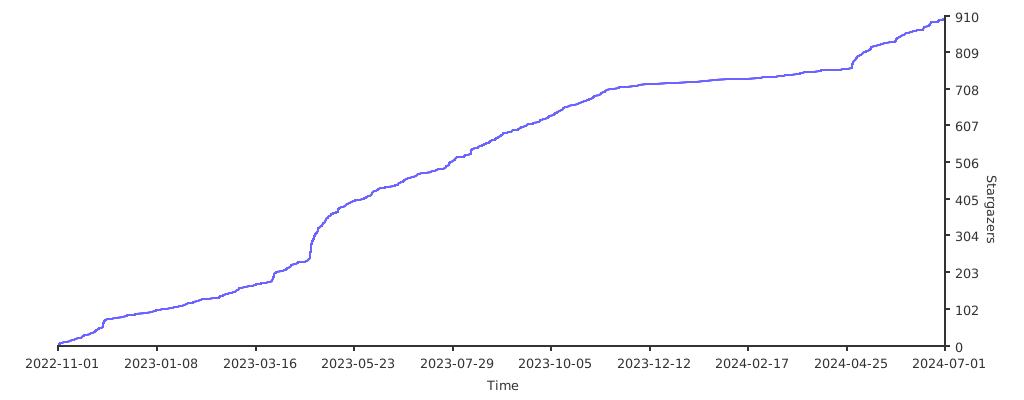
Project Star Growth Trend Chart