Castello Branco Tecnologia - Material.Icons
October 6, 2024 · View on GitHub
This projet is UNO/WinUI3 Version of MaterialIcon control of project https://github.com/SKProCH/Material.Icons
Special thanks to https://github.com/SKProCH
#Packages
Material.Icons
Parsed icons set from materialdesignicons.com and display control implementations for different GUI frameworks.
- All icons are always up-to-date because automatically updated every 6 hours.
- Small package size because icons are graphically encoded via SVG Path.
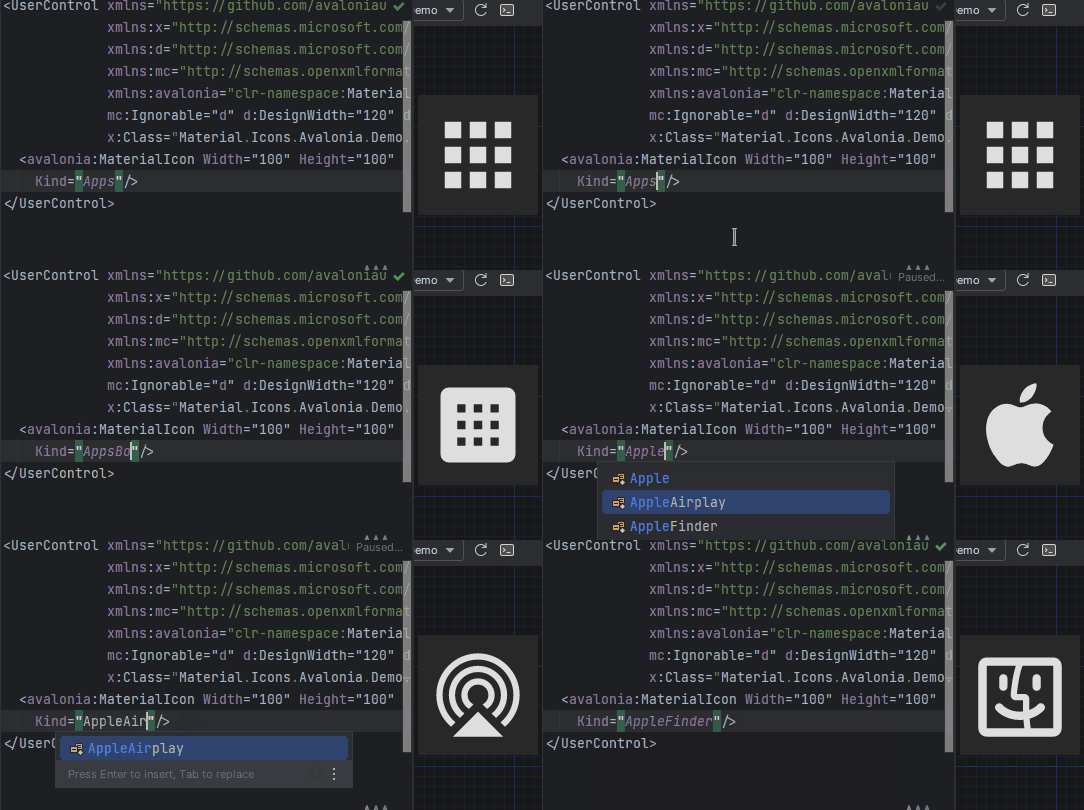
- Icon types are strongly typed enum, so your IDE will suggest available variants:
Getting started
Install Material.Icons nuget package:
dotnet add package Material.Icons


Using
Icon types stored in Material.Icons.MaterialIconKind enum.
We can resolve an icon path by using Material.Icons.MaterialIconDataProvider.GetData().
In XAML use control MaterialIcon to show icon
xmlns:icons="using:Material.Icons.UNO"
<icons:MaterialIcon Width="24" Height="24" Margin="4" HorizontalAlignment="Left" VerticalAlignment="Bottom" Foreground="Black" Kind="PersonTie" />