Installation
August 4, 2026 · View on GitHub
seqsizzle is a pager for viewing FASTQ and FASTA files with fuzzy matching, allowing different adaptors to be colored differently.
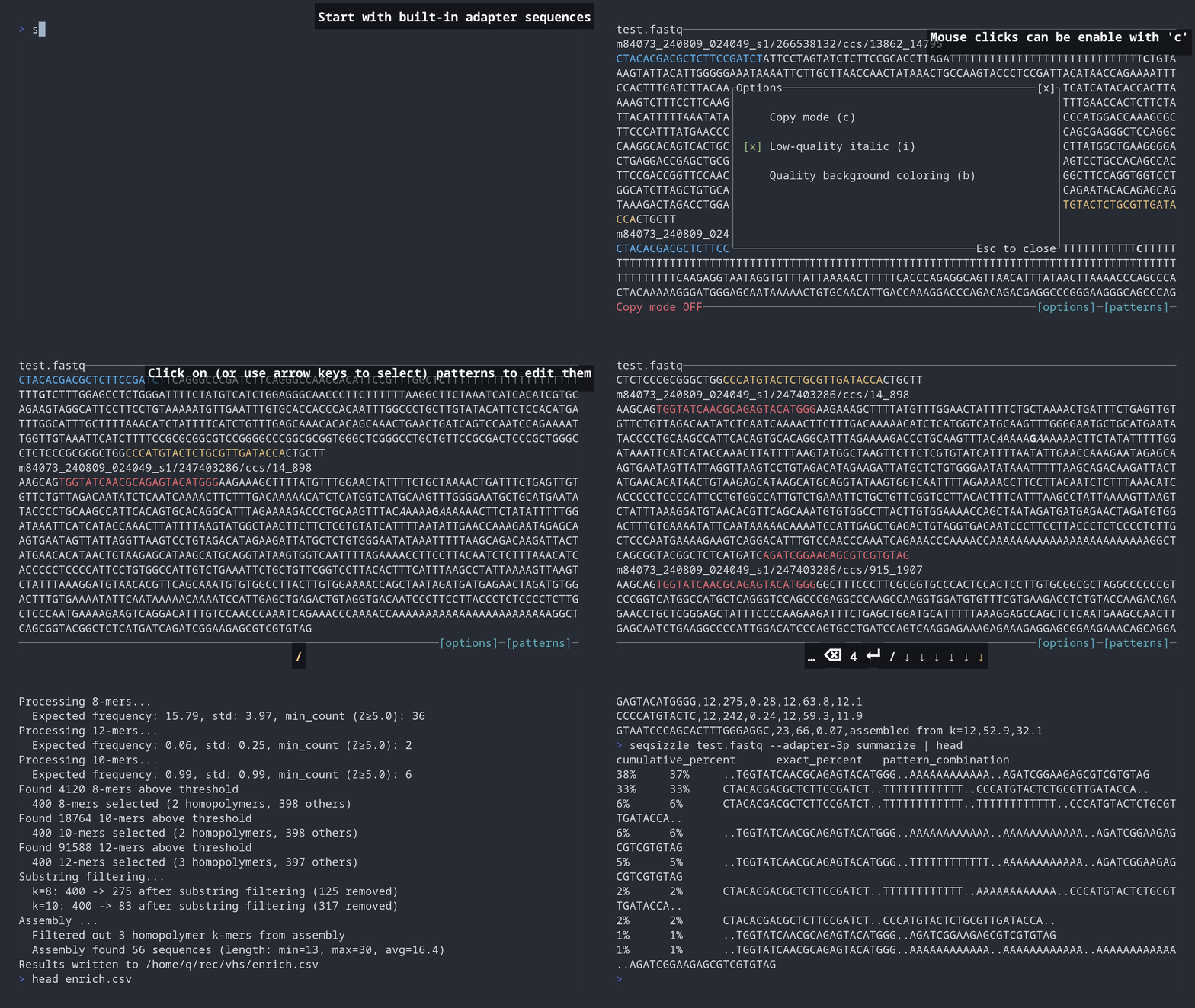
Installation
Pre-built binary

You can simply download and run the binary from Github Actions.
Conda
seqsizzle is also available on bioconda:
conda install -c bioconda -c conda-forge seqsizzle
Cargo (crates.io)

If you already have a Rust environment set up, you can use the cargo install command:

cargo install seqsizzle
Cargo will build the seqsizzle binary and place it in $HOME/.local/share/cargo/bin/seqsizzle.
Cargo (git)
If you already have a Rust environment set up, you can use the cargo install command in your local clone of the repo:
git clone https://github.com/ChangqingW/SeqSizzle
cd SeqSizzle
cargo install --path .
Cargo will build the seqsizzle binary and place it in $HOME/.cargo.
Usage
seqsizzle -h:
A pager for viewing FASTQ and FASTA files with fuzzy matching, allowing different adaptors to be colored differently.

Usage: seqsizzle [OPTIONS] <FILE> [COMMAND]

Commands:
  summarize  Summarize the reads with patterns specified by the --patterns argument or the adapter flags. Make sure you supply the flags BEFORE the subcommand, e.g. `./seqsizzle my.fastq -p my_patterns.csv --adapter-3p summarize`. '..' indicats unmatched regions of positive length, '-' indicates the patterns are overlapped. Prints, for each pattern combination, a cumulative and an exact value in TSV format (three columns; with --counts the values are read counts, otherwise percentages of reads): cumulative_count/cumulative_percent, exact_count/exact_percent, and pattern_combination. The exact value is the number of reads matching that exact combination; the cumulative value also adds the counts of every longer combination that contains it as a contiguous block. Rows are sorted by the exact value. To be moved to the UI in the future
  enrich     Find enriched k-mers in the reads. This can be used to identify potential adapter/primer sequences
  help       Print this message or the help of the given subcommand(s)

Arguments:
  <FILE>  The FASTQ or FASTA file to view (supports .fastq, .fasta, .fa, .fq and their .gz variants)

Options:
      --adapter-3p
          Start with 10x 3' kit adaptors:
           - Patrial Read1: CTACACGACGCTCTTCCGATCT (and reverse complement)
           - Partial TSO: CCCATGTACTCTGCGTTGATACCA (and reverse complement)
           - Poly(>10)A/T
      --adapter-5p
          Start with 10x 5' kit adaptors
           - Patrial Read1: CTACACGACGCTCTTCCGATCT (and reverse complement)
           - Patrial Read2: AGATCGGAAGAGCACACGTCTGAA (and reverse complement)
           - TSO: TTTCTTATATGGG (and reverse complement)
           - Poly(>10)A/T
  -p, --patterns <PATTERNS_PATH>
          Start with patterns from a CSV file
          Must have the following header:
          pattern,color,editdistance,comment
  -s, --save-patterns <SAVE_PATTERNS_PATH>
          Save the search panel to a CSV file before quitting. To be removed in the future since you can now hit Ctrl-S in the search panel to save the patterns
      --quality-italic
          Enable italic styling for low quality bases (enabled by default)
      --no-quality-italic
          Disable italic styling for low quality bases
      --quality-threshold <QUALITY_THRESHOLD>
          Quality threshold for styling [default: 10]
      --quality-colors
          Enable background color styling based on quality scores. You will probably have a hard time distinguishing forground colors from background colors, so this is disabled by default
  -h, --help
          Print help
  -V, --version
          Print version
Navigation
Viewer mode
 Up / down arrow (or
 j / k) to scroll by one line, Ctrl+U / Ctrl+D to scoll half a screen.
The mouse scroll wheel also scrolls up / down by one line when copy mode is off.
/ (or Ctrl+F) to toggle search panel, q to quit.
i to toggle Italics for low quality bases (threshold define by --quality-threshold, default 10).
b to toggle Background color styling based on quality scores
? to open a key-reference help popup (any key or click closes it).
c to toggle Copy mode (see Copy mode below).
o to toggle Options panel.
Viewer mode with background color styling enabled would make forground colors hard to distinguish:
 Make sure your terminal supports 256 colors (e.g. terminal emulators like iterm2, kitty, etc.) and your font support italics and bold styles otherwise it may look less appealing.
Copy mode
Clicking and native terminal text selection cannot both be active at once. seqsizzle starts in copy mode, which releases the mouse so you can select and copy text with your terminal as usual. In this mode, you will need to use the /, o keys to open the search panel and option panel as clicking does not work. The popup panels always accept clicking and ignores copy mode.
Press c to turn copy mode off, which make the [patterns] and [options] buttons available. Most terminals also let you hold Shift and drag to select text even with copy mode off.
search panel mode
 The panel is always clickable: click an input box to focus it, click a pattern row to select it, and double-click a pattern to pop it into the input fields for editing. Press
 Return to add current inputs into the search pattern list (when focusing on any of the input boxes, rather than the patterns list). Backspace (or Delete, d) when a pattern is selected deletes the selected pattern from the list.
You can also navigate the pane using keyboard only: Left / right arrow (or Tab / Shift-Tab) to cycle through different input fields and the patterns list. When on the patterns list field, up / down arrows cycle through patterns, Return to pop the selected pattern into the input fields for editing. / or Esc to close the search panel.
Use Shift + arrow keys to move cursor within an input field (as arrow keys alone are bind to cycling input fields).
Subcommands
enrich
seqsizzle enrich --help:
Find enriched k-mers in the reads. This can be used to identify potential adapter/primer sequences

Usage: seqsizzle <FILE> enrich [OPTIONS] --output <OUTPUT>

Options:
  -o, --output <OUTPUT>
          Path to write the output CSV file
      --max-reads <MAX_READS>
          Limit the total number of reads used for enrichment. Set to 0 to use all reads [default: 10000]
      --sample
          If set, randomly sample `--max-reads` reads from the file instead of taking the first N. Requires `--max-reads`
      --k-min <K_MIN>
          Minimum k-mer length to check [default: 8]
      --k-max <K_MAX>
          Maximum k-mer length to check [default: 12]
      --k-step <K_STEP>
          Step size between k-values (arithmetic progression) [default: 2]
      --top-kmers <TOP_KMERS>
          Number of top k-mers to keep per k value [default: 400]
      --substring-count-ratio-threshold <SUBSTRING_COUNT_RATIO_THRESHOLD>
          Substring filtering counts ratio threshold. For k-mers that are contained within longer k-mers, those with (shorter k-mer count) / (longer k-mer count) >= this threshold will be removed. For homopolymer k-mers, the threshold is lowered to threshold^4 [default: 0.8]
      --min-count <MIN_COUNT>
          Minimum counts per read threshold for k-mers (overrides z-score if provided). Accepts fractional values (e.g., 0.01 for 1 count per 100 reads)
      --z-score-threshold <Z_SCORE_THRESHOLD>
          Z-score threshold for k-mer enrichment (default: 5.0) [default: 5]
      --skip-assemble
          Perform assembly with k_max k-mers
      --detect-reverse-complement
          Detect and merge reverse complement k-mers
  -h, --help
          Print help
Example output CSV file:
seqsizzle test.fastq enrich -o enrichment.csv
sequence,length,estimated_count,counts_per_read,source_k,sqrt_deviance,log_fold_enrichment
TTTTTTTTTTTT,12,179912,17.99,12,2041.4,18.2
AAAAAAAAAAAA,12,94008,9.40,12,1433.7,17.2
CCCATGTACTCTGCGTTGATACCACTGCTT,30,6190,0.62,assembled from k=12,640.8,49.3
CTACACGACGCTCTTCCGATCT,22,6440,0.64,assembled from k=12,533.7,33.3
AAGCAGTGGTATCAACGCAGAGTACATGGG,30,3298,0.33,assembled from k=12,463.3,48.4
AGATCGGAAGAGCGTCGTGTAG,22,3441,0.34,assembled from k=12,384.5,32.4
...
summarize
seqsizzle summarize --help:
Summarize the reads with patterns specified by the --patterns argument or the adapter flags. Make sure you supply the flags BEFORE the subcommand, e.g. `./seqsizzle my.fastq -p my_patterns.csv --adapter-3p summarize`. '..' indicats unmatched regions of positive length, '-' indicates the patterns are overlapped. Prints, for each pattern combination, a cumulative and an exact value in TSV format (three columns; with --counts the values are read counts, otherwise percentages of reads): cumulative_count/cumulative_percent, exact_count/exact_percent, and pattern_combination. The exact value is the number of reads matching that exact combination; the cumulative value also adds the counts of every longer combination that contains it as a contiguous block. Rows are sorted by the exact value. To be moved to the UI in the future

Usage: seqsizzle <FILE> summarize [OPTIONS]

Options:
      --counts  Print the counts of each summarized catagory instead of the percentage
  -h, --help    Print help
Example output:
seqsizzle test.fastq --adapter-3p summarize > summarize.txt
head -1 summarize.txt; tail summarize.txt
cumulative_percent	exact_percent	pattern_combination
1%	1%	..TGGTATCAACGCAGAGTACATGGG..AAAAAAAAAAAA..AAAAAAAAAAAA..AAAAAAAAAAAA..AGATCGGAAGAGCGTCGTGTAG
1%	1%	CTACACGACGCTCTTCCGATCT..TTTTTTTTTTTT..TTTTTTTTTTTT..TTTTTTTTTTTT..CCCATGTACTCTGCGTTGATACCA..
1%	1%	..TGGTATCAACGCAGAGTACATGGG..AGATCGGAAGAGCGTCGTGTAG
1%	1%	CTACACGACGCTCTTCCGATCT..CCCATGTACTCTGCGTTGATACCA..
3%	3%	CTACACGACGCTCTTCCGATCT..TTTTTTTTTTTT..AAAAAAAAAAAA..CCCATGTACTCTGCGTTGATACCA..
3%	3%	..TGGTATCAACGCAGAGTACATGGG..TTTTTTTTTTTT..AAAAAAAAAAAA..AGATCGGAAGAGCGTCGTGTAG
6%	6%	..TGGTATCAACGCAGAGTACATGGG..AAAAAAAAAAAA..AAAAAAAAAAAA..AGATCGGAAGAGCGTCGTGTAG
6%	6%	CTACACGACGCTCTTCCGATCT..TTTTTTTTTTTT..TTTTTTTTTTTT..CCCATGTACTCTGCGTTGATACCA..
34%	34%	..TGGTATCAACGCAGAGTACATGGG..AAAAAAAAAAAA..AGATCGGAAGAGCGTCGTGTAG
36%	36%	CTACACGACGCTCTTCCGATCT..TTTTTTTTTTTT..CCCATGTACTCTGCGTTGATACCA..
The output indicates 36% of reads contains the R1 adaptor, followed by a polyT stretch and the TSO sequence. The line above (rows sorted by exact_percent) indicates that 34% of reads are the reverse complement of that. The .. indicates an insertion of unmatched sequence.
The two value columns are exact_percent — reads matching exactly that combination — and cumulative_percent, which also adds every longer combination that contains it as a contiguous block (separators must match). With --counts the same two columns are reported as read counts (exact_count, cumulative_count) instead of percentages. The two columns coincide for the most common combinations above because none of them is contained in a longer one; shorter combinations elsewhere in the file have a higher cumulative value than exact value.
Demo data
The data used in the demonstration GIF is sampled from the PacBio single-nucleus data from LongBench. You can also download it from here to try it out.
Citing seqsizzle
Please consider citing our preprint https://doi.org/10.64898/2026.07.17.738618 if you use seqsizzle
Roadmap
functionality
- Gzip (
fastq.gz) support - FASTA support
- BAM support
- Styling mismatches and low quality bases
- Built-in k-mer enrichment to identify primers and adaptors
- Filter reads by match
- Counting reads with match
UI
- Make elements in the search panel clickable, try implementations discussed in ratatui repo