Neofetch Themes
August 18, 2025 · View on GitHub

A project which aims at making your life more convenient by putting a bunch of neofetch configs in a single place.
Video Showcase/Tutorial: https://www.youtube.com/watch?v=aQ44CafqcH0&feature=youtu.be
Discord • Reddit • Github
Overview
acenoster fetch, Bejkon, Bejkon 2, Boxes, Eldfetch, idlifetch, insert name, insert name 2 electric boogaloo, Kenielf, Mixedfetch, Onre's Fetch, ozozFetch, ozozPredatorFetch, papirus, Remfetch, Talljoe's Fetch, troutfetch, tuxNature
af++, AxylFetch, AxylFetch EndeavourOS, Dotfetch, Blockfetch, BMOfetch, MinecraftFetch, ozozFetch, ozozFetch_v2, PenguinFetch, SimpleFetch, Smallfetch
Normal:
acenoster fetch

NOTE: You will need to install any one Nerd font and use it in your terminal for the above theme to render the icons correctly. To install the fonts, download any one monospaced font from Nerd fonts download page and extract the downloaded .zip file and copy its contents into a folder in either \usr\share\fonts or ~\.local\share\fonts
Bejkon
NOTE: To use the logo you need to change the ascii source in line 743 to where your logo file is stored at.
Bejkon 2
NOTE: Same as Bejkon but line 741
Boxes
Eldfetch
idlifetch
insert name
insert name 2 electric boogaloo
NOTE: On Arch-based distros, run yay -S ttf-material-design-icons-extended, otherwise the pacman packages won't work. On other distros you can install Material Design Icons Desktop TTF from this repository.
Kenielf

Gildenfetch

Mixedfetch
Onre's Fetch
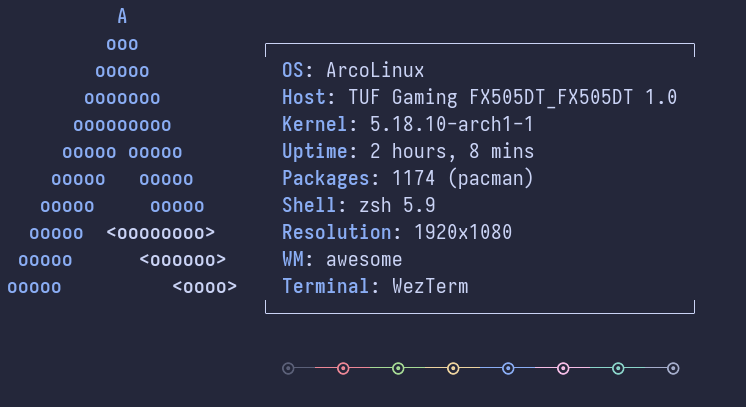
ozozFetch

ozozPredatorFetch

papirus
Remfetch
Talljoe's Fetch
troutfetch

tuxNature

Small:
Note: you are required to manually change the distro ascii in the config
af++

Fun fact: This is called af++ or AxylFetch++ because this was actually based on AxylFetch once, then got modified further
AxylFetch
AxylFetch EndeavourOS
Blockfetch
BMOfetch
if you want to change the speech bubble text, you can do so by running bmosay.sh in your terminal:
sh path_to_bmofetch/bmosay.sh "your text here"
NOTE: You will need to install any one Nerd font and use it in your terminal for the above theme to render the icons correctly.
To install the fonts, download any one monospaced font from Nerd fonts download page and extract the downloaded .zip file and copy its contents into a folder in either \usr\share\fonts or ~\.local\share\fonts.
If the font is not monospaced you will perhaps need to change the gap size in the config for the speech bubble to overlay correctly.
Dotfetch
MinecraftFetch

ozozFetch

ozozFetch_v2

PenguinFetch

SimpleFetch

Smallfetch
FAQs
Installation
GUI
-
Go to the
.configdirectory in your home folder using your file manager.
Note: PressCtrl + Hto locate it, as it is a hidden directory. -
Navigate into the
neofetchdirectory. -
Open the file
config.confwith your preferred text editor and replace the text inside it with the config from your favorite theme.
E. g.: You want to use
Mixedfetch, click on Mixedfetch on the readme or locate it from the repo. There will be aconfig.conffile, copy the contents and paste it in your ownconfig.conffile, save the file and you're done!
CLI
- Backup your config. By running
cd ~/.config/neofetch/ && rename config.conf configbackup.conf config.conf
you save your current config in the file configbackup.conf.
- Clone this repository by running
git clone https://github.com/Chick2D/neofetch-themes/
in your preferred folder.
- Run
cat neofetch-themes/<folder>/<file> > ~/.config/neofetch/config.conf
where <folder> is the section in this readme, while <file> is the file name of the config of this theme.
For example: If you want papirus, it'd be
cat neofetch-themes/normal/papirus.conf > ~/.config/neofetch/config.conf
Contribution
Please don't remove the link to this repo from the configs and If you post this on reddit try mention which neofetch-theme you're using
For example
Distro: Arch Linux
WM: bspwm
Terminal: alacritty
Neofetch Theme: axylfetch
To add your own theme send a pull request containing your file in the appropriate directory, a screenshot in the readme and it's name, you can understand the syntax yourself its very easy
Support
I'd really appreciate any kind of support for me
Or dm me on Reddit