pytest-rabbitmq
March 22, 2026 · View on GitHub
.. image:: https://raw.githubusercontent.com/dbfixtures/pytest-rabbitmq/master/logo.png :width: 100px :height: 100px

pytest-rabbitmq
.. image:: https://img.shields.io/pypi/v/pytest-rabbitmq.svg :target: https://pypi.python.org/pypi/pytest-rabbitmq/ :alt: Latest PyPI version

.. image:: https://img.shields.io/pypi/wheel/pytest-rabbitmq.svg :target: https://pypi.python.org/pypi/pytest-rabbitmq/ :alt: Wheel Status

.. image:: https://img.shields.io/pypi/pyversions/pytest-rabbitmq.svg :target: https://pypi.python.org/pypi/pytest-rabbitmq/ :alt: Supported Python Versions

.. image:: https://img.shields.io/pypi/l/pytest-rabbitmq.svg :target: https://pypi.python.org/pypi/pytest-rabbitmq/ :alt: License

What is this?
A pytest plugin for tests that require a running RabbitMQ broker. It provides process and client fixtures.
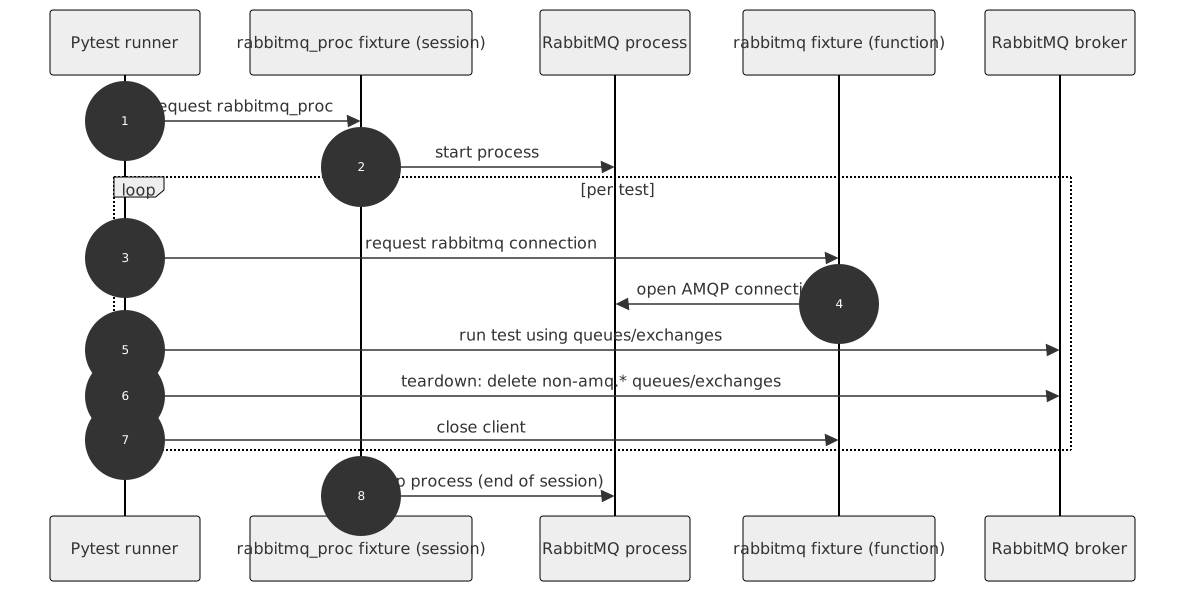
.. image:: https://raw.githubusercontent.com/dbfixtures/pytest-rabbitmq/main/docs/images/architecture.svg :alt: Project Architecture Diagram :align: center
How to use
The plugin contains two fixtures:
- rabbitmq - it is a client fixture with function scope. After each test, it removes queues and exchanges created during the test to keep tests isolated and reliable.
- rabbitmq_proc - a session-scoped fixture that starts a RabbitMQ instance at its first use and stops it at the end of the test session.
Simply include one of these fixtures in your test fixture list.
You can also create additional RabbitMQ client and process fixtures if you need to:
.. code-block:: python
from pytest_rabbitmq import factories

rabbitmq_my_proc = factories.rabbitmq_proc(
    port=None)
rabbitmq_my = factories.rabbitmq('rabbitmq_my_proc')
.. note::
Each RabbitMQ process fixture can be configured differently using fixture factory arguments.
Prerequisites
Install RabbitMQ on the machine where tests are executed.
The plugin starts a local RabbitMQ process and uses rabbitmq-server and
rabbitmqctl binaries.
By default, binary paths are set to typical Linux locations:
/usr/lib/rabbitmq/bin/rabbitmq-server/usr/lib/rabbitmq/bin/rabbitmqctl
If your environment uses different paths, override them with fixture arguments,
command-line options, or pytest.ini settings described below.
Quickstart: first test
Install the plugin:
.. code-block:: shell
pip install pytest-rabbitmq
Create a test that uses the built-in fixture:
.. code-block:: python
def test_rabbitmq_fixture_available(rabbitmq):
    assert rabbitmq is not None
Run your tests:
.. code-block:: shell
pytest -q
Configuration
You can define settings in three ways: fixture factory argument, command-line option, and pytest.ini configuration option.
You can pick which you prefer, but remember that these settings are handled in the following order:
* ``Fixture factory argument``
* ``Command-line option``
* ``Configuration option in your pytest.ini file``
.. list-table:: Configuration options :header-rows: 1
-
- RabbitMQ option
- Fixture factory argument
- Command-line option
- pytest.ini option
- Default
-
- host
- host
- --rabbitmq-host
- rabbitmq_host
- 127.0.0.1
-
- RABBITMQ_NODE_PORT
- port
- --rabbitmq-port
- rabbitmq_port
- random
-
- Port search count
- --rabbitmq-port-search-count
- rabbitmq_port_search_count
- 5
-
- RABBITMQ_DIST_PORT
- distribution_port
- --rabbitmq-distribution-port
- rabbitmq_distribution_port
- random
-
- rabbitmqctl path
- ctl
- --rabbitmq-ctl
- rabbitmq_ctl
- /usr/lib/rabbitmq/bin/rabbitmqctl
-
- rabbitmq server path
- server
- --rabbitmq-server
- rabbitmq_server
- /usr/lib/rabbitmq/bin/rabbitmq-server
-
- Plugin directory location
- plugin_path
- --rabbitmq-plugindir
- rabbitmq_plugindir
- $TMPDIR
-
- Node name
- node
- --rabbitmq-node
- rabbitmq_node
- rabbitmq-test-{port}
Example usage:
-
Pass it as an argument in your own fixture.
.. code-block:: python
rabbitmq_proc = factories.rabbitmq_proc(port=8888) -
Use the
--rabbitmq-portcommand-line option when you run your tests... code-block::
pytest tests --rabbitmq-port=8888 -
Specify your port as
rabbitmq_portin yourpytest.inifile.To do so, put a line like the following under the
[pytest]section of yourpytest.ini:.. code-block:: ini
  [pytest]
  rabbitmq_port = 8888
Package resources
- Bug tracker: https://github.com/dbfixtures/pytest-rabbitmq/issues