Easy CANopen
July 11, 2026 · View on GitHub
Easy CANopen is a protocol for shaping the CAN-bus message in a specific way that suits industrail automation.
CANopen is a very difficult protocol to use, due to the complexitivity of CANopen. So therefore I’m writing a Easy CANopen protocol available for free to use on any embedded systems such as STM32, Arduino, AVR, PIC etc or PC.
To learn to build on this project, you need to use my examples. I have written this project in C language because C is an industry standard. The C language dialect I have chosen is C99 and I don't use dynamical memory allocation in this library. So it will work with MISRA C standard.
With this library, you can communicate with valves, engines, actuators, machinery, hardware and all other things that are suitable for industrial automation. I have build up a basic structure of the project and the purpose with my basic structure is to make Easy CANopen work for very small embedded CAN-bus systems.
Looking for SAE J1939 library? https://github.com/DanielMartensson/Open-SAE-J1939/
GUI version
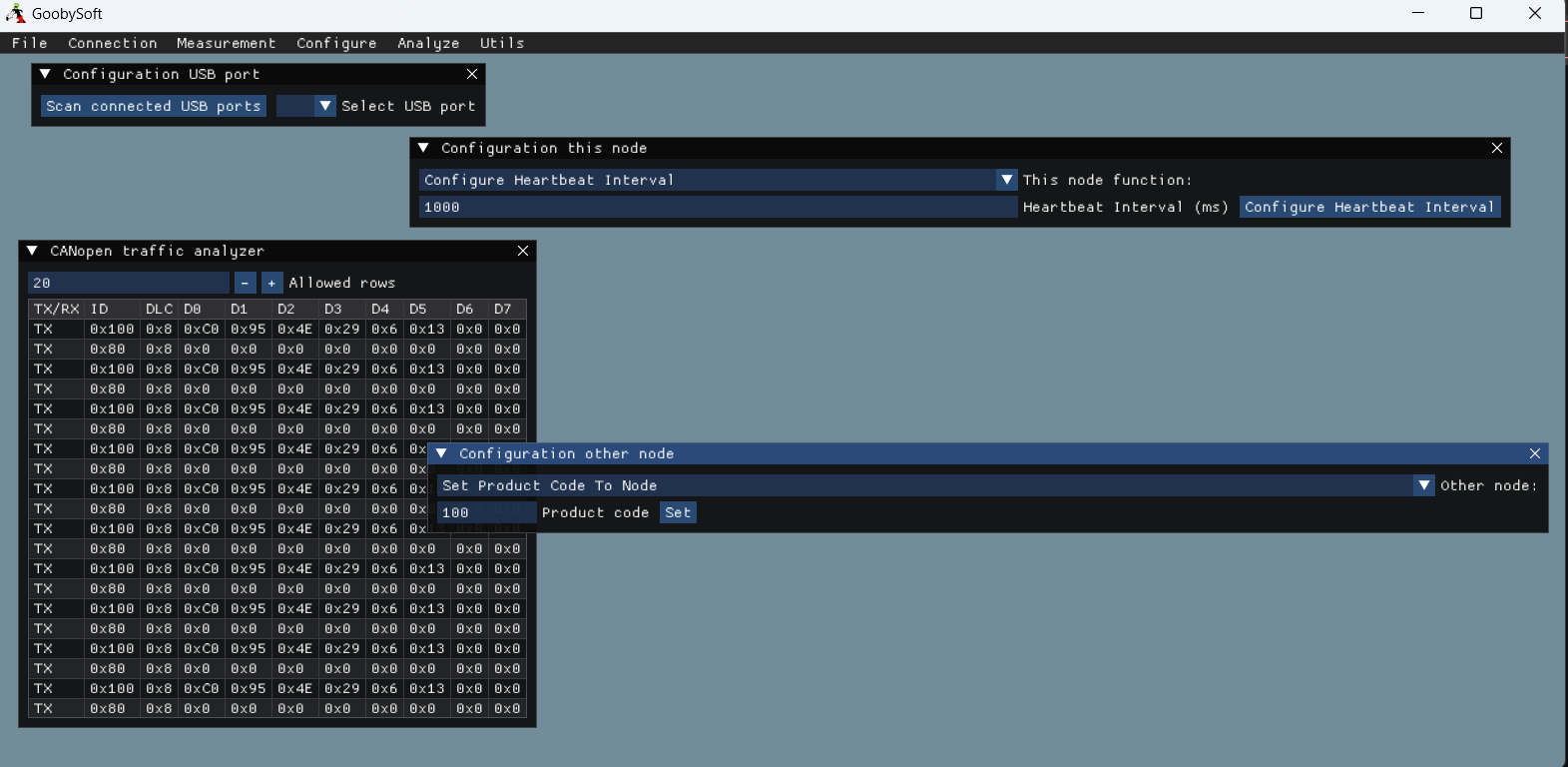
There is a GUI logging software that can analyze CANopen messages ad even SAE J1939 messages as well. Head over to GoobySoft
Status of the project
This project is on idle because I need more testers and I don't have the time and hardware to test my code onto that hardware. Please, if you want to contribute to this project e.g send me a PR for tested code or even contribute on this project. That would be very grateful!
Getting started
Learn the structure of the project, else you won't be able to understand Easy CANopen. The project structure follows the same pattern.
After you have got a basic understanding of the project, you are able to build on it. Keep it simple and follow how the manufatures implement the their CANopen protocol.
I don't recomend to implement the complete protocol from CiA beacause they are too heavy. Only use the documents from CiA as reference manual.
After you have understand the structure of the project, then select processor choice in Hardware -> Hardware.h file.
Here you can select for example STM32, Arduino, PIC, AVR etc. or if you want to run it on PC first, then select PROCESSOR_CHOICE 0 and run some examples.
That's the debugging mode for internal CAN feedback.
How to use the project
- Step 1: Download this repository
- Step 2: Go to
Hardware -> Hardware.hand select your processor, if it's not available, please write code for it and send me a pull request. You can specify what platform you're using inCMakeLists.txtas well. - Step 3: Copy over the
Srcfolder to your project folder inside your IDE. RenameSrcto for exampleEasy CANopen. That's a good name. - Step 4: Use the
Examples -> Startup.txtexample as your initial starting code for an Easy CANopen project.
#include <stdlib.h>
#include <stdio.h>

/* Include Easy CANopen */
#include "Easy_CANopen/Easy_CANopen.h"

void Callback_Function_Send(uint16_t ID, uint8_t DLC, uint8_t data[]) {
	/* Apply your transmit layer here, e.g:
	 * uint32_t TxMailbox;
	 * static CAN_HandleTypeDef can_handler;
	 * This function transmit ID, DLC and data[] as the CAN-message.
	 * HardWareLayerCAN_TX(&can_handler, ID, DLC, data, &TxMailbox);
	 *
	 * You can use TCP/IP, USB, CAN etc. as hardware layers for SAE J1939
	 */
}

void Callback_Function_Read(uint16_t* ID, uint8_t data[], bool* is_new_data) {
	/* Apply your receive layer here, e.g:
	 * CAN_RxHeaderTypeDef rxHeader = {0};
	 * static CAN_HandleTypeDef can_handler;
	 * This function read CAN RX and give the data to ID and data[] as the CAN-message.
	 * if (HardWareLayerCAN_RX(can_handler, &rxHeader, ID, data) == STATUS_OK){
	 *	*is_new_data = true;
	 * }
	 *
	 * You can use TCP/IP, USB, CAN etc. as hardware layers for SAE J1939
	 */
}

/* This function reads the CAN traffic */
void Callback_Function_Traffic(uint16_t ID, uint8_t DLC, uint8_t data[], bool is_TX) {
	/* Print if it is TX or RX */
	printf("%s\t", is_TX ? "TX" : "RX");

	/* Print ID as hex */
	printf("%08X\t", ID);

	/* Print the data */
	uint8_t i;
	for (i = 0U; i < DLC; i++) {
		printf("%X\t", data[i]);
	}

	/* Print the non-data */
	for (i = DLC; i < 8U; i++) {
		printf("%X\t", 0U);
	}

	/* New line */
	printf("\n");
}

/* Apply your delay here */
void Callback_Function_Delay(uint8_t delay){
	/* Place your hardware delay here e.g HAL_Delay(delay); for STM32 */
}

int main() {

	/* Declare master node */
	CANopen master_node = { 0 };

	/*
	 * Callbacks can be used if you want to pass a specific CAN-function into the hardware layer.
	 * All you need to do is to enable INTERNAL_CALLLBACK inside hardware.h
	 * If you don't want to have the traffic callback, just set the argument as NULL.
	 * If you don't want any callback at all, you can write your own hardware layer by selecting a specific processor choice at hardware.h
	 */
	Easy_CANopen_Hardware_Set_Callback_Functions(Callback_Function_Send, Callback_Function_Read, Callback_Function_Traffic, Callback_Function_Delay);

	/* Begin to activate node configuration so we can write our node ID */
	Easy_CANopen_Other_Node_Activate_Node_Configuration(true);

	/* CANopen process */
	bool run = true;
	while (run) {
		/* Read incoming messages */
		Easy_CANopen_Thread_Listen_Messages(&master_node);

		/* Your application code here */

	}

	return 0;
}
See the examples in Examples folder for more examples.
The structure of the project
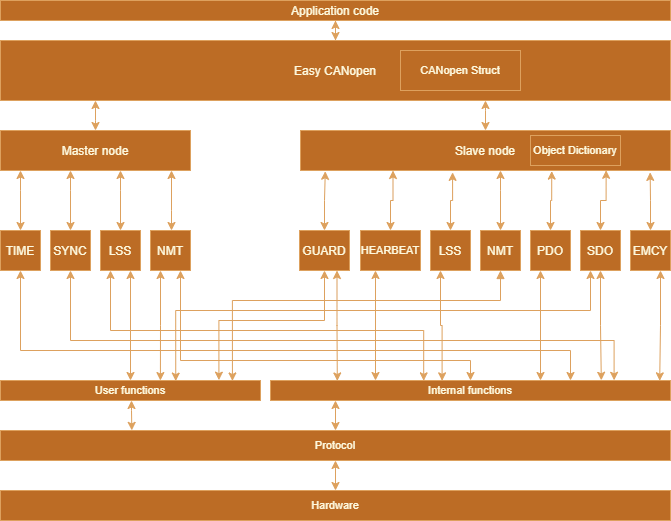
Easy CANopen functionality
- User functions:
- Set node ID address
- Get node ID address
- Set vendor ID, product code, revision number and serial number
- Get vendor ID, product code, revision number and serial number
- Check if vendor ID, product code, revision number low, revision number high, serial number low, serial number high exist
- Set baud rate
- Activate baud rate
- Save baude rate and node ID
- Check if there are non configured node ID
- Send guard status request
- Internal functions:
- EMCY message produce and consume
- Send bootup message
- Send heartbeat status
Questions and answers
- Q: Can this library be used with
C++?- A: Yes it can be used with
C++
- A: Yes it can be used with
- Q: I want to build on this library, what should I do?
- A: First you need to know
C99and bitwise operations. Then you need to understand the Easy CANopen structure.
- A: First you need to know
- Q: Can I use this on my Arduino?
- A: Yes, this
Ccode is 100% pureCcode and only usingCstandard library and also the code does not take account of what hardware you are using.
- A: Yes, this
- Q: Do I need to install the library for to use the library?
- A: No, just copy over the
.cand.hfiles to your project and compile. I have used this with QT framework.
- A: No, just copy over the
- Q: This project is quite old now and not so much updates, is it still worth to use it?
- A: Yes, this library only updates when I or other includes more functionality from Easy CANopen. The reason why I wrote this in
C99is because it's an industry standard and will you will always be able to compile this library and use it.
- A: Yes, this library only updates when I or other includes more functionality from Easy CANopen. The reason why I wrote this in
- Q: What is your plan with the library?
- A: To make CANopen easy to use
- Q: I don't have CAN-bus, but can I use this library anyway with UART, USB, WiFi etc?
- A: Yes. This is only a way to shape a massage in a specific way.
- Q: Can I send data with this library, even if I don't have CAN-bus?
- A: Yes. There are something called PDO transfer. Use that if you want to transfer data in an industrial way.
- Q: Can I send multi package messages from from multiple nodes to one node at the same time?
- A: No. If you starting to send multipackages from multiple nodes to another node, then that node cannot understand the message.