Numba Celltree
April 11, 2025 · View on GitHub
.. image:: https://img.shields.io/github/actions/workflow/status/deltares/numba_celltree/ci.yml?style=flat-square :target: https://github.com/deltares/numba_celltree/actions?query=workflows%3Aci .. image:: https://img.shields.io/codecov/c/github/deltares/numba_celltree.svg?style=flat-square :target: https://app.codecov.io/gh/deltares/numba_celltree .. image:: https://img.shields.io/badge/code%20style-black-000000.svg?style=flat-square :target: https://github.com/psf/black


Finding your way around in unstructured meshes is difficult. Numba Celltree provides methods for searching for points, lines, boxes, and cells (convex polygons) in a two dimensional unstructured mesh.
.. code:: python
import numpy as np
from numba_celltree import CellTree2d, demo

vertices, faces = demo.generate_disk(5, 5)
vertices += 1.0
vertices *= 5.0
tree = CellTree2d(vertices, faces, -1)

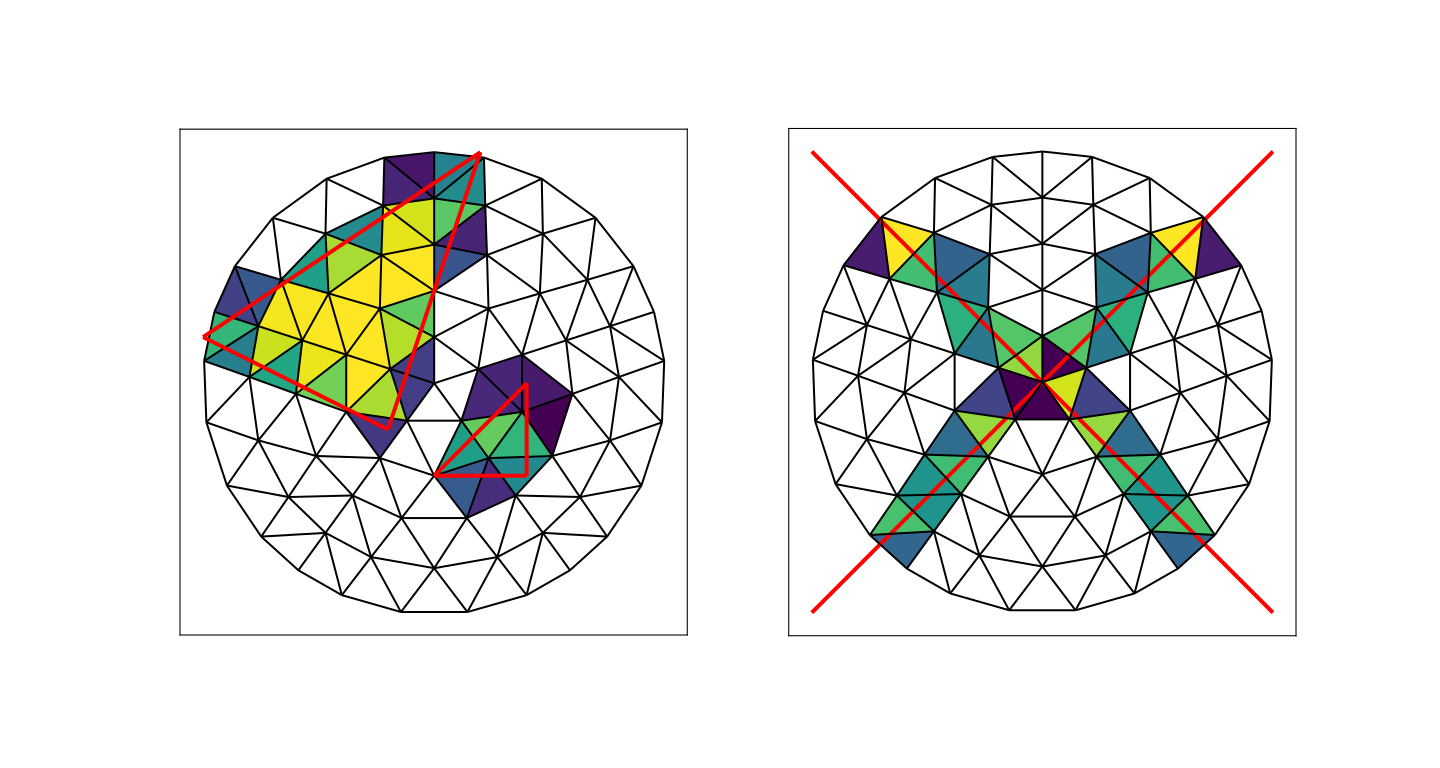
# Intersection with two triangles
triangle_vertices = np.array(
    [
        [5.0, 3.0],
        [7.0, 3.0],
        [7.0, 5.0],
        [0.0, 6.0],
        [4.0, 4.0],
        [6.0, 10.0],
    ]
)
triangles = np.array([[0, 1, 2], [3, 4, 5]])
tri_i, cell_i, area = tree.intersect_faces(triangle_vertices, triangles, -1)

# Intersection with two lines
edge_coords = np.array(
    [
        [[0.0, 0.0], [10.0, 10.0]],
        [[0.0, 10.0], [10.0, 0.0]],
    ]
)
edge_i, cell_i, intersections = tree.intersect_edges(edge_coords)
.. image:: https://raw.githubusercontent.com/Deltares/numba_celltree/main/docs/_static/intersection-example.svg :target: https://github.com/deltares/numba_celltree
Installation
.. code:: console
pip install numba_celltree
Documentation
.. image:: https://img.shields.io/github/actions/workflow/status/deltares/numba_celltree/ci.yml?style=flat-square :target: https://deltares.github.io/numba_celltree/
Background
This package provides the cell tree data structure described in:
Garth, C., & Joy, K. I. (2010). Fast, memory-efficient cell location in unstructured grids for visualization. IEEE Transactions on Visualization and Computer Graphics, 16(6), 1541-1550.
This paper can be read here <https://escholarship.org/content/qt0vq7q87f/qt0vq7q87f.pdf>_.
The tree building code is a direction translation of the (public domain) C++ code <https://github.com/NOAA-ORR-ERD/cell_tree2d/blob/master/src/cell_tree2d.cpp>_
by Jay Hennen, which is available in the cell_tree2d <https://github.com/NOAA-ORR-ERD/cell_tree2d>_ python package. This
implementation is currently specialized for two spatial dimensions, but
extension to three dimensions is relatively straightforward. Another (BSD
licensed) implementation which supports three dimensions can be found in VTK's
CellTreeLocator <https://vtk.org/doc/nightly/html/classvtkCellTreeLocator.html>_.
The cell tree of the cell_tree2d currently only locates points. I've added
additional methods for locating and clipping lines and convex polygons.
Just-In-Time Compilation: Numba
This package relies on Numba <https://numba.pydata.org/>_ to just-in-time
compile Python code into fast machine code. This has the benefit of keeping
this package a "pure" Python package, albeit with a dependency on Numba.
With regards to performance:
- Building the tree is marginally faster compared to the C++ implementation (~15%).
- Serial point queries are somewhat slower (~50%), but Numba's automatic
parallelization speeds things up significantly. (Of course the C++ code can
be parallelized in the same manner with
pragma omp parallel for.) - The other queries have not been compared, as the C++ code lacks the functionality.
- In traversing the tree, recursion in Numba appears to be less performant than maintaining a stack of nodes to traverse. The VTK implementation also uses a stack rather than recursion. Ideally, we would use a stack memory allocated array since this seems to result in a ~30% speed-up (especially when running multi-threaded), but these stack allocated arrays cannot be grown dynamically.
- Numba (like its
LLVM JIT sister Julia <https://julialang.org/>) does not allocate small arrays on the stack automatically, like C++ and Fortran compilers do. However, it can be donemanually <https://github.com/numba/numba/issues/5084>. This cuts down runtimes for some functions by at least a factor 2, more so in parallel. However, these stack allocated arrays work only in the context of Numba. They must be disabled when running in uncompiled Python -- there is some code innumba_celltree.utilswhich takes care of this. - Some methods like
locate_pointsare trivially parallelizable, since there is one return value for each point. In that case, we can pre-allocate the output array immediately and applynb.prange, letting it spawn threads as needed. - Some methods, however, return an a priori unknown number of values. At the
time of writing, Numba's lists are
not thread safe <https://github.com/numba/numba/issues/5878>_. There are two options here. The first option is to query twice: the first time we only count, then we allocate the results array(s), and the second time we store the actual values. Since parallelization generally results in speedups over a factor 2, this still results in a net gain. The second option is to chunk manually, and assign one chunk per thread. Each chunk can then allocate dynamically; we store the output of each thread in a list (of numpy arrays). This has overhead in terms of continuous bounds-checking and a final merge, but appears to be on net ~30% faster than the query-twice scheme. The net gain may disappear with a sufficiently large number of CPUs as at some point the serial merge and larger number of dynamic allocations starts dominating the total run time (on my 16 core laptop, querying once is still superior).
To debug, set the environmental variable NUMBA_DISABLE_JIT=1. Re-enable by
setting NUMBA_DISABLE_JIT=0.
.. code:: bash
export NUMBA_DISABLE_JIT=1
In Windows Command Prompt:
.. code:: console
set NUMBA_DISABLE_JIT=1
In Windows Powershell:
.. code:: console
$env:NUMBA_DISABLE_JIT=1
In Python itself:
.. code:: python
import os

os.environ["NUMBA_DISABLE_JIT"] = "1"
This must be done before importing the package to have effect.