Dofus Batteries Included (DBI) - Plugins
October 5, 2024 · View on GitHub

Dofus Batteries Included (DBI) - Plugins
DBI is first and foremost a tool that helps writing plugins for the Unity version of the game Dofus. It is built upon BepInEx.
This repository contains the Core plugin that is mandatory and define the common tools that can be used by the other plugins.
It also contains the TreasureSolver plugin that is both an example of what a DBI plugin looks like, but also an awesome tool to get treasure hunts clues without constantly swapping between the game window and the browser.
This project has only been tested on windows computers.
DISCLAIMER: The goal of this tool is to provide quality of life improvements to our beloved game. If your goal is to cheat or harm other players experience in any way, you are garbage and get the hell out of here.
Getting started
Installation guide
- Download and install BepInEx Unity (IL2CPP) in the Dofus game folder.
- Download the latest release
- Move the
DofusBatteriesIncluded/folder to theBepInEx/plugins/folder of your BepInEx install. The only plugin that is mandatory isDofusBatteriesIncluded.Plugins.Core.
WARNING: A specific version of the plugins can only work for the specific version of the game that it was built against. Trying to use a plugin with another version of the game can lead to unexpected results, or even crashes of the game. The plugins have a built-in mechanism that prevents them from running if they have been built for another version of the game.
Build guide
- Download and install BepInEx Unity (IL2CPP) in the Dofus game folder
- Run
Dofus.exeonce and wait for BepInEx some necessary files - Once the game is running, a
BepInEx/interop/folder should have been created - Locate the
Dofus_Data/boot.configfile in the game install folder, thebuild-guidvalue will be necessary below - Clone the repository
- Copy the content of the
BepInEx/interop/to theInteropfolder of the reporistory, overwrite all files if necessary - Run
dotnet publish -p:DOFUSBUILDID={build-guid} -o dist(replace{build-guid}with the value found inboot.config) - Only some of the assemblies in the
dist/folder need to be copied to theBepInEx/plugins/folder: only copy the assemblies starting withDofusBatteriesIncludedand theResourcesfolder
How it works
The Core plugin
The common features of DBI are implemented in the Core assembly and the CorePlugin plugin. Most of the features provided by the assembly are accessible through the DBI static class.
Check expected build ID
To specify the expected build ID of you plugin, provide the ID to the DBIPlugin base class constructor. If no expected build ID is provided, the plugin will always be executed.
The actual build ID will be read from the Dofus_Data/boot.config file when the plugin is loaded. If the expected build ID does not match the actual build ID, the plugin will return and no additional code will be executed. In particular, the StartAsync method of the plugin will NOT be called.
WARNING: A specific version of the plugins can only work for the specific version of the game that it was built against. Trying to use a plugin with another version of the game can lead to unexpected results, or even crashes of the game. It is recommended to always provide an expected build ID.
Logging
DBI provides integration with Microsoft loggers: simply call one of the DBI.Logging.Create methods to get an ILogger that outputs to the BepInEx console window.
Persistent storage
DBI provides persistent key-value stores. They can be used to store application data without making it a setting that can be configured by the user:
Task<string> DBI.Store.GetValueAsync(string storeName, string key)Task DBI.Store.SetValueAsync(string storeName, string key, string value)
Settings
DBI uses the configuration system provided by BepInEx and store the configuration of all plugins in the BepInEx/config/DofusBatteriesIncluded.cfg file.
There is a global [DBI] Enabled setting that allows to enable of disable all the plugins. If DBI is disabled, no plugin will be loaded: the StartAsync methods will NOT be executed.
Additionally, the inheritors of DBIPlugin define a [PluginName] Enabled setting by default. If a plugin is disabled, it will not be loaded: the StartAsync methods will NOT be executed. This setting is removed if the plugin overrides the CanBeDisabled property.
The Core assembly also provides a way to define new configurations:
- Boolean
bool currentValue = DBI.Configuration.Configure("Awesome plugin", "My config?", true).Bind();
- Multiple choice
string currentValue = DBI.Configuration.Configure("Awesome plugin", "My config", "My default value")
    .WithPossibleValues("My default value", "My other value")
    .WithDescription("The description of this awesome configuration.")
    .RegisterChangeCallback(OnConfigChange)
    .Bind();
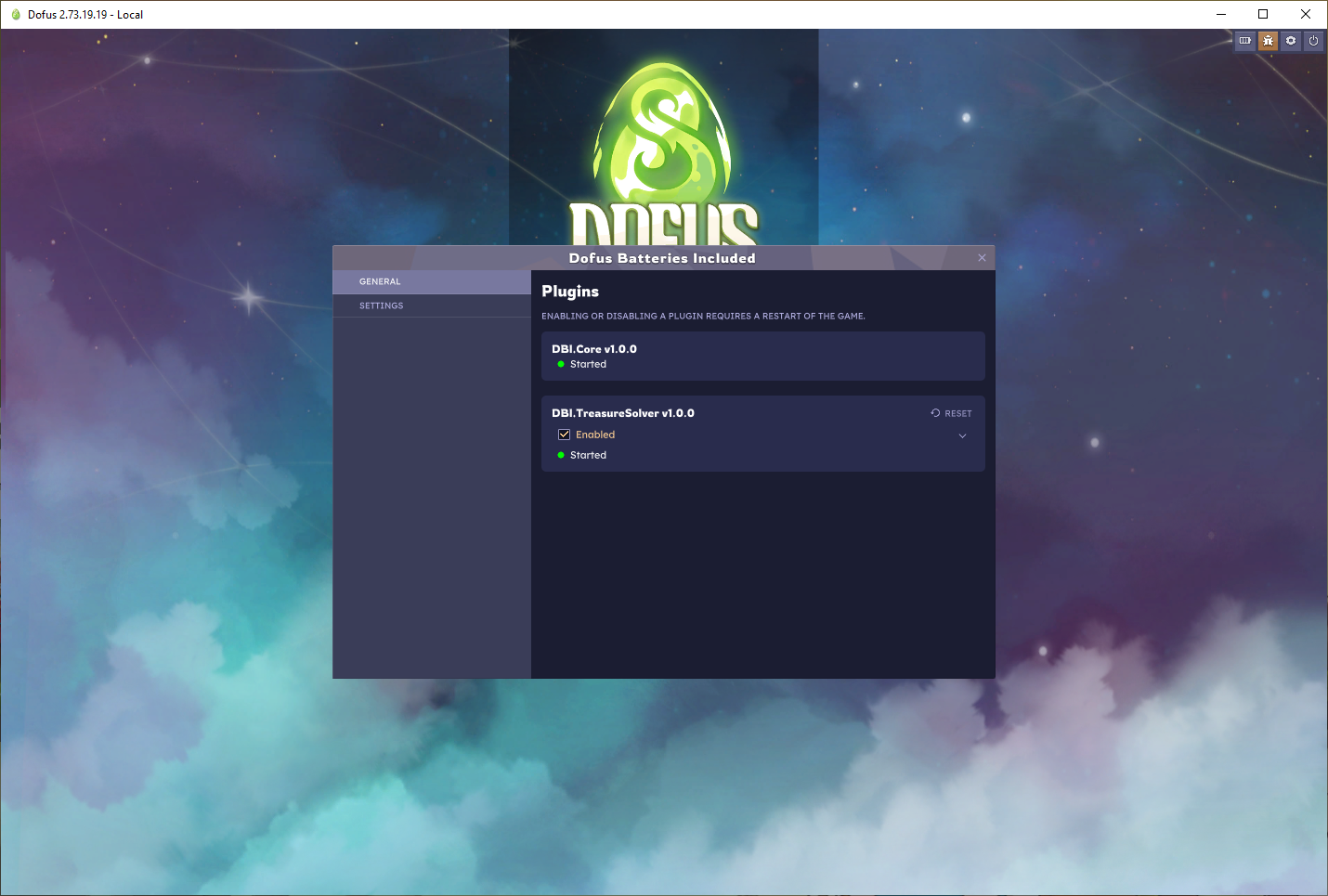
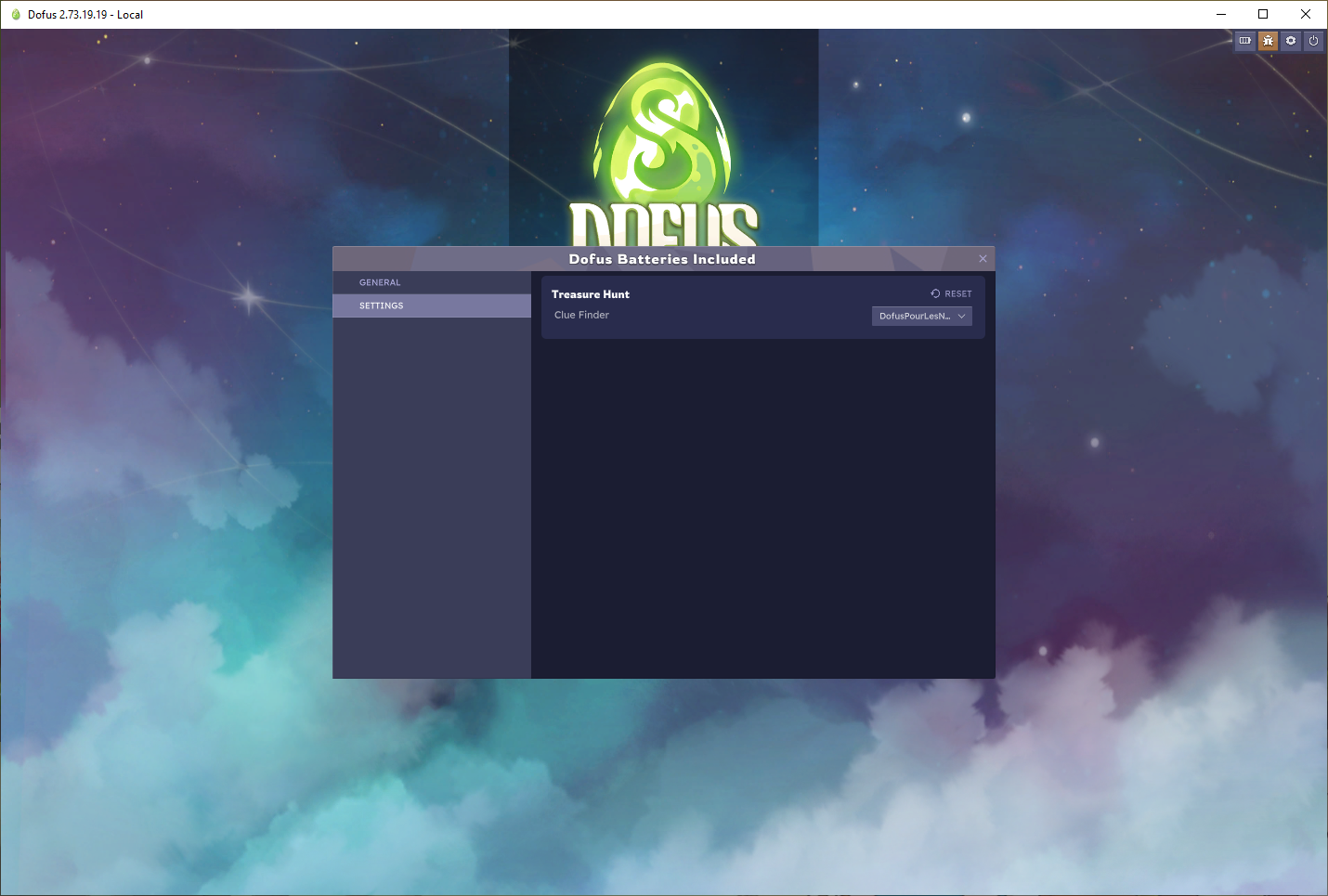
Finally, the Core plugin adds a new widget to the game, accessible using a new button in the top right menu.
The widget has two tabs:
- The General tab that lists the currently installed plugins
- The Settings tab that lists the settings of all the plugins (the one created using
DBI.Configuration)
Windows
The abstract DofusBatteriesIncludedWindow can be used to create new windows. The window can then be filled in the abstract Build method. See CoreWindow.cs for an example.
Messaging
The Core assembly provides a way to listen to any event received by the game.
- Either use
DBI.Messaging.GetListener<TEvent>()to get a listener and subscribe to itsMessageReceivedevent - Or use
DBI.Message.RegisterListener<TListener>()to register an implementation ofIMessageListener<TEvent>that will receive events of typeTEvent
This is the most reliable way to get the current state of the game without having to deal with the obfuscated symbols of the game.
Player
The Core assembly gets basic information about the current player and exposes them in DBI.Player. It also provides useful events.
Your plugin
Setup
Create a new .NET 6 class library project. We will need packages from additional nuget feeds:
- DBI feed (WIP: nuget feed is not setup yet)
- https://nuget.bepinex.dev/v3/index.json
- https://nuget.samboy.dev/v3/index.json
Add the following to the csproj of your project
<PropertyGroup>
    <RestoreAdditionalProjectSources>
        (WIP: nuget feed is not setup yet)
        https://nuget.bepinex.dev/v3/index.json;
        https://nuget.samboy.dev/v3/index.json
    </RestoreAdditionalProjectSources>
</PropertyGroup>
Then reference the BepInEx nugets and the DofusBatteriesIncluded.Plugins.Core project:
<ItemGroup>
    <PackageReference Include="BepInEx.Unity.IL2CPP" Version="6.0.0-be.*" IncludeAssets="compile"/>
    <PackageReference Include="BepInEx.PluginInfoProps" Version="2.*"/>
    <PackageReference Include="DofusBatteriesIncluded.Plugins.Core" Version="1.*"/>
</ItemGroup>
Finally create your plugin.
[BepInPlugin(MyPluginInfo.PLUGIN_GUID, MyPluginInfo.PLUGIN_NAME, MyPluginInfo.PLUGIN_VERSION)]
[BepInDependency(Core.MyPluginInfo.PLUGIN_GUID)]
class MyAwesomePlugin : DBIPlugin
{
    protected override Task StartAsync()
    {
        Log.LogInformation("Hello world!");
    }
}
Compile the project and move the DofusBatteriesIncluded.Plugins.Core.dll assembly and the project assembly to the BepInEx/plugins/ folder of the game. Run Dofus.exe and wait for the log message.
Congrats!
Assemblies from the Interop/ folder can be referenced using a <HintPath>, for example:
<ItemGroup>
    <Reference Include="UnityEngine">
        <HintPath>..\Interop\UnityEngine.dll</HintPath>
    </Reference>
    <Reference Include="UnityEngine.CoreModule">
        <HintPath>..\Interop\UnityEngine.CoreModule.dll</HintPath>
    </Reference>
    <Reference Include="Il2Cppmscorlib">
        <HintPath>..\Interop\Il2Cppmscorlib.dll</HintPath>
    </Reference>
    <Reference Include="Core">
        <HintPath>..\Interop\Core.dll</HintPath>
    </Reference>
</ItemGroup>
Gotchas
- Multithreading: by default the only thread that can communicate with the IL2CPP domain is the main thread. Watch out when using async-await that all the communication with the game threads happens before the first await.
There are some tools to help integrate tasks in Unity behaviours, for example tasks can be awaited in Coroutines usingCoroutineExtensions.WaitForCompletion(Task task): the task itself will run in another thread but the rest of the Coroutine will be executed in the main thread.