Echo-Server / Docker / Kubernetes / Helm
July 16, 2022 · View on GitHub






Read the docs : https://ealenn.github.io/Echo-Server
An echo server is a server that replicates the request sent by the client and sends it back.
Available:






- GET / POST / PUT / PATCH / DELETE
- Request (Query, Body, IPs, Host, Urls...)
- Request Headers / Response Headers
- Environment variables
- Control via Headers/Query
- Folders and Files
- Monitoring
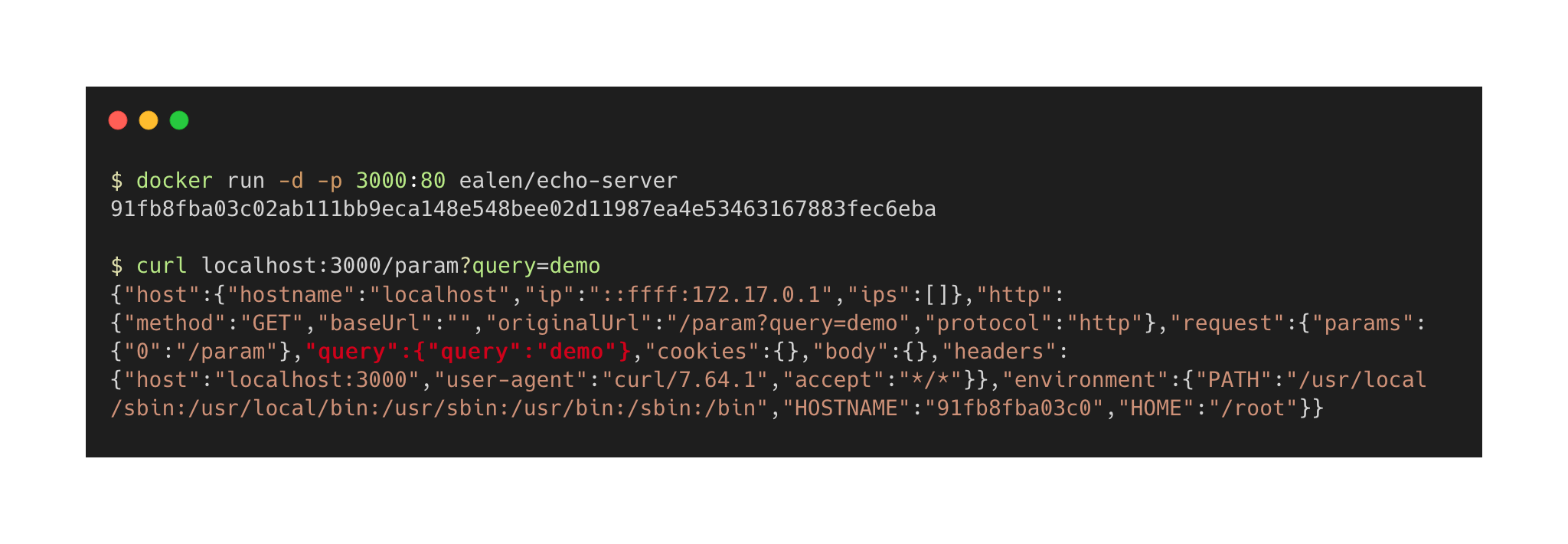
Table of contents
- Echo-Server / Docker / Kubernetes / Helm
Configuration
| Environment | Helm | CLI | Default |
|---|---|---|---|
| PORT | service.port | --port | 80 |
| LOGS__IGNORE__PING | application.logs.ignore.ping | --logs:ignore:ping | false |
| ENABLE__HOST | application.enable.host | --enable:host | true |
| ENABLE__HTTP | application.enable.http | --enable:http | true |
| ENABLE__REQUEST | application.enable.request | --enable:request | true |
| ENABLE__COOKIES | application.enable.cookies | --enable:cookies | true |
| ENABLE__HEADER | application.enable.header | --enable:header | true |
| ENABLE__ENVIRONMENT | application.enable.environment | --enable:environment | true |
| ENABLE__FILE | application.enable.file | --enable:file | true |
Use Echo-Server
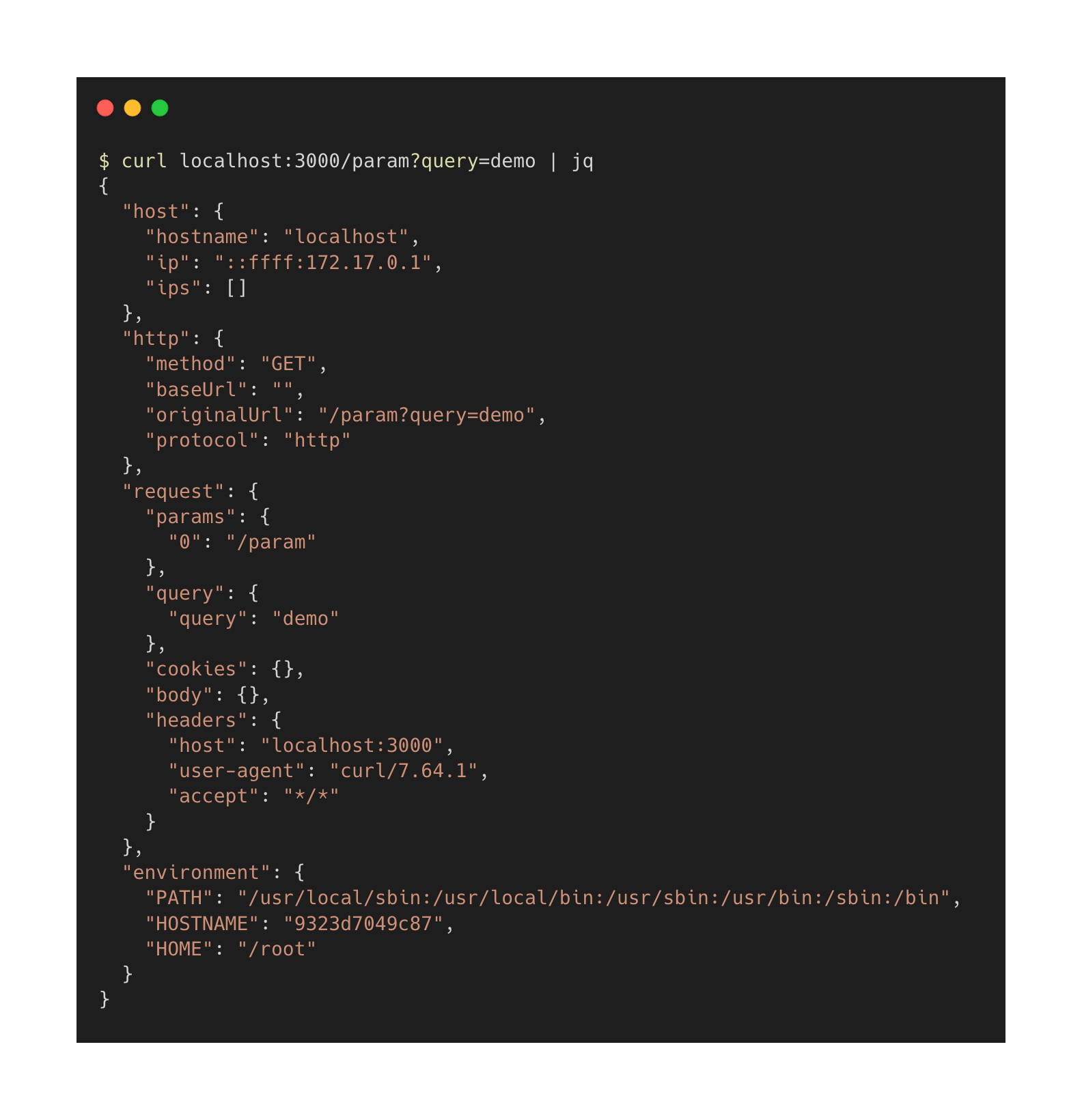
I use jq for nice curl results ;)
Custom responses
| Query | Header | Content | Conditions |
|---|---|---|---|
| ?echo_code= | X-ECHO-CODE | HTTP code 200, 404 | 200 <= CODE <= 599 |
404-401 or 200-500-301 | |||
| ?echo_body= | X-ECHO-BODY | Body message | |
| ?echo_env_body= | X-ECHO-ENV-BODY | The key of environment variable | Enable environment true |
| ?echo_header= | X-ECHO-HEADER | Response Header Lang: en-US | Enable header true |
| ?echo_time= | X-ECHO-TIME | Wait time in ms | 0 <= TIME <= 30.000 |
| ?echo_file= | X-ECHO-FILE | Path of Directory or File | Enable file true |
Custom HTTP Status Code
➜ curl -I --header 'X-ECHO-CODE: 404' localhost:8080
➜ curl -I localhost:8080/?echo_code=404

HTTP/1.1 404 Not Found
➜ curl -I --header 'X-ECHO-CODE: 404-300' localhost:8080
➜ curl -I localhost:8080/?echo_code=404-300

HTTP/1.1 404 Not Found
HTTP/1.1 300 Multiple Choices
➜ for i in {1..10}
➜ do
➜    curl -I localhost:8080/?echo_code=200-400-500
➜ done

HTTP/1.1 500 Internal Server Error
HTTP/1.1 400 Bad Request
HTTP/1.1 200 OK
HTTP/1.1 500 Internal Server Error
HTTP/1.1 200 OK
HTTP/1.1 500 Internal Server Error
Custom Body
➜ curl --header 'X-ECHO-BODY: amazing' localhost:8080
➜ curl localhost:8080/?echo_body=amazing

"amazing"
Custom Body with Environment variable value
➜ curl --header 'X-ECHO-ENV-BODY: HOSTNAME' localhost:8080
➜ curl localhost:8080/?echo_env_body=HOSTNAME

"c53a9ed79fa2"
➜ for i in {1..10}
➜ do
➜    curl localhost:8080/?echo_env_body=HOSTNAME
➜ done

"c53a9ed79fa2"
"f10c3af61e40"
"c53a9ed79fa2"
"f10c3af61e40"
"c53a9ed79fa2"
Custom Headers
➜ curl --header 'X-ECHO-HEADER: One:1' localhost:8080
➜ curl localhost:8080/?echo_header=One:1

HTTP/1.1 200 OK
One: 1
➜ curl --header 'X-ECHO-HEADER: One:1, Two:2' localhost:8080
➜ curl "localhost:8080/?echo_header=One:1,%20Two:2"

HTTP/1.1 200 OK
One: 1
Two: 2
Custom response latency
➜ curl --header 'X-ECHO-TIME: 5000' localhost:8080
➜ curl "localhost:8080/?echo_time=5000"

⏳... 5000 ms
You can change default validations with
| ENVIRONMENT | CLI | Default |
|---|---|---|
| CONTROLS__TIMES__MIN | --controls:times:min | 0 |
| CONTROLS__TIMES__MAX | --controls:times:max | 60000 |
(Latency is defined in milliseconds)
File/Folder explorer
➜ curl --header 'X-ECHO-FILE: /' localhost:8080
➜ curl "localhost:8080/?echo_file=/"

["app", "bin", "etc", "usr", "var"]
Combine custom actions
➜ curl --header 'X-ECHO-CODE: 401' --header 'X-ECHO-BODY: Oups' localhost:8080
➜ curl "localhost:8080/?echo_body=Oups&echo_code=401"

HTTP/1.1 401 Unauthorized
"Oups"
Change default Queries/Request commands
| Environment | CLI | Default |
|---|---|---|
| COMMANDS__HTTPBODY__QUERY | --commands:httpBody:query | echo_body |
| COMMANDS__HTTPBODY__HEADER | --commands:httpBody:header | x-echo-body |
| COMMANDS__HTTPENVBODY__QUERY | --commands:httpEnvBody:query | echo_env_body |
| COMMANDS__HTTPENVBODY__HEADER | --commands:httpEnvBody:header | x-echo-env-body |
| COMMANDS__HTTPCODE__QUERY | --commands:httpCode:query | echo_code |
| COMMANDS__HTTPCODE__HEADER | --commands:httpCode:header | x-echo-code |
| COMMANDS__HTTPHEADERS__QUERY | --commands:httpHeaders:query | echo_header |
| COMMANDS__HTTPHEADERS__HEADER | --commands:httpHeaders:header | x-echo-header |
| COMMANDS__TIME__QUERY | --commands:time:query | echo_time |
| COMMANDS__TIME__HEADER | --commands:time:header | x-echo-time |
| COMMANDS__FILE__QUERY | --commands:file:query | echo_file |
| COMMANDS__FILE__HEADER | --commands:file:header | x-echo-file |
Loggers
| Environment | CLI | Default |
|---|---|---|
| LOGS__APP | --logs:app | echo-server |
| LOGS__LEVEL | --logs:level | debug |
| LOGS__FORMAT | --logs:format | default |
Format
| LOG FORMAT | DESCRIPTION |
|---|---|
| default | Combine line & object |
| line | Simple `Fri, 22 Jan 2021 10:45:20 GMT |
| object | JSON { "host": {}, http: {}, request: {}} |
Seq
| Environment | CLI | Default |
|---|---|---|
| LOGS__SEQ__ENABLED | --logs:seq:enabled | false |
| LOGS__SEQ__SERVER | --logs:seq:server | |
| LOGS__SEQ__KEY | --logs:seq:key | |
| LOGS__SEQ__LEVEL | --logs:seq:level | info |
ELK
Setting up
Docker
docker run -p 8080:80 ealen/echo-server
Docker-Compose
Sample
version: "3"
services:
  echo-server:
    image: ealen/echo-server
    ports:
      - 8080:80
With Seq
version: "3"
services:
  echo:
    image: ealen/echo-server
    environment:
      PORT: 80
      LOGS__SEQ__ENABLED: "true"
      LOGS__SEQ__SERVER: "http://seq:5341"
    ports:
      - 8080:80

  seq:
    image: datalust/seq
    environment:
      ACCEPT_EULA: "Y"
    ports:
      - 3010:80
Kubernetes
curl -sL https://raw.githubusercontent.com/Ealenn/Echo-Server/master/docs/examples/echo.kube.yaml | kubectl apply -f -
Kubernetes with Helm
helm repo add ealenn https://ealenn.github.io/charts
helm repo update
helm install --set ingress.enable=true --name echoserver ealenn/echo-server
NodeJS
# Dependencies
npm ci
# Run with node
node ./src/webserver --port 8080
# Run with npm script
PORT=8080 npm run start
Contributing
Please read CONTRIBUTING.md for details on our code of conduct, and the process for submitting pull requests to us.
Versioning
We use SemVer for versioning. For the versions available, see the tags on this repository.
License
This project is licensed under the GNU Lesser General Public License - see the LICENSE.txt file for details.
Development
Documentation
Docker-Compose is available on ./docs folder.
docker compose up -d
The documentation is here localhost:4000
Tests
npm ci
# Without code coverage
npm run test
# With code coverage
npm run test-with-coverage
Release notes
git log --pretty=oneline
Update Helm Chart
=> https://github.com/Ealenn/charts/tree/master/charts/echo-server