README.md
January 24, 2023 · View on GitHub

Everblush for Neovim
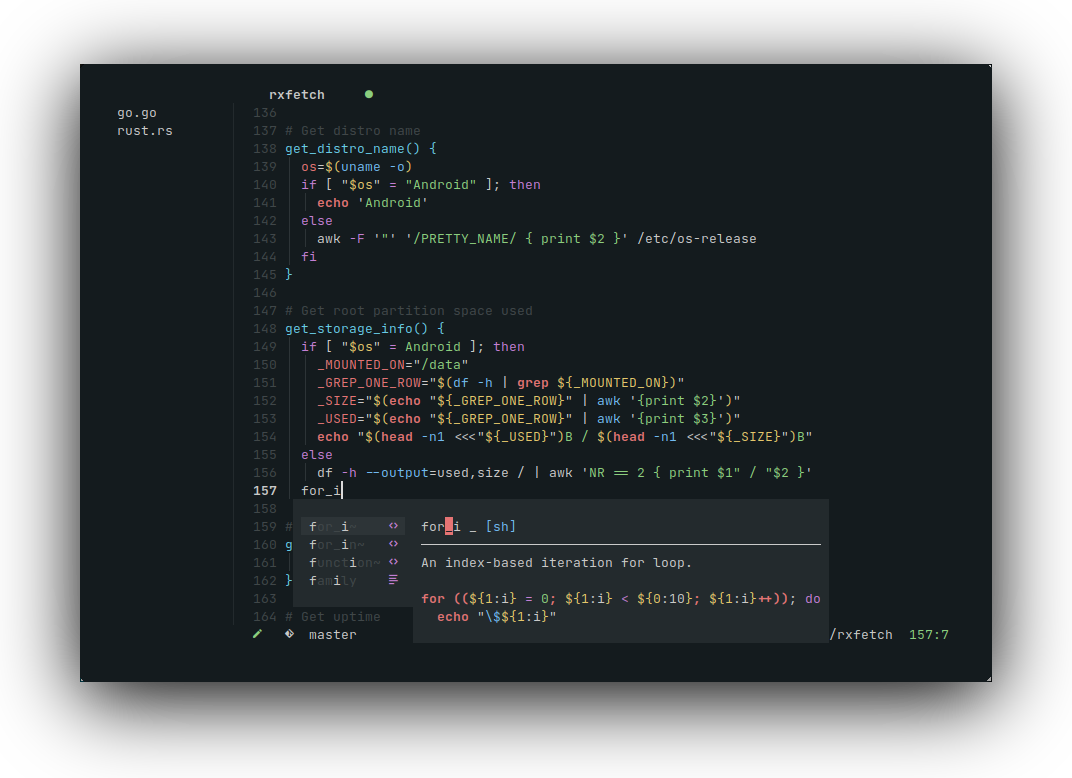
A dark, vibrant, and beautiful color scheme for Neovim




Preview

More screenshots
Bash
Rust

Go

CSS

Installation
packer.nvim
Add the following lines to the init.lua file in the packer setup function:
{ 'Everblush/nvim', as = 'everblush' }
lazy.nvim
Add the following lines to the init.lua file in the lazy setup function:
{ 'Everblush/nvim', name = 'everblush' }
vim-plug
Add the line Plug Everblush/nvim to your vimrc and install using the command :PlugInstall.
Usage
Lua
Add this line to your init.lua file:
vim.cmd('colorscheme everblush')
Vimscript
Add this line to your init.vim file (for Neovim) or .vimrc (for Vim):
colorscheme everblush
Configuration
The default options shown below are automatically set when the colorscheme is applied. Refer to the examples for sample configuration changes, and add them to the init.lua file.
require('everblush').setup({

    -- Default options
    override = {},
    transparent_background = false,
    nvim_tree = {
        contrast = false,
    },

    -- Configuration examples

    -- Override the default highlights using Everblush or other colors
    override = {
        Normal = { fg = '#ffffff', bg = 'comment' },
    },

    -- Set transparent background
    transparent_background = true,

    -- Set contrast for nvim-tree highlights
    nvim_tree = {
        contrast = true,
    },
})
Integrations
lualine.nvim
Lua
require('lualine').setup({
    options = { 'theme' = 'everblush' }
})
VimScript
lua << EOF
require('lualine').setup({
    options = { 'theme' = 'everblush' }
})
EOF
lightline.vim
Lua
vim.g.lightline = {
    'colorscheme' = 'everblush',
}
Vimscript
let g:lightline = {'colorscheme': 'everblush'}
vim-airline
Lua
vim.g.airline_theme = 'everblush'
vim.g.airline_powerline_fonts = 1 -- For powerline symbols in statusline
vim.g['airline#extensions#tabline#enabled'] = 1 -- To enable custom tabline
Vimscript
let g:airline_theme = 'everblush'
let g:airline_powerline_fonts = 1 " For powerline symbols in statusline
let g:airline#extensions#tabline#enabled = 1 " To enable custom tabline
Other integrations
- bufferline.nvim
- gitsigns
- indent-blankline.nvim
- lspsaga.nvim
- neogit
- nvim-cmp
- nvim-tree.lua
- nvim-treesitter
- telescope.nvim
- trouble.nvim
- vim-gitgutter
- vim-illuminate