Ad Normalizer
July 9, 2026 · View on GitHub
A Proxy put in front of an ad server that dispatches transcoding and packaging of VAST and VMAP creatives.

Quick Start with Open Source Cloud
The fastest way to get started — Launch a fully configured Ad Normalizer with all dependencies in Eyevinn Open Source Cloud (OSaaS).
With Open Source Cloud you get:
- Pre-configured Redis, SVT Encore, Encore Packager, and S3 storage
- No infrastructure setup required
- Ready to use in minutes
Deploy the Complete Ad Pipeline
-
OSC Web Console — The easiest way. Go to the Solutions section in the OSC console and deploy the complete ad pipeline with a few clicks.
-
Terraform — For infrastructure-as-code workflows, use our Terraform example to deploy the complete ad pipeline with a single command.
How It Works
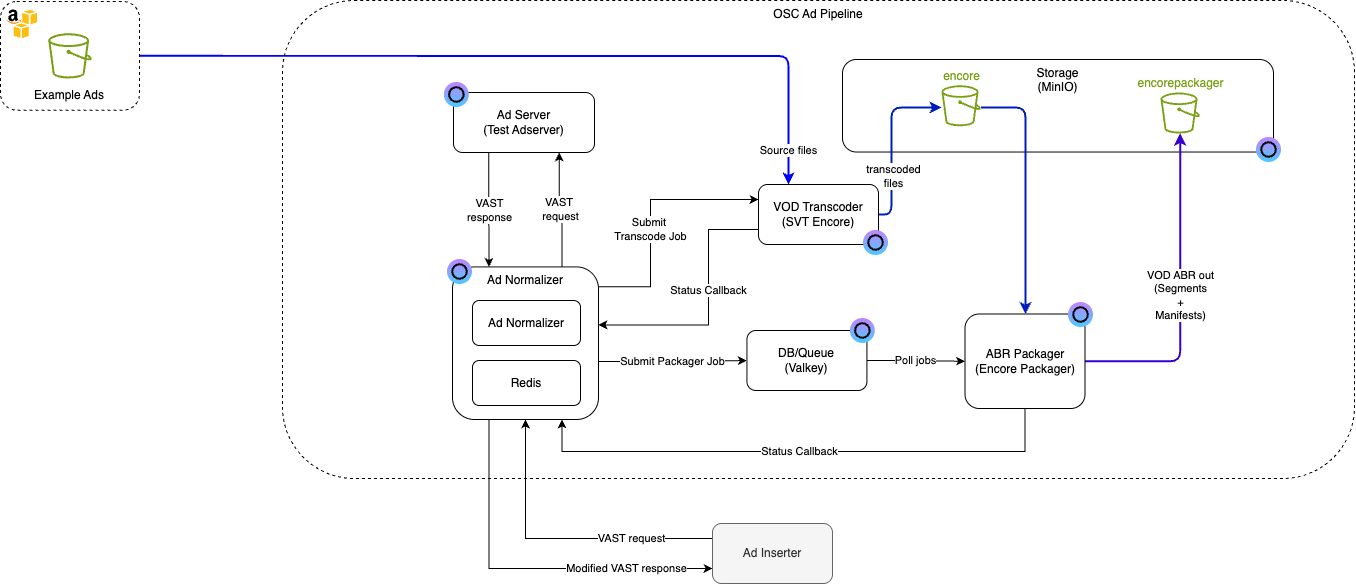
The ad normalizer uses Redis to keep track of transcoded creatives, and returns the master playlist URLs for the ad assets specified in the VAST or VMAP response from the underlying ad server if they exist. If the service does not know of any packaged assets for a creative, it creates a transcoding job in SVT Encore using the URL provided in the app configuration and listens to Encore callbacks to handle job updates.
On receiving a successful job callback, the normalizer creates a packaging job for the transcoded assets using encore-packager. The packager sends a callback on job completion or failure. If the packaging job is successful, the URL of the resulting multivariant playlist is added to the Redis cache.
API
The service provides two main endpoints:
VAST Endpoint
The service accepts requests to the endpoint api/v1/vast; if the request specifies the content type as application/xml or leaves it blank,
it will return a modified VAST file where the mediafile objects have their links replaced with playlist URLs.
HLS manifests are returned by default. DASH manifests can be requested with the Prefer header:
% curl -v "http://localhost:8000/api/v1/vast?dur=30"
or
% curl -v -H 'accept: application/xml' "http://localhost:8000/api/v1/vast?dur=30"
will return the same XML result.
% curl -v -H 'accept: application/xml' -H 'prefer: manifest-format=dash' "http://localhost:8000/api/v1/vast?dur=30"
will return XML with DASH manifest URLs. To explicitly request the default HLS format, use prefer: manifest-format=vnd.apple.mpegurl.
if application/json content-type is explicitly requested, the normalizer returns JSON conforming to the asset list standard used for HLS interstitials:
% curl -v -H 'accept: application/json' "http://localhost:8000/api/v1/vast?dur=30"
results in:
{
  "ASSETS": [
    {
      "DURATION": "30",
      "URI": "https://your-minio-endpoint/creativeId/substring/index.m3u8"
    }
  ]
}
VMAP Endpoint
The service also accepts requests to the endpoint api/v1/vmap, which handles VMAP (Video Multiple Ad Playlist) documents. The endpoint returns XML with transcoded assets:
% curl -v "http://localhost:8000/api/v1/vmap"
or
% curl -v -H 'accept: application/xml' "http://localhost:8000/api/v1/vmap"
will return a modified VMAP
The VMAP endpoint processes all VAST ads within the VMAP document, ensuring that all video assets are properly transcoded and available in the requested manifest format. HLS is returned by default, and DASH can be requested with prefer: manifest-format=dash.
Note that the VMAP endpoint does not support json as a response type.
Blacklist endpoint
The service supports blacklisting of source files via the endpoint api/v1/blacklist. It accepts POST and DELETE requests.
Both requests expect a body with the following format
{
  "mediaUrl": "${your media URL}"
}
A POST request will add the URL to the blacklist, and a DELETE will remove it. Whenever a VAST or VMAP response is provided by the ad server, the normalizer will filter out ads with a media file present in the blacklist.
The most probable use case for this feature is making sure that broken ad assets are not contiuosly added to the encore cue and failing transcodes.
Requirements
Option 1: Open Source Cloud (Recommended)
Use Eyevinn Open Source Cloud to get a fully managed environment with all dependencies pre-configured. This is the recommended approach for most users.
Option 2: Self-Hosted
To run the ad normalizer on your own infrastructure, you need:
- A Redis instance
- A media processing pipeline:
- SVT Encore — transcoding
- Encore Packager — HLS packaging
- S3-compatible storage (e.g., MinIO) — storing transcoded and packaged assets
Tip: You can also create just the media processing pipeline using Open Source Cloud while running the normalizer yourself.
Note: The ad normalizer assumes that your packager is set up with the output subfolder template $EXTERNALID$/$JOBID$
Usage (Self-Hosted)
Using Open Source Cloud? Environment variables are configured through the web interface — get started here.
Environment variables
| Variable | Description | Default value | Mandatory |
|---|---|---|---|
ENCORE_URL | The URL of your encore instance | none | yes |
LOG_LEVEL | The log level of the service | Info | no |
REDIS_URL | The url of your redis instance | none | yes |
AD_SERVER_URL | The url of your ad server | none | yes |
PORT | The port that the server listens on | 8000 | no |
OUTPUT_BUCKET_URL | The url to the output folder for the packaged assets | none | yes |
OSC_ACCESS_TOKEN | your OSC access token. Only needed when running encore in Eyevinn OSC | none | no |
KEY_FIELD | The VAST field used as key in the cache. possible non-default values are resolution and url. If no value is provided, it used the universal Ad Id | universalAdId | no |
KEY_REGEX | RegExp string used to strip away unwanted characters from the key string | [^a-zA-Z0-9] | no |
ENCORE_PROFILE | The transcoding profile used by encore when processing the ads | program | no |
ASSET_SERVER_URL | Base URL used in the links created for manifests. Typical use case is a CDN URL. If not set, a https version of output bucket URL is used | none | no |
REDIS_CLUSTER | Flag to signal that redis is in cluster mode. Only needed when actually running redis in cluster mode | false | no |
JIT_PACKAGE | Signals whether packaging of ads is performed JIT. If set, the normalizer does not create packaging jobs | false | no |
PACKAGING_QUEUE | The name of the redis queue used for packaging jobs | package | no |
ROOT_URL | The root url of the service in your environment, f.ex. normalizer.domain.com. used when creating callback URLs for transcoding and packaging jobs | none | yes |
IN_FLIGHT_TTL | The amount of time (in seconds) that a job can go without updates while still being considered in progress | 3600 | no |
VERSION | The service version. Used for metrics and telemetry | none | no |
ENVIRONMENT | The environment the service is running in. Used for telemetry and metrics | none | no |
Starting the service
go run ./...
Development
When developing, it is recommended that you put the required variables in a dotenv file at the repository root. This will make it easier to iterate and change environment variables throughout the development process. Before pushing changes to the repo, please run the following steps to make sure your pipeline will succeed:
make testto verify that your changes do not break existing functionality (if adding features, it is good practice to also write tests).- If you are adding new features, it is also recommended to run
make coveragein order to make sure that the new functionality has adequate test coverage. make lintwill rungolangci-lintto ensure that the code still follows the formatting standards. Errors should be fixed, as the pipeline won't succeed otherwise. Warnings should be handled on a case-by-case basis.make formatwill rungofmton the entire codebase.
Contributing
See CONTRIBUTING
Support
Join our community on Slack where you can post any questions regarding any of our open source projects. Eyevinn's consulting business can also offer you:
- Further development of this component
- Customization and integration of this component into your platform
- Support and maintenance agreement
Contact sales@eyevinn.se if you are interested.
About Eyevinn Technology
Eyevinn Technology is an independent consultant firm specialized in video and streaming. Independent in a way that we are not commercially tied to any platform or technology vendor. As our way to innovate and push the industry forward we develop proof-of-concepts and tools. The things we learn and the code we write we share with the industry in blogs and by open sourcing the code we have written.
Want to know more about Eyevinn and how it is to work here. Contact us at work@eyevinn.se!