README_EN.md
September 1, 2026 · View on GitHub
Visual Workflow
A visual multi-agent workflow designer tailored for DeepSeek Harness
English · 简体中文


Key Highlights
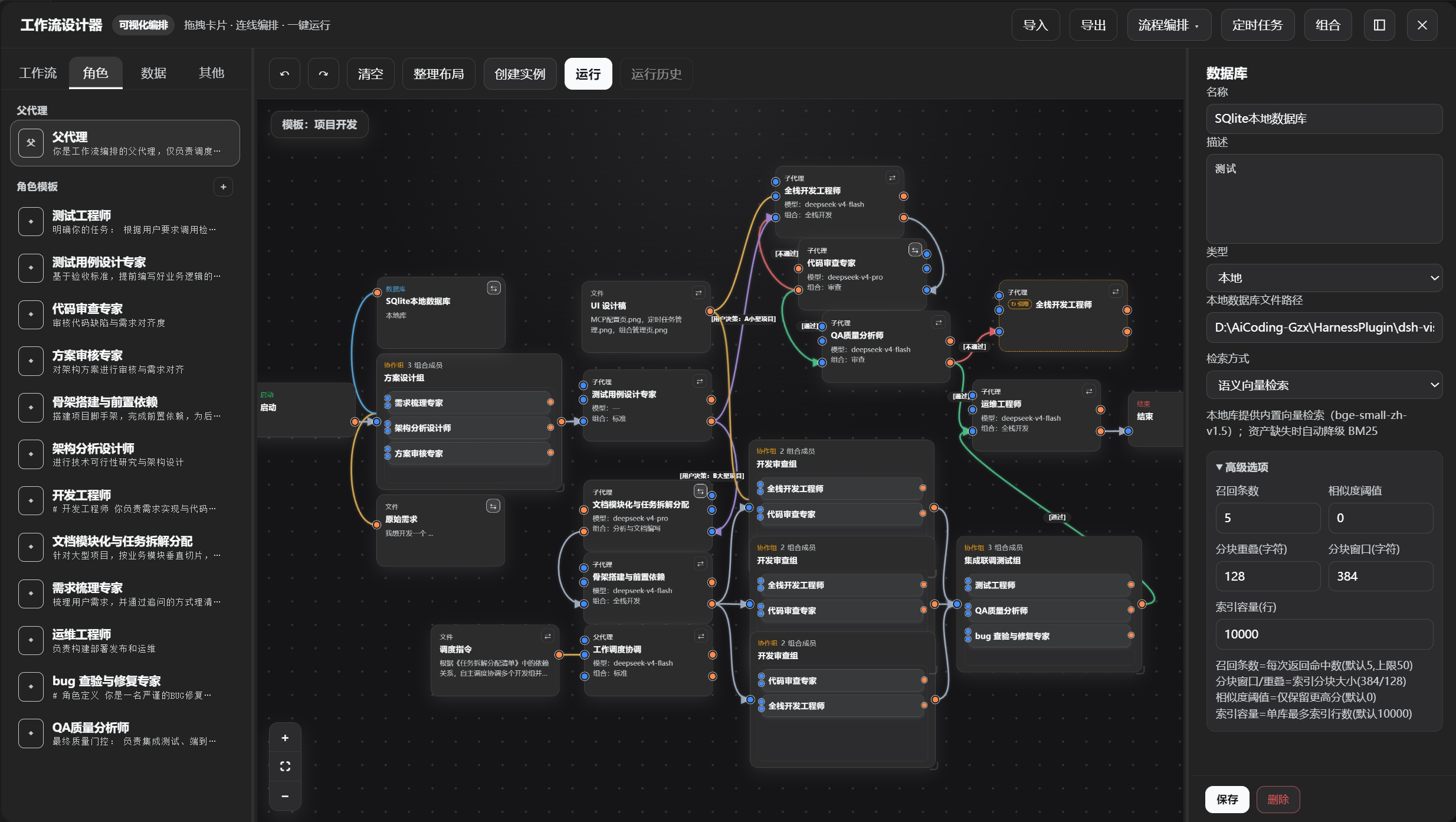
✦ Drag-and-Drop Orchestration
- Zero-code drag-and-drop with SVG canvas smooth interaction, full undo/redo support; infinite canvas, one-click auto-layout, making complex workflows easily accessible.
✦ Dual-Mode Architecture
- Flow Orchestration Mode: Long-process, multi-agent intelligent scheduling with parent-agent autonomous progression, supporting checkpoint resume and real-time editing during execution;
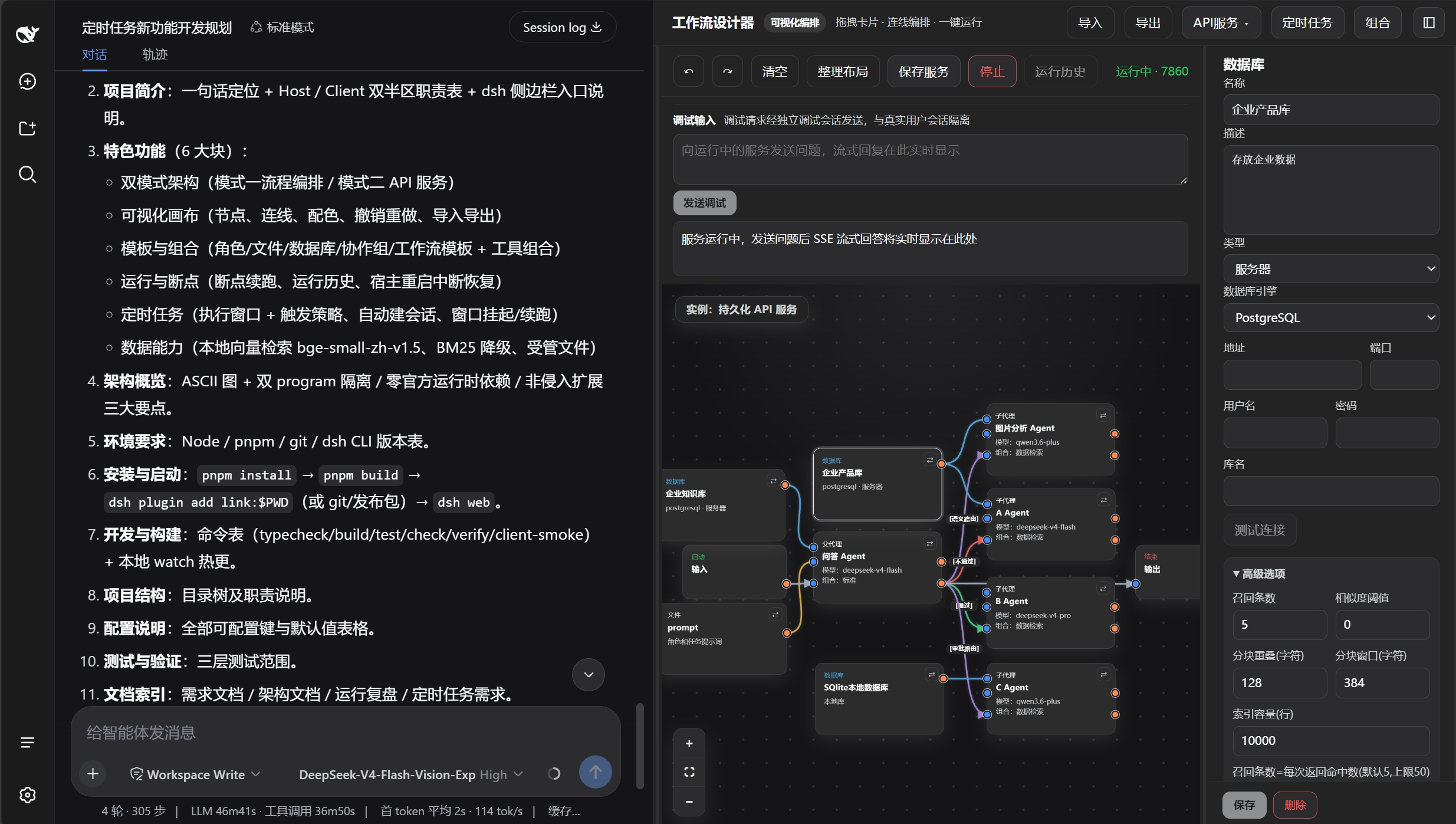
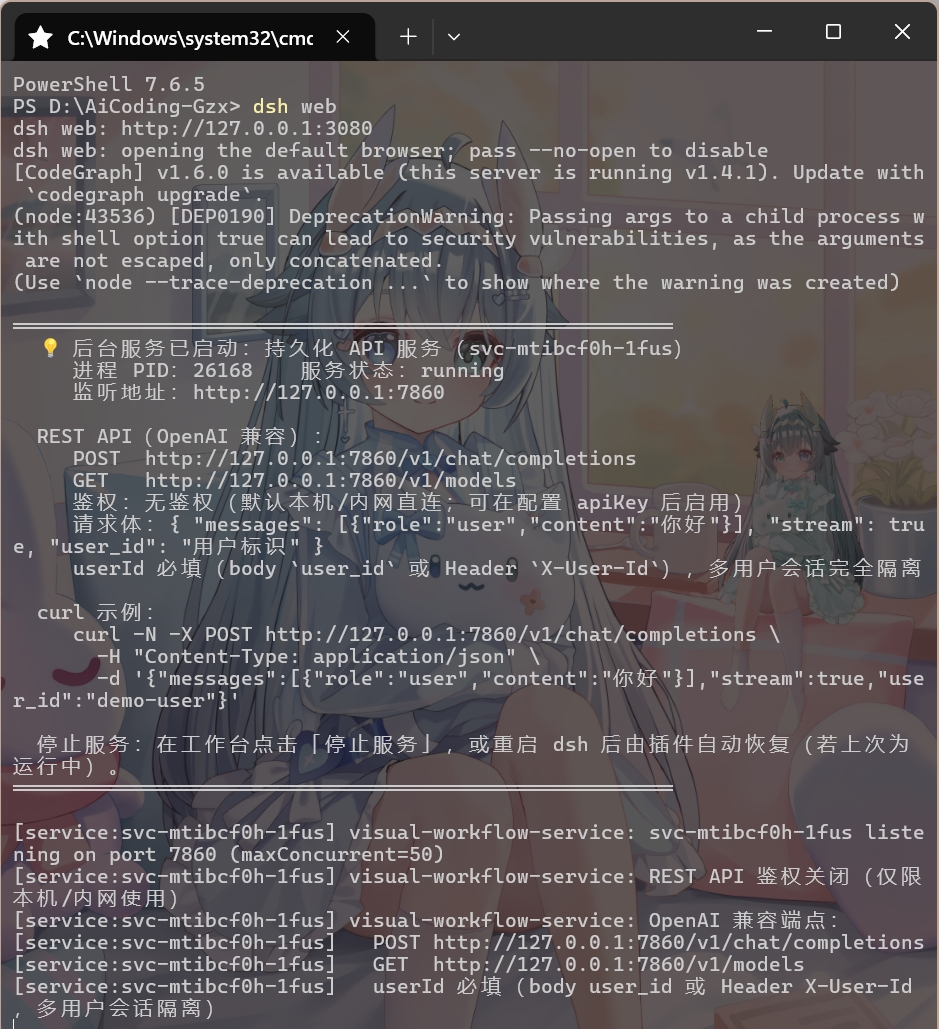
- API Service Mode: One-click publication as standalone REST API service (OpenAI-compatible protocol), multi-tenant session isolation, automatic port allocation.
|
|
Deploy DSH as an independent backend service, with persistent headless agents running in the background, connectable to external applications (e.g., QQ bots, Feishu) or custom frontends.
✦ Bidirectional Canvas Synchronization
- After saving canvas modifications, the orchestrator instantly reflects the latest topology (new nodes/connections take effect immediately); runtime status (node highlighting, status badges) is displayed back on the canvas in real time; bidirectional change anti-loop protection, run-lock guards against cross-session conflicts, ensuring orchestration and canvas remain consistent.
✦ Deep Customization
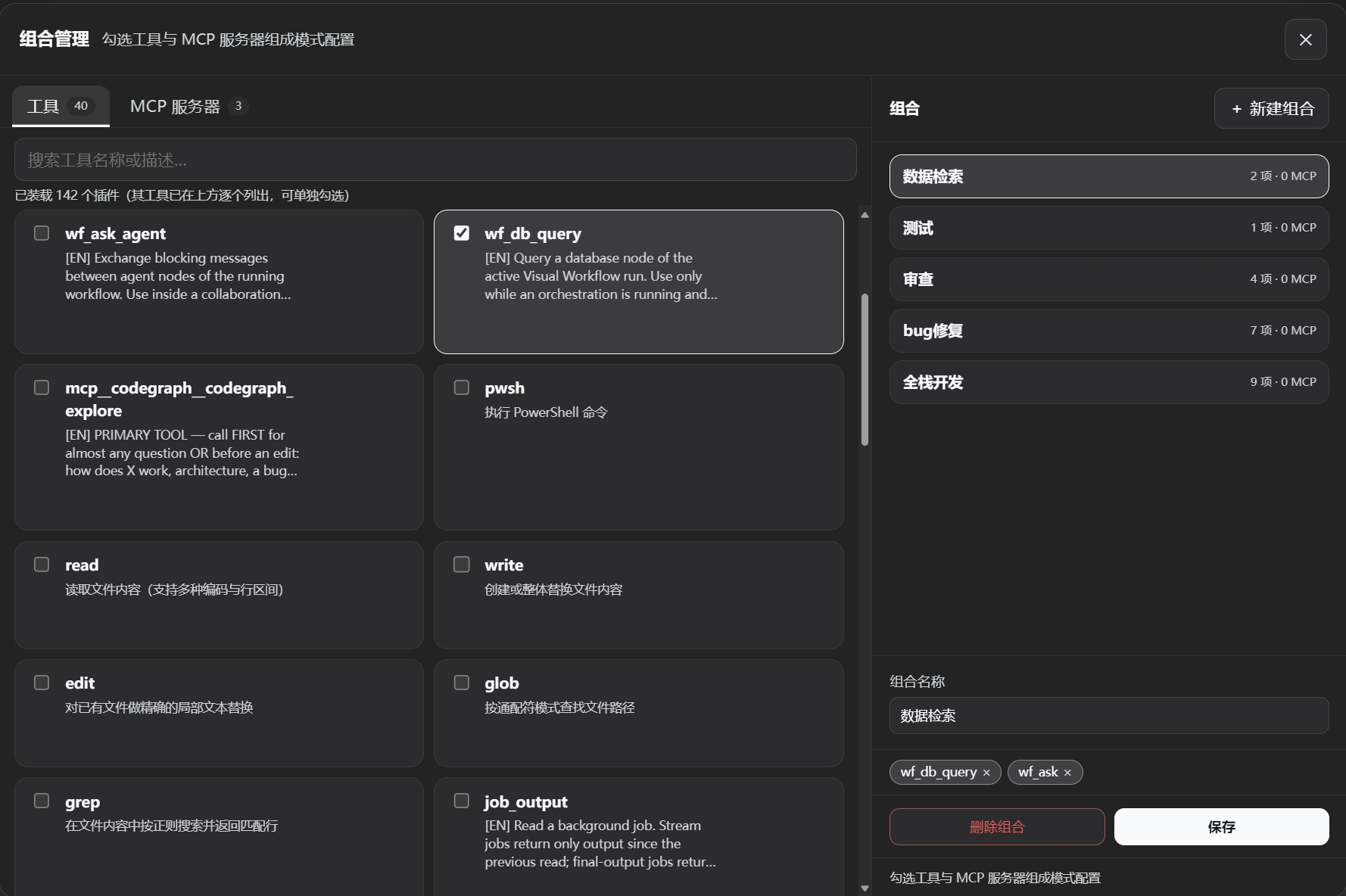
- Each sub-agent node independently configures system prompt, LLM model, reasoning effort, tool combinations (built-in presets / custom combinations), ReAct iteration cap, and retry cap; parent agents can also freely select models and scheduling templates, meeting fine-grained orchestration requirements.
|
|
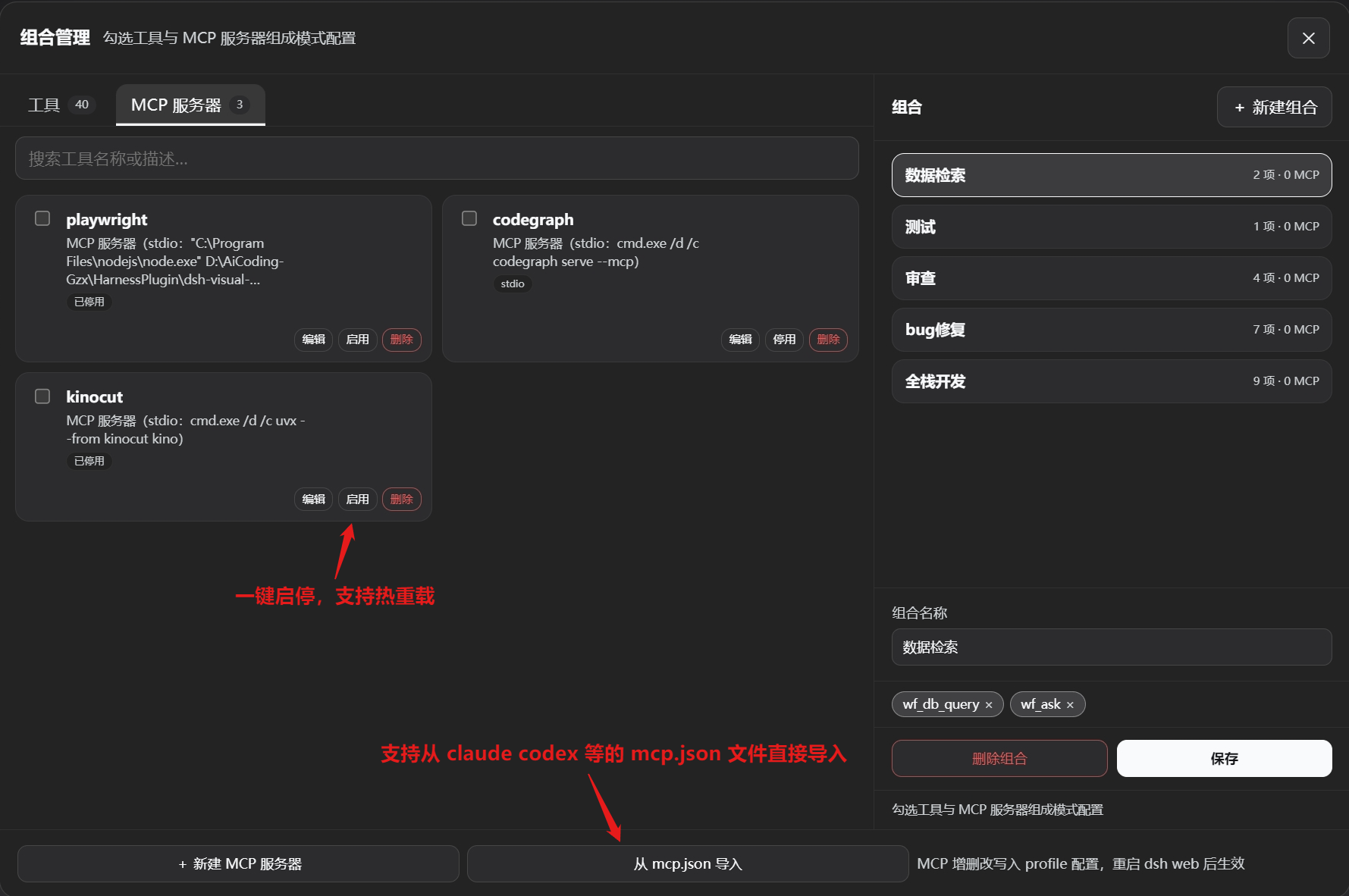
Freely combine tools and assign them to individual agents to avoid cluttering the context with unused tools; MCP servers can be registered with a single line of configuration and support hot-reload for immediate effect.
✦ Collaboration Groups & Virtual Nodes
- Drag multiple role nodes into a collaboration group; agents within the group execute in parallel and communicate via
wf_ask_agent; virtual nodes serve as aliased references to master nodes, sharing the same execution instance, enabling more flexible topology reuse.
✦ Scheduled Triggers
- Built-in scheduled tasks within the workspace: select a workflow template, configure execution windows and trigger policies, automatically create and run instances; missed windows auto-suspend/resume, support off-peak API calls to save costs and effort.
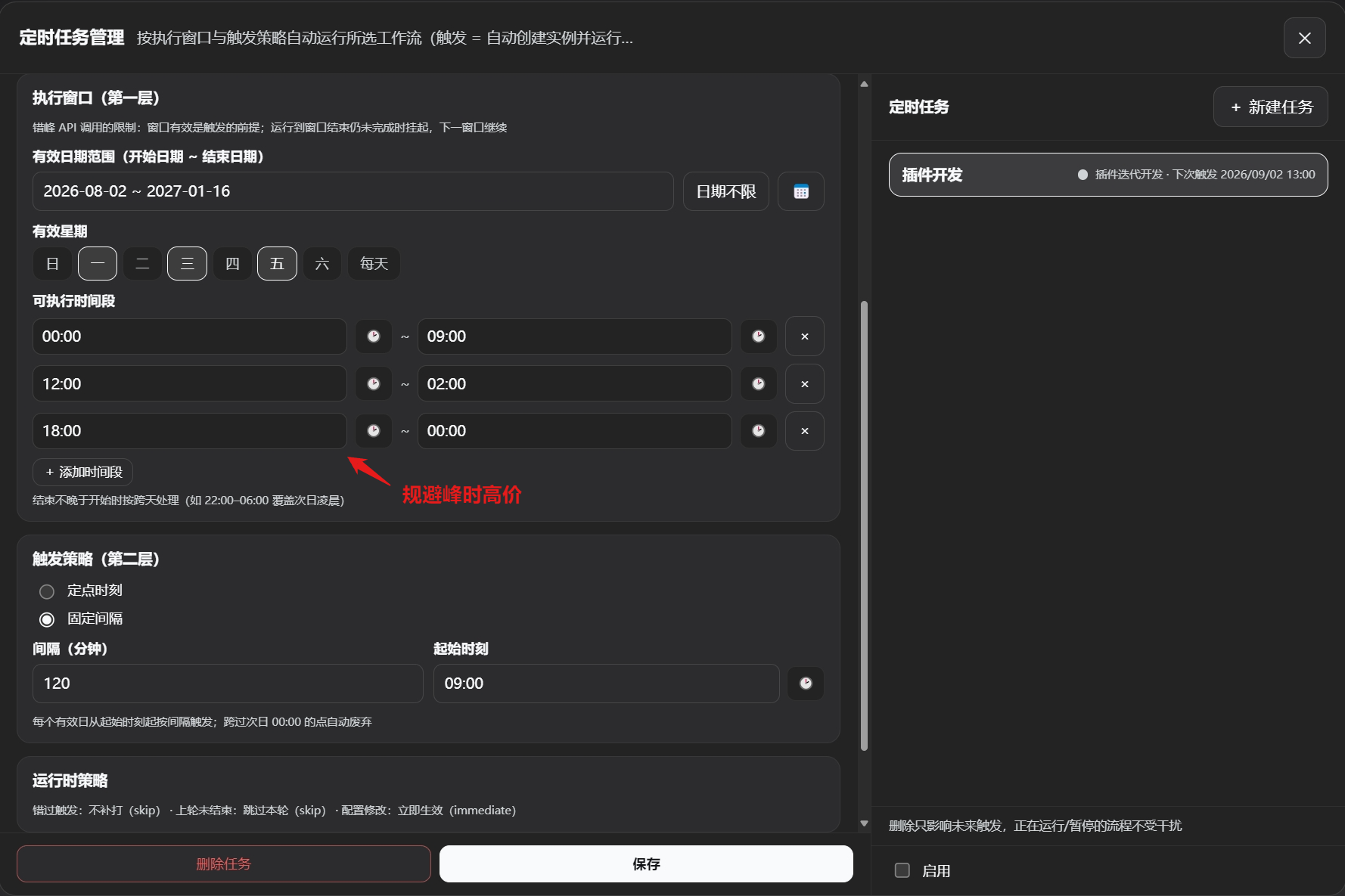
Fully automated operation and maintenance: scheduled automatic workflow execution, supports off-peak invocation, auto-pause, workflow data persistence, and auto-resume during off-peak hours.
✦ Zero Official Package Dependencies
- All DSH ecosystem services (LLM, sub-agents, tools, user questions, etc.) are resolved at runtime via
ctx.get(); Host tools are registered as plain object definitions; the plugin itself has no compile-time dependencies on any official packages, ensuring better upgrade compatibility.
Core Concepts
| Concept | Description |
|---|---|
| Template | The "blueprint" for roles/files/databases/workflows, stored under ~/.dsh/visual-workflow/; templates are decoupled from instances via deep copy, so modifying a template does not affect already-instantiated nodes. |
| Instance | A concrete running instance of a workflow or service (under workflows/ and services/); can only be created from a workflow template, and can be edited and saved on the canvas. |
| Node | A card on the canvas, including parent agent, sub-agent, file, database, stage (start/end/pause), collaboration group, and virtual node. |
| Edge | Conveys flow direction (flow edge), context content (context edge), or database identifier (database edge); flow edges can carry condition labels (pass/fail/content) determined semantically by the parent agent. |
| Parent Agent | The core scheduler of the orchestration; in Mode 1, responsible for supervision and scheduling (not executing specific tasks); in Mode 2, serves as the final responder; can be instructed by the user to adjust the orchestration flow. |
| Sub-agent | Task executor; independently configures persona, model, tools, etc., created and scheduled by the parent agent as needed. |
| Orchestration | The main agent autonomously drives the process using tools such as wf_run_node, wf_ask, wf_finish, controlling node states. |
| Mode | The plugin provides two operation modes: Flow Orchestration Mode (Mode 1) and API Service Mode (Mode 2), switched via the top bar; each stores data in separate directories. |
| Checkpoint Resume | After a workflow is paused or the host is unexpectedly interrupted, the states of executed nodes are persisted; upon resumption, no re-execution occurs—the process continues from the checkpoint. |
| Collaboration Group | Combines multiple role nodes into a parallel execution unit; agents within the group can communicate freely; the group as a whole triggers subsequent flow only after completion. |
| Virtual Node | An alias reference to a master node; does not store independent configuration, shares the master node's execution instance, used for topology reuse. |
Distinction: Unlike the official subagent scheduling, which only passes the parent's tools and model,
wf_run_nodecreates sub-agent nodes that can be freely equipped with any combination of tools, different models, and custom system prompts.
Node Cards
1. Role Node (Task Execution Unit)
Card layout (3 inputs on the left, 2 outputs on the right):
        ┌─────────────────────────┐
   left1 ●│  [Role Card] Title      │● right1
(database) │  Type Badge / Model /   │(context)
   left2 ●│  Tool Combo Badge       │● right2
(context) │                         │(flow out)
   left3 ●│                         │
(flow in) │                         │
        └─────────────────────────┘
| Port | Name | Semantics |
|---|---|---|
| left1 | Database input | Connects to a database node, injecting retrieval/query tools |
| left2 | Context input | Receives upstream context (if not connected, no inheritance) |
| left3 | Flow input | Controls execution order |
| right1 | Context output | Passes this node's output downstream |
| right2 | Flow output | Sequential execution / conditional branching (pass/fail/content) |
Property Configuration:
| Property | Description |
|---|---|
| Name | Node name |
| System prompt | Text input or reference to a .md file; sets the role system prompt |
| LLM model | Independently select provider + model |
| Reasoning effort | Consistent with the official dropdown |
| Tool combination | Built-in presets (Standard/Minimal/PTC/Creative) + custom combinations (created in Combo Management) |
| ReAct iteration cap | Soft cut-off: upon reaching the cap, forced finalization (no new tool calls, output existing conclusions); default 50 |
| Retry cap | Node-level attempt count guardrail; default 3 |
| Input/Output data schema | Text/JSON description (assists model understanding) |
| System prompt toggles | Controls official system prompt injection (enabled by default); two toggles separately control official persona and tool text injection |
Virtual Node: Click "Duplicate" to generate a virtual node (dashed border + "↻ Reference" badge), which shares configuration and execution instance with the master node; deleting the master node cascades cleanup.
2. File Node
- File content is stored directly in the template (text / PDF-extracted text / images and other non-text files stored under managed paths)
- The right property panel allows uploading/replacing files; upon saving, all referencing nodes sync automatically
- Purpose: inject prompts, requirements, compressed summaries, and other context into role nodes
- Text content injection cap defaults to 20,000 characters; truncation with notification occurs beyond that; non-text only injects the managed path, accessible by agents via the official read tool
3. Database Node
- Local type: Supports SQLite files, built-in vector retrieval (bge-small-zh-v1.5, CPU inference; automatic BM25 fallback if model assets are missing or fail to load)
- Server type: Supports MySQL / PostgreSQL, providing structured read-only queries and vector retrieval (local index construction)
- The right panel allows configuring connection details, testing connections, and adjusting advanced retrieval options (recall count, chunk window, similarity threshold, index capacity)
- Database retrieval is exposed as the
wf_db_querytool (single tool with three modes: search/query/schema) for agents to call; agents must obtain this tool via a db-in edge
4. Stage Node
- Start (Mode 1) / Input (Mode 2): Entry point; in Mode 2, automatically receives the external user question as initial context
- End (Mode 1) / Output (Mode 2): Terminal point; in Mode 2, aggregates the parent agent's final output and streams it back
- Pause (Mode 1 only): Flow gate; upon reaching this node, the process pauses and saves a checkpoint (manual review point); re-running continues from the right output
5. Collaboration Group Node
- Drag multiple role nodes into a collaboration group; roles within the group start in parallel (only context/database edges are retained for members)
- A collaboration prompt is appended to each member's first user message, automatically listing all member IDs and role names
- Agents within the group communicate via
wf_ask_agent(blocking) and interact with the user viawf_ask - The group card has a left flow input and a right flow output; member nodes support cross-group context/database edges
- The card is resizable (8-direction handles); internal member list is scrollable
Edges
Edge Types & Colors:
| Edge Type | Semantics | Color |
|---|---|---|
| Flow edge | Controls execution order | ⚪ Cool gray / silver |
| Context edge | Passes textual content, file indices | 🟡 Amber gold |
| Database edge | Passes database service identifier | 🔵 Sky blue |
| Condition: pass | Condition evaluates to true, execute this branch | 🟢 Emerald green |
| Condition: fail | Condition evaluates to false, execute this branch or retry | 🔴 Coral red |
| Condition: content | Custom semantic routing (route label) | 🟣 Violet |
After editing a condition, the condition color overrides the initial color; condition judgments are performed semantically by the parent agent.
Orchestration Tools
Agents autonomously schedule using the following tools (guardrails and persistence provided by the plugin):
| Tool | Parameters | Description |
|---|---|---|
wf_run_node | nodeId – node IDthinking? – reasoning effortiterationLimit? – ReAct iteration capretryLimit? – retry cap | Asynchronously starts the node sub-agent, immediately returns started; if a pause node, returns paused and persists checkpoint. |
wf_run_node_wait | nodeId – node IDthinking? – reasoning effortiterationLimit? – ReAct iteration capretryLimit? – retry cap | Blocks until the node completes; returns ok/fail along with the final output. |
wf_ask | questions[] – list of questions (multiple allowed)options? – optional configurationsmulti_select? – allow multi-select | Asks the user a question, rendering the official question card; blocks until the user responds. |
wf_ask_agent | cmd: ask/reply/resolve – command typetargetChildId – target agent IDmessage? – message contentaskId? – ask ID (for reply/resolution) | Blocking inter-agent communication: ask initiates a question and suspends; reply replies directly; resolve allows the parent agent to perform timeout resolution (continue/retry/terminate). |
wf_db_query | dataId – data node IDmode: search/query/schema – query modequery?/sql? – query statementtopK? – number of results | Read-only database access: vector retrieval, structured queries (SELECT only), table schema inspection. |
wf_finish | status? – completion status (completed/failed)summary? – summary message | Finalizes the workflow, marking completion or failure, and releases the run lock (idempotent). |
Installation (Windows)
dsh plugin --profile web add "github:GZX2211/dsh-Visual-Workflow#main"
Restart dsh web; the "Workflow" button above the bottom-left settings is the entry point (click to open the workspace).
Verify mount:
dsh --profile web --dump-config | findstr "visual-workflow"
Uninstall:
dsh plugin --profile web remove dsh-visual-workflow
Installation Troubleshooting
Encounter Host key verification failed
In PowerShell or CMD, run:
git config --global url."https://github.com/".insteadOf "git@github.com:"
pnpm build interception: declares prepare, requires allowBuilds (common)
Navigate to %USERPROFILE%\.dsh\profiles\web\pnpm-workspace.yaml in File Explorer, add the package names from the error message to the allowBuilds list, save, and reinstall.
Quick Start
- Create a workflow template – In the left panel "Workflows" → click
+below the template area to create a blank template - Create a role template – In the left panel "Roles" →
+→ configure prompt / model / tool combo → save - Drag onto the canvas – Drag roles/files/databases/stages/collaboration groups from the left panel to generate nodes
- Connect edges – Drag from the right output ports to the left input ports (
flowcontrols order,ctxpasses context,dbinjects data tools) - Create instance and run – Click "Create Instance" above the canvas (or directly click "Run", which auto-creates an instance); Mode 1 starts the flow; Mode 2 click "Run" to start the API service
- Real-time editing – Modify the canvas during execution and save; subsequent scheduling takes effect immediately; node status highlighting is reflected back; supports undo/redo
- Checkpoint resume – After a pause node or window closure, re-running continues from the checkpoint; the history panel shows all run records and allows recovery of interrupted flows
Mode switching: The top bar "Mode" dropdown lets you choose the running mode – Mode 1 for long-running scheduled orchestration, Mode 2 for persistent API services. Combo management: The top bar "Combos" button lets you create custom tool combinations (official tools/self-built tools + MCP servers), selectable in role templates. Scheduled tasks: The top bar "Scheduled Tasks" entry lets you select a workflow template, configure execution windows and trigger policies for automatic scheduling.
Data Storage
All files are located under ~/.dsh/visual-workflow/, with atomic writes (temp file + fsync + rename), human-readable JSON:
workflows/          # Mode 1 instances (per-session isolation)
services/           # Mode 2 instances (per-session isolation)
flow-templates/     # Workflow templates (globally shared)
roles/              # Role templates
files/              # File templates
databases/          # Database templates
combos.json         # Custom tool combinations
runs/               # Run history (run snapshots, including checkpoint data)
orchestrations/     # Orchestration fact sources per run (for parent agent consumption)
data/files/         # Managed non-text file copies
data/vector/        # Vector index files (per dataId)
scheduler/          # Scheduled task definitions and trigger records
services/*.sessions.json  # Mode 2 userId↔sessionId mappings
Configuration
Override defaults in cordis.patch.yml:
- insert:
    - id: visual-workflow
      name: dsh-visual-workflow
      config:
        dataDir: !!js dshHomePath('visual-workflow')
        servicePortBase: 7860
        apiKey: null
        maxConcurrentPerService: 50
        wfAskAgentTimeoutMs: 120000
        runIdleTimeoutMs: 1800000
        reactIterationLimitDefault: 50
        retryLimitDefault: 3
        outputFullLimit: 102400
        documentTextLimit: 20000
        embeddingModelDir: null
        embeddingEndpoint: null
        runPollMs: 2000
See Architecture Documentation §2.2 for detailed explanations of each configuration item.
Local Development
git clone https://github.com/GZX2211/dsh-Visual-Workflow.git
cd dsh-visual-workflow
pnpm install
dsh plugin --profile web add "link:$PWD"
Common commands:
pnpm build         # Build Host (tsc) + Client (tsdown)
pnpm test          # Unit tests (vitest)
pnpm client-smoke  # Client smoke test
pnpm check         # Full check (types + tests + build + smoke)
pnpm verify        # Same as above (gate)
Modifying the Client requires a rebuild and hard refresh of the browser; modifying the Host requires restarting
dsh web.
Directory Structure (Core)
dsh-visual-workflow/
├── src/
│   ├── host/                     # Host plugin
│   │   ├── shared/               # Pure type contracts shared between frontend and backend
│   │   ├── storage/              # Atomic storage (FlowStore)
│   │   ├── orchestrator/         # Run locks, checkpoint state machine, bidirectional sync
│   │   ├── agent/                # Sub-agent execution engine, guardrails, prompt injection
│   │   ├── tools/                # wf_* tool registration
│   │   ├── remote/               # GUI API endpoints
│   │   ├── service/              # Mode 2 service manager (fork/port pool/recovery)
│   │   ├── embedding/            # Local vector embedding and indexing
│   │   ├── scheduler/            # Scheduled task engine
│   │   └── prompts/              # Orchestration/node task prompt templates
│   └── client/                   # WebUI source
│       ├── studio/               # Main state machine (useReducer)
│       ├── components/           # Canvas/panels/combos/history/scheduled tasks, etc.
│       ├── hooks/                # Single-responsibility hooks
│       └── lib/                  # Pure logic (remote/graph-model/bundle)
├── tests/                        # Unit + integration tests
├── scripts/                      # Build and watch scripts
├── assets/models/                # Local embedding model assets
├── cordis.patch.yml              # Web profile mount layer
├── serve.patch.yml               # Mode 2 service process composition layer template
├── docs/                         # Requirements / Architecture / MCP registration guide
└── package.json
Future Roadmap
- Deep dependency handling for combos (conflict detection)
- More node types (HTTP request, conditional branching, loops, etc.)
- Third-party platform adapters (Feishu/WeCom) for Mode 2
- UI/UX improvements (sidebar dragging for layout changes)
- Workflow prompt optimization (command execution accuracy, exception handling)
- API service enhancements (runtime logs, error feedback)
- Tool optimization (merge tools to reduce context)
- Parent agent tool whitelist configuration (to reduce unnecessary context)
License
MIT © GZX2211. Issues and PRs are welcome. This is a community project; UI design reference from dsh-deepseek-flow.