Engram for Pi
May 28, 2026 · View on GitHub



Give every Pi session the same brain — local by default, cloud when you want it, and searchable across agents.
Pi is great at doing the work in front of it. The problem is everything around the work: what the agent learned yesterday, which architecture decision was accepted, why a bug was fixed a certain way, what the user prefers, and what should survive when the context window compacts.
Engram is persistent memory for AI coding agents. gentle-engram connects Pi to that memory so your agent can save the useful parts of a session and retrieve them later — without stuffing raw tool output back into the prompt.
At a glance
| You want | Engram gives Pi |
|---|---|
| Fewer repeated explanations | Searchable memories from previous sessions |
| Lower context waste | Curated saves instead of raw tool-call dumps |
| Continuity after compaction | Required session summaries and recovery protocol |
| One memory across tools | Shared MCP-backed memory for Pi and other agents |
| Team/project memory | Optional Engram Cloud replication and dashboard |
The promise
Install it once. Keep coding. Pi remembers.
- One brain for many agents — Pi, Claude Code, OpenCode, Gemini CLI, Codex, VS Code/Copilot, Cursor, Windsurf, Antigravity, and any MCP-compatible agent can read/write the same Engram memory.
- Local-first memory — a single Go binary writes to SQLite + FTS5 on your machine. No Node service, Python stack, or hosted account required for the core path.
- Cloud when the team needs it — Engram Cloud adds opt-in, project-scoped replication, shared access, and a browser dashboard while keeping local SQLite authoritative.
- Token-efficient by design — Engram stores curated summaries, decisions, prompts, and session handoffs instead of a noisy firehose of raw tool calls. Agents search first, then fetch only the relevant memory.
- Compaction survival — before context resets, the Memory Protocol pushes summaries into Engram so the next session can recover what matters.
- Simple Pi setup — install the Pi package, install the MCP adapter, run
pi-engram init, restart Pi. - Built by Gentleman Programming — Engram comes from the Gentleman Programming ecosystem: an open-source engineering community, YouTube channel, and hands-on agentic-coding workflow around real tools instead of toy demos.
- Real open-source project — Engram ships docs, releases, beta programs, contributor guidelines, issue templates, CI, and a growing contributor/community workflow around the main repository.
Built with the community
Engram is not an abandoned side script or a black-box SaaS. It is built in public by Gentleman Programming for developers who are already using coding agents seriously.
- YouTube channel: tutorials, demos, and product thinking around AI coding workflows — https://www.youtube.com/c/GentlemanProgramming
- Engram + SDD + Skills demo: https://www.youtube.com/watch?v=UoS_LP-PCG8
- Engram Cloud demo: https://www.youtube.com/watch?v=JPZkbGgJNUQ
- GitHub community: issues, discussions, beta feedback, contributors, and transparent roadmap work — https://github.com/Gentleman-Programming/engram
The goal is simple: make agentic development feel like a real engineering system — memory, specs, skills, cloud sync, review discipline, and community learning all connected.
Why this is different from “more context”
Context windows are temporary. Engram is memory.
| More context | Engram memory |
|---|---|
| Helps during the current run | Helps across sessions, agents, machines, and compactions |
| Often includes raw logs/tool output | Stores curated, searchable knowledge |
| Gets summarized away | Persists in SQLite + FTS5 |
| Usually tied to one agent | Works through MCP across agent clients |
Engram does not try to make the model read everything. It gives the model a disciplined memory protocol: save important knowledge, search before repeating work, and fetch full details only when needed.
See the memory
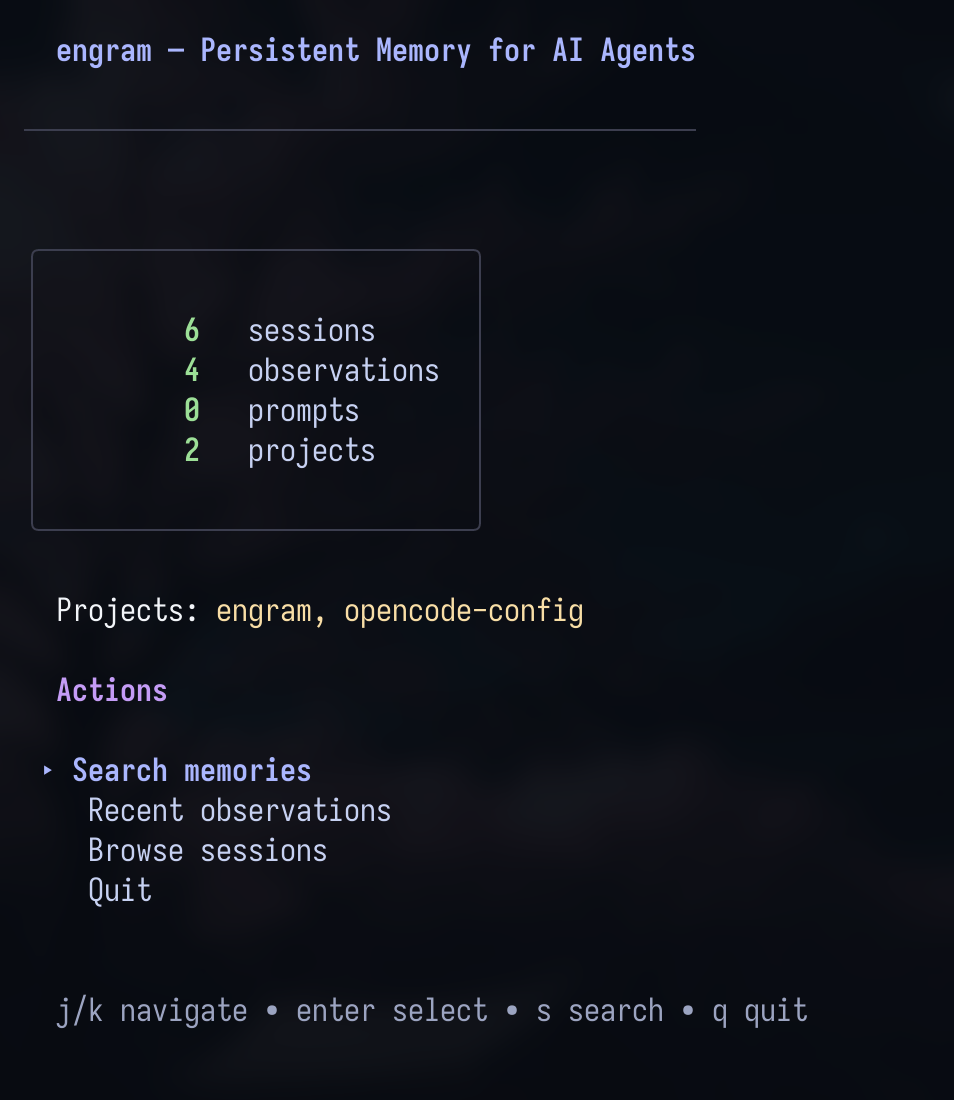
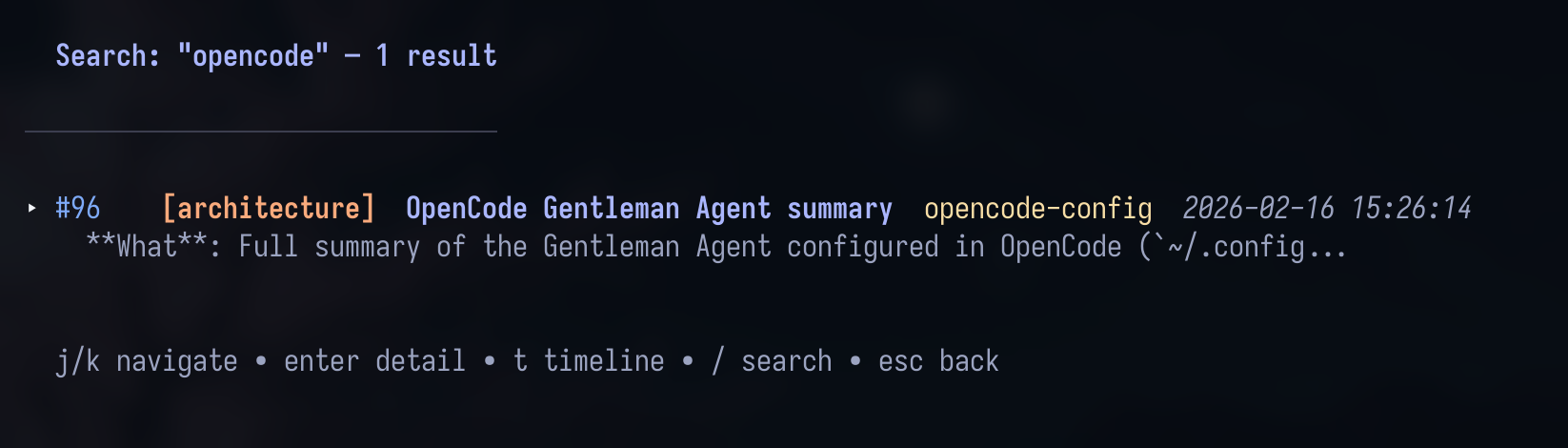
Engram includes a terminal UI for browsing sessions, observations, prompts, projects, timelines, and search results. Engram Cloud adds browser visibility for shared project memory.
Quick start
pi install npm:gentle-engram@0.1.7
pi install npm:pi-mcp-adapter
pi-engram init
Restart Pi after installation, then ask Pi what it remembers about the current project or call mem_context.
What gets installed
gentle-engram connects Pi to Engram through two complementary paths:
| Path | Purpose |
|---|---|
| Pi extension | Captures prompts/session events, injects the Memory Protocol, and exposes compact Pi-native mem_* tools over the Engram HTTP server. |
| MCP tools | Keeps Engram's MCP surface available through pi-mcp-adapter for clients and flows that use MCP directly. |
Pi events/tools -> gentle-engram extension -> ENGRAM_URL / engram serve -> SQLite
Pi MCP tools   -> pi-mcp-adapter -> ENGRAM_BIN / engram mcp -> SQLite
Pi-native compact tools use the same HTTP server path as event capture, including project detection, diagnostics, passive capture, and conflict-judgment tools such as mem_current_project, mem_doctor, mem_capture_passive, mem_judge, and mem_compare. MCP tools remain a separate stdio path, so direct MCP usage still needs an Engram binary even when ENGRAM_URL points at a remote HTTP server. Engram MCP direct tools are not enabled by default in Pi to avoid duplicate raw engram_mem_* tool rows.
Compact memory tool rendering
gentle-engram owns the Pi chrome for Engram memory tools by registering compact Pi-native mem_* tools in the companion package. When tools such as mem_search, mem_context, mem_save, mem_session_summary, mem_get_observation, mem_judge, and mem_doctor run in Pi, the default collapsed view stays compact:
🧠 search “auth model” …
↳ ✓ 4 results
Normal memory activity also updates the status bar with short progress/result text such as 🧠 engram · search… and 🧠 engram · ✓ 4 results. The extension does not use notifications for normal memory operations.
When a tool call fails because Engram cannot determine which project to use, the status bar shows an actionable label instead of the generic error:
| Status bar label | Meaning |
|---|---|
🧠 repos · ambiguous project | Pi was started from a directory that contains multiple git repos. Run Pi from inside a single repo, or add .engram/config.json with project_name to the parent directory. |
🧠 repos · error | A different tool or network error occurred. Expand the tool output in Pi for the full error message. |
Full tool details remain available by expanding the tool output in Pi. If gentle-engram or the Engram server is not installed/running, the compact tool reports an error instead of implying memory is available.
What Pi can remember
- Architecture decisions and tradeoffs
- Bug fixes, root causes, and gotchas
- User preferences and project conventions
- Session goals, next steps, and handoff summaries
- Prompt context tied to meaningful saved observations
- Cross-machine/team memory once a project is enrolled in Engram Cloud
Private blocks
gentle-engram redacts explicit private blocks before sending captured prompts, passive observations, or compaction summaries to Engram:
<private>
this should not be persisted verbatim
</private>
The persisted payload keeps the surrounding text but replaces the private block with [REDACTED]. Redaction is applied recursively to string values in outgoing JSON payloads and to query values in Engram HTTP requests.
This is a lightweight convenience convention, not a full secret-scanning system. Do not rely on it to detect credentials automatically.
Compaction recovery
When Pi emits a compaction lifecycle event, gentle-engram best-effort extracts a compacted summary from supported event fields and saves it as a session_summary observation with topic key session/compaction-recovery.
Unsupported event shapes fail gracefully. The extension still injects a manual recovery instruction containing FIRST ACTION REQUIRED, so the next agent turn can call mem_session_summary if the Engram MCP tools are installed and active. If the tools are unavailable, save the compacted summary manually after Engram is available again.
Local, sync, or cloud
Engram can grow with your workflow:
| Mode | Use it when |
|---|---|
| Local SQLite | You want fast private memory on one machine. |
| Git sync | You want portable compressed memory chunks without a hosted service. |
| Engram Cloud | You want shared project memory, browser visibility, and replication across machines/agents. |
Cloud is opt-in and project-scoped. Local SQLite remains the source of truth; cloud replicates and makes memory visible when you explicitly enroll a project.
Requirements
- Pi coding agent with npm package support.
- Engram installed as
engramonPATH, orENGRAM_BINpointing at the binary. pi-mcp-adapteronly if you want the optional MCP gateway for compatibility/debugging; Pi-nativemem_*tools come fromgentle-engram.
If you only want HTTP session capture against an already running Engram server, set ENGRAM_URL and the extension will not auto-start a local engram serve process.
Configuration
Existing Engram server
Use an already running Engram HTTP server:
ENGRAM_URL=http://127.0.0.1:7437 pi
When ENGRAM_URL is set, the extension treats the server as externally managed and does not auto-start engram serve.
Custom Engram binary
Use a custom Engram binary for MCP tools and local auto-start:
ENGRAM_BIN=/path/to/engram pi
If the binary is missing, Pi keeps running and memory degrades instead of crashing with spawn engram ENOENT.
Install command details
pi-engram init writes Pi-owned config in the Pi agent directory:
settings.json: ensuresnpm:pi-mcp-adapterandnpm:gentle-engram@0.1.7are declared.mcp.json: adds anengramMCP server that launchesengram mcp --tools=agentthrough a safe Node wrapper withdirectTools: false, so MCP remains available through the gateway without duplicating Pi-nativemem_*tools.
engram setup pi also auto-pins npmCommand in Pi's settings.json when mise is detected in PATH. It sets npmCommand to ["mise", "exec", "node@<version>", "--", "npm"] so Pi always uses the mise-managed Node version. Existing npmCommand values are never overwritten; if mise is not found, this step is a no-op.
Existing mcpServers.engram entries are preserved unless you pass --force:
pi-engram init --force
The command respects PI_CODING_AGENT_DIR; otherwise it writes to ~/.pi/agent.
Project detection
The HTTP event-capture path mirrors Engram's normal project detection order as closely as a Pi adapter can:
- nearest
.engram/config.jsoninside the current git repo - git
originremote name - git root directory name
- single child git repo name
- current directory basename
MCP tool calls still use Engram core's canonical project resolver at call time. Pi-native tool calls ask the Engram HTTP server for /project/current; if that route is missing on an older running server, the adapter falls back to the nearest local .engram/config.json and returns a version-mismatch warning. For critical repos or monorepos, prefer an explicit .engram/config.json:
{
  "project_name": "my-project"
}
Troubleshooting
| Symptom | Fix |
|---|---|
mem_* tools are missing | Install/verify npm:gentle-engram@0.1.7, run pi-engram init, then restart Pi. Keep npm:pi-mcp-adapter installed if you use MCP integrations such as Notion or direct MCP flows. |
Pi cannot find engram | Set ENGRAM_BIN=/absolute/path/to/engram. |
| Session capture should use another server | Set ENGRAM_URL=http://host:7437. |
Pi shows error MCP: 0/N servers but mem_* works | That status is Pi's global MCP gateway, not proof that Engram's Pi-native HTTP tools failed. Check ~/.pi/agent/mcp.json for stale/unreachable servers such as remote OAuth services, and keep npm:pi-mcp-adapter installed if you use MCP integrations like Notion. |
| Existing MCP config was not replaced | Run pi-engram init --force. |
mem_current_project reports /project/current unsupported | Restart or upgrade the running engram serve; check ENGRAM_URL/ENGRAM_BIN. If .engram/config.json exists, Pi uses it as a temporary fallback. |
mem_session_summary cannot detect a project | Ask the user which project should receive the summary, then retry mem_session_summary with project: "name". |
Status bar shows 🧠 repos · ambiguous project | Pi was started from a parent directory that contains multiple git repos. Run Pi from inside a single repo, or add .engram/config.json with "project_name": "my-project" to the ambiguous directory. |
Next steps
- Run
engram tuito inspect stored memories. - Use
mem_current_projectto confirm project detection before writing memories. - Read the main Engram setup guide: https://github.com/Gentleman-Programming/engram/blob/main/docs/AGENT-SETUP.md
- Explore Engram Cloud: https://github.com/Gentleman-Programming/engram/blob/main/docs/engram-cloud/README.md
- Watch Gentleman Programming on YouTube: https://www.youtube.com/c/GentlemanProgramming
- Join the project through issues, discussions, and beta feedback: https://github.com/Gentleman-Programming/engram