README.md
September 23, 2026 · View on GitHub

Conduck
Your AI. Every Apple device. No Conduck middleman.
The native Apple client for the AI you choose — your own server, a local model, or OpenRouter.
One conversation across iPhone, iPad, Mac, Apple Watch, and CarPlay.

Watch the 40-second film · Setup guide · Discord
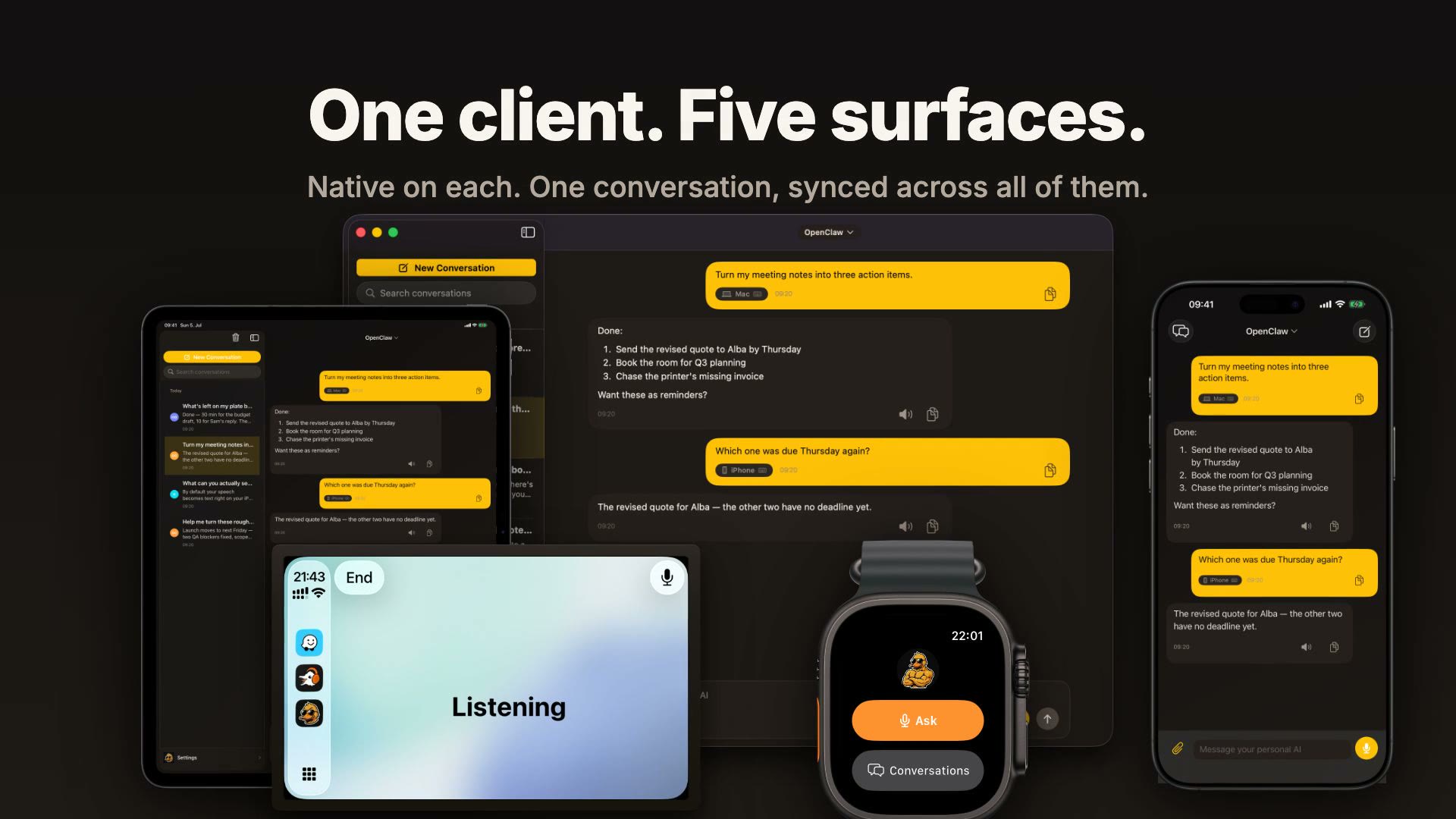
Conduck is the app, not the AI. There is no model inside it and no Conduck account to create: you connect the AI you already use, and your device talks to it directly under your own keys. The code is open source under Apache-2.0.
Why Conduck
🎙️ Ask from anywhereAction Button, Control Center, Shortcuts, the Mac menu bar, a hotkey, your Watch, or CarPlay. |
🔄 One chat, every deviceStart on the Mac, check the reply on your wrist. Synced through your own private iCloud. |
📎 Talk, type, or shareDictate on-device, attach photos and files, or use Screenshot & Ask on Mac. |
🗂️ A desk for your projectsCollect notes, screenshots, and files. Hand a project to your AI when you're ready. |
📊 See what you useTokens, speed, and reliability per model and device, measured on your device only. |
🔒 Nobody in the middleNo Conduck server, no account, no analytics or tracking. Your keys, your AI. |
Requires iOS, iPadOS, macOS, and watchOS 26.5 or later. The Mac app needs Apple silicon. CarPlay runs through the iPhone app.
Get started
Free, with no account needed. Pick the one that sounds like you:
✨ “I just want to try it.”Tap Sign in with OpenRouter in the app. You're chatting in about a minute, no server needed. |
🖥️ “I run models myself.”Add your Ollama, LM Studio, or any OpenAI-compatible server by its address. |
🤖 “I run an AI agent.”Pair OpenClaw, Hermes, or your own agent with |
Step-by-step for each path: setup guide →
Private by design
Your devices keep the library. Your chosen AI answers the requests. No Conduck-operated server sits anywhere in the path.

Read the diagram as text
- Connect. Conduck sends context from local conversation history directly to your chosen agent gateway or model endpoint. Each chat stays bound to its connection. An agent gateway can run tools and jobs; a plain model endpoint provides chat and inline attachments. Gateway file exchange uses a separately configured file server. No Conduck-operated server sits in these paths.
- Store. Chats, projects and Work materials live on your devices; API keys and tokens live in Keychain. Eligible Work files can sync, while large files stay on their original device. Your chosen gateways and providers may retain the information you send under their own policies.
- Sync. Content uses private CloudKit, selected settings use iCloud's key-value store, and credentials use end-to-end encrypted iCloud Keychain. These services synchronize independently and can take time. Turning content sync off keeps local and existing cloud copies; settings and key sync continue separately. Watch chats use CloudKit, while setup and keys come from the paired iPhone; Work file bytes do not sync to Watch.
- Speak. On iPhone, iPad and Mac, Conduck records, transcribes, saves the text, assembles context, asks your AI and saves the reply. Apple speech is the default. Optional cloud speech receives audio for transcription or reply text for read-aloud. Recordings stay out of chat history, though local retry and relay copies can remain. Work captures reach AI only through an explicit handoff.
Architecture illustration based on source reviewed 22 September 2026.
See exactly how your data moves · Privacy policy
Official app or build it yourself
| Official app | Your own build | |
|---|---|---|
| Get it | App Store | Build from this repository |
| Terms | Individuals, including professional use; organizations need a separate agreement | Apache-2.0, including commercial use |
| Name and art | Conduck | “Conduck Community” with placeholder art |
| CarPlay | Included | Not included (needs Apple's per-team entitlement) |
The official app is built from this same source, plus branding, signing, and the CarPlay entitlement — no functional code is withheld.
Build from source
- Clone this repository.
- Open
Conduck/Conduck.xcodeprojin Xcode 26.5 or later. - Build and run. Simulator builds need no configuration.
An unsigned simulator build can't save keys, so a gateway added there won't persist — see QA mode or building for your own devices. If you redistribute a build, pick your own name and icons as TRADEMARKS.md requires.
Contributing
- Start with CONTRIBUTING.md — including the glossary, since gateway means something different here — then the architecture document and the project map.
- Questions and setup help: Discord. Bugs and feature requests: GitHub issues.
- Contributions use the Developer Certificate of Origin (
git commit -s), no CLA. - Report security issues privately via SECURITY.md.
License and trademarks
Conduck-authored code and neutral placeholder art are licensed under Apache-2.0. Bundled third-party code remains under its own licenses; see NOTICE and THIRD_PARTY_NOTICES.md.
The Conduck™ name and official duck-character artwork are excluded from that license. Their use is governed by TRADEMARKS.md.
Apple, the Apple logo, Apple Watch, App Store, CarPlay, iCloud, iPad, iPhone, Mac, macOS, watchOS, and Xcode are trademarks of Apple Inc., registered in the U.S. and other countries and regions.