README.md
October 9, 2025 · View on GitHub







Astrelium is a powerful, intelligent local-first coding assistant built as a VS Code extension. It connects to your own LLM (like gpt-oss:20b via Ollama) and provides comprehensive development capabilities including automated project creation, workspace analysis, code review, testing, debugging, and much more—all offline with no cloud dependencies.
🎯 Advanced Commands
Astrelium recognizes natural language commands for advanced operations:
Code Analysis & Review
"review code"or"code review"- Comprehensive code quality analysis"explain code"or"explain this"- Detailed code explanations"analyze performance"- Performance analysis with optimization suggestions"check security"or"security audit"- Security vulnerability scanning
Code Generation & Modification
"generate tests"or"create tests"- Generate comprehensive test suites"optimize code"or"optimize this"- Code optimization with performance improvements"refactor [pattern]"- Apply specific design patterns (mvc, singleton, factory, observer)"generate documentation"- Create project documentation
Project Management
"suggest architecture"- Architectural improvements and design patterns"api documentation"- Generate API documentation with OpenAPI specs"migrate to [technology]"- Create migration plans between technologies
Example Commands:
"Review this code for best practices"
"Generate unit tests for the current file"
"Optimize this code for better performance"
"Suggest architectural improvements for this project"
"Create API documentation"
"Refactor using MVC pattern"
"Migrate this project to React"
"Check for security vulnerabilities"
📦 Setup
- Install Ollama: Download from ollama.com
- Install Model: Run
ollama pull gpt-oss:20bin terminal - Start Ollama: Run
ollama serveorollama run gpt-oss:20b - Clone Repository:
git clone https://github.com/Hammaduddin561/astrelium.git - Install Dependencies:
cd astrelium && npm install - Compile Extension:
npm run compile - Launch: Press
F5in VS Code to start Extension Development Host
🧠 Usage
Basic Chat
- Open the Astrelium sidebar panel (🌌 icon)
- Type your coding questions or requests
- Get intelligent, context-aware responses
Project Creation
- Type:
"Create a [language] [project type] with [features]" - Astrelium analyzes requirements and creates complete project structure
- Automatically compiles, tests, and debugs the code
- Opens created files in VS Code for immediate editing
Advanced Operations
- Open a file you want to analyze/modify
- Use natural language commands for specific operations
- Astrelium provides detailed analysis and automated improvements
- Review changes and backups created automatically
File Sharing
- Click 📎 button to upload files (any format, up to 10MB)
- Astrelium analyzes content and provides relevant assistance
- Supports images, documents, code files, and more
� Features
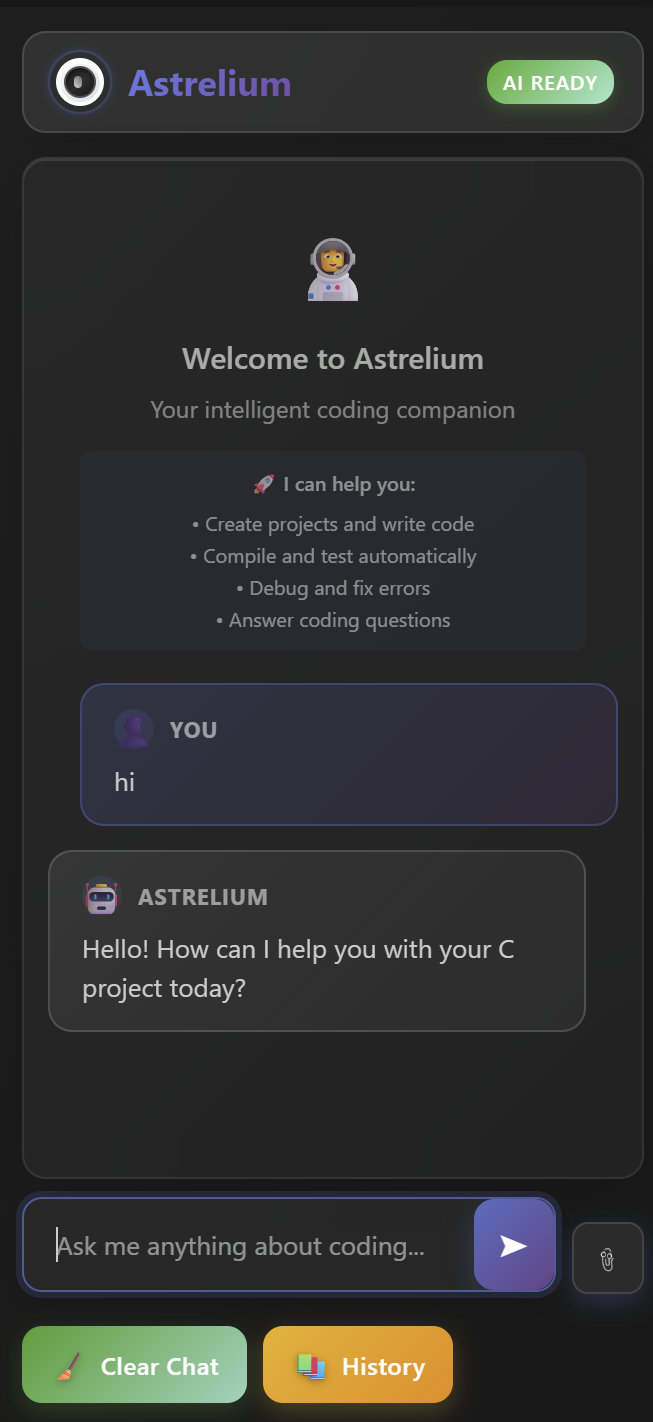
Astrelium in action - Modern chat interface with intelligent code assistance
🧠 Smart AI Assistant
- Automated Project Creation: Create complete projects with proper file structures, dependencies, and build configurations
- Intelligent Code Generation: Generate, compile, test, and debug code automatically
- Real-time Error Detection: Automatic debugging with intelligent error analysis and fixes
- Context-Aware Responses: Understands your project structure and provides relevant suggestions
📊 Advanced Workspace Analysis
- Deep Project Understanding: Automatically analyzes project type, languages, frameworks, and dependencies
- File Structure Mapping: Complete workspace mapping with entry points, test files, and documentation
- Git Integration: Tracks repository status, branches, and changes
- Performance Metrics: Calculates project statistics including file count, lines of code, and main files
🔧 Professional Development Tools
- Code Review: Comprehensive code quality analysis with best practices suggestions
- Architectural Guidance: Suggests improvements and design patterns for your projects
- Test Generation: Creates comprehensive test suites including unit, integration, and edge case tests
- Code Optimization: Performance optimization with before/after comparisons
- Security Auditing: Vulnerability scanning and security best practices enforcement
🛠️ Advanced Code Operations
- Intelligent Refactoring: Apply design patterns (MVC, Singleton, Factory, Observer) automatically
- Code Explanation: Detailed explanations of complex code logic and algorithms
- Documentation Generation: Create README files, API docs, and user guides automatically
- Migration Planning: Detailed plans for migrating between technologies (React, Vue, Python, etc.)
- API Documentation: Generate OpenAPI/Swagger specifications automatically
📁 File Management
- Universal File Upload: Share any file type (PDF, DOC, images, code files) up to 10MB
- Smart File Analysis: Automatic content analysis and context extraction
- Backup Creation: Automatic backups before code modifications
- Multi-format Support: Handles various programming languages and file formats
💬 Enhanced Chat Interface
- Modern UI: Beautiful glass morphism design with smooth animations
- Persistent History: Chat history saved and restored across sessions
- Syntax Highlighting: Proper code formatting with language-specific highlighting
- File Preview: Visual preview of uploaded files before processing
- Responsive Design: Optimized for different screen sizes
🔌 Offline-First Architecture
- Local LLM Integration: Works with Ollama, LM Studio, and other local models
- No Cloud Dependencies: Complete privacy with all processing done locally
- Fast Performance: Direct integration with VS Code for optimal speed
- Secure: No data sent to external servers
�🔗 Local Model Requirements
Ensure Ollama is running with the gpt-oss:20b model:
# Install Ollama
curl -fsSL https://ollama.com/install.sh | sh

# Pull the model
ollama pull gpt-oss:20b

# Start the model
ollama run gpt-oss:20b
Or use other compatible local models by modifying the API endpoint in the extension settings.
⚙️ Configuration
The extension automatically detects and analyzes your workspace, but you can customize:
- Model Settings: Change the model name in
src/extension.ts - API Endpoint: Modify the Ollama endpoint (default:
localhost:11434) - Context Window: Adjust the number of tokens for longer conversations
- Auto-compilation: Enable/disable automatic compilation and testing
🎨 UI Features
- 🌌 Astronaut Theme: Custom logo and space-themed design
- ✨ Glass Morphism: Modern translucent UI elements
- 🎯 Smart Highlighting: Language-specific syntax highlighting
- 📱 Responsive: Adapts to different panel sizes
- 🔄 Smooth Animations: Elegant transitions and loading states
🛡️ Privacy & Security
- 100% Local: All processing happens on your machine
- No Telemetry: No data collection or external communication
- Secure: Files and conversations stay private
- Open Source: Full transparency with open codebase
🤝 Contributing
- Fork the repository
- Create a feature branch:
git checkout -b feature/amazing-feature - Commit changes:
git commit -m 'Add amazing feature' - Push to branch:
git push origin feature/amazing-feature - Open a Pull Request
🐛 Troubleshooting
Extension Not Loading
- Ensure Ollama is running:
ollama serve - Check model availability:
ollama list - Verify VS Code version compatibility
Model Not Responding
- Restart Ollama service
- Check model is running:
ollama ps - Verify network connectivity to localhost:11434
Compilation Errors
- Run
npm installto update dependencies - Check TypeScript version:
tsc --version - Clear build cache:
npm run clean
📄 License
Apache License 2.0 - see LICENSE file for details.
🌟 Acknowledgments
- Built with TypeScript and VS Code Extension API
- Powered by Ollama for local LLM inference
- Inspired by modern AI development workflows
- Community-driven feature development
🎮 Extension Settings
Astrelium contributes the following VS Code settings:
astrelium.modelEndpoint: Configure the Ollama API endpoint (default:http://localhost:11434)astrelium.modelName: Set your preferred LLM model (default:gpt-oss:20b)astrelium.autoSave: Enable/disable automatic chat history savingastrelium.contextWindow: Maximum tokens for conversation context (default:4096)astrelium.enableFileUpload: Enable/disable file upload functionality
⚡ Performance Tips
🚀 Optimal Model Selection
- gpt-oss:20b: Best balance of capability and speed
- llama3.1:8b: Faster responses, good for basic tasks
- codellama:13b: Specialized for code generation
🔧 System Optimization
- RAM: Minimum 16GB recommended for smooth operation
- GPU: CUDA/Metal acceleration improves response times
- Storage: SSD recommended for faster model loading
💡 Usage Best Practices
- Keep conversations focused for better context
- Use specific commands for targeted results
- Upload files under 10MB for optimal performance
- Clear chat history periodically for memory management
🎯 Usage
Basic Commands
- Create Projects: "Create a React app with TypeScript"
- Code Generation: "Add a display function in this file"
- Code Review: "Review this code for best practices"
- Testing: "Generate tests for this function"
- Documentation: "Create documentation for this project"
Advanced Features
- Workspace Analysis: Automatic project understanding and context
- File Upload: Drag and drop files for analysis
- Code Refactoring: Apply design patterns automatically
- Security Auditing: Scan for vulnerabilities
- Migration Planning: Get migration strategies between frameworks
🏗️ Architecture
Astrelium is built with:
- TypeScript for extension logic
- VS Code Extension API for editor integration
- WebView API for modern chat interface
- Node.js for file system operations
- Ollama API for local LLM communication
🤝 Contributing
We welcome contributions! Please see our Contributing Guidelines for details.
Development Setup
git clone https://github.com/Hammaduddin561/astrelium.git
cd astrelium
npm install
npm run compile
Running Tests
npm test
📄 License
This project is licensed under the Apache License 2.0 - see the LICENSE file for details.
Copyright 2025 Md Hammaduddin

Licensed under the Apache License, Version 2.0 (the "License");
you may not use this file except in compliance with the License.
You may obtain a copy of the License at

    http://www.apache.org/licenses/LICENSE-2.0

Unless required by applicable law or agreed to in writing, software
distributed under the License is distributed on an "AS IS" BASIS,
WITHOUT WARRANTIES OR CONDITIONS OF ANY KIND, either express or implied.
See the License for the specific language governing permissions and
limitations under the License.
🐛 Issues & Support
- Bug Reports: GitHub Issues
- Feature Requests & Ideas: GitHub Discussions
- Questions & Help: GitHub Discussions Q&A
📖 Documentation
- 📚 Complete Guide: Wiki Home
- 🚀 Quick Start: Getting Started Guide
- 📦 Installation: Setup Instructions
- ⚙️ Configuration: Settings & Options
- 🛠️ Advanced Features: Power User Guide
- 🆘 Troubleshooting: Common Issues & Solutions
🙏 Acknowledgments
- Built with ❤️ using VS Code Extension API
- Powered by local LLM models via Ollama
- Inspired by the need for privacy-focused AI development tools
🔮 Roadmap
- VS Code Marketplace publication
- Support for more LLM providers (LM Studio, OpenAI-compatible APIs)
- Plugin system for custom AI functions
- Team collaboration features
- Advanced code analysis and metrics
- Integration with popular development tools
🚀 Ready to revolutionize your coding experience?
👨🚀 ASTRELIUM 🌌
Install Astrelium and unleash the power of local AI assistance!
Built with ❤️ for developers who value privacy and performance