Build+ Unity Extension
January 27, 2025 · View on GitHub


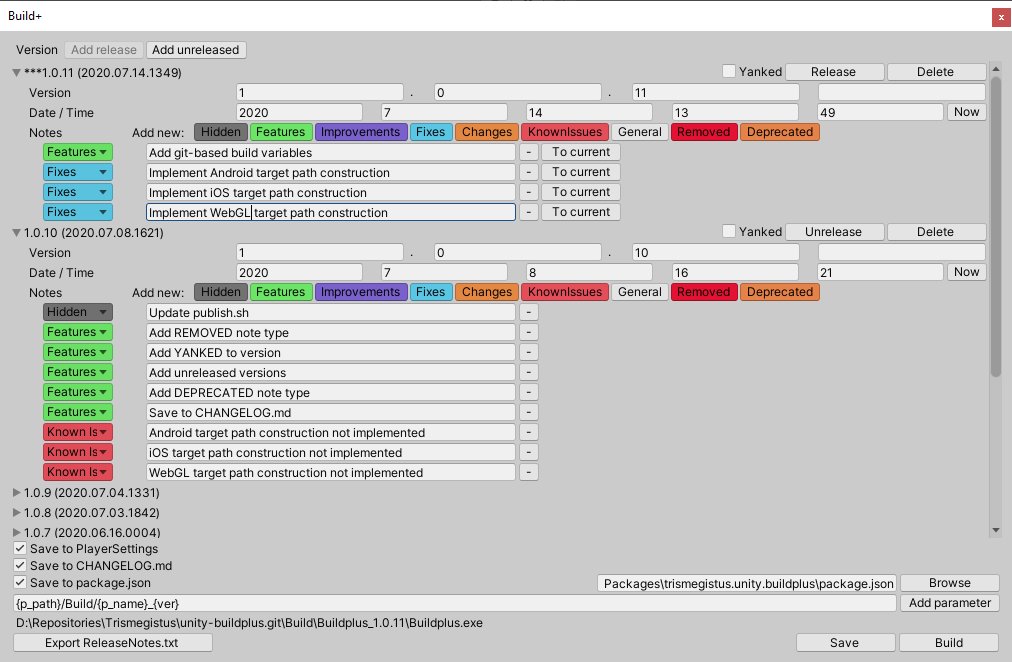
What is this?
A UPM version of Build+. There's no way to contact its owner : (
Features
- Edit version info
- Edit release notes (now with colored labels!💐):
- ⬛ Hidden
- 🟩 Features
- 🟪 Improvements
- 🟦 Fixes
- 🟧 Changes
- 🟧 Deprecated
- 🟥 KnownIssues
- 🟥 Removed
- ⬜ General
- Add unreleased versions with planned changes
- Update version:
- PlayerSettings
package.jsonat given path (for distributing packages to UPM)CHANGELOG.mdbased on Keep a Changelog
- Build with generated path using variables:
p_path- path to project folderplatform- current build targetver- last versionp_name- Application.productName
- Read all information at runtime from ScriptableObject
Dependencies
Handled automatically when installed from registry
- SmartFormat - parsing build path template
Installation
OpenUPM
This is the easiest way and you can update to new versions quickly: OpenUPM
From git URL
- Open package manager
- Select Plus -> From git URL
- Paste
https://github.com/Hermesiss/unity-buildplus.git?path=/Packages/trismegistus.unity.buildplus - Press install
Add your own build path parameters
You can see example usage in StandardBuildParameters
- Create static method with
PathParameterreturn type and no arguments. Only in Editor class - Add
[BuildPathProvider]attribute to class - Add
[BuildPath]attribute to method - Construct proper
PathParameter
This method will be called on opening Build+ window, saving, building or pressing "Refresh".
Readme from creator
Build+ can help you to version your app in a straight-forward way and avoid some of the headaches with maintaining release notes outside of the development environment. With Build+ you can even include your release notes in the app itself! As Build+ evolves, additional useful features will be added to automating your builds.
Launch Build+ by selecting File->Build+...
When you save you'll see a _BuildPlus.xml and a _BuildPlus.asset added to the root of your Assets/ folder. The xml is used only for easy merging. The asset file is a binary serialized version that you can use directly in your app for showing the version number/release notes. An example of this is shown in BuildPlus/Example/Example.unity.
Suggested workflow:
- All developers on the team can add their significant changes to the release notes and check in the
_BuildPlus.xml/assetalong with the changed files. This should be done at the current version shown in Build+. - When a build is made and released, the developer who makes the build should increment the version number and check in
_BuildPlus.xml/asset, so that other developers know where new notes should go.
ReleaseNotes.txt:
After you have made a single build using the standard Build menu, you can then use Build+ to make additional builds
using the previously used settings. When you build this way, you will see a ReleaseNotes.txt file alongside your build.
Please send any feedback to buildplus@luminaryproductions.net.
Enjoy!
Luminary Productions
