Dont Forget Your Recipe
October 23, 2022 · View on GitHub
🚀 About The Team
Team 70: dont-forget-ur-password
Contributors
Product Requirement
University of Melbourne: COMP30022 IT Capstone Project
Semester2, 2022
Personal Item Register
Product Description
A website based application to track and share your recipes. You can create your own recipes here, label them into your own categories. You can also view and share recipes in our food-lover community, where users can rate and comment each other's favourite dishes. Last, don't forget to put on a red heart for recipes you like, so that they are tracked in your personal kitchen.
Documentation
We use Confluence Confluence Team Space
Architecture

Usage
Installtion
The project us yarn as front-end package management tool,
npm as back-end package management tool. Install dependecies independently
Install dependecies for front-end
  cd front-end
  yarn install
Install dependecies for back-end
  cd front-end
  npm install
To run the project, go to root folder and run:
npm run dev
This will start both frontend and backend concurrently
Build
Testing
npm test
Configuration
Environment Variable
To run this project, you will need to add the following environment variables to your .env file
PORT=<server port>
DATABASE= <mongoDB>
DATABASE_COMPASS=<MongoDB>
ENVIRONMENT=<process environment>
COOKIE_SECRET=<Cookie secret>
BASE_URL=<server base url>
BASE_URL_FRONT_END= <frontend base url>


#google service
GOOGLE_CLIENT_ID=<google client ID>
GOOGLE_CLIENT_SECRET= <google client secret>
EMAIL_USER=<email sender>
EMAIL_USER_2=<email sender 2>
EMAIL_PASS=<email sender password >
EMAIL_PASS_2=<email sender password 2>
HOST=""
SERVICE="gmail"
HTTPS & CA
add ... to your computer
Contributing
branches & ci cd
Deployment
See the deploy on Heroku: https://dont-recipe-frontback.herokuapp.com/
Set up Heroku
Settings on Heroku:
BuildPack:
heroku/nodejs
Application requires the same environemnt variable that need to be set under Project Setting => Config Vars
Download and install the Heroku CLI.
If you haven't already, log in to your Heroku account and follow the prompts to create a new SSH public key.
heroku login
Set up Heroku in your local repository, run:
heroku git:remote -a <heroku name>
Deploy Process
Scripts had already been setup for the deploy process
Our npm server serves a static frontend build.
Heroku runs the script underheroku-postbuild first to create the frontend build.
After the build is done successfully, Heroku runs npm start and start running the server.
To Deploy:
run:
git push heroku <branch>
Getting Started with frontend
:bangbang: Prerequisite
This project is run by:
yarn
check if you have yarn installed by running:
yarn --version
Installing yarn through npm:
npm install --global yarn
see more about yarn
Run The App Locally
If you just cloned the repository, run:
yarn install
to install dependencies, no need to run it again until there is a change in dependecies.
yarn start
or
yarn start:windows
for windows environment
Runs the app in the development mode.
Open https://localhost:3000 to view it in your browser.
The page will reload when you make changes.
You may also see any lint errors in the console.
When there is changes in dependencies
:pray: :bangbang:Please inform everyone when you upgrade/install packages.
To update, delete folder /node_modules completely and run yarn installto install all dependencies again in order to prevent conflicts.
Coding Style
Enforced by Prettier and ESlint
Make sure to use VScode and install extensions
Prettier ESlint
Setup Auto formatting
use crtl+shift+p to open Vscode panel
under the panel, type and select format document with, choose Prettier as the formatter
In VScode settings, find Editor: format on save and click on the option.
End-of-Line Character Sequences: LF
Check at the bottom line of your VScode
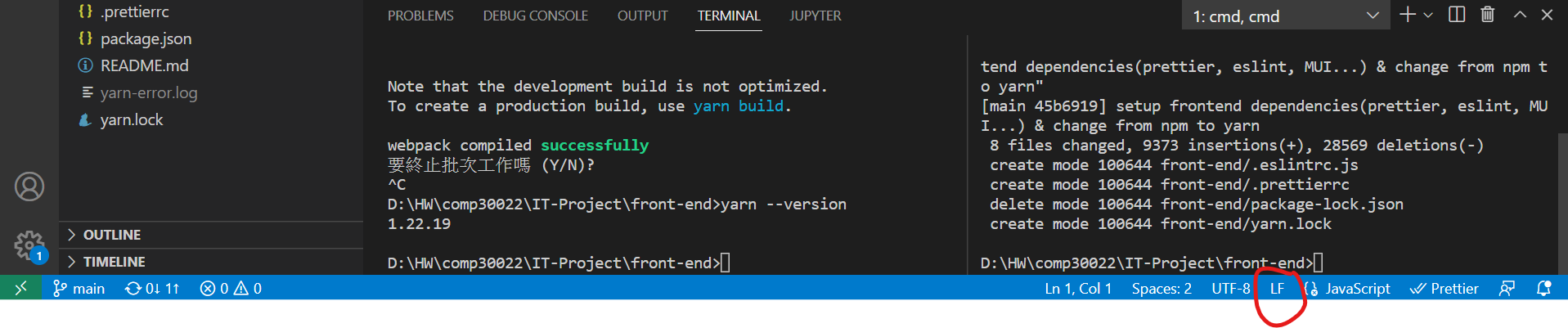 :bangbang: if you are on Windows system, git will tempt to convert LF to CRLF. To cahnge this, configured your git by
git config core.autocrlf false
Using PropTypes
import PropTypes with
import PropTypes from 'prop-types'
example:
const Component =({prop1='', prop2=()=>{})=>{

}

Component.propTypes = {
    /** description of the prop**/
    prop1=PropTypes.string,
    prop2=PropTypes.func,
}