MinimalFox
April 7, 2026 · View on GitHub
MinimalFox is a minimalist user style focused on reducing screen clutter while keeping Firefox simple and usable.

This was written mainly for Firefox ESR, but it may also work on standard Firefox versions.
This style is compatible with any theme. The one used in the screenshots is Dark Space.
https://github.com/user-attachments/assets/b31692f5-84b7-43a3-9ebf-dbd563a5c6f7
Prerequisites
- Firefox ESR (recommended, though it may also work on standard Firefox versions)
- Cascadia Code installed on your system
- Knowing basic Firefox shortcuts like
CTRL+W,CTRL+T, andALT+D
Firefox keyboard shortcuts
Installation: Configure Firefox
-
Open Firefox and type
about:configin the address bar. -
Press Enter.
-
Click Accept the Risk and Continue if prompted.
-
Search for
toolkit.legacyUserProfileCustomizations.stylesheetsand set it totrue. -
Search for
browser.compactmode.showand set it totrue. -
Set toolbar density to
compact.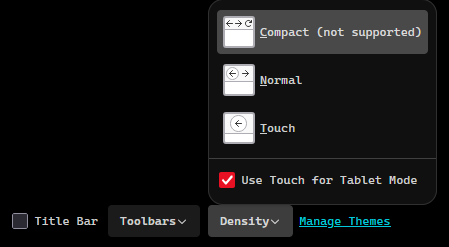
-
Optional: disable tab previews by setting
browser.tabs.hoverPreviewtofalse.
Installation: Copy the file
-
Open Firefox and go to your profile root folder through
about:profiles. -
Create a folder named
chromeif it does not already exist. -
Copy the
userChrome.cssfile from this repository into thechromefolder. -
Restart Firefox.
-
In
about:preferences, set your default font to Cascadia Code.
Conclusion
MinimalFox is a simple, easy-to-maintain user style focused on a clean and developer-friendly Firefox setup.