General
June 22, 2026 · View on GitHub
A simple and complete third person controller asset, made in Godot 4.
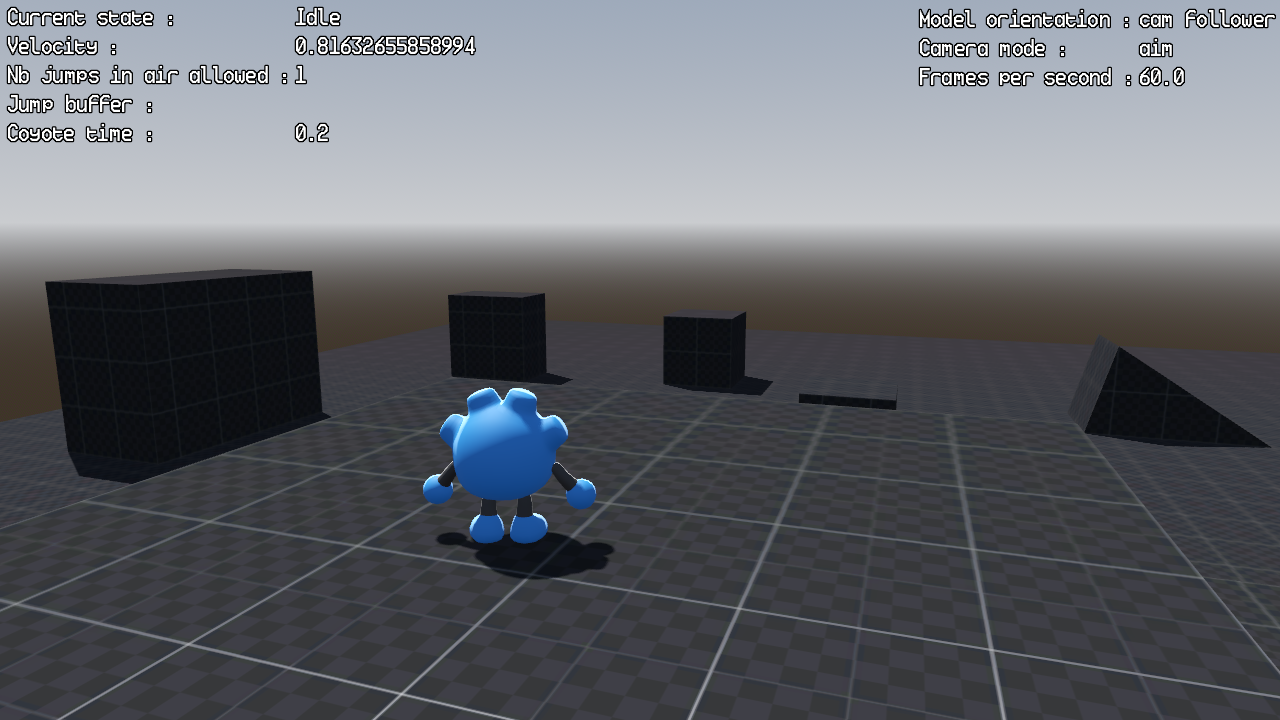
General
This asset is a heavely modified fork of Gtibo's Godot-Plush-Character project (https://github.com/gtibo/Godot-Plush-Character).
It provides a simple, fully commented, finite state machine based controller, camera, as well as a properties HUD.
A test map is provided to test the controller.
A cute 3D character model made by Gtibo is also provided, fully animated (he use an animation tree powered by a state machine as well), plus movement sounds and particles effects.
The controller use a finite state machine, designed to be easely editable, allowing to easily add, remove and modify behaviours and actions.
Each state has his own script, allowing to easely filter and manage the communication between each state.
He is also very customizable, with all movement parameters, camera settings, and keybindings being exposed as export variables in the inspector for easy customization.
The asset is 100% written in GDScript, with the snake case convention.
Compatibility
- Godot 4.4 - 4.7: Fully supported.
- Godot 4.0 - 4.3: Should work, but you will need to delete the
.uidfiles.
Features
Movement
- Finite state machine based controller
- Smooth acceleration and deceleration
- Slope and hill traversal
- Walking
- Running (continuous hold or toggle)
- Jumping (configurable multi-jump)
- Jump buffering
- Coyote time
- Air control (customizable via curves)
Camera
- Default/Free camera
- Aim/Shooter/Above shoulder camera (with left and right sides)
- Camera zoom
Model
- Model orientation (camera independant, or camera follower)
UI
- Properties HUD
Misc
- Input action checker
Purpose
I saw the Godot plush project bu Gtibo about 1,5 weeks, and i told to myself "hey, that would be a great start point for a third person controller !"
And so, here we go !
Installation / Quickstart
Step 1: Add the asset to your project
Download or clone this repository and copy the addons/ folder into your Godot project's root directory.
Step 2(optional): Set up input actions
The controller requires 12 input actions to be defined in your project's Input Map. If they are not binded, the default keybindings will be used. Go to Project > Project Settings > Input Map and create each of the following actions, then bind them to your preferred keys/buttons.
By default, the key actions are defined as "play_char_{action_name}_action". Do not change this name unless you have configured your own key bindings.
To change the keybinds in the scripts, i have set up one that center all the inputs needed, so you won't have to go in differents files each time you want to modify something. The script is called "input_management_component_script", it is located in the player character scene.
| Input Action Name | Purpose | Default key |
|---|---|---|
play_char_move_forward_action | Move forward | W, Up |
play_char_move_backward_action | Move backward | S, Down |
play_char_move_left_action | Strafe left | A, Left |
play_char_move_right_action | Strafe right | D, Right |
play_char_run_action | Run / sprint | Shift |
play_char_jump_action | Jump | Space |
play_char_mouse_mode_action | Toggle mouse capture | Ctrl |
play_char_aim_cam_action | Camera aim | Right mouse button |
play_char_aim_cam_side_action | Camera aim side | G |
play_char_cam_zoom_in_action | Camera zoom in | Mouse wheel up, V |
play_char_cam_zoom_out_action | Camera zoom out | Mouse wheel down, B |
play_char_change_cam_collision_action | Change camera collision mode | T |
Step 3(optional): Set up collisions
Collisions masks and layers are already set up in the scenes, but for more clarity you can name them in the "3D Physics" section of your Godot projet settings window, as following :
- 1 : world
- 2 : player_character
State machine overview
The controller uses 5 states, each in its own script:
| State | Description |
|---|---|
| Idle | No movement input. Handles jump buffering and coyote time transitions. |
| Walk | Standard movement at base walk speed. |
| Run | Faster movement. Supports continuous hold or toggle mode. |
| Jump | Active jump with air control. |
| InAir | Airborne without jumping (e.g., walked off an edge). Manages coyote time, jump buffering, and double jumps. |
Issues and contributions
- Bug reports: Open an issue in the Issues section.
- Feature requests: Post in the Discussions section.
- Pull requests: Submit improvements in the Pull Requests section.
Credits
- Gtibo for the original project : https://github.com/gtibo/Godot-Plush-Character
- PiCode for the Godot Theme Prototype Textures asset: https://godotengine.org/asset-library/asset/2480
- Demo Audio: Kenney
Donations
If you like my assets, and want to support my work : https://ko-fi.com/jeheno