JDet
March 2, 2025 · View on GitHub
Introduction
JDet is an object detection benchmark based on Jittor, and mainly focus on aerial image object detection (oriented object detection).
Install
JDet environment requirements:
- System: Linux(e.g. Ubuntu/CentOS/Arch), macOS, or Windows Subsystem of Linux (WSL)
- Python version >= 3.7
- CPU compiler (require at least one of the following)
- g++ (>=5.4.0)
- clang (>=8.0)
- GPU compiler (optional)
- nvcc (>=10.0 for g++ or >=10.2 for clang)
- GPU library: cudnn-dev (recommend tar file installation, reference link)
Step 1: Install the requirements
git clone https://github.com/Jittor/JDet
cd JDet
python -m pip install -r requirements.txt
If you have any installation problems for Jittor, please refer to Jittor
Step 2: Install JDet
cd JDet
# suggest this
python setup.py develop
# or
python setup.py install
If you don't have permission for install,please add --user.
Or use PYTHONPATH:
You can add export PYTHONPATH=$PYTHONPATH:{you_own_path}/JDet/python into .bashrc, and run
source .bashrc
Getting Started
Datasets
The following datasets are supported in JDet, please check the corresponding document before use.
DOTA1.0/DOTA1.5/DOTA2.0 Dataset: dota.md.
FAIR Dataset: fair.md
SSDD/SSDD+: ssdd.md
You can also build your own dataset by convert your datas to DOTA format.
Config
JDet defines the used model, dataset and training/testing method by config-file, please check the config.md to learn how it works.
Train
python tools/run_net.py --config-file=configs/s2anet_r50_fpn_1x_dota.py --task=train
Test
If you want to test the downloaded trained models, please set resume_path={you_checkpointspath} in the last line of the config file.
python tools/run_net.py --config-file=configs/s2anet_r50_fpn_1x_dota.py --task=test
Test on images / Visualization
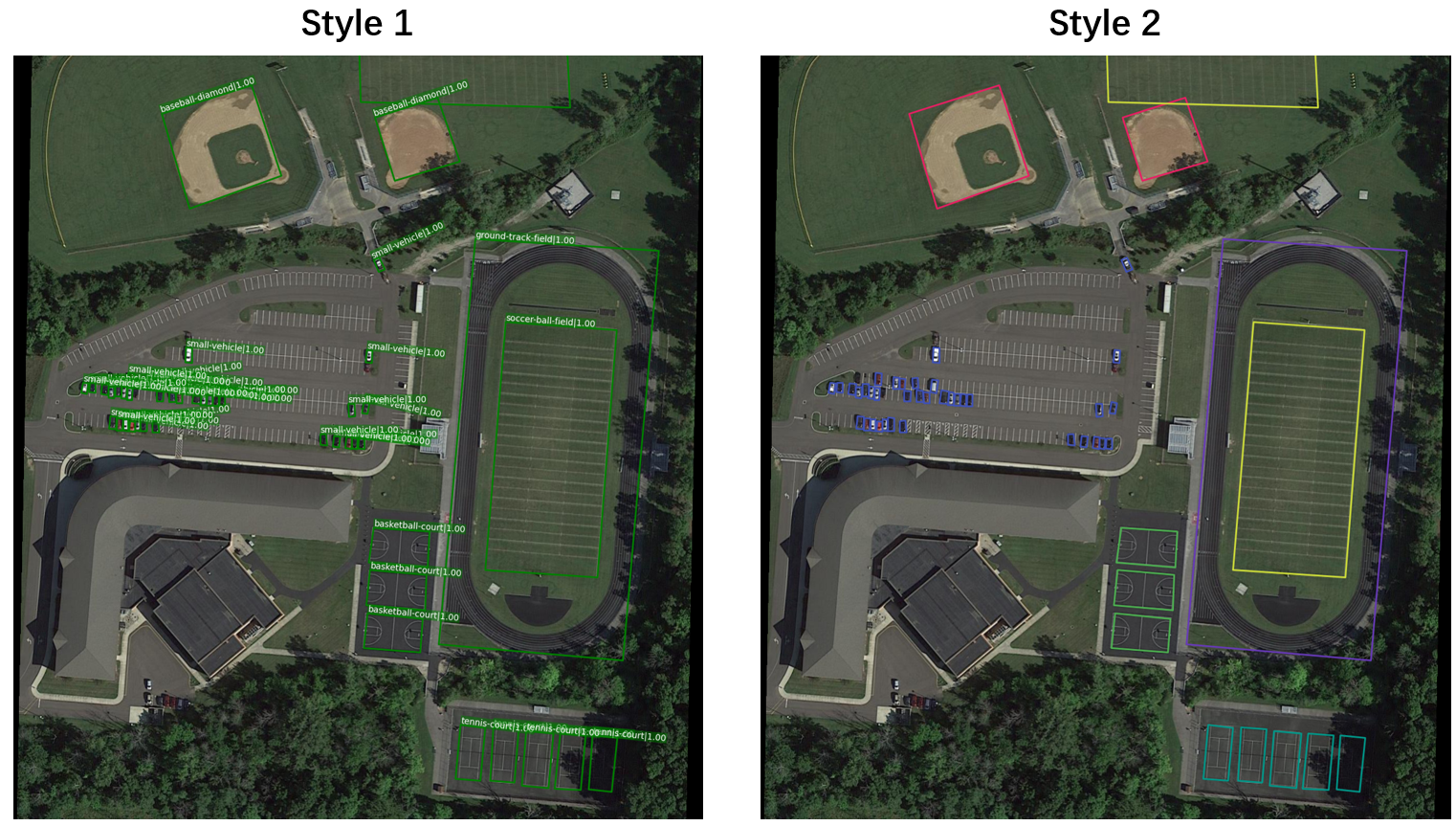
You can test and visualize results on your own image sets by:
python tools/run_net.py --config-file=configs/s2anet_r50_fpn_1x_dota.py --task=vis_test
You can choose the visualization style you prefer, for more details about visualization, please refer to visualization.md.
Build a New Project
In this section, we will introduce how to build a new project(model) with JDet. We need to install JDet first, and build a new project by:
mkdir $PROJECT_PATH$
cd $PROJECT_PATH$
cp $JDet_PATH$/tools/run_net.py ./
mkdir configs
Then we can build and edit configs/base.py like $JDet_PATH$/configs/retinanet.py.
If we need to use a new layer, we can define this layer at $PROJECT_PATH$/layers.py and import layers.py in $PROJECT_PATH$/run_net.py, then we can use this layer in config files.
Then we can train/test this model by:
python run_net.py --config-file=configs/base.py --task=train
python run_net.py --config-file=configs/base.py --task=test
Models
| Models | Dataset | Sub_Image_Size/Overlap | Train Aug | Test Aug | Optim | Lr schd | mAP | Paper | Config | Download |
|---|---|---|---|---|---|---|---|---|---|---|
| S2ANet-R50-FPN | DOTA1.0 | 1024/200 | flip | - | SGD | 1x | 74.11 | arxiv | config | model |
| S2ANet-R50-FPN | DOTA1.0 | 1024/200 | flip+ra90+bc | - | SGD | 1x | 76.40 | arxiv | config | model |
| S2ANet-R50-FPN | DOTA1.0 | 1024/200 | flip+ra90+bc+ms | ms | SGD | 1x | 79.72 | arxiv | config | model |
| S2ANet-R101-FPN | DOTA1.0 | 1024/200 | Flip | - | SGD | 1x | 74.28 | arxiv | config | model |
| Gliding-R50-FPN | DOTA1.0 | 1024/200 | Flip | - | SGD | 1x | 72.93 | arxiv | config | model |
| Gliding-R50-FPN | DOTA1.0 | 1024/200 | Flip+ra90+bc | - | SGD | 1x | 74.93 | arxiv | config | model |
| H2RBox-R50-FPN | DOTA1.0 | 1024/200 | flip | - | AdamW | 1x | 67.62 | arxiv | config | model |
| RetinaNet-hbb-R50-FPN | DOTA1.0 | 1024/200 | flip | - | SGD | 1x | 68.02 | arxiv | config | model |
| RetinaNet-obb-R50-FPN | DOTA1.0 | 1024/200 | flip | - | SGD | 1x | 68.07 | arxiv | config | model |
| GWD-R50-FPN | DOTA1.0 | 1024/200 | flip | - | SGD | 1x | 68.88 | arxiv | config | model |
| KLD-R50-FPN | DOTA1.0 | 1024/200 | flip | - | SGD | 1x | 69.10 | arxiv | config | model |
| KFIoU-R50-FPN | DOTA1.0 | 1024/200 | flip | - | SGD | 1x | 69.36 | arxiv | config | model |
| FasterRCNN-R50-FPN | DOTA1.0 | 1024/200 | Flip | - | SGD | 1x | 69.631 | arxiv | config | model |
| RoITransformer-R50-FPN | DOTA1.0 | 1024/200 | Flip | - | SGD | 1x | 73.842 | arxiv | config | model |
| FCOS-R50-FPN | DOTA1.0 | 1024/200 | flip | - | SGD | 1x | 70.40 | ICCV19 | config | model |
| OrientedRCNN-R50-FPN | DOTA1.0 | 1024/200 | Flip | - | SGD | 1x | 75.62 | ICCV21 | config | model |
| ReDet-R50-FPN | DOTA1.0 | 1024/200 | Flip | - | SGD | 1x | 76.23 | arxiv | config | model pretrained |
| CSL-R50-FPN | DOTA1.0 | 1024/200 | flip | - | SGD | 1x | 67.99 | arxiv | config | model |
| RSDet-R50-FPN | DOTA1.0 | 1024/200 | Flip | - | SGD | 1x | 68.41 | arxiv | config | model |
| ATSS-R50-FPN | DOTA1.0 | 1024/200 | flip | - | SGD | 1x | 72.44 | arxiv | config | model |
| Reppoints-R50-FPN | DOTA1.0 | 1024/200 | flip | - | SGD | 1x | 56.34 | arxiv | config | model |
| OrientedRCNN-LSKNet-S-FPN | DOTA1.0 | 1024/200 | flip+ra90 | - | AdamW | 1x | 77.17 | IJCV | config | pretrained |
| StripRCNN-StripNet-S-FPN | DOTA1.0 | 1024/200 | flip+ra90 | - | AdamW | 1x | 77.36 | arxiv | config | pretrained |
Notice:
- ms: multiscale
- flip: random flip
- ra: rotate aug
- ra90: rotate aug with angle 90,180,270
- 1x : 12 epochs
- bc: balance category
- mAP: mean Average Precision on DOTA1.0 test set
Plan of Models
:heavy_check_mark:Supported :clock3:Doing :heavy_plus_sign:TODO
- :heavy_check_mark: S2ANet
- :heavy_check_mark: Gliding
- :heavy_check_mark: RetinaNet
- :heavy_check_mark: Rotated RetinaNet
- :heavy_check_mark: Faster R-CNN
- :heavy_check_mark: SSD
- :heavy_check_mark: ROI Transformer
- :heavy_check_mark: FCOS
- :heavy_check_mark: Oriented R-CNN
- :heavy_check_mark: YOLOv5
- :heavy_check_mark: GWD
- :heavy_check_mark: KLD
- :heavy_check_mark: H2RBox
- :heavy_check_mark: KFIoU
- :heavy_check_mark: Localization Distillation
- :heavy_check_mark: ReDet
- :heavy_check_mark: CSL
- :heavy_check_mark: Reppoints
- :heavy_check_mark: RSDet
- :heavy_check_mark: ATSS
- :heavy_check_mark: LSKNet
- :heavy_check_mark: StripRCNN
- :clock3: R3Det
- :clock3: Cascade R-CNN
- :clock3: Oriented Reppoints
- :heavy_plus_sign: DCL
- :heavy_plus_sign: Double Head OBB
- :heavy_plus_sign: Guided Anchoring
- :heavy_plus_sign: Sampling Equivariant Self-attention Networks
- :heavy_plus_sign: ...
Plan of Datasets
:heavy_check_mark:Supported :clock3:Doing :heavy_plus_sign:TODO
- :heavy_check_mark: DOTA1.0
- :heavy_check_mark: DOTA1.5
- :heavy_check_mark: DOTA2.0
- :heavy_check_mark: SSDD
- :heavy_check_mark: SSDD+
- :heavy_check_mark: FAIR
- :heavy_check_mark: COCO
- :heavy_plus_sign: LS-SSDD
- :heavy_plus_sign: DIOR-R
- :heavy_plus_sign: HRSC2016
- :heavy_plus_sign: ICDAR2015
- :heavy_plus_sign: ICDAR2017 MLT
- :heavy_plus_sign: UCAS-AOD
- :heavy_plus_sign: FDDB
- :heavy_plus_sign: OHD-SJTU
- :heavy_plus_sign: MSRA-TD500
- :heavy_plus_sign: Total-Text
- :heavy_plus_sign: ...
Contact Us
Website: http://cg.cs.tsinghua.edu.cn/jittor/
Email: jittor@qq.com
File an issue: https://github.com/Jittor/jittor/issues
QQ Group: 761222083

The Team
JDet is currently maintained by the Tsinghua CSCG Group. If you are also interested in JDet and want to improve it, Please join us!
Citation
@article{hu2020jittor,
  title={Jittor: a novel deep learning framework with meta-operators and unified graph execution},
  author={Hu, Shi-Min and Liang, Dun and Yang, Guo-Ye and Yang, Guo-Wei and Zhou, Wen-Yang},
  journal={Science China Information Sciences},
  volume={63},
  number={222103},
  pages={1--21},
  year={2020}
}