Agent Maestro
September 6, 2026 · View on GitHub
Use your preferred coding client with the GitHub Copilot models available in VS Code. Agent Maestro provides a local API bridge for Claude Code, Claude Desktop, Codex, Gemini CLI, and other compatible clients. Model requests use VS Code's Copilot connection and remain subject to your account's model access and usage limits.
For automation, Agent Maestro also exposes Roo Code tasks through REST and MCP: start work, follow progress, and respond to tool approvals from another application. Cline integration currently supports basic task creation.
Features
- Choose your client and model. Connect through Anthropic Messages, OpenAI Chat Completions/Responses, or Gemini-compatible endpoints, with setup commands for four clients and a picker of available Copilot models.
- Work with tools and images. Supported tool histories and image inputs are converted to VS Code messages. Ordinary client tools still execute in the client; AM does not run them on its behalf.
- Search for current information. Exa-backed search supports declared Anthropic/Responses web-search tools and experimental Codex standalone search, with source links and protocol-specific limits.
- Configure longer conversations. Claude Code and Codex setup uses the selected model's advertised context window. Streaming heartbeats keep supported clients connected while a response is pending.
- Automate Roo tasks. Use HTTP/SSE for task progress and interaction, or the MCP task tool for up to 20 concurrent tasks.
This README and the documentation index describe this checkout. Features in pending .changeset/ entries may not yet be available in the installed Marketplace release; check the changelog for released versions.
Quick Start
Prerequisites
- VS Code 1.120.0 or newer, with GitHub Copilot signed in and eligible models available. The LLM proxy currently selects models from the
copilotvendor. - Install the client you want to use: Claude Code, Claude Desktop, Codex, or Gemini CLI. Installing a client alone does not provide proxy models.
- Install Roo Code or a compatible variant such as Kilo Code only if you need task orchestration. Cline is optional and currently supports task creation only.
For source development, use Node.js 22 or newer and the pnpm version specified in package.json.
1. Install and Start the Proxy
Install Agent Maestro from VS Code Marketplace or Open VSX.
Open your project in VS Code and keep that window running while using the client. The API server starts when Agent Maestro activates, normally at http://127.0.0.1:23333.
Run Agent Maestro: Get API Server Status from the Command Palette to confirm the server and active port. If it is stopped, run Agent Maestro: Start API Server. You do not need the separate MCP server for LLM proxy requests.
2. Configure Your Client
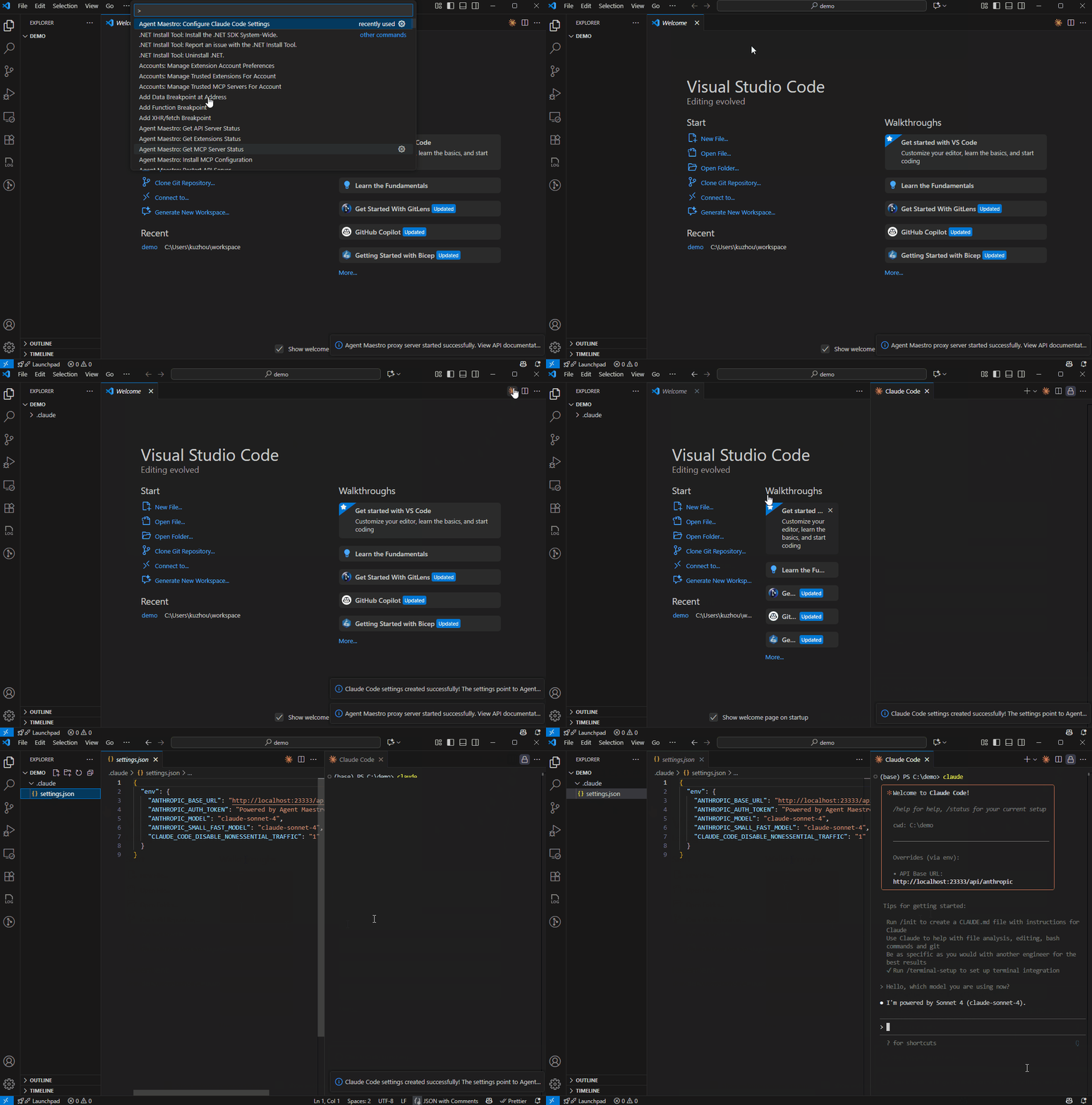
Open the Command Palette and run the relevant command:
| Client | Command | Configuration written |
|---|---|---|
| Claude Code | Agent Maestro: Configure Claude Code Settings | Choose ~/.claude/settings.json or <workspace>/.claude/settings.json |
| Claude Desktop | Agent Maestro: Configure Claude Desktop Settings | Platform-specific Claude-3p/configLibrary gateway configuration |
| Codex | Agent Maestro: Configure Codex Settings | ~/.codex/config.toml |
| Gemini CLI | Agent Maestro: Configure Gemini CLI Settings | Choose ~/.gemini/.env or <workspace>/.gemini/.env, plus settings.json in the same directory |
For Claude Code, Codex, or Gemini CLI, choose a model from the picker. If the list is empty, check Copilot sign-in and model availability in VS Code before continuing. Claude Code and Gemini CLI also offer project settings when you want the configuration limited to this workspace.
If you have enabled AM's optional LLM API key, apply the client authentication settings before the first request. Otherwise, the generated placeholder credentials are sufficient for the default local setup.
3. Get Your First Response
Start a fresh client session so it loads the new configuration. For CLI clients, use a terminal in the configured project directory:
| Client | Start after configuration |
|---|---|
| Claude Code CLI | Run claude |
| Codex CLI | Run codex |
| Gemini CLI | Run gemini |
| Claude Desktop | Fully quit and reopen the app, then start a new chat |
Send this small connectivity check:
Reply with exactly AM_CONNECTED. Do not read files or use tools.
Look for the reply and the matching request in VS Code's Output → Agent Maestro channel. AM logs an incoming request with its resolved model and a completion with token usage; this confirms the client used the proxy rather than another configured provider. The prompt is a smoke check, not a guarantee of exact model output.
Once connected, try a normal task such as explaining a function in your project. Requests consume model quota, and any tool approvals remain part of the client workflow. If the check fails, see troubleshooting. Direct API users can use the complete request examples.
Web Search
Search is available when a supported client requests it. AM does not add search to every prompt.
| Client/API path | How it is enabled | What to expect |
|---|---|---|
| Anthropic Messages | Client declares web_search_20250305 and the model selects it | At most one search per request; final text with source links |
| OpenAI Responses | Client declares stable web_search and the model selects it | At most one search per request; hosted-search events and URL citations |
| Codex standalone | Configure Codex Settings enables the experimental feature for supported CLI versions | Up to four search queries plus page open and find operations |
After configuring a supported Codex release, try asking it to find a recent release announcement and cite its sources. An existing web_search = "disabled" setting is preserved; change it to "live" if you want to enable search.
Searches can use Exa's anonymous allowance, including domain, recency, country, and cache-only constraints on standalone search. No Exa API key is required; anonymous access remains subject to Exa's rate limits. Run Agent Maestro: Set Exa API Key to use your Exa account. Queries and retrieved page URLs are sent to Exa, whose usage limits and billing are separate from Copilot.
These paths have different contracts: Gemini has no hosted-search integration here, and not every native search option or Codex web command is supported. See search compatibility and supported Codex versions.
Models and Context Windows
- Claude Code: Setup writes the selected model's compaction window and defaults the compaction threshold to 85% unless you already set one. For the supported 1M tier, it adds the client-side
[1m]marker. - Codex: Setup writes
model_context_windowfrom the selected model's advertisedmaxInputTokens.
AM prefers Copilot-provided usage metadata when available and estimates token counts otherwise. A local estimate can differ from provider usage; see context-window handling for the exact configuration and limits.
Run Agent Maestro: Select Fallback Model to choose a model for requests whose model ID cannot be matched. Exact and fuzzy matches take priority. Selecting auto leaves automatic model selection in effect; unavailable models can fall back to another available Copilot model.
GET /api/v1/lm/chatModels lists models discovered by VS Code, including vendors that may not be proxy-eligible. The Output channel distinguishes eligible Copilot models.
Configuration
Use VS Code settings for the following options. Port and default-Roo settings can be set per workspace; the other settings have application scope.
| Setting | Default | Purpose |
|---|---|---|
agent-maestro.proxyServerPort | 23333 | Proxy HTTP port |
agent-maestro.mcpServerPort | 23334 | MCP port |
agent-maestro.defaultRooIdentifier | rooveterinaryinc.roo-cline | Default Roo-compatible extension |
agent-maestro.rooVariantIdentifiers | ["kilocode.kilo-code"] | Additional Roo variants to discover |
agent-maestro.fallbackModelId | "" | Fallback model; configure through the command above |
agent-maestro.allowOutsideWorkspaceAccess | false | Permit filesystem access outside the workspace |
AGENT_MAESTRO_PROXY_PORT and AGENT_MAESTRO_MCP_PORT environment variables override the corresponding settings. Restart the extension host after changing ports or extension identifiers.
Roo/Kilo and MCP Setup
The MCP server normally uses port 23334 and requires the configured default Roo extension to provide a task manager. If only Kilo Code is installed, set agent-maestro.defaultRooIdentifier to kilocode.kilo-code and reload VS Code before starting MCP. HTTP task requests can also select an installed variant explicitly with extensionId.
Install MCP Configuration currently writes http://localhost:23334/mcp regardless of the configured port. If you use a custom MCP port, update that URL in the generated client configuration manually after installation.
Gemini Settings and Existing Overrides
The configurator writes GOOGLE_GEMINI_BASE_URL, GEMINI_API_KEY, GEMINI_MODEL, and GEMINI_TELEMETRY_ENABLED=false to the chosen .gemini/.env, preserving an existing API key. It also sets security.auth.selectedType to gemini-api-key in the adjacent settings.json.
The configurator warns about a workspace-root .env that can override user settings. If Gemini still connects to an old endpoint, check that file and the launching environment as well as .gemini/.env.
Access and Authentication
Authentication is disabled by default. Agent Maestro: Set LLM API Key stores an optional key in VS Code SecretStorage; an empty value disables it again. Generated placeholder client keys do not configure the server key. When authentication is enabled, configure the same key in your client, using:
| Route prefix | Header |
|---|---|
/api/anthropic/* | x-api-key: <key> |
/api/openai/* | Authorization: Bearer <key> |
/api/gemini/* | x-goog-api-key: <key> |
See complete request examples.
Claude Code with Authentication Enabled
Set ANTHROPIC_API_KEY in the chosen settings file's env section and remove ANTHROPIC_AUTH_TOKEN there and from the launching environment. AM requires x-api-key; the configurator's ANTHROPIC_AUTH_TOKEN sends a bearer header instead. Keep ANTHROPIC_BASE_URL pointing to AM. Rerunning the configurator can reintroduce the token setting, so recheck these fields afterward. See Claude Code's gateway authentication guidance.
Remote Access
The HTTP server listens on a wildcard address. The LLM key does not protect /api/v1 task, file, or workspace operations, or the separate MCP server. Before making either port accessible beyond a trusted local environment, put authenticated access controls in front of it. CORS is not an access-control substitute; AM currently allows cross-origin browser requests. See the remote demo requirements.
API and Commands
The default HTTP origin is http://127.0.0.1:23333. Inspect the running instance's /openapi.json for routes and schemas; use the compatibility guides for supported protocol behavior and limits.
| Interface | Paths | Reference |
|---|---|---|
| Anthropic | /api/anthropic/v1/messages, /api/anthropic/v1/messages/count_tokens, /api/anthropic/v1/models | LLM compatibility |
| OpenAI | /api/openai/v1/chat/completions, /api/openai/v1/responses | Responses compatibility |
| Gemini | /api/gemini/v1beta/models/{model}:generateContent, :streamGenerateContent, :countTokens | LLM compatibility |
| Codex standalone search | /api/openai/v1/alpha/search | Search compatibility |
| Roo and Cline | /api/v1/roo/*, /api/v1/cline/task | Roo HTTP/SSE |
| Model discovery | /api/v1/lm/chatModels, /api/v1/lm/tools | Running OpenAPI document |
Use these Command Palette actions to manage the extension:
- Agent Maestro: Start API Server, Stop API Server, Restart API Server, Get API Server Status.
- Agent Maestro: Start MCP Server, Stop MCP Server, Get MCP Server Status, Install MCP Configuration.
- Agent Maestro: Get Extensions Status.
- Agent Maestro: Set Exa API Key to configure or clear an optional search-provider key.
Troubleshooting and Diagnostics
| Symptom | First check |
|---|---|
| Connection refused | Keep the VS Code window open; check Get API Server Status and the client's configured port. |
| No models in the setup picker | Check Copilot sign-in, model access, and model-discovery messages in AM Output. |
| HTTP 401 | Match the server key and provider-specific header; see the Claude Code authentication note above. |
| Client answers but AM has no matching request | Start a new client session and inspect its active provider/base URL and project/environment overrides. |
| MCP unavailable with Kilo | Select Kilo as the default Roo extension and reload; check the generated MCP URL for custom ports. |
Start with the Agent Maestro Output channel. Supported LLM request failures also append diagnostics to a timestamped *-debug.log in the first workspace folder when file logging succeeds; the error response includes the path when available.
Review every log before sharing it. Known Anthropic message fields are redacted in diagnostic files, but system prompts, tool definitions, unknown fields, and error details can remain. Raw OpenAI/Gemini request bodies are not redacted. Debug-level Output logs are a separate channel and can contain request or response content. See the logging scope.
Development and Further Reading
- Documentation index: current guides, runbooks, and dated design records.
- Testing guide and contributor instructions.
- Roo extension API notes and remote demo.
- Changelog, including migration details for older versions.
Potential future work includes code-server deployment support, richer orchestration for Claude Code/Codex, and task scheduling. These are roadmap items, not supported interfaces.
Report a bug or request a feature.
License
MIT.