Overview
February 26, 2024 · View on GitHub
This repository contains the implementation of applications with PPML-Omics from:
Juexiao Zhou, Siyuan Chen, et al. "PPML-Omics: a Privacy-Preserving federated Machine Learning method protects patients’ privacy from omic data"
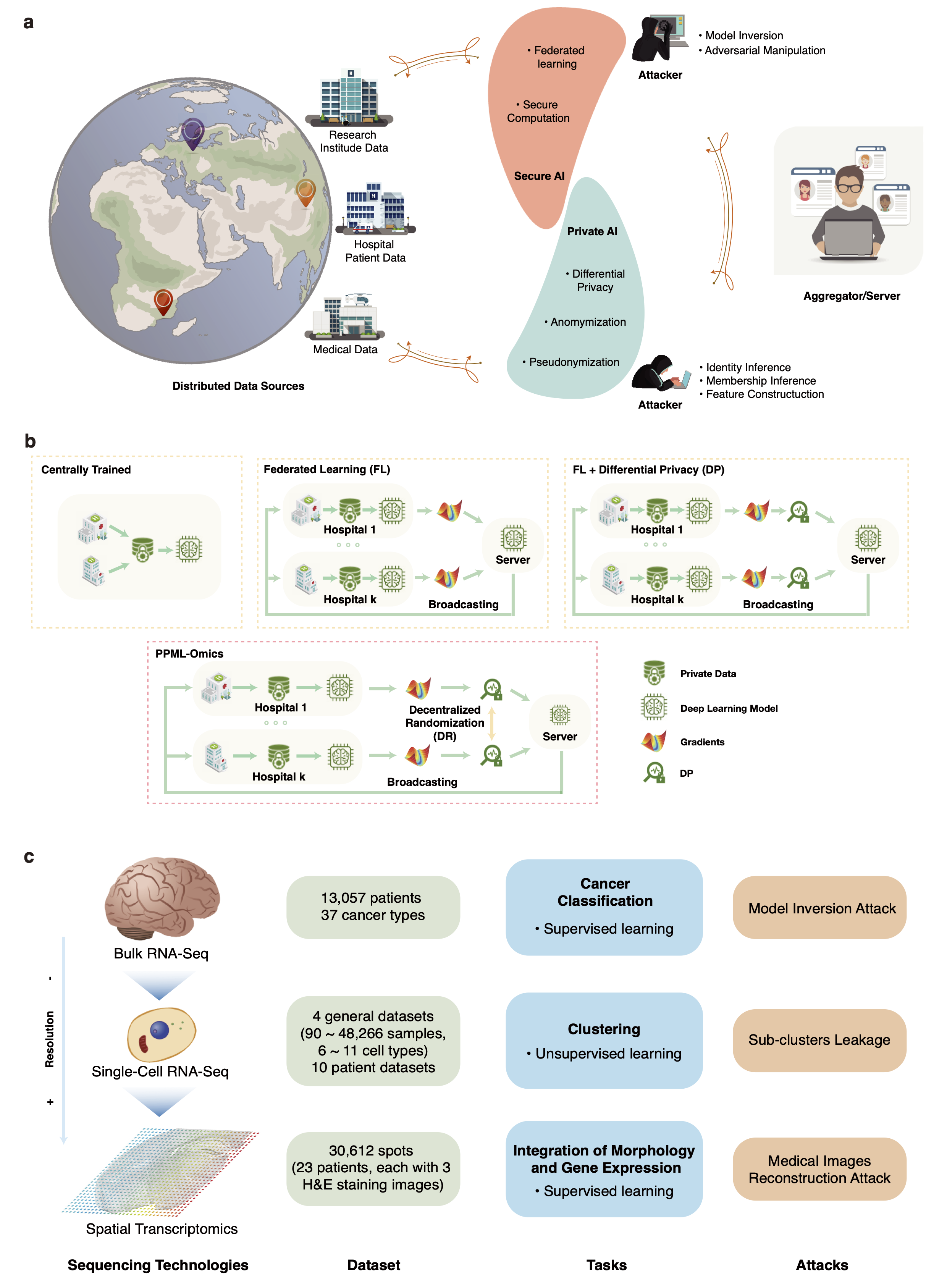
Fig. 1 PPML-Omics: a Privacy-Preserving federated Machine Learning method protects patients’ privacy from omic data. a, Schematic overview of the relationships and interactions between distributed data owners, aggregator, attackers and techniques in the field of secure and private AI. b, Schematic overview of different methods, including centrally trained method, federated learning (FL), FL with differential privacy (DP), and PPML-Omics. c, Illustration of 3 representative tasks, datasets and attacks of omic data in this paper for demonstrating the utility and privacy-preserving capability of PPML-Omics, including the 1) cancer classification with bulk RNA-seq, 2) clustering with scRNA-seq and 3) integration of morphology and gene expression with spatial transcriptomics.
Usage
Files Description
/Attack: source codes for attack experiments
/Application: examples of applying PPML-Omics, users can eaisy modify based on it to meet their own requirements.
Environment Setup
conda create -n ppmlomics python=3.9
conda activate ppmlomics
conda install mamba -y
mamba install pytorch torchvision torchaudio pytorch-cuda=11.8 -c pytorch -c nvidia -y
mamba install seaborn -y
mamba install matplotlib -y
mamba install tqdm -y
mamba install scikit-learn -y
mamba install -c conda-forge scipy -y
mamba install numpy=1.20.3 -y
mamba install -c conda-forge umap-learn -y
mamba install -c conda-forge openslide-python -y
pip install tenseal
Examples
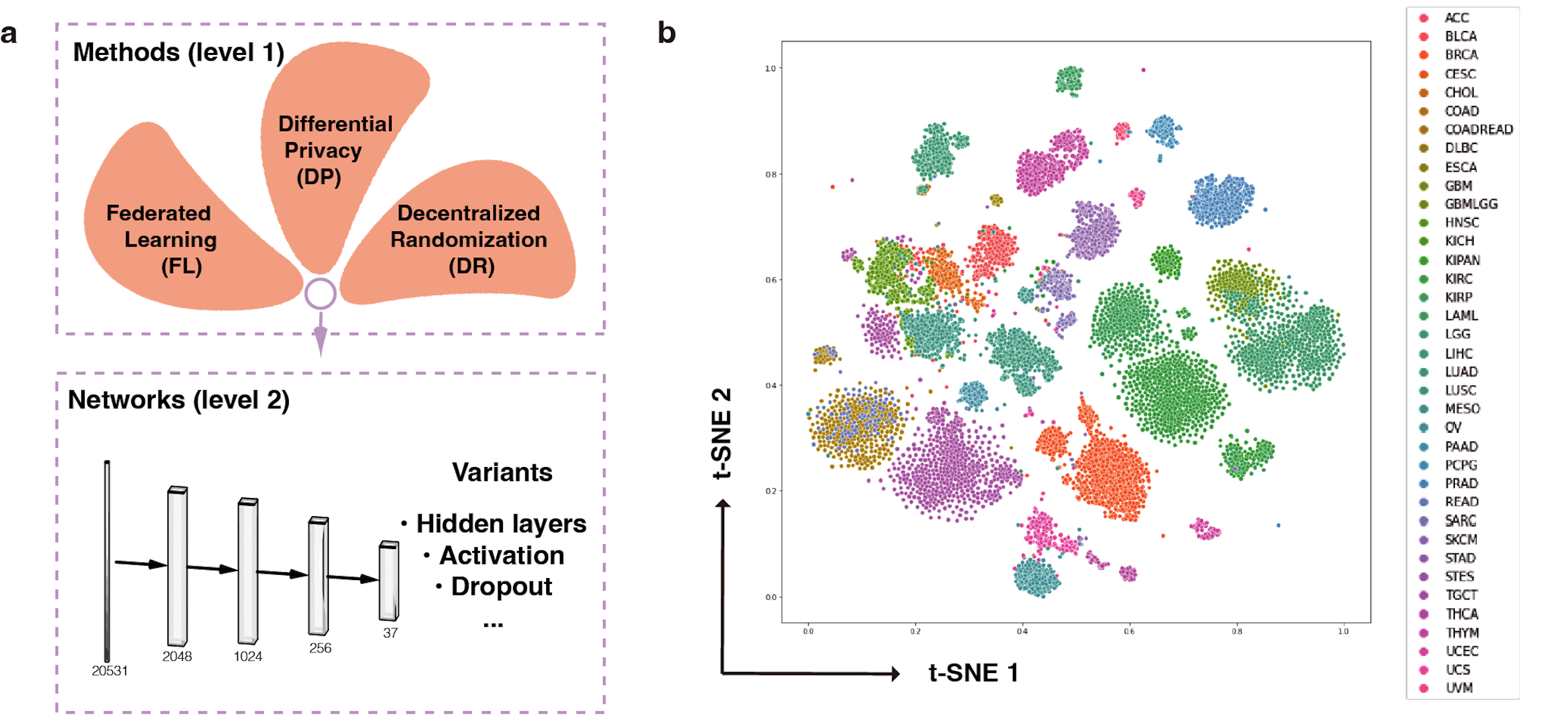
Application 1: Cancer type classification with PPML-Omics
Root
Please run all codes in this section with Application/CancerTypeClassification as root.
Dataset Preparation
The complete dataset can be downloaded via Google Drive.
python 01.processData.py
Optional Parameters
python 02.simulationApp.py --help
usage: 02.simulationApp.py [-h] [--device DEVICE] [--epochs EPOCHS] [--batch_size BATCH_SIZE] [--lr LR] [--epsilon EPSILON] [--delta DELTA] [--mode MODE] [--client CLIENT]
                                 [--l2_clip L2_CLIP] [--nprocess NPROCESS] [--expname EXPNAME] [--train_data TRAIN_DATA] [--test_data TEST_DATA] [--shuffle_model SHUFFLE_MODEL]

dfsa

optional arguments:
  -h, --help            show this help message and exit
  --device DEVICE       default: cuda:0
  --epochs EPOCHS       default: 50
  --batch_size BATCH_SIZE
                        default: 1
  --lr LR               default: 0.01
  --epsilon EPSILON     default: 100
  --delta DELTA         default: 0.5
  --mode MODE           default: SGD, DP, PPMLOmics
  --client CLIENT       default: 3
  --l2_clip L2_CLIP     default: 5
  --nprocess NPROCESS   default: 20
  --expname EXPNAME     experiment name
  --train_data TRAIN_DATA
                        will load data/{}.npy
  --test_data TEST_DATA
                        will load data/{}.npy
  --shuffle_model SHUFFLE_MODEL
                        0: off, 1: on
Systems
PPML-Omics provides 4 basic modes for calculate the gradients: SGD, SIGNSGD, DP, DPSIGNSGD, and 1 shuffling mode, with --shuffle_model sets to 1, which can be freely combined into different systems.
Example of centrally trained method (#client=1)
python 02.simulationApp.py --mode SGD --client 1 --epochs 10 --batch_size 8 --lr 0.001 --expname PureSGD0 --train_data train_log10_0 --test_data test_log10_0
Example of FL method with 5 clients
python 02.simulationApp.py --mode SGD --client 5 --epochs 10 --batch_size 8 --lr 0.001 --expname FL --train_data train_log10_0 --test_data test_log10_0
Example of FL+DP method with different privacy budget
for e in 50 40 30 20 10 5 1
do
python 02.simulationApp.py --mode DP --client 20 --epochs 10 --device cuda:1 --batch_size 8 --lr 0.001 --epsilon ${e} --expname DP_e${e} --train_data train_log10_0 --test_data test_log10_0
done
Example of PPML-Omics
for e in 50 40 30 20 10 5 1
do
python 02.simulationApp.py --mode PPMLOmics --client 20 --epochs 10 --batch_size 8 --lr 0.001 --epsilon ${e} --expname PPMLOmics_e${e} --train_data train_log10_0 --test_data test_log10_0
done
Example of varing number of clients
for cli in 5 10 20 50
do
python 02.simulationApp.py --mode PPMLOmics --client ${cli} --epochs 10 --device cuda:1 --batch_size 8 --lr 0.001 --epsilon 20  --expname PPMLOmics_e20_cli${cli} --train_data train_log10_0 --test_data test_log10_0
done
Example of MIA
python 03.attackApp.py --model path/to/model
Visualization of MIA
MIAVisualization.ipynb
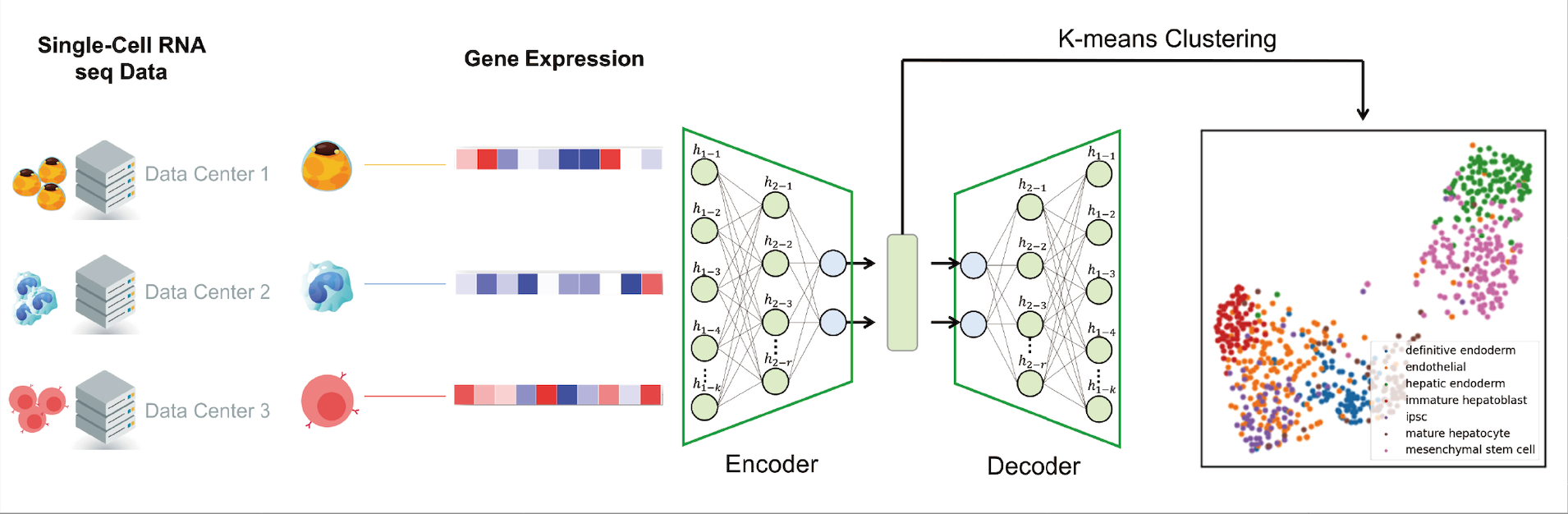
Application 2: Clustering with scRNA-seq data
Root
Please run all codes in this section with Application/SingleCellClustering as root.
Dataset Preparation
The count data for 4 scRNA-seq dataset can be downloaded via Google Drive.
The original .rds file can be found in scDHA website
Optional Parameters
python 01.simulationApp.py --help
usage: 01.simulationApp.py [-h] [--device DEVICE] [--epochs EPOCHS] [--batch_size BATCH_SIZE] [--lr LR] [--epsilon EPSILON] [--delta DELTA] [--mode MODE] [--client CLIENT] [--l2_clip L2_CLIP] [--nprocess NPROCESS] [--dataset DATASET] [--expname EXPNAME] [--train_data TRAIN_DATA] [--test_data TEST_DATA] [--shuffle_model SHUFFLE_MODEL]

dfsa

optional arguments:
  -h, --help            show this help message and exit
  --device DEVICE       default: cuda:0
  --epochs EPOCHS       default: 50
  --batch_size BATCH_SIZE
                        default: 1
  --lr LR               default: 0.01
  --epsilon EPSILON     default: 100
  --delta DELTA         default: 0.5
  --mode MODE           default: SGD, DP, PPMLOmics
  --client CLIENT       default: 3
  --l2_clip L2_CLIP     default: 5
  --nprocess NPROCESS   default: 20
  --dataset DATASET     dataset name
  --expname EXPNAME     experiment name
  --train_data TRAIN_DATA
                        will load data/{}.npy
  --test_data TEST_DATA
                        will load data/{}.npy
  --shuffle_model SHUFFLE_MODEL
                        0: off, 1: on
Example of centrally trained method (#client=1)
for dataset in hrvatin pollen yan
  do
     python 01.simulationApp.py --dataset=$dataset --mode=SGD --client=1 --epochs=5 --batch_size=8 --lr=0.001 --expname="PureSGD"
done
Example of FL method with 5 clients
for dataset in hrvatin pollen yan
  do
     python 01.simulationApp.py --dataset=$dataset --mode=SGD --client=5 --epochs=5 --batch_size=8 --lr=0.001 --expname="FL"
done
Example of FL+DP method with different privacy budget
for dataset in hrvatin pollen yan
  do
    for e in 2 3 5 10 20 50
    do
     python 01.simulationApp.py --dataset=$dataset --mode=DP --client=30 --epochs=5 --rep=3 --batch_size=8 --lr=0.001 --epsilon=${e} --delta=1e-5 --expname="DP"
    done
done
Example of PPML-Omics
for dataset in hrvatin pollen yan
  do
    for e in 2 3 5 10 20 50
    do
     python 01.simulationApp.py --dataset=$dataset --mode=PPMLOmics --client=30 --epochs=5 --rep=3 --batch_size=8 --lr=0.001 --epsilon=${e} --delta=1e-5 --expname="PPML-Omics"
    done
done
Example on Patient data
for dataset in P0410 P1026
do
    for e in 2 3 5 10 20 50
    do
    	python 01.simulationApp.py --dataset=$dataset --mode=PPMLOmics --client=1 --epochs=5 --rep=3 --batch_size=8 --lr=0.001 --epsilon=${e} --delta=1e-5 --expname="PPML-Omics"
    done
done
Test and Visualization
# For datasets: yan pollen hrvatin
python 02.Test.py --dataset="yan" --model="model/PPMLOmics_yan_modelbest.tar" --expname="PPMLOmics_e5"
# For patients
python 04.TestPatient.py --dataset="P0123" --model="model/PPMLOmics_P0123_epsilon_5.0_modelbest.tar" --expname="PPMLOmics_e5"
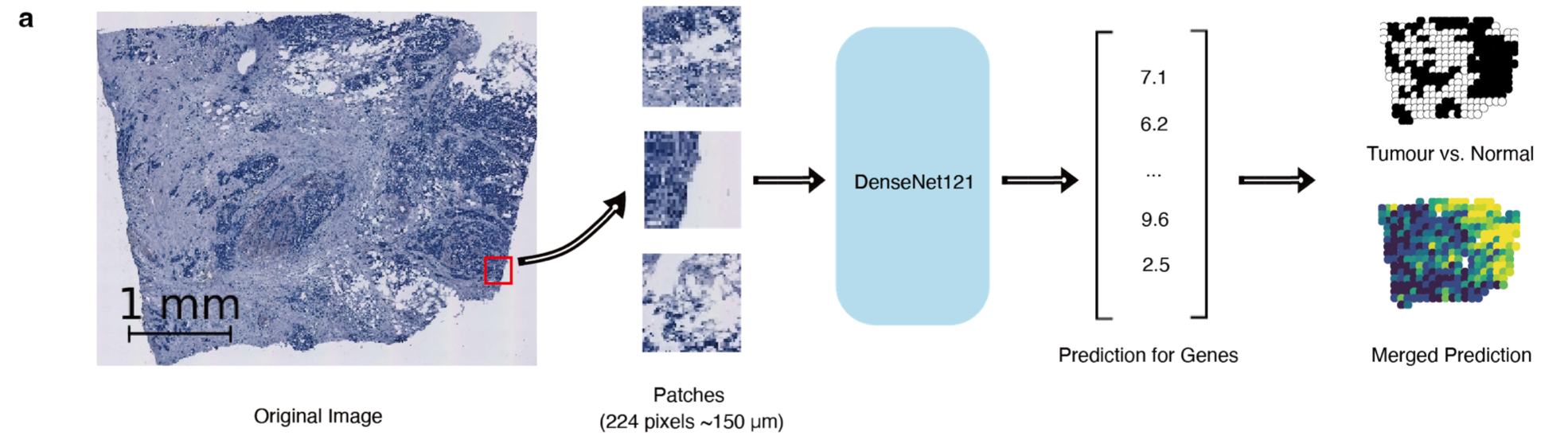
Application 3: Integration of tumour morphology and gene expression with spatial transcriptomics
Root
Please run all codes in this section with Application/SpatialTranscriptomics as root.
Dataset Preparation
The complete dataset can be downloaded via Google Drive.
Optional Parameters
python 01.simulationApp.py --help
usage: 01.simulationApp.py [-h] [--device DEVICE] [--epochs EPOCHS] [--batch_size BATCH_SIZE] [--lr LR] [--epsilon EPSILON] [--delta DELTA] [--mode MODE] [--client CLIENT] [--l2_clip L2_CLIP] [--nprocess NPROCESS] [--expname EXPNAME] [--shuffle_model SHUFFLE_MODEL]

dfsa

optional arguments:
  -h, --help            show this help message and exit
  --device DEVICE       default: cuda:0
  --epochs EPOCHS       default: 50
  --batch_size BATCH_SIZE
                        default: 1
  --lr LR               default: 0.01
  --epsilon EPSILON     default: 100
  --delta DELTA         default: 0.5
  --mode MODE           default: SGD, DP, PPMLOmics
  --client CLIENT       default: 3
  --l2_clip L2_CLIP     default: 5
  --nprocess NPROCESS   default: 20
  --expname EXPNAME     experiment name
  --shuffle_model SHUFFLE_MODEL
                        0: off, 1: on
Example of centrally trained method (#client=1)
python 01.simulationApp.py --device cuda:0 --mode SGD --client 1 --epochs 10 --batch_size 32 --nprocess 40 --lr 1e-6 --expname PureSGD
Example of FL method with 30 clients
python 01.simulationApp.py --device cuda:1 --mode SGD --client 30 --epochs 10 --batch_size 32 --nprocess 40 --lr 1e-6 --expname FL
Example of FL+DP method with different privacy budget
for e in 10 5 1 0.5 0.1
do
python 01.simulationApp.py --device cuda:1 --mode DP --client 30 --epochs 10 --epsilon ${e} --lr 1e-5 --delta 1e-5 --batch_size 32 --nprocess 40 --l2_clip 20 --expname DP_e${e}
done
Example of PPML-Omics
for e in 10 5 1 0.5 0.1
do
python 01.simulationApp.py --device cuda:0 --mode PPMLOmics --client 30 --epochs 10 --epsilon ${e} --lr 1e-6 --delta 1e-5 --batch_size 32 --nprocess 40 --l2_clip 20 --expname PPMLOmics_e${e}
done
Example of iDLG on centrally trained method
python 02.attackApp.py --mode SGD --expname iDLG_attack_SGD
Example of iDLG on PPML-Omics
python 02.attackApp.py --mode DP --expname iDLG_attack_DP --epsilon 0.01
Citation
If you find our work helpful, please cite our paper:
@article{zhou2024ppml,
  title={PPML-Omics: A privacy-preserving federated machine learning method protects patients’ privacy in omic data},
  author={Zhou, Juexiao and Chen, Siyuan and Wu, Yulian and Li, Haoyang and Zhang, Bin and Zhou, Longxi and Hu, Yan and Xiang, Zihang and Li, Zhongxiao and Chen, Ningning and others},
  journal={Science Advances},
  volume={10},
  number={5},
  pages={eadh8601},
  year={2024},
  publisher={American Association for the Advancement of Science}
}