UIViewController-KeyboardAnimation
July 7, 2017 · View on GitHub

Easy way to handle iOS keyboard showing/dismissing.
Introduction
Working with iOS keyboard demands a lot of duplicated code. This category allows you to declare your animations with smooth keyboard animation timing and write very little code.
Demo
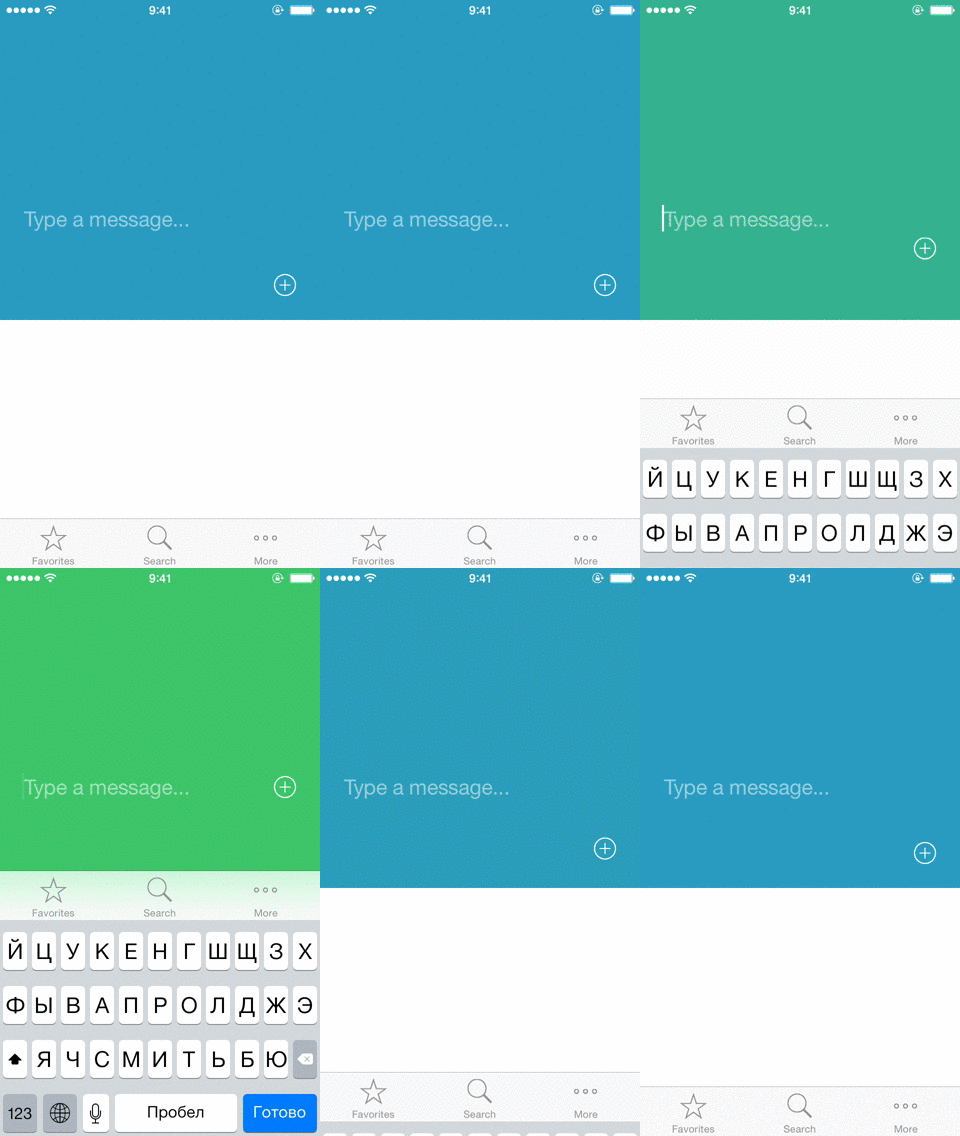

Try it yourself
pod try UIViewController+KeyboardAnimation
Example
Imagine that you need to implement chat-like input over keyboard. OK, import this category.
#import <UIViewController+KeyboardAnimation.h>
Then make autolayout constraint between your input bottom and superview botton in Interface Builder, connect it with your view controller implementation through IBOutlet.
@property (weak, nonatomic) IBOutlet NSLayoutConstraint *chatInputBottomSpace;
Then subscribe to keyboard in place you like (viewWillAppear is the best place really).
@weakify(self)
[self an_subscribeKeyboardWithAnimations:^(CGRect keyboardRect, NSTimeInterval duration, BOOL isShowing) {
    @strongify(self)
    self.chatInputBottomSpace.constant = isShowing ?  CGRectGetHeight(keyboardRect) : 0;
    [self.view layoutIfNeeded];
} completion:nil];
That’s all!
Don’t forget to unsubscribe from keyboard events (viewWillDisappear is a my recommendation). Calling category method will do all “dirty” work for you.
[self an_unsubscribeKeyboard];
For more complex behaviour (like in demo section) you can use extended API call with before animation section.
@weakify(self)
[self an_subscribeKeyboardWithBeforeAnimations:^(CGRect keyboardRect, NSTimeInterval duration, BOOL isShowing) {
    @strongify(self)

    self.isKeaboardAnimation = YES;

    [UIView transitionWithView:self.imageView duration:duration options:UIViewAnimationOptionTransitionCrossDissolve animations:^{
        if (isShowing) {
            self.imageView.image = [self.imageView.image applyLightEffect];
        } else {
            [self.imageView hnk_setImageFromURL:self.model.cardImageUrl];
        }
    } completion:nil];
} animations:^(CGRect keyboardRect, NSTimeInterval duration, BOOL isShowing) {
    @strongify(self)

    self.headerHeight.constant = isShowing ? kHeaderMinHeight :kHeaderMaxHeight;
    self.panelSpace.constant = isShowing ?  CGRectGetHeight(keyboardRect) : 0;

    for (UIView* v in self.headerAlphaViews) {
        v.alpha = isShowing ? 0.0f : 1.0f;
    }

    [self.view layoutIfNeeded];
} completion:^(BOOL finished) {
    @strongify(self)

    self.isKeaboardAnimation = NO;
}];
Sinse version 1.3 you could add reaction for UIKeyboardWillChangeFrameNotification with an_subscribeKeyboardFrameChangesWithAnimations/an_unsubscribeKeyboardFrameChanges (thanks @timaktimak for PR 🙌)
Underhood
This category registers/unregisters your view controller to UIKeyboardWillShowNotification/UIKeyboardWillHideNotification. Also it holds animation blocks, so you really need to provide weak reference to self (i use @weakify/@strongify from ReactiveCocoa dependency).
Installation
Add the following to your CocoaPods Podfile
pod 'UIViewController+KeyboardAnimation', '~> 1.3'
or clone as a git submodule,
or just copy files
License
All this code is available under the MIT license.
Contact
Follow me on Twitter or Github
More sources
Simple category to show loading status in a navigation bar (left/right items or title) UINavigationItem-Loading