rusty-req
September 25, 2025 · View on GitHub




A high-performance asynchronous request library based on Rust and Python, suitable for scenarios that require high-throughput concurrent HTTP requests. It implements the core concurrent logic in Rust and packages it into a Python module using PyO3 and maturin, combining Rust's performance with Python's ease of use.
🌐 English | 中文
🚀 Features
- Dual Request Modes: Supports both batch concurrent requests (
fetch_requests) and single asynchronous requests (fetch_single). - High Performance: Built with Rust, Tokio, and a shared
reqwestclient for maximum throughput. - Highly Customizable: Allows custom headers, parameters/body, per-request timeouts, and tags.
- Flexible Concurrency Modes: Choose between
SELECT_ALL(default, get results as they complete) andJOIN_ALL(wait for all requests to finish) to fit your use case. - Smart Response Handling: Automatically decompresses
gzip,brotli, anddeflateencoded responses. - Global Timeout Control: Use
total_timeoutin batch requests to prevent hangs. - Detailed Results: Each response includes the HTTP status, body, metadata (like processing time), and any exceptions.
- Debug Mode: An optional debug mode (
set_debug(True)) prints detailed request/response information.
🔧 Installation
pip install rusty-req
Or build from source:
# This will compile the Rust code and create a .whl file
maturin build --release

# Install from the generated wheel
pip install target/wheels/rusty_req-*.whl
Development & Debugging
cargo watch -s "maturin develop"
⚙️ Proxy Configuration & Debug
1. Using Proxy
If you need to access external networks through a proxy, create a ProxyConfig object and set it as a global proxy:
import asyncio
import rusty_req

async def proxy_example():
    # Create ProxyConfig object
    proxy = rusty_req.ProxyConfig(
        http="http://127.0.0.1:7890",
        https="http://127.0.0.1:7890"
    )

    # Set global proxy (all requests will use this proxy)
    await rusty_req.set_global_proxy(proxy)

    # Send request (will go through proxy automatically)
    resp = await rusty_req.fetch_single(url="https://httpbin.org/get")
    print(resp)

if __name__ == "__main__":
    asyncio.run(proxy_example())
2. Debug Logging
set_debug enables debug mode, supporting console output and log file writing:
import rusty_req

# Print debug logs to console only
rusty_req.set_debug(True)

# Print to console and write to log file
rusty_req.set_debug(True, "logs/debug.log")

# Disable debug mode
rusty_req.set_debug(False)
📦 Example Usage
1. Fetching a Single Request (fetch_single)
Perfect for making a single asynchronous call and awaiting its result.
import asyncio
import pprint
import rusty_req

async def single_request_example():
    """Demonstrates how to use fetch_single for a POST request."""
    print("🚀 Fetching a single POST request to httpbin.org...")

    # Enable debug mode to see detailed logs in the console
    rusty_req.set_debug(True)

    response = await rusty_req.fetch_single(
        url="https://httpbin.org/post",
        method="POST",
        params={"user_id": 123, "source": "example"},
        headers={"X-Client-Version": "1.0"},
        tag="my-single-post"
    )

    print("\n✅ Request finished. Response:")
    pprint.pprint(response)

if __name__ == "__main__":
    asyncio.run(single_request_example())
2. Fetching Batch Requests (fetch_requests)
The core feature for handling a large number of requests concurrently. This example simulates a simple load test.
import asyncio
import time
import rusty_req
from rusty_req import ConcurrencyMode

async def batch_requests_example():
    """Demonstrates 100 concurrent requests with a global timeout."""
    requests = [
        rusty_req.RequestItem(
            url="https://httpbin.org/delay/2",  # This endpoint waits 2 seconds
            method="GET",
            timeout=2.9,  # Per-request timeout, should succeed
            tag=f"test-req-{i}",
        )
        for i in range(100)
    ]

    # Disable debug logs for cleaner output
    rusty_req.set_debug(False)

    print("🚀 Starting 100 concurrent requests...")
    start_time = time.perf_counter()

    # Set a global timeout of 3.0 seconds. Some requests will be cut off.
    responses = await rusty_req.fetch_requests(
        requests,
        total_timeout=3.0,
        mode=ConcurrencyMode.SELECT_ALL # Explicitly use SELECT_ALL mode
    )

    total_time = time.perf_counter() - start_time

    # --- Process results ---
    success_count = 0
    failed_count = 0
    for r in responses:
        # Check the 'exception' field to see if the request was successful
        if r.get("exception") and r["exception"].get("type"):
            failed_count += 1
        else:
            success_count += 1

    print("\n📊 Load Test Summary:")
    print(f"⏱️  Total time taken: {total_time:.2f}s")
    print(f"✅ Successful requests: {success_count}")
    print(f"⚠️ Failed or timed-out requests: {failed_count}")

if __name__ == "__main__":
    asyncio.run(batch_requests_example())
3. Understanding Concurrency Modes (SELECT_ALL vs JOIN_ALL)
The fetch_requests function supports two powerful concurrency strategies. Choosing the right one is key to building robust applications.
-
ConcurrencyMode.SELECT_ALL(Default): Best-Effort Collector This mode operates on a "first come, first served" or "best-effort" basis. It aims to collect as many successful results as possible within the giventotal_timeout.- It returns results as soon as they complete.
- If the
total_timeoutis reached, it gracefully returns all the requests that have already succeeded, while marking any still-pending requests as timed out. - A failure in one request does not affect others.
-
ConcurrencyMode.JOIN_ALL: Transactional (All-or-Nothing) This mode treats the entire batch of requests as a single, atomic transaction. It is much stricter.- It waits for all submitted requests to complete first.
- It then inspects the results.
- Success Case: Only if every single request was successful will it return the complete list of successful results.
- Failure Case: If even one request fails for any reason (e.g., its individual timeout, a network error, or a non-2xx status code), this mode will discard all results and return a list where every request is marked as a global failure.
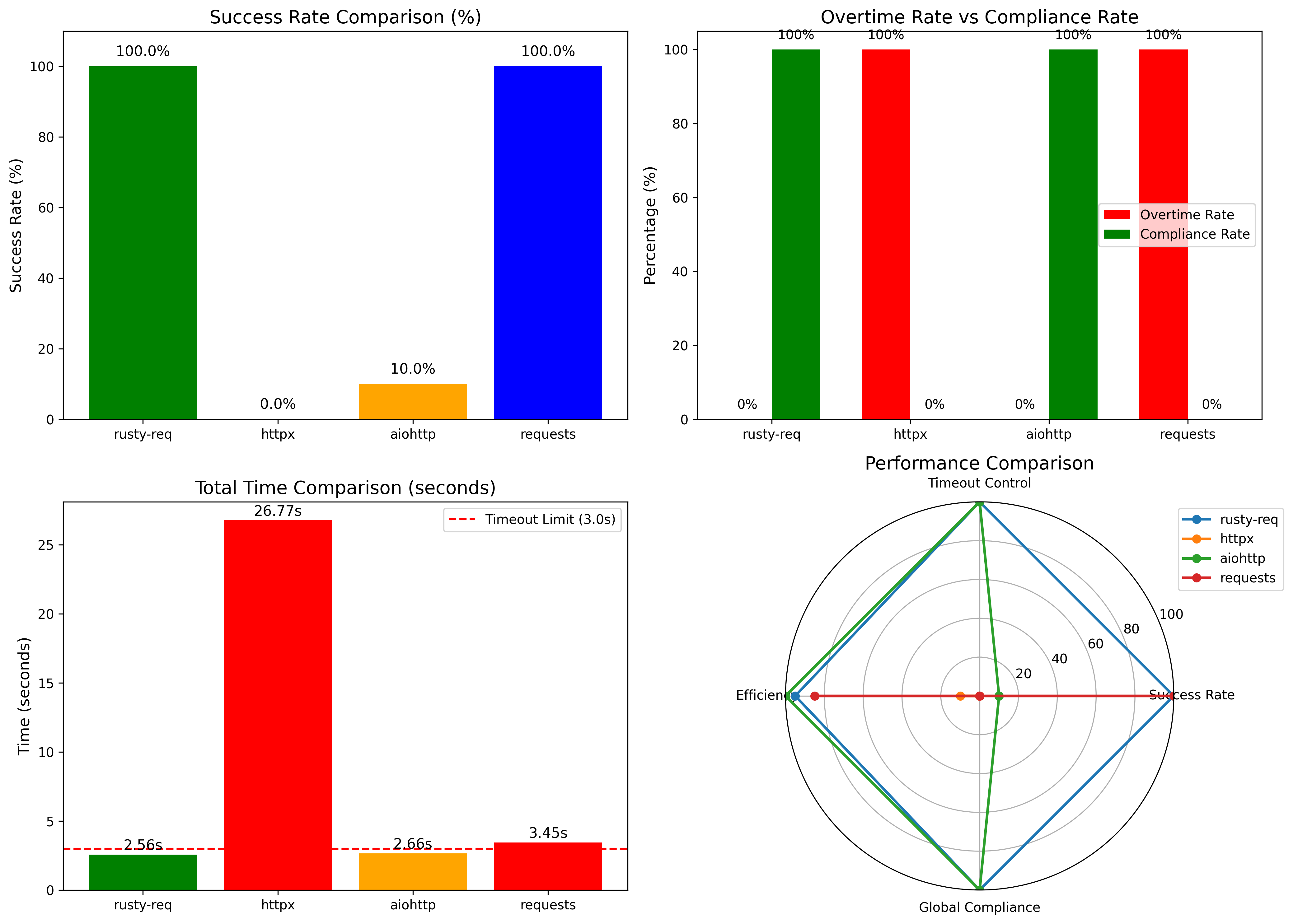
4. Timeout Performance Comparison
Under the same test conditions (global timeout 3s, per-request timeout 2.6s, httpbin delay 2.3s), we compared the performance of different libraries:
| Library / Framework | Total Requests | Successful | Timed Out | Success Rate | Actual Total Time | Notes / Description |
|---|---|---|---|---|---|---|
| Rusty-req | 1000 | 1000 | 0 | 100.0% | 2.56s | Stable performance under high concurrency; precise control of per-request and total timeouts |
| httpx | 1000 | 0 | 0 | 0.0% | 26.77s | Timeout parameters did not take effect; overall performance abnormal |
| aiohttp | 1000 | 100 | 900 | 10.0% | 2.66s | Per-request timeout effective, but global timeout control insufficient |
| requests | 1000 | 1000 | 0 | 100.0% | 3.45s | Synchronous blocking mode; not suitable for large-scale concurrent requests |
Key takeaways:
- Rusty-req can complete tasks within strict global timeout limits while maintaining high concurrency and stability.
- Traditional asynchronous libraries struggle with global timeout enforcement and extreme concurrency scenarios.
- Synchronous libraries like
requestsproduce correct results but are not scalable for large-scale concurrent requests.
Quick Comparison
| Aspect | ConcurrencyMode.SELECT_ALL (Default) | ConcurrencyMode.JOIN_ALL |
|---|---|---|
| Failure Handling | Tolerant. One failure does not affect other successful requests. | Strict / Atomic. One failure causes the entire batch to fail. |
| Primary Use Case | Maximizing throughput; getting as much data as possible. | Tasks that must succeed or fail as a single unit (e.g., transactions). |
| Result Order | By completion time (fastest first). | By original submission order. |
| "When do I get results?" | As they complete, one by one. | All at once, only after every request has finished and been validated. |
Code Example
The example below clearly demonstrates the difference in behavior.
import asyncio
import rusty_req
from rusty_req import ConcurrencyMode

async def concurrency_modes_example():
    """Demonstrates the difference between SELECT_ALL and JOIN_ALL modes."""
    # Note: We are using an endpoint that returns 500 to force a failure.
    requests = [
        rusty_req.RequestItem(url="https://httpbin.org/delay/2", tag="should_succeed"),
        rusty_req.RequestItem(url="https://httpbin.org/status/500", tag="will_fail"),
        rusty_req.RequestItem(url="https://httpbin.org/delay/1", tag="should_also_succeed"),
    ]

    # --- 1. Test SELECT_ALL ---
    print("--- 🚀 Testing SELECT_ALL (Best-Effort) ---")
    results_select = await rusty_req.fetch_requests(
        requests,
        mode=ConcurrencyMode.SELECT_ALL,
        total_timeout=3.0
    )

    print("Results:")
    for res in results_select:
        tag = res.get("meta", {}).get("tag")
        status = res.get("http_status")
        err_type = res.get("exception", {}).get("type")
        print(f"  - Tag: {tag}, Status: {status}, Exception: {err_type}")

    print("\n" + "="*50 + "\n")

    # --- 2. Test JOIN_ALL ---
    print("--- 🚀 Testing JOIN_ALL (All-or-Nothing) ---")
    results_join = await rusty_req.fetch_requests(
        requests,
        mode=ConcurrencyMode.JOIN_ALL,
        total_timeout=3.0
    )

    print("Results:")
    for res in results_join:
        tag = res.get("meta", {}).get("tag")
        status = res.get("http_status")
        err_type = res.get("exception", {}).get("type")
        print(f"  - Tag: {tag}, Status: {status}, Exception: {err_type}")

if __name__ == "__main__":
    asyncio.run(concurrency_modes_example())
The expected output from the script above:
--- 🚀 Testing SELECT_ALL (Best-Effort) ---
Results:
  - Tag: should_also_succeed, Status: 200, Exception: None
  - Tag: will_fail, Status: 500, Exception: HttpStatusError
  - Tag: should_succeed, Status: 200, Exception: None

==================================================

--- 🚀 Testing JOIN_ALL (All-or-Nothing) ---
Results:
  - Tag: should_succeed, Status: 0, Exception: GlobalTimeout
  - Tag: will_fail, Status: 0, Exception: GlobalTimeout
  - Tag: should_also_succeed, Status: 0, Exception: GlobalTimeout
🧱 Data Structures
RequestItem Parameters
| Field | Type | Required | Description |
|---|---|---|---|
url | str | ✅ | The target URL. |
method | str | ✅ | The HTTP method. |
params | dict / None | No | For GET/DELETE, converted to URL query parameters. For POST/PUT/PATCH, sent as a JSON body. |
headers | dict / None | No | Custom HTTP headers. |
tag | str | No | An arbitrary tag to help identify or index the response. |
http_version | str | No | The default behavior when the HTTP version is set to “Auto” is to attempt HTTP/2 first, and fall back to HTTP/1.1 if HTTP/2 is not supported. |
ssl_verify | bool | No | SSL certificate verification (default True, set False to disable for self-signed certificates) |
timeout | float | ✅ | Timeout for this individual request in seconds. Defaults to 30s. |
ProxyConfig Parameters
| Field | Type | Required | Description |
|---|---|---|---|
http | str / None | No | Proxy URL for HTTP requests (e.g. http://127.0.0.1:8080). |
https | str / None | No | Proxy URL for HTTPS requests. |
all | str / None | No | A single proxy URL applied to all schemes (overrides http/https). |
no_proxy | List[str] / None | No | List of hostnames/IPs to exclude from proxying. |
username | str / None | No | Optional proxy authentication username. |
password | str / None | No | Optional proxy authentication password. |
trust_env | bool / None | No | Whether to respect system environment variables (HTTP_PROXY, NO_PROXY). |
fetch_requests Parameters
| Field | Type | Required | Description |
|---|---|---|---|
requests | List[RequestItem] | ✅ | A list of RequestItem objects to be executed concurrently. |
total_timeout | float | No | A global timeout in seconds for the entire batch operation. |
mode | ConcurrencyMode | No | The concurrency strategy. SELECT_ALL (default) for best-effort collection. JOIN_ALL for atomic (all-or-nothing) execution. See Section 3 for a detailed comparison. |
fetch_single Parameters
| Field | Type | Required | Description |
|---|---|---|---|
url | str | ✅ | The target request URL. |
method | str / None | No | HTTP method, e.g., "GET", "POST". If not provided, the client may handle defaults. |
params | dict / None | No | Request parameters. For GET/DELETE, converted to URL query parameters; for POST/PUT/PATCH, sent as JSON body. |
timeout | float / None | No | Timeout for this request in seconds. Defaults to 30s. |
headers | dict / None | No | Custom HTTP request headers. |
tag | str / None | No | Arbitrary tag to help identify or index the response. |
proxy | ProxyConfig / None | No | Optional proxy configuration. Applied to this request if provided. |
http_version | HttpVersion / None | No | HTTP version choice, usually supports "Auto" (try HTTP/2, fallback to HTTP/1.1), "1.1", "2", etc. |
ssl_verify | bool / None | No | Whether to verify SSL certificates. Defaults to True; set False to ignore self-signed certificates. |
Response Dictionary Format
Both fetch_single and fetch_requests return a dictionary (or a list of dictionaries) with a consistent structure.
Example of a successful response:
{
  "http_status": 200,
  "response": {
    "headers": {
      "access-control-allow-credentials": "true",
      "access-control-allow-origin": "*",
      "connection": "keep-alive",
      "content-length": "314",
      "content-type": "application/json",
      "date": "Wed, 10 Sep 2025 03:15:31 GMT",
      "server": "gunicorn/19.9.0"
    },
    "content": "{\"data\":\"...\", \"headers\":{\"...\"}}"
  },
  "meta": {
    "process_time": "2.0846",
    "request_time": "2025-09-10 11:22:46 -> 2025-09-10 11:22:48",
    "tag": "req-0"
  },
  "exception": {}
}
Example of a failed response (e.g., timeout):
{
  "http_status": 0,
  "response": {
    "headers": {
      "access-control-allow-credentials": "true",
      "access-control-allow-origin": "*",
      "connection": "keep-alive",
      "content-length": "314",
      "content-type": "application/json",
      "date": "Wed, 10 Sep 2025 03:15:31 GMT",
      "server": "gunicorn/19.9.0"
    },
    "content": ""
  },
  "meta": {
    "process_time": "3.0012",
    "request_time": "2025-08-08 03:15:05 -> 2025-08-08 03:15:08",
    "tag": "test-req-50"
  },
  "exception": {
    "type": "Timeout",
    "message": "Request timeout after 3.00 seconds"
  }
}
Changelog
For a detailed list of changes, see the CHANGELOG
Star History
📄 License
This project is licensed under the MIT License.