The Dwarf's Hammer 🔨
February 4, 2026 · View on GitHub
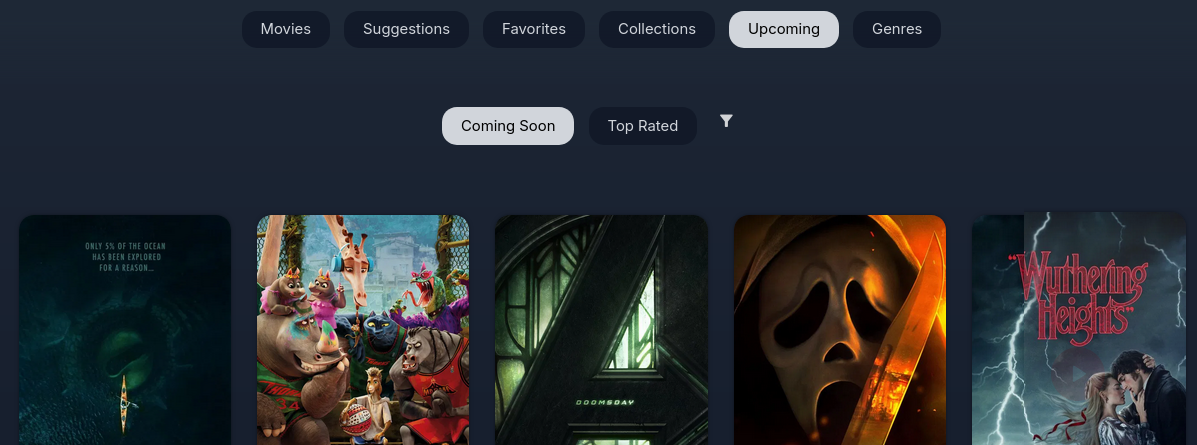
Enhanced collection management and content discovery for Jellyfin, tested on 10.11.5



✨ Features
🎬 Upcoming Content
- Upcoming Movies (Coming Soon + Top Rated)
- Upcoming Series :
- Library: Upcoming episodes + last missing episode
- Trending
- Top Rated
- TMDB integration with trailer playback
- Genre filtering
- "In Library" badges
📚 Collection Management
- "No Collection" filter for Movies and Series
- Series Collections tab
- Auto-tagging for non-collection content, required for filtering movies only
- Real-time sync option (admin only)
🔍 Enhanced UI
- Actor/actress Google search from context menu
- Copy title from context menu
- Missing episodes/seasons detection
- Collection links on detail pages
🚀 Installation
Step 1: Install Plugin
- Dashboard → Plugins → Repositories
- Click + Add
- Name:
The Dwarf's Hammer - URL:
https://raw.githubusercontent.com/kamoba/jellyfin-plugin-thedwarfshammer/main/manifest.json - Save
- Go to Plugins catalog tab
- Find The Dwarf's Hammer
- Click Install
- Restart Jellyfin
- Refresh browser
Step 2: Configure Plugin
- Dashboard → Plugins → The Dwarf's Hammer
- Get free TMDB API key from themoviedb.org/settings/api (Optional, needed for Upcomings)
- Paste API key
- Click Save
- Dashboard → Scan All Libraries (or use "Tag Non-Collection Movies" button on Dashboard)
- This tags movies not in collections with "NotInCollection"
- Tags auto-update on each full library scan
- ⚠️ Note: Quick scans (Libraries → Movies → Scan Library) won't update tags - use full scan from Dashboard
Tip: For ongoing updates, enable "Real-time Tagging" in plugin settings to automatically tag new movies as they're added.
Step 3: Install Client Script
Choose one method:
Option A: JavaScript Injector Plugin
- Install JavaScript Injector from Plugins
- Restart Jellyfin
- Download: thedwarfshammer.js
- Dashboard → Plugins → JavaScript Injector
- Add script, paste contents, enable, save
- Refresh browser (Ctrl+F5)
Option B: Manual Injection
Docker:
wget https://raw.githubusercontent.com/kamoba/jellyfin-plugin-thedwarfshammer/main/Web/thedwarfshammer.js
docker cp thedwarfshammer.js jellyfin:/jellyfin/jellyfin-web/
docker exec jellyfin sed -i 's|</body>|<script src="thedwarfshammer.js"></script></body>|' /jellyfin/jellyfin-web/index.html
docker restart jellyfin
Linux:
sudo wget -O /usr/share/jellyfin/web/thedwarfshammer.js https://raw.githubusercontent.com/kamoba/jellyfin-plugin-thedwarfshammer/main/Web/thedwarfshammer.js
sudo sed -i 's|</body>|<script src="thedwarfshammer.js"></script></body>|' /usr/share/jellyfin/web/index.html
sudo systemctl restart jellyfin
Or Edit index.html:
Download script in same location then add `<script src="thedwarfshammer.js"></script>` before `</body>`
Option C: Install the File Transformation plugin [TO DO]
⚠️ Re-apply after Jellyfin updates
✅ Done! Refresh browser (Ctrl+F5)
🎯 Usage
- Upcoming Content: Movies/Shows → "Upcoming" tab
- Filter Collections: Filter button → "No collections"
- Missing Episodes: Open any series/season → see missing episodes
- Auto-Tag: Dashboard → "Tag Non-Collection Movies" button (admin only)
💡 Tip: Press Ctrl+F5 (or Cmd+Shift+R on Mac) to refresh cached data (default 1h) and fetch latest upcoming content from TMDB.
🔒 Security
- TMDB API key stored server-side only
- All API calls proxied through plugin
- Role-based access control
🐛 Troubleshooting
Plugin not showing:
docker logs jellyfin | grep -i dwarf
Script not loading:
- Hard refresh (Ctrl+F5)
- Check browser console (F12)
📜 License
MIT License
🙏 Credits
💬 Support
Enjoying this plugin? ⭐ Star the repo!