🎬 mpv-webdav-loader
June 17, 2025 · View on GitHub
✨ Features
🎧 Audio WebDAV & Sub WebDAV Integration
These scripts provide automatic connection of external subtitles and audio files using the WebDAV protocol. The connection is explicit due to the specified folders on the WebDAV server.
ℹ️ Note: Due to MPV's limitations in searching files over HTTP, these scripts were created to facilitate video playback on Android/iPhone devices. However, they also work perfectly on Linux/Windows systems.
⚙️ Configuration
🎮 MPV Configuration
Add the following to your mpv.conf:
# Audio file settings
audio-file-paths = RUS Sound: Rus Sound: RUS Sounds: Rus Sounds: Sound Rus: Sounds Rus
audio-file-auto = fuzzy

# Subtitle settings
sub-file-paths = RUS Subs: Rus Subs: SUBS: Subs: subs: Sub: Rus Sub
sub-auto = fuzzy
sid = no

# Script paths (customize these paths as needed)
script = /storage/emulated/0/Android/media/is.xyz.mpv/AudioWebDAV.lua
script = /storage/emulated/0/Android/media/is.xyz.mpv/SubWebDAV.lua
🌐 WebDAV Server Setup
🐧 Apache WebDAV Setup (Debian/Ubuntu)
-
Install Apache2:
sudo apt-get update sudo apt-get install apache2 -
Create and set permissions for WebDAV directory:
sudo mkdir /var/www/webdav sudo chown -R www-data:www-data /var/www/ -
Enable required Apache modules:
sudo a2enmod dav sudo a2enmod dav_fs -
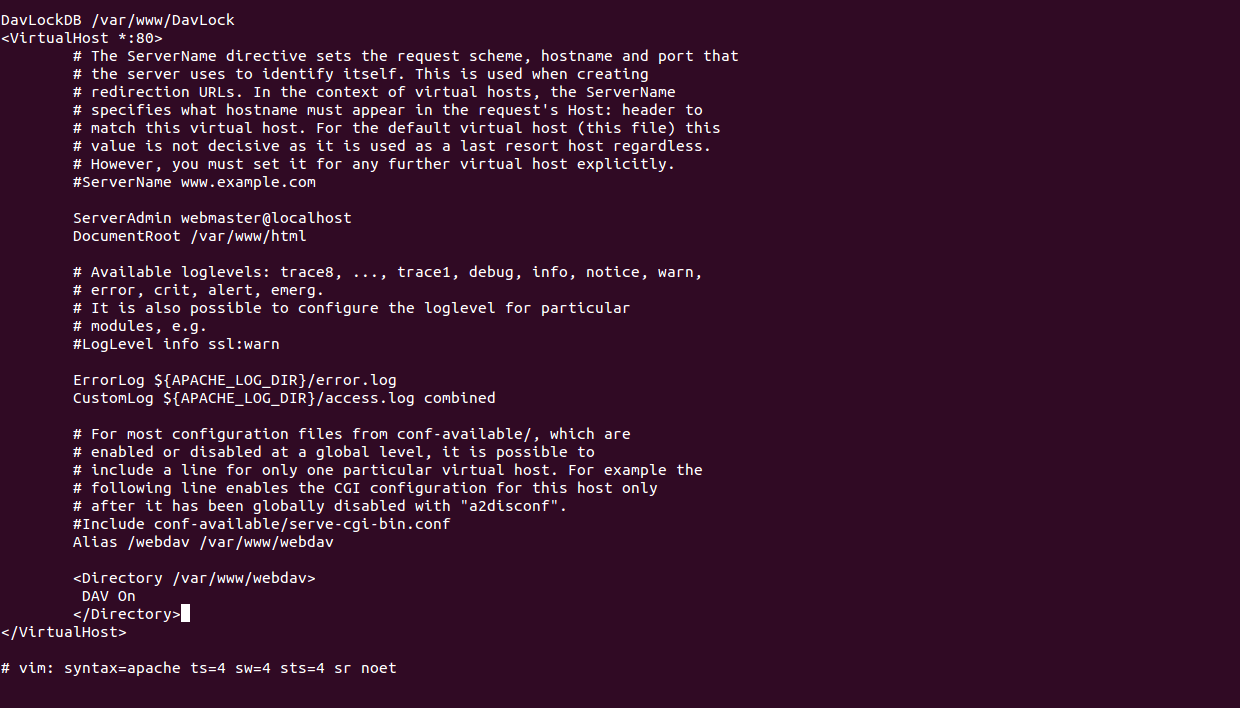
Configure Apache:
- Edit the default configuration:
sudo vi /etc/apache2/sites-available/000-default.conf - Add the following directives inside the
<VirtualHost>section:Alias /webdav/var/www/webdav <Directory /var/www/webdav> DAV On </Directory>
📝 Configuration Details:
DavLockDB: Specifies the path to the WebDAV locking databaseAlias: Links requests tohttp://hostname/webdavto/var/www/webdavDirectory: Enables WebDAV for the specified directory
- Edit the default configuration:
-
Enable and restart Apache:
sudo systemctl enable apache2
sudo systemctl restart apache2
🔧 Custom Path Configuration
-
Edit Apache configuration:
sudo vi /etc/apache2/apache2.conf -
Add custom directory configuration:
<Directory /home/your_user/folder_public_html> Options Indexes FollowSymLinks AllowOverride None Require all granted </Directory> -
Add www-data user to the appropriate group for folder access:
sudo service apache2 restart
📸 Screenshots
Made with ❤️ for MPV users