README.md
June 28, 2026 · View on GitHub
SynFlow: Scaling Up LiDAR Scene Flow Estimation with Synthetic Data



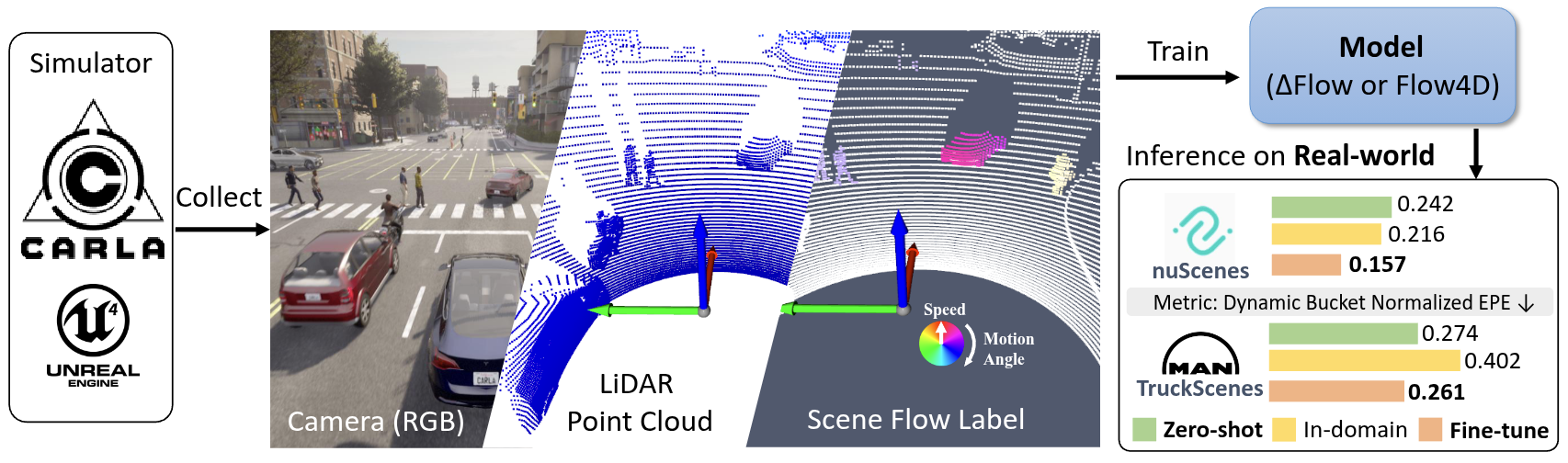
SynFlow got accepeted in ECCV2026, I'm updating the repo and README, stay tuned for the dataset release and code release! Timeline and TODO:
- 2026-06-18: Initial the repo and add README.
- 2026-06-19: Upload the dataset to Huggingface and add the download link in README.
- 2026-06-28: Update the CARLA code for dataset generation and add the dataset generation instruction in README.
Prerequisites
Test computer and sftool (py38):
- Desktop setting: i9-12900KF, GPU 3090
- System setting: Ubuntu 20.04, Python 3.8
- Test Date: 2025-12-07, CARLA Version: 0.9.15, Using the conda env sftool (py38)
CARLA Installation, please refer to CARLA Quickstart for detailed instructions. Quick step:
- Download the desired version of CARLA from CARLA Releases
- Unzip the file and navigate to the extracted folder
- Run the following command to start the CARLA server:
./CarlaUE4.sh --quality-level=Epic -carla-rpc-port=2010
Synthetic Dataset
You can always download the dataset from HuggingFace:
| Dataset/Model | Download Link | Description |
|---|---|---|
| SynFlow-4k | hf/town* | It contains around 4k scenes includes 940k frames with 3D flow ground truth... TODO |
| DeltaFlow weight (trained on SynFlow-4k) | hf/model-ckpt | Model trained on SynFlow-4k dataset, which can be used for evaluation and as a pretrained model for real-world data finetuning. |
| DeltaFlow weight (trained on SynFlow-4k with real-world data) | hf/model-ckpt | Model trained on SynFlow-4k dataset with real-world data, which can be used for evaluation and as a pretrained model for real-world data finetuning. PLEASE NOTE this model is non-commercial use only as the training includes real-world data. |
Dataset Generation
(Optional) Step 1 - Generate route
If you want to generate the route yourself, you can use the generate_route.py script.
python generate_route.py --map Town01 --min_len 150.0 --max_len 250.0 --sampling_dist 10.0 --resolution 2.0 --min_new_meters 20.0
Otherwise, you can download the route from hf/routes-xml and put them into assets/data folder.
Step 2: Generate dataset
You can launch more than 1 CARLA simulator (on different ports) to collect data in parallel. Each process collect 1 route at a time.
Check conf/collect.yaml to modify the sensor settings, NPC density, etc.
# Launch CARLA simulator first
./CarlaUE4.sh --quality-level=Epic -carla-rpc-port=2010

# In another terminal, run the data collection script
python collect_data.py simulation.route_file="./assets/data/town10.xml" 'simulation.route_id=3' simulation.port=2010 simulation.data_output="/home/kin/data/CARLA/data-64-test" sensors.lidar_semantic.channels=64 simulation.max_frames_per_scene=1000 world_settings.logging_level="DEBUG" simulation.record_carla_log=false
When you are ready for full data collection, you can use a bash script to launch multiple processes or :
# Here is 32-channel LiDAR setting example
python collect_data.py sensors.lidar_semantic.channels=32 sensors.lidar_semantic.points_per_second=160000 'simulation.route_id=[0,1,2]' simulation.port=2000 'simulation.route_file=/home/kin/data/CARLA/CARLA_0.9.16/PythonAPI/opensf-carla/assets/data/town01.xml' world_settings.logging_level="DEBUG"
For convenience, you can also use the provided run_all.py script to manage multiple CARLA instances and data collection processes. This script includes automatic restart mechanisms in case of crashes.
python run_all.py --port 2000 --townids "01,02" --data_dir /home/kin/data/CARLA/data-64-460k-7k -m 1000 -s 0 -c 64
Key arguments:
--port: CARLA RPC port (TrafficManager uses port+8000 automatically)--townids: comma-separated town IDs, processed sequentially-c: LiDAR channel count (32 or 64)-s: start route ID (useful for resuming large maps like Town12)-r: restart every N routes for memory management (default: 25)--stall_timeout: restart if no output for N minutes (default: 20); CARLA can freeze without crashing after long runs — this detects and recovers from that case--max_ram_gb: emergency restart if system RAM exceeds N GB (default: 55)
Restart triggers (automatic, no manual intervention needed):
| Trigger | Cause | Restarts CARLA? |
|---|---|---|
CARLA_CRASH | CARLA process died | Yes |
SEGFAULT | collect_data.py segfault | Yes |
STALL | No stdout for stall_timeout min (frozen) | Yes |
ERROR | collect_data.py non-zero exit | Yes |
MEMORY_RESTART | N routes completed (memory leak prevention) | Yes |
RAM_EXCEEDED | System RAM > max_ram_gb | Yes |
Run multiple parallel instances by launching with different --port and --data_dir:
# Instance 1: Town01-02 on port 2000
python run_all.py --port 2000 --townids "01,02" -c 64 --data_dir /data/set-a &

# Instance 2: Town03-05 on port 3000
python run_all.py --port 3000 --townids "03,05" -c 64 --data_dir /data/set-b &
Visualize data
You may need create index file index_total.pkl first by running:
python create_data_index.py --data_dir /home/kin/data/CARLA/CARLA_0.9.16/PythonAPI/data
As we already save the data in the OpenSceneFlow format, we can directly use the OpenSceneFlow visualization tool to visualize the collected data.
cd OpenSceneFlow
python tools/visualization.py --res_name flow --data_dir /home/kin/data/CARLA/CARLA_0.9.16/PythonAPI/data

Some noted issues
- Town12 no pedestrian spawned or no walking pedestrian, check https://github.com/carla-simulator/carla/issues/6552#issuecomment-3700038363.
Downloaded the zip file then put the bin file to /path/to/carla/CarlaUE4/Content/Carla/Maps/Town12/Nav/Town12.bin.
-
CARLA simulator crash during data collection. Known issues: ; so I added auto-restart mechanism in run_all.py to restart the simulator when crash detected. but still need to investigate on Town12 crash issue for some route id.
-
If CARLA is not work for you, quick check: if port is occupied, you can check the port by running
netstat -ntlp | grep 2010. Or if render driver is working, check blog-Fix Vulkan Segmentation Fault on Linux
Model Training and Inference
- Python Environment Setup: Follow the OpenSceneFlow to setup the environment or use docker.
- Dataset Preparation: Download the SynFlow dataset hf/town*
- Run Command: The training with the following command (modify the data path accordingly):
python train.py slurm_id=$SLURM_JOB_ID wandb_mode=online wandb_project_name=synflow \
     train_data="['data/town-06-07-10', 'SynFlow/data/town-01-05', 'SynFlow/data/town-12']" \
     val_data='$DATA_DIR/val' model=deltaflow loss_fn=deltaflowLoss model.target.decoder_option=default \
     num_workers=16 num_frames=5 model.target.decay_factor=0.4 epochs=21 batch_size=2 \
     save_top_model=3 val_every=3 train_aug=True "voxel_size=[0.15, 0.15, 0.15]" "point_cloud_range=[-38.4, -38.4, -3, 38.4, 38.4, 3]" \
     optimizer.lr=2e-4 +optimizer.scheduler.name=StepLR +optimizer.scheduler.step_size=3 +optimizer.scheduler.gamma=0.9
Evaluation
Trained your own model or downloaded the pretrained weights from Table.
You can also run the evaluation by yourself with the following command with trained weights:
python eval.py checkpoint=${path_to_pretrained_weights} dataset_path=${demo_data_path}
Cite & Acknowledgements
If you use this dataset or find our work helpful, please cite our papers, more bib on OpenSceneFlow-Cite.
@article{zhang2026synflow,
  author    = {Zhang, Qingwen and Zhu, Xiaomeng and Jiang, Chenhan and Jensfelt, Patric},
  title     = {{SynFlow}: Scaling Up LiDAR Scene Flow Estimation with Synthetic Data},
  journal   = {arXiv preprint arXiv:2604.09411},
  year      = {2026},
}
@inproceedings{zhang2025deltaflow,
  title={{DeltaFlow}: An Efficient Multi-frame Scene Flow Estimation Method},
  author={Zhang, Qingwen and Zhu, Xiaomeng and Zhang, Yushan and Cai, Yixi and Andersson, Olov and Jensfelt, Patric},
  booktitle={The Thirty-ninth Annual Conference on Neural Information Processing Systems},
  year={2025},
  url={https://openreview.net/forum?id=T9qNDtvAJX}
}
This work was partially supported by the Wallenberg AI, Autonomous Systems and Software Program (WASP) funded by the Knut and Alice Wallenberg Foundation and Prosense (2020-02963) funded by Vinnova.