ADR for MkDocs's Material Theme
April 3, 2025 · View on GitHub
ADR are short text documents that captures an important architectural decision made along with its context and consequences.
Install
pip install mkdocs-material-adr
# or
poetry add mkdocs-material-adr
In the mkdocs.yml file
theme:
  # set the name
  name: mkdocs-material-adr

  # Configuration for the material theme
  features:
    - navigation.instant


plugins:
  - mkdocs-material-adr/adr
  - material/search # Note: all material plugin should be namespaced for them to work
Features
ADR Headers
Information about the ADR are displayed in a header Define information about the ADR in the frontmatter.
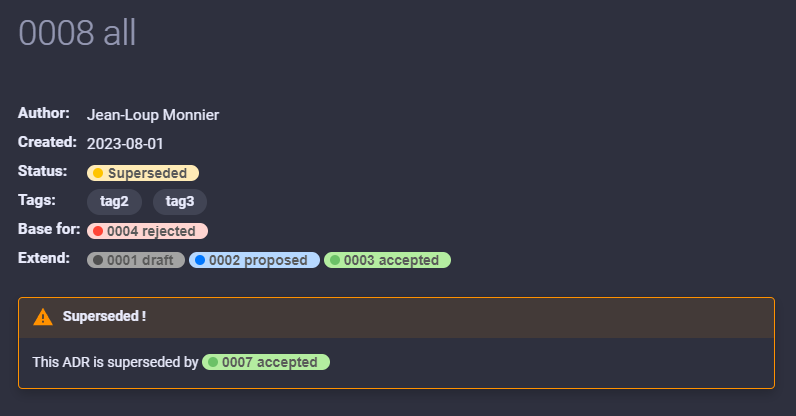
---
    title: 0004 Title
    adr:
        author: Jean-Loup Monnier
        created: 01-Aug-2023
        status:  draft | proposed | rejected | accepted | superseded
        superseded_by: 0001-test
        extends:
            - 0001-first
            - 0002-second
---
You can change the colors or add new status using css
/* Background color */
.c-pill-<lower_case_status_name> {
    background: #a3a3a3;
}

/* Dot color */
.c-pill-<lower_case_status_name>:before {
    background: #505050;
}
ADR Graph
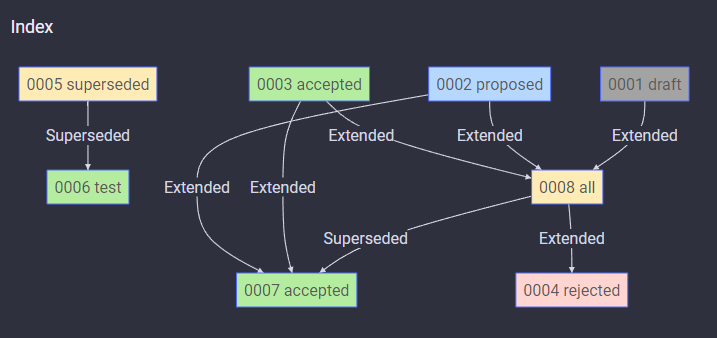
Auto generated graph.
To enable it add [GRAPH] in the markdown file you want the graph to be, Then add th following configuration
You can also override the graph direction with [GRAPH direction=LR] (default to TD).
plugins:
  - mkdocs-material-adr/adr:
      graph_file: index.md # Change this to your file

markdown_extensions:
  - pymdownx.superfences:
      custom_fences:
      - name: mermaid
        class: mermaid
        format: !!python/name:pymdownx.superfences.fence_code_format