BiLerobot: Bimanual SO100 Digital Twin
June 26, 2025 · View on GitHub
A bimanual robotics platform combining LeRobot and ManiSkill for advanced dual-arm manipulation tasks using the SO100 robot digital twin.
🚀 Overview
BiLerobot is a comprehensive robotics simulation and learning framework that provides:
🎥 Demo Video
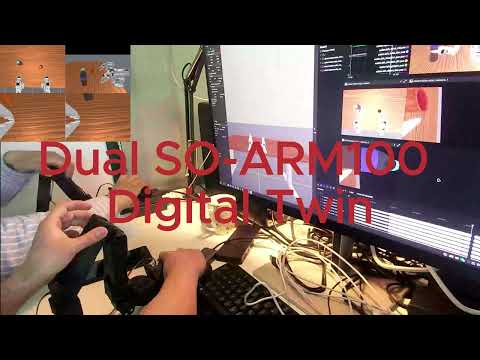
BiLerobot bimanual SO100 manipulation demonstration
- Bimanual SO100 Robot: Digital twin of the SO100 dual-arm manipulation platform
- ManiSkill Integration: High-fidelity physics simulation environments
- LeRobot Compatibility: Dataset recording, policy training, and deployment
- Teleoperation Support: Real-time control with physical SO100 leader arms
- Multi-Camera System: Wrist-mounted cameras for visual feedback
Update
LeRobot Integration
This repository includes a bi_so100/ folder that provides direct integration with LeRobot. The folder contains:
bi_so100_follower/: Bi_SO100 robotbi_so100_leader/: Bi_SO100 teleoperator
Quick Setup
-
Copy Robot and Teleoperator Files
Copy the bi_so100 components to your LeRobot installation:
# Copy follower to robots directory
cp -r bi_lerobot/bi_so100/bi_so100_follower /path/to/lerobot/lerobot/common/robots/

# Copy leader to teleoperators directory
cp -r bi_lerobot/bi_so100/bi_so100_leader /path/to/lerobot/lerobot/common/teleoperators/
For example, on a typical installation:
cp -r bi_lerobot/bi_so100/bi_so100_follower /home/name/Codes/lerobot/lerobot/common/robots/ cp -r bi_lerobot/bi_so100/bi_so100_leader /home/name/Codes/lerobot/lerobot/common/teleoperators/ -
Modify Robot Utility File
Add the following to
lerobot/common/robots/utils.pyin themake_robot_from_config()function:elif config.type == "bi_so100_follower": from .bi_so100_follower import BiSO100Follower return BiSO100Follower(config) -
Modify Teleoperator Utility File
Add the following to
lerobot/common/teleoperators/utils.pyin themake_teleoperator_from_config()function:elif config.type == "bi_so100_leader": from .bi_so100_leader import BiSO100Leader return BiSO100Leader(config) -
Import in LeRobot Scripts
In
record.pyandteleoperate.py, importbi_so100_leaderandbi_so100_follower.
Usage with LeRobot
After setup, you can use BiSO100 directly with LeRobot by specifying the robot and teleop types:
# Record data with BiSO100
python -m lerobot.record \
    --robot.type=bi_so100_follower \
    --teleop.type=bi_so100_leader \
    --display_data=true \
    --dataset.repo_id=${HF_USER}/test \
    --dataset.num_episodes=10 \
    --dataset.single_task=test \
    --robot.cameras="{wrist_camera_1: {type: opencv, index_or_path: /dev/video0, width: 640, height: 480, fps: 30, }, wrist_camera_2: {type: opencv, index_or_path: /dev/video2, width: 640, height: 480, fps: 30, }, top_camera: {type: opencv, index_or_path: /dev/video4, width: 640, height: 480, fps: 30, }, side_camera: {type: opencv, index_or_path: /dev/video6, width: 640, height: 480, fps: 30, }}" \
    --dataset.episode_time_s=60 \
    --policy.path=./checkpoints/last/pretrained_model # for evaluation

# Teleoperate with BiSO100
python -m lerobot.teleoperate \
    --robot.type=bi_so100_follower \
    --teleop.type=bi_so100_leader \
    --display_data=true \
    --robot.cameras="{wrist_camera_1: {type: opencv, index_or_path: 0, width: 640, height: 480, fps: 30, }, wrist_camera_2: {type: opencv, index_or_path: 1, width: 640, height: 480, fps: 30, }, top_camera: {type: opencv, index_or_path: 2, width: 640, height: 480, fps: 30, }, side_camera: {type: opencv, index_or_path: 3, width: 640, height: 480, fps: 30, }}"
These files follow LeRobot's configuration style and can be used directly by specifying the robot and teleop type as bi_so100_follower and bi_so100_leader respectively. Then enjoy!
📋 Requirements
Core Dependencies
- Python: ≥3.8
- ManiSkill: Physics simulation and environment framework
- LeRobot: Dataset management and policy training
- PyTorch: Deep learning backend
- SAPIEN: 3D physics simulation engine
- Gymnasium: Reinforcement learning environment interface
Hardware (Optional)
- SO100 Leader Arms for teleoperation
- USB connections for real-time control
🛠️ Installation
- Clone the repository:
git clone https://github.com/your-username/BiLerobot.git
cd BiLerobot
- Install the package:
pip install -e .
- Install dependencies:
# Install ManiSkill
pip install mani-skill

# Install LeRobot
pip install lerobot

# Additional dependencies
pip install sapien gymnasium torch transforms3d pygame tyro
- Download Assets
The BiSO100 environments require additional 3D assets for objects and scenes. You'll need to download both YCB objects and PartNet-Mobility articulated objects.
YCB Objects
For everyday objects like cups and containers:
python -m mani_skill.utils.download_asset "ycb"
PartNet-Mobility Objects
For articulated objects like bottles with lids, the default download only includes limited categories. You'll need to manually download the complete dataset:
Automatic Download (Limited Categories):
# This only downloads: cabinet_drawer, cabinet_door, chair, bucket, faucet
python -m mani_skill.utils.download_asset "partnet_mobility"
Manual Download (Complete Dataset):
- Register and Login: Visit SAPIEN Downloads and create an account
- Browse Assets: Explore available objects at SAPIEN Browse
- Download: Download the complete PartNet-Mobility dataset
- Extract: Place the downloaded contents in
~/.maniskill/data/partnet_mobility/dataset/
The manual download ensures you have access to all object categories including bottles, containers, and other articulated objects used in the BiSO100 tasks.
Quick Asset Download (Alternative): If you encounter issues with the manual PartNet-Mobility download or need quick access to the bottle assets used in BiSO100 tasks, you can download them directly from Google Drive.
# After downloading from Google Drive, extract to:
# ~/.maniskill/data/partnet_mobility/dataset/
Note: This alternative download link may be removed if it conflicts with SAPIEN's distribution policies. For official access, please use the manual download method above.
🤖 Robot Configuration
BiSO100 Specifications
- Dual Arms: 2x SO100 robotic arms
- DOF: 5 joints per arm + 1 gripper = 12 total DOF
- Mounting: Fixed base (stationary platform)
- Cameras: Wrist-mounted cameras on each arm
- Control Modes: Position, velocity, delta position, end-effector control
Joint Configuration
Left Arm:  [Rotation, Pitch, Elbow, Wrist_Pitch, Wrist_Roll, Jaw]
Right Arm: [Rotation_2, Pitch_2, Elbow_2, Wrist_Pitch_2, Wrist_Roll_2, Jaw_2]
🌍 Environments
Available Tasks
BiSO100OpenLid-v1
- Objective: Collaborative lid opening using both arms
- Features: Bottle with removable lid, coordinated manipulation
- Cameras: Top-down and side view for complete workspace coverage
- Success: Lid successfully removed from bottle
Environment Features
- Physics: SAPIEN-based realistic simulation
- Rendering: Ray-traced visuals with configurable shaders
- Sensors: Multi-camera RGB/depth observation
- Rewards: Dense and sparse reward modes
🎮 Usage Examples
1. Basic Robot Control
# Run interactive control demo
python bi_lerobot/examples/demo_bi_so100_ctrl.py \
    --env_id BiSO100OpenLid-v1 \
    --render_mode human \
    --control_mode pd_joint_delta_pos_dual_arm
2. End-Effector Control
# Control robot end-effectors directly
python bi_lerobot/examples/demo_bi_so100_ctrl_ee.py \
    --env_id BiSO100OpenLid-v1 \
    --control_mode pd_joint_delta_pos_dual_arm
3. Calibration Real SO100
Before using real SO100 hardware for teleoperation, you need to properly calibrate the leader arms. Follow the LeRobot SO100 documentation for complete setup instructions.
Leader Arm:
python -m lerobot.calibrate \
    --teleop.type=so100_leader \
    --teleop.port=/dev/ttyACM0 \  # /dev/ttyACM1
    --teleop.id=left_leader  # right_leader
4. Calibration Virtual SO100
# Generate interactive calibration for teleoperation
python bi_lerobot/examples/generate_bi_so100_calibration_interactive.py \
    --leader-id=left_leader \  # right_leader
    --virtual-arm=left \  # right
    --teleop-port=/dev/ttyACM0  # /dev/ttyACM1
5. Teleoperation with Real Hardware
# Control simulation with physical SO100 leaders
python bi_lerobot/examples/teleoperate_bi_so100_with_real_leader.py \
    --env_id BiSO100OpenLid-v1 \
    --leader_ids left_leader,right_leader \
    --teleop_ports /dev/ttyACM0,/dev/ttyACM1
6. Dataset Recording
# Record demonstration data with teleoperation
python bi_lerobot/examples/record_bi_so100_maniskill.py \
    --robot.env_id BiSO100OpenLid-v1 \
    --robot.leader_ids left_leader,right_leader \
    --robot.teleop_ports /dev/ttyACM0,/dev/ttyACM1 \
    --dataset.repo_id ${HF_USER}/bi_so100_demonstrations \
    --dataset.num_episodes 10 \
    --dataset.single_task "Open bottle lid with both arms"
7. Policy Training Integration
# Record data using a pretrained policy
python bi_lerobot/examples/record_bi_so100_maniskill.py \
    --robot.env_id BiSO100OpenLid-v1 \
    --policy.path path/to/pretrained/policy \
    --dataset.repo_id ${HF_USER}/bi_so100_demonstrations \
    --dataset.num_episodes 10
🎯 Control Modes
Supported Control Modes
pd_joint_pos: Direct joint position controlpd_joint_delta_pos_dual_arm: Incremental joint position (dual-arm)pd_ee_delta_pos: End-effector position controlpd_ee_delta_pose: End-effector pose control (position + orientation)pd_joint_vel: Joint velocity control
Key Mappings (Interactive Control)
- WASD: Move end-effector in XY plane
- QE: Move end-effector up/down
- RF: Rotate wrist pitch
- TG: Rotate wrist roll
- Space: Toggle gripper open/close
- Arrow Keys: Control second arm
- Enter: Reset environment
📊 Data Collection
Dataset Format
- LeRobot Compatible: Standard HuggingFace dataset format
- Multi-Modal: RGB cameras, joint states, actions
- Timestamped: Synchronized data streams
- Compressed: Efficient video encoding for large datasets
Recording Features
- Real-time teleoperation recording
- Policy rollout recording
- Multi-camera synchronized capture
- Automatic episode segmentation
- Data validation and quality checks
📁 Project Structure
bi_lerobot/
├── agents/           # Robot agent implementations
│   └── robots/
│       └── bi_so100/ # SO100 robot definition and control
├── bi_so100/         # LeRobot integration components
│   ├── bi_so100_follower/    # Bi_SO100 robot for LeRobot
│   │   ├── __init__.py
│   │   ├── bi_so100_follower.py
│   │   └── config_bi_so100_follower.py
│   └── bi_so100_leader/      # Bi_SO100 teleoperator for LeRobot
│       ├── __init__.py
│       ├── bi_so100_leader.py
│       └── config_bi_so100_leader.py
├── envs/            # Simulation environments
│   └── tasks/
│       └── tabletop/ # Tabletop manipulation tasks
├── assets/          # Robot models and configurations
│   └── robots/
│       └── bi_so100/ # URDF and mesh files
└── examples/        # Usage examples and demos
    ├── demo_bi_so100_ctrl.py              # Basic robot control
    ├── demo_bi_so100_ctrl_ee.py           # End-effector control
    ├── teleoperate_bi_so100_with_real_leader.py # Hardware teleoperation
    ├── record_bi_so100_maniskill.py       # Dataset recording
    └── generate_bi_so100_calibration_interactive.py # Calibration
🧪 Development
Adding New Tasks
- Create task class in
bi_lerobot/envs/tasks/ - Register environment with
@register_envdecorator - Implement required methods:
_load_scene,_initialize_episode,evaluate
Extending Robot Capabilities
- Modify robot URDF in
bi_lerobot/assets/robots/bi_so100/ - Update control configurations in
bi_so100.py - Add new control modes as needed
🤝 Contributing
- Fork the repository
- Create a feature branch
- Make your changes
- Add tests and documentation
- Submit a pull request
📄 License
This project follows the respective licenses of its components:
- LeRobot: Apache 2.0 License
- ManiSkill: MIT License
🙏 Acknowledgments
- LeRobot: Making AI for Robotics more accessible with end-to-end learning
- ManiSkill: An open source GPU parallelized robotics simulator and benchmark
- XLeRobot: Fully Autonomous Household Dual-Arm Mobile Robot
📞 Support
For issues and questions:
- Check the Issues page
- Review ManiSkill and LeRobot documentation
- Join the community discussions