SwinTrack
October 18, 2022 · View on GitHub
This is the official repo for SwinTrack.
Update: Our work is accepted by NeurIPS 2022🎇, new model weight & tracking raw results: google drive. arxiv link is updated. Code will be updated soon.
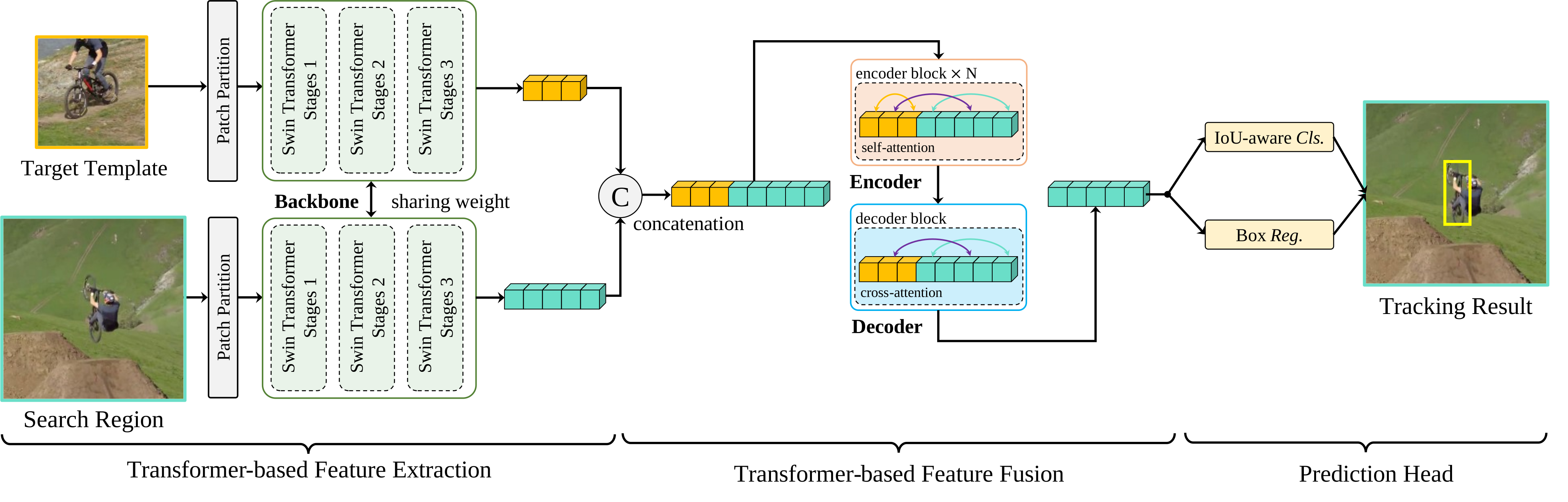
A Simple and Strong Baseline
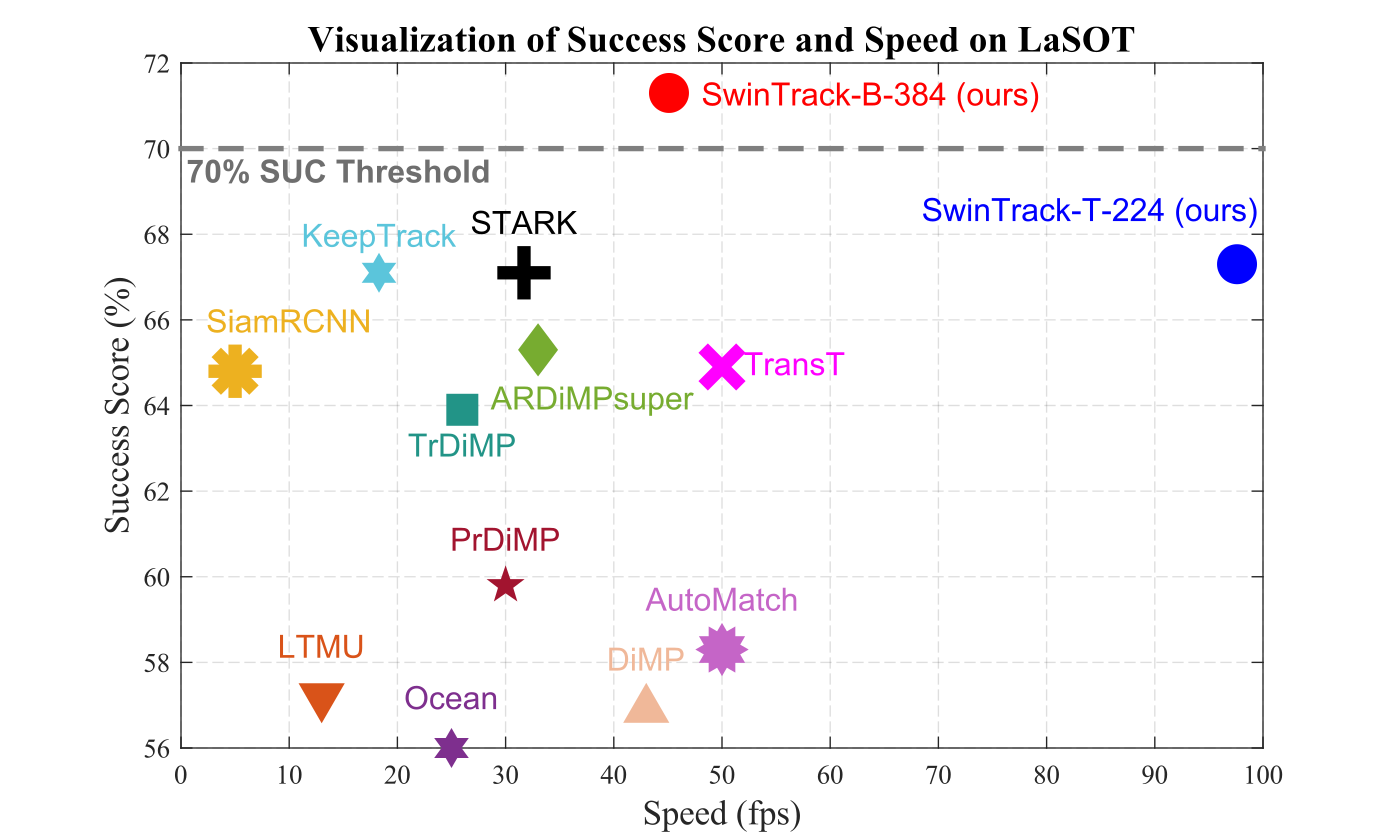
Prerequisites
Environment
conda (recommended)
conda create -y -n SwinTrack
conda activate SwinTrack
conda install -y anaconda
conda install -y pytorch torchvision cudatoolkit -c pytorch
conda install -y -c fvcore -c iopath -c conda-forge fvcore
pip install wandb
pip install timm
pip
pip install -r requirements.txt
Dataset
Download
Unzip
The paths should be organized as following:
lasot
├── airplane
├── basketball
...
├── training_set.txt
└── testing_set.txt

lasot_extension
├── atv
├── badminton
...
└── wingsuit

got-10k
├── train
│   ├── GOT-10k_Train_000001
│   ...
├── val
│   ├── GOT-10k_Val_000001
│   ...
└── test
    ├── GOT-10k_Test_000001
    ...

trackingnet
├── TEST
├── TRAIN_0
...
└── TRAIN_11

coco2017
├── annotations
│   ├── instances_train2017.json
│   └── instances_val2017.json
└── images
    ├── train2017
    │   ├── 000000000009.jpg
    │   ├── 000000000025.jpg
    │   ...
    └── val2017
        ├── 000000000139.jpg
        ├── 000000000285.jpg
        ...
Prepare path.yaml
Copy path.template.yaml as path.yaml and fill in the paths.
LaSOT_PATH: '/path/to/lasot'
LaSOT_Extension_PATH: '/path/to/lasot_ext'
GOT10k_PATH: '/path/to/got10k'
TrackingNet_PATH: '/path/to/trackingnet'
COCO_2017_PATH: '/path/to/coco2017'
Prepare dataset metadata cache (optional)
Download the metadata cache from google drive or baidu pan (passcode: 5dt9), and unzip it in datasets/cache/
datasets
└── cache
    ├── SingleObjectTrackingDataset_MemoryMapped
    │   └── filtered
    │       ├── got-10k-got10k_vot_train_split-train-3c1ffeb0c530522f0345d088b2f72168.np
    │       ...
    └── DetectionDataset_MemoryMapped
        └── filtered
            └── coco2017-nocrowd-train-bcd5bf68d4b87619ab451fe293098401.np
Login to wandb
Register an account at wandb, then login with command:
wandb login
Training & Evaluation
Train and evaluate on a single GPU
# Tiny
python main.py SwinTrack Tiny --output_dir /path/to/output --num_workers $num_dataloader_workers

# Base
python main.py SwinTrack Base --output_dir /path/to/output --num_workers $num_dataloader_workers

# Base-384
python main.py SwinTrack Base-384 --output_dir /path/to/output --num_workers $num_dataloader_workers
--output_dir is optional, --num_workers defaults to 4.
note: our code performs evaluation automatically when training is done, output is saved in /path/to/output/test_metrics.
Train and evaluate on multiple GPUs using DDP
# Tiny
python main.py SwinTrack Tiny --distributed_nproc_per_node $num_gpus --distributed_do_spawn_workers --output_dir /path/to/output --num_workers $num_dataloader_workers
Train and evaluate on multiple nodes with multiple GPUs using DDP
# Tiny
python main.py SwinTrack Tiny --master_address $master_address --distributed_node_rank $node_rank distributed_nnodes $num_nodes --distributed_nproc_per_node $num_gpus --distributed_do_spawn_workers --output_dir /path/to/output --num_workers $num_dataloader_workers
Train and evaluate with run.sh helper script
# Train and evaluate on all GPUs
./run.sh SwinTrack Tiny --output_dir /path/to/output -W $num_dataloader_workers
# Train and evaluate on multiple nodes
NODE_RANK=$NODE_INDEX NUM_NODES=$NUM_NODES MASTER_ADDRESS=$MASTER_ADDRESS DATE_WITH_TIME=$DATE_WITH_TIME ./run.sh SwinTrack Tiny --output_dir /path/to/output --num_workers $num_dataloader_workers
Ablation study
The ablation study can be done by applying a small patch to the main config file.
Take the ResNet 50 backbone as the example, the rest parameters are the same as the above.
# Train and evaluate with resnet50 backbone
python main.py SwinTrack Tiny --mixin_config resnet.yaml
# or with run.sh
./run.sh SwinTrack Tiny --mixin resnet.yaml
All available config patches are listed in config/SwinTrack/Tiny/mixin.
Train and evaluate with GOT-10k dataset
python main.py SwinTrack Tiny --mixin_config got10k.yaml
Submit $output_dir/test_metrics/got10k/submit/*.zip to the GOT-10k evaluation server to get the result of GOT-10k test split.
Evaluate Existing Model
Download the pretrained model from google drive or baidu pan (passcode: 8hsv), then type:
python main.py SwinTrack Tiny --weight_path /path/to/weigth_file.pth --mixin_config evaluation.yaml --output_dir /path/to/output
Our code can evaluate the model on multiple GPUs in parallel, so all parameters above are also available.
Tracking results
Follow the updated link.
Raw results: google drive or baidu pan (passcode: neyk)
PyTracking compatible: google drive or baidu pan (passcode: w5fk)
Citation
@misc{lin2021swintrack,
      title={SwinTrack: A Simple and Strong Baseline for Transformer Tracking},
      author={Liting Lin and Heng Fan and Yong Xu and Haibin Ling},
      year={2021},
      eprint={2112.00995},
      archivePrefix={arXiv},
      primaryClass={cs.CV}
}