CARE: Catalysis Automated Reaction Evaluator
June 26, 2026 · View on GitHub










CARE: Catalysis Automated Reaction Evaluator
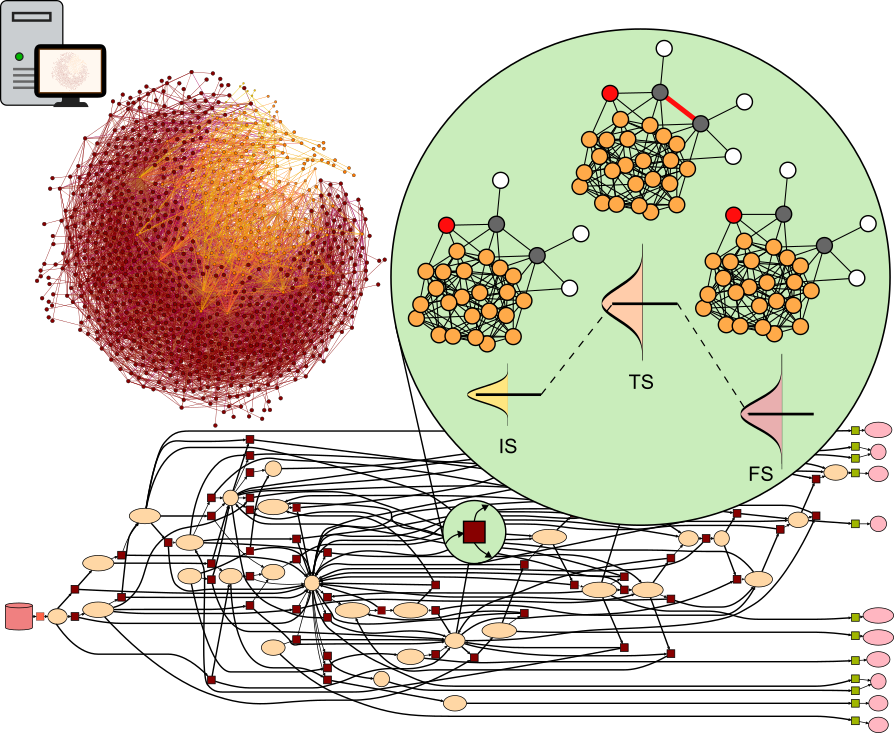
CARE (Catalytic Automated Reaction Evaluator) is a framework for the automated generation and manipulation of chemical reaction networks (CRNs) in heterogeneous catalysis. CARE is powered by ML-based energy evaluators (GAME-Net-UQ, FairChem, MACE potentials, etc.) and includes kinetic functionalities enabling the quantification of catalytic activity for reactions containing thousands of elementary steps.
🪛 Installation
1. From PyPI
pip install care-crn
2. ML evaluators
care-crn interfaces with several external ML models, most of them ML interatomic potentials (MLIPs). These must be installed separately as they depend on different versions of Pytorch, causing conflicts. You can install FairChemV1 or FairChemV2, MACE, UPET, Orb-v2, and SevenNet by running:
pip install care-crn[mace]
pip install care-crn[fairchemv1]
pip install care-crn[fairchemv2]
pip install care-crn[upet]
pip install care-crn[orb]
pip install care-crn[sevennet]
pip install care-crn[gamenetuq]
Note: as each ML model depends on specific versions of Python packages (pytorch, e3nn, ase, etc.), starting from care-crn==0.6.0 you will need to create one distinct environment for each ML evaluator you want to employ.
3. Julia microkinetic solver
To run microkinetic simulations, the workflow relies on a Julia backend for high-performance ODE integration. No manual installation is required. Thanks to juliapkg, the first time you execute a simulation that requires the Julia solver, the package will automatically:
- Download a private, compatible version of Julia (if you don't already have one).
- Install the necessary Julia packages (
DifferentialEquations.jl, etc.) defined insrc/care/juliapkg.jsoninto an isolated environment.
Note: The very first time you run a simulation, it may take a few extra minutes to download and precompile these dependencies. Subsequent runs will be instantaneous.
4. Developer Installation
If you want to contribute to the code or use the very latest (unstable) version, you can install from the source.
- 💾 Required disk space: ~6.5 GB (Conda environment), ~4.3 GB (Julia+dependencies)
-
Clone the repo:
git clone git@github.com:LopezGroup-ICIQ/care.git cd care -
Create a conda environment:
conda create -n care_env python==3.12 conda activate care_env -
Install the package in "editable" mode:
python3 -m pip install -e .[gamenetuq,mace,etc.] # with ML evaluators of choice
💥 Usage
Network generation
The blueprint can be constructed by providing (i) reactants and products as SMILES, (ii) the network carbon and oxygen cutoffs ncc and noc, or (iii) the chemical space as SMILES. Current version allows generation of CRNs with CHONS-containing species.
from care import ReactionNetwork

# from reactants and products (e.g., CO2 to Methanol)
crn = ReactionNetwork.from_species(reactants=["O=C=O", "[H][H]"], products=["CO", "O"])

# from carbon and oxygen cutoffs
crn = ReactionNetwork.from_cutoffs(ncc=2, noc=1)

# from chemical space (e.g., Ethanol decomposition network)
crn = ReactionNetwork.from_chemical_space(cs=["CCO"])
ML energy evaluation
The range of catalyst materials on which CRNs can be evaluated depends on the domain of the employed ML model. CARE currently provides interfaces to GAME-Net-UQ and MLIPs such as FairChem-v1/v2, MACE, Orb, UPET, and SevenNet.
from care import Surface
from care.evaluators import MACEIntermediateEvaluator, NEBReactionEnergyEstimator

catalyst = Surface.from_mp("mp-2", mp_api_key="your_key", hkl="110", xy_repeat=2)  # Pt(110)
ml_evaluator = MACEIntermediateEvaluator(catalyst, device="cuda", num_configs=2, max_steps=5, fmax=0.5)
neb_evaluator = NEBReactionEnergyEstimator(mlp=ml_evaluator, num_images=3, max_steps=5)

for intermediate in crn.intermediates.values():
    ml_evaluator(intermediate)

for reaction in crn.reactions:
    neb_evaluator(reaction)
Microkinetic run
operating_conditions = {'T': 473, 'P': 1e6}  # T in K, P in Pa
y0 = {"CO2": 0.33, "H2": 0.67}  # reactants composition (mole fraction)

results = crn.run_kinetics(iv=y0, oc=operating_conditions)
Run all together
You can run the entire pipeline (blueprint generation ➡ energy evaluation ➡ kinetic simulation) running the care_run script:
care_run -h  # documentation
care_run -i input.toml -o output_name
This will generate a output_name folder with the generated reaction network and additional results from the kinetic simulation.
Examples of input .toml files can be found here.
📖 Tutorials
We currently provide two tutorials, available in the notebooks directory:
- CARE tutorial (run it on Google Colab by clicking the badge on top of the README)
- Adsorbate placement
✒️ License
The code is released under the MIT license.
📜 Reference
Morandi, S., Loveday, O., Renningholtz, T. et al. An end-to-end framework for reactivity in heterogeneous catalysis. Nat. Chem. Eng. (2026). https://doi.org/10.1038/s44286-026-00361-8