README.md
July 5, 2026 · View on GitHub


Local-first portfolio management for humans and AI agents — written in Rust.
portfolio_rs is a CLI + interactive TUI for tracking financial investment
portfolios, and a toolkit for the AI era: machine-readable investment
policies, policy-aware reviews, rebalancing simulations, durable financial
memory (diary, decisions, reports), a portable agent skill, and a local HTTP
API. It is also a Rust library that GUIs (e.g. a desktop app) can embed.
This project is the modern successor of finance.
Installation
Available in nixpkgs: nix-shell -p portfolio_rs or nix run nixpkgs#portfolio_rs
Install via pkgx: pkgx portfolio_rs
Install from cargo: cargo install portfolio_rs
Quick Start
Simple mode: a single positions file
Create a JSON file with your portfolio positions (see example data for the schema), then launch the TUI:
portfolio_rs my_positions.json
Workspace mode: a durable finance workspace
For the full experience — policies, diary, decisions, and reports — create a workspace:
portfolio_rs init-workspace my-portfolio
portfolio_rs policy init --strategy balanced-growth my-portfolio
portfolio_rs context my-portfolio/positions.json
This creates a directory with an INVESTMENT_POLICY.md (your financial
constitution), a machine-readable portfolio/policy.toml, folders for diary
entries, decision records, theses, and reports, agent instruction files
(AGENTS.md, CLAUDE.md), and a .gitignore that protects your private
data.
Commands
| Command | Description |
|---|---|
portfolio_rs [FILE] | Interactive TUI (default) |
balances [FILE] | Balances table with PnL |
allocation [FILE] | Allocation pie chart and breakdown |
performance [FILE] | Performance metrics (YTD, total return) |
sort [FILE] | Positions sorted by value (display only) |
context [FILE] | Agent-friendly portfolio briefing (Markdown/JSON) |
review [FILE] | Policy-aware review: drift, violations, actions |
simulate [FILE] | Rebalancing what-if scenarios (never trades) |
validate [FILE] | Validate a portfolio JSON file |
policy init/validate | Create/check a machine-readable policy.toml |
decision draft | Draft a structured decision record |
report weekly | Generate a weekly Markdown report |
doctor [DIR] | Workspace health check |
init-workspace [DIR] | Create a new finance workspace |
agent init/skill | Agent instructions + portable skill management |
api | Local HTTP API server |
mcp | MCP server for agents (experimental preview) |
config | Show config file location |
components | List TUI components for --disable |
If no file is specified, commands use the portfolio file (or workspace) from
your config. Run portfolio_rs <COMMAND> --help for details.
AI & Agent Integration
portfolio_rs is designed to be operated by coding agents and LLMs, locally:
-
Structured output:
context,review, andsimulatesupport--format json(camelCase) for scripts and agents, and Markdown for humans and LLM prompts.portfolio_rs context positions.json --format json portfolio_rs review positions.json --policy portfolio/policy.toml --format json -
Machine-readable policy:
portfolio/policy.tomlencodes your goals, risk profile, target allocations, and constraints. Strategy templates:balanced-growth,capital-preservation,aggressive-growth,custom. -
Portable agent skill: install the built-in
portfolio-rsskill into any agent harness that supports skill files (opencode, Claude Code, Cursor, ...):portfolio_rs agent skill export ~/.config/opencode/skills -
Workspace instructions:
portfolio_rs agent initcreatesAGENTS.mdandCLAUDE.mdwith local paths and safety rules (no trades, no broker interaction, private data stays local). -
Durable memory: decisions and reports are plain Markdown files in your workspace — reviewable in six months, greppable forever. Use
--dry-runto preview any file mutation. -
MCP server (experimental):
portfolio_rs mcpstarts a JSON-RPC-over- stdio preview. Tools are advertised viatools/listbut currently return pointers to the equivalent CLI commands; a protocol-complete implementation is planned.
HTTP API
Serve your portfolio to local scripts, agents, and GUIs:
portfolio_rs api positions.json [--policy portfolio/policy.toml] [--host 127.0.0.1] [--port 3000]
| Endpoint | Description |
|---|---|
GET /health | Liveness check |
GET /api/portfolio | Full portfolio summary |
GET/POST /api/positions | List / create positions |
GET/PUT/DELETE /api/positions/:id | Read / update / delete a position |
GET /api/allocation | Allocation breakdown |
GET /api/performance | Performance metrics |
GET /api/context | Agent briefing (JSON) |
GET /api/review | Policy review (requires --policy) |
GET /api/simulate | Rebalance simulation (requires --policy) |
GET /api/validate | Portfolio file validation |
GET /api/doctor?dir=DIR | Workspace health check |
POST /api/refresh | Force a live quote refresh |
Notes:
- The API has no authentication and is intended for local use only; binding to a non-loopback host prints a loud warning.
- Position mutations are persisted back to the portfolio file — except for
.gpgfiles, which are never rewritten. - Live quotes are cached for a short TTL;
POST /api/refreshbypasses the cache.
Library Usage
The crate is also a library: state::AppState is an embedding-friendly
facade used by the HTTP API and external GUIs (e.g. a Tauri desktop app).
It loads portfolios/workspaces/policies, does position CRUD, and runs every
analysis (context, review, simulate, doctor, validate, reports) with
camelCase-serializable DTOs.
use portfolio_rs::AppState;

async fn total_value() -> eyre::Result<f64> {
    let state = AppState::new("EUR".to_string());
    state.load_file("positions.json").await?;
    let summary = state.get_portfolio_summary().await;
    Ok(summary.total_value)
}
TUI Features
The interactive Terminal User Interface (default mode) provides:
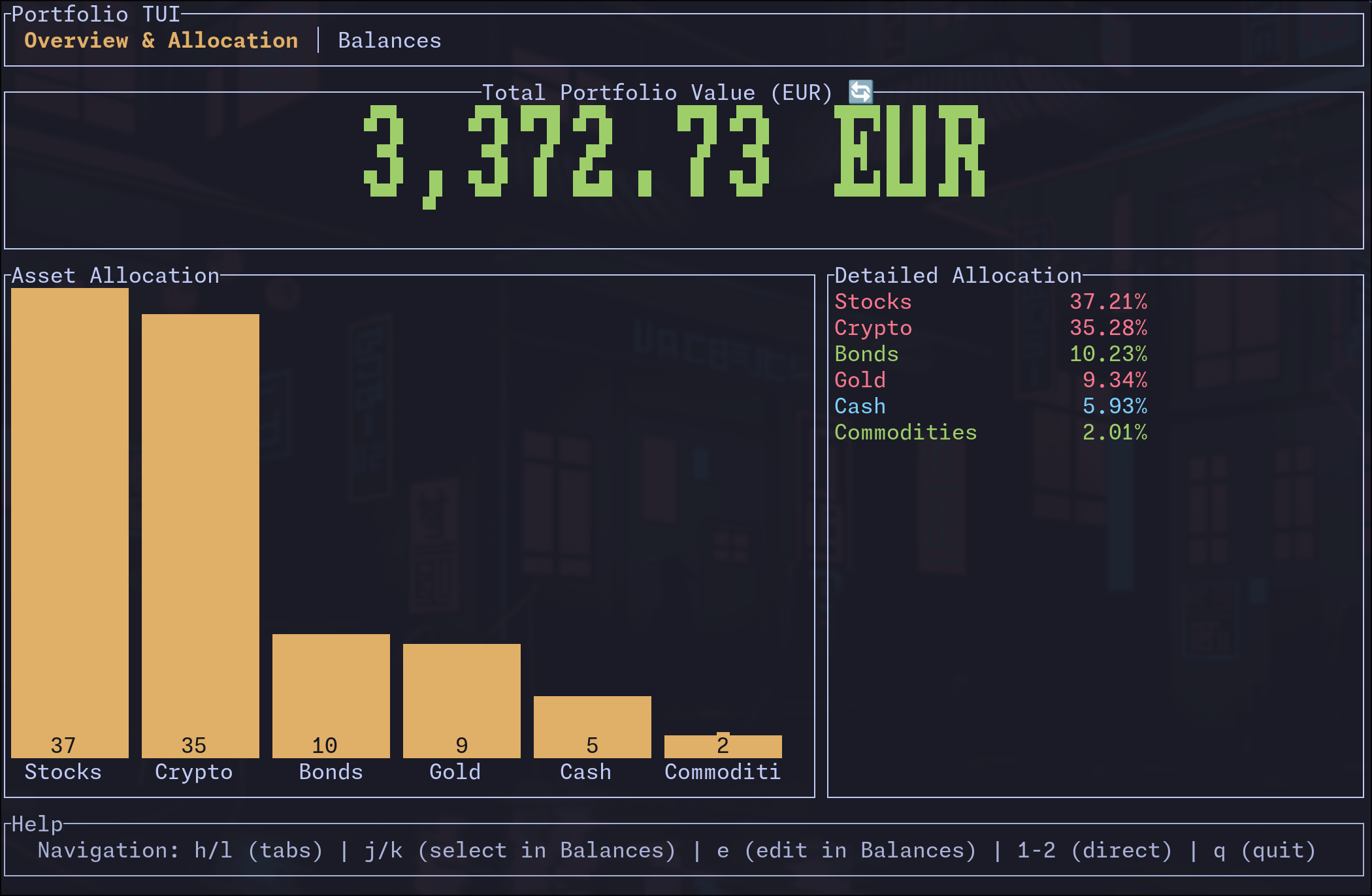
- Overview & Allocation Tab: Large display of total portfolio value, visual bar chart, and detailed allocation breakdown
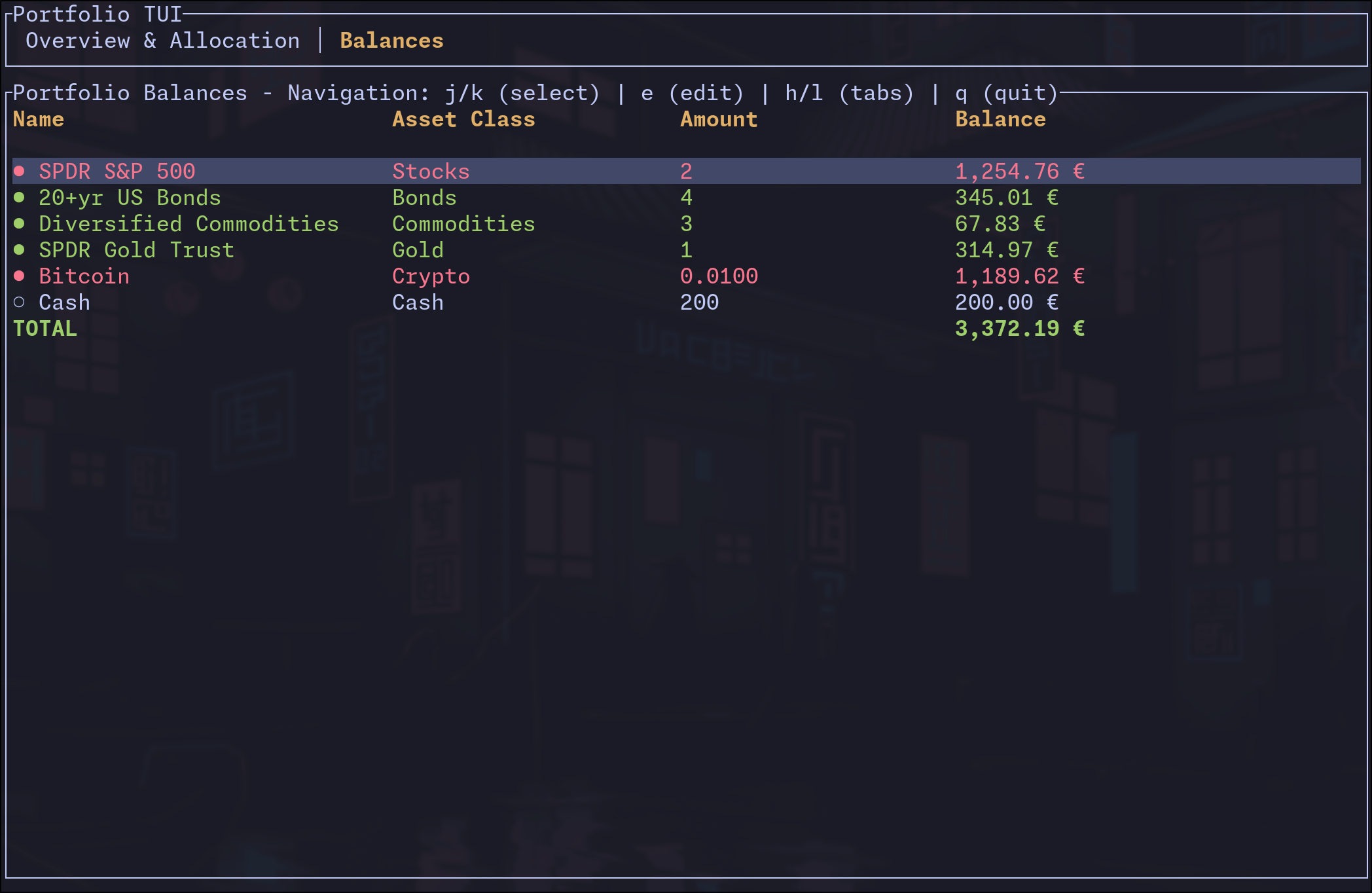
- Balances Tab: Detailed table of all positions with amounts, current values, and edit functionality
TUI Customization
You may optionally specify which tab to open at start-up:
portfolio_rs [JSON_FILE] --tab overview     # Start on Overview & Allocation tab (default)
portfolio_rs [JSON_FILE] --tab balances     # Start on Balances tab
You can disable specific UI components using the --disable flag with comma-separated component names:
Overview Tab Components:
tab_bar- Top navigation tabstotal_value- Large portfolio value displayasset_allocation- Visual bar chartdetailed_allocation- Allocation percentage listhelp- Help text at bottom
Balances Tab Components:
tab_bar- Top navigation tabsname- Position name columnasset_class- Asset class columnamount- Amount/quantity columnbalance- Balance/value column
Examples:
# Hide tab bar and help text
portfolio_rs --disable tab_bar,help example_data.json

# Show only the allocation chart (hide detailed list)
portfolio_rs --disable detailed_allocation example_data.json

# Minimal balances view (name and balance only)
portfolio_rs --disable asset_class,amount example_data.json
TUI Navigation
h/l: Switch tabs left/right (vim-style)j/k: Navigate up/down (select positions in Balances tab)e: Edit selected position amount (in Balances tab)Tab/←→: Switch between tabs1-2: Jump directly to specific tabsq/Esc: Quit the application
Edit Functionality
- Select any position with
j/kand presseto edit - Real-time balance preview and input validation
- Changes are saved automatically to your data file
- Supports decimal precision for crypto and fractional shares
Screenshots
Overview & Allocation Tab
Balances Tab with Edit Functionality
Demo

Configuration
Upon first run, portfolio_rs will create a default config file.
Use portfolio_rs config to show the config file location.
The most useful config entry is portfolio_file where you can set the
absolute path to your data file. This will be used when no file is
specified as an argument. Workspace users can point workspace_dir at their
workspace instead; the workspace's positions.json then takes precedence.
Bonus: GPG Encryption
This tool supports (gpg) encrypted json files. Decrypted values are never written to disk.
# you will need a valid gpg key in ~/.gnupg/
portfolio_rs [COMMAND] data.json.gpg
Pro Tip: Use a plugin like vim-gnupg for editing your data file.