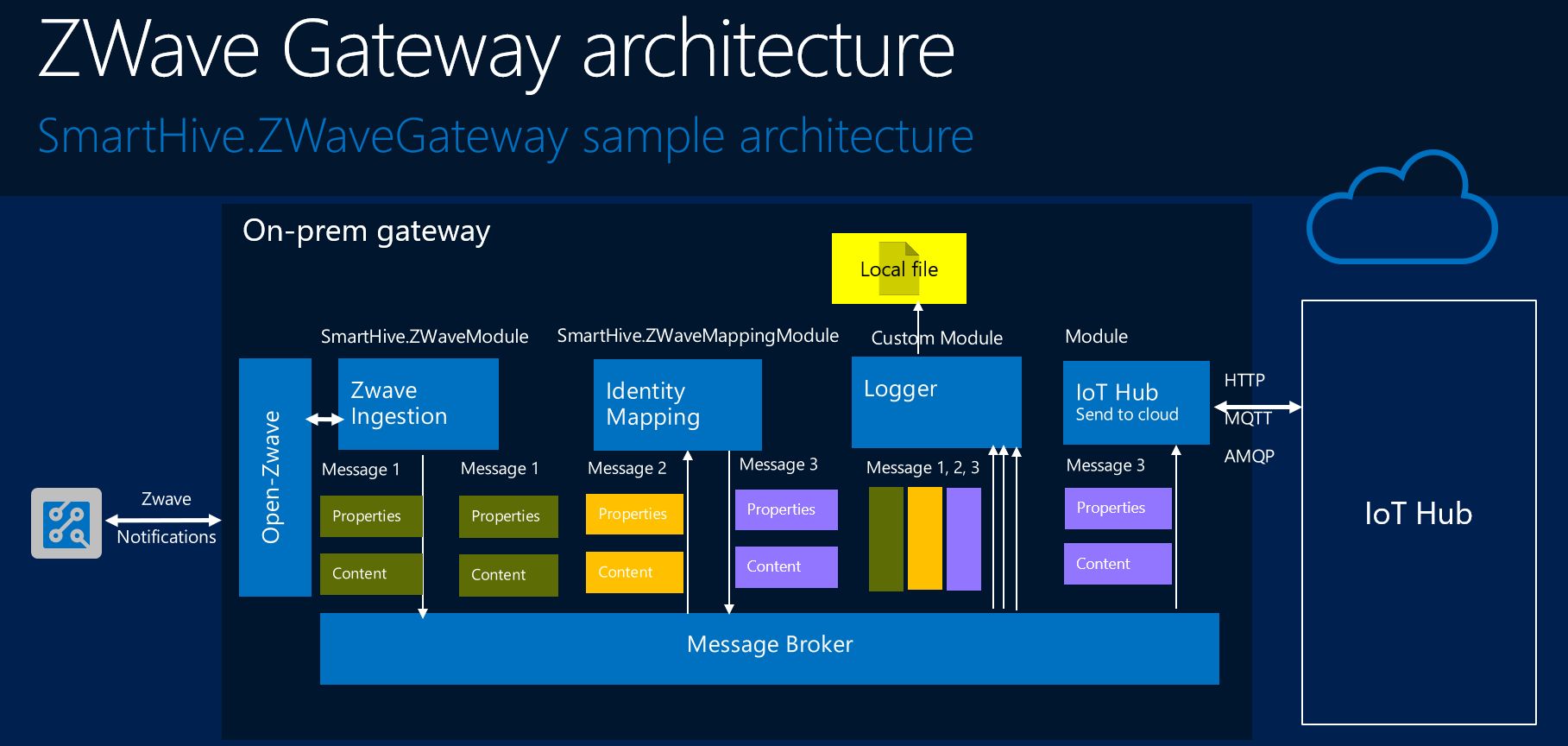
SmartHive.ZWave is Azure IoT Edge gateway modules for Zwave protocol.
March 14, 2018 · View on GitHub
- Azure IoT Edge framework - Microsoft framework to build IoT Gateway.
- Open Z-Wave - free software library that interfaces with Z-Wave protocol stack.
How to build modules
You can now build the IoT Edge runtime and samples on your local machine:
-
Install the prerequisites
The steps in this tutorial assume you are running Ubuntu Linux.
To install the prerequisite packages, open a shell and run the following commands:
sudo apt-get -y update && sudo apt-get -y install libgnutls28-dev libgnutlsxx28 libudev-dev libyaml-dev curl build-essential libcurl4-openssl-dev git cmake make libssl-dev uuid-dev valgrind libglib2.0-dev libtool autoconf nano
In the shell, run the following command to clone the Azure IoT Edge GitHub repository to your local machine:
git clone --recursive https://github.com/MaxKhlupnov/SmartHive SmartHive
- Open a shell. Navigate to the root folder in your local copy of the SmartHive repository.
-
Compile and install OpenZWave
Run the build script as follows:
cd open-zwave && make && make install && ldconfig /usr/local/lib64
See https://github.com/OpenZWave/open-zwave for more info
-
Merge SmartHive project and iot-edge project for compilation
Copy SmartHive.ZWaveModule and SmartHive.ZWaveMappingModule folders into iot-edge/modules directoryCopy SmartHive.ZWaveGateway folders into iot-edge/samples directoryPrepare iot-edge CMakeLists.txt for compilation. Run scripts as follows:
printf "\n add_subdirectory(SmartHive.ZWaveGateway) \n" >> $HOME/SmartHive/iot-edge/samples/CMakeLists.txt
printf "\n add_subdirectory(SmartHive.ZWaveModule)\n add_subdirectory(SmartHive.ZWaveMappingModule) \n" >> $HOME/SmartHive/iot-edge/modules/CMakeLists.txt
-
Compile iot-edge with SmartHive modules
Run the build script from iot-edge directory as follows:
tools/build.sh --disable-native-remote-modules
See https://docs.microsoft.com/en-us/azure/iot-hub/iot-hub-linux-iot-edge-get-started for more info
- Compiled modules and gateway sample will be placed in the iot-edge\build directory
How to build Docker image
- Install Docker
In the shell, run the following command to clone the Azure IoT Edge GitHub repository to your local machine:
git clone https://github.com/MaxKhlupnov/SmartHive SmartHive
Run script as follow from Docker folder
docker build -t zwavemodule ./
How to run
-
Run SmartHive.ZWaveGateway same ways as https://github.com/Azure/iot-edge/tree/master/v1/samples/simulated_device_cloud_upload.
samples/SmartHive.ZWaveGateway/SmartHive.ZWaveGateway zwave_device_cloud_upload_<your platform>.json
-
Run Docker container as follow:
sudo docker run -p 8008:8008 -i -t --privileged --device /dev/ttyACM0 openzwave/openzwave-control-panel /bin/bash
There are three parts in the project.
- SmartHive.ZWaveGateway is IoT Edge gateway that forwards telemetry from a ZWave devices to IoT Hub.
- SmartHive.ZWaveModule is a Azure IoT Gateway SDK module, capable of reading data from ZWave devices and publish the data to the Azure IoT Hub via SmartHive.ZWaveMappingModule
- SmartHive.ZWaveMappingModule is a Azure IoT Gateway SDK module, capable maps ZWave network device addresses to device id and keys in Azure IoT Hub. This module is not multi-threaded, all work will be completed in the Receive callback. Based on Azure IoT Gateway SDK identitymap module