README_CPP.md
March 28, 2024 · View on GitHub
Table of contents
🌍 Summary of C++ and Programming World
✨ Object-Oriented Programming
| This section was written in conjunction with ChatGPT. |
Click to expand
Object-Oriented Programming (OOP) is a programming paradigm that organizes code around objects, which are instances of classes. It focuses on the concept of objects, their properties (attributes), and behaviors (methods), allowing for modular, reusable, and structured code design.
Encapsulation
Encapsulation is the practice of bundling data and the methods that operate on that data within a single unit, which is typically a class. It promotes data hiding and information hiding, ensuring that the internal state and implementation details of an object are not directly accessible from outside the object. Encapsulation helps achieve data integrity, security, and abstraction by controlling access through well-defined interfaces.
Data Hiding
Data hiding is a principle closely related to encapsulation. It involves concealing the internal implementation details of an object and exposing only the necessary information through well-defined interfaces. By hiding implementation details, the object's data is protected and can only be accessed or modified through controlled methods. This enhances data security, code maintainability, and reduces the risk of unintended modifications or access to critical data.
Inheritance

Inheritance is a mechanism in OOP that allows new classes (derived classes or subclasses) to inherit properties and behaviors from existing classes (base classes or superclasses). Inheritance promotes code reuse, as derived classes can inherit and extend the functionality of their base classes. The derived classes can add new attributes and behaviors or override existing ones to customize the behavior of inherited members. Inheritance facilitates code organization, modularity, and the creation of hierarchical relationships between classes.
Polymorphism

Polymorphism is a fundamental concept in object-oriented programming (OOP) that allows objects of different classes to be treated as objects of a common base class. It enables you to write code that can work with objects of multiple types in a uniform manner.
Polymorphism is often illustrated through inheritance, where you have a base class and multiple derived classes that inherit from it. The derived classes can override or extend the behavior of the base class's methods, while still adhering to the common interface.
⌨️ Syntax and Structure
| This section was written in conjunction with ChatGPT. |
Syntax refers to the set of rules that define the structure, format and grammar of a programming language. It dictates how statements and expressions should be written to form valid code.
C++ follows a structured syntax that includes elements such as keywords1, identifiers, operators and control structures. The syntax is designed to provide precise instructions to the compiler on how to interpret and execute the code.
Weak vs Strong typing
Weak and strong typing refer to different approaches in how programming languages handle data types and type safety.
In C++, the language is considered strongly typed, as it requires explicit type conversions and does not perform implicit type coercion without the programmer's explicit instruction (except number data types). C++ enforces strong typing to ensure type safety and minimize potential errors.
Weak Typing (Python2 code):
a = 5 # Compiled! Because Python is a weak typing language.
Strong Typing (C++ code):
a = 5; // Error!
int a = 5; // Compiled!
Semicolons in C++
In C++, a semicolon (;) is used to mark the end of a statement. It serves as a delimiter, indicating to the compiler that one statement has finished and another begins. The presence of semicolons allows the compiler to separate statements and interpret code correctly.
The requirement for semicolons in C++ is a design choice that provides explicit statement termination. This approach allows for more fine-grained control over program execution and eliminates ambiguity.
In contrast, languages like Python2 use indentation to define blocks of code, eliminating the need for explicit statement termination with semicolons.
int a = 5; // Compiled!
int b = 5 // Error! Semicolon missing.
Curly Braces in C++
C++ uses curly braces ({}) as block delimiters to enclose multiple statements or define the body of control structures, functions, and classes. The use of curly braces provides a clear and explicit way to define the boundaries of code blocks (also know as a scope).
Curly braces help define the scope of variables and maintain code readability. They ensure that statements within the braces are treated as a single unit, making it easier to understand the flow and logic of the program.
class Car
{

};
namespace MyNamespace
{

}
void MyFunction()
{
    {
        // Scope inside a function
    }
}
Comments in C++
Both single-line and multi-line comments are helpful for adding explanatory notes, documenting code, or temporarily disabling sections of code during debugging or development. They enhance code readability, facilitate collaboration, and provide valuable information to developers maintaining the codebase.
Single-line comments
Single-line comments start with two forward slashes // and continue until the end of the line.
They are typically used for brief comments or explanations on a single line.
// This is a single-line comment in C++
Multi-line comments
Multi-line comments, also known as block comments, start with a forward slash (/) followed by an asterisk (*) and end with an asterisk (*) followed by a forward slash (/).
Multi-line comments can span multiple lines and are used for more extensive comments or documentation.
/*
    This is a multi-line comment
    It can span multiple lines
*/
Headers vs source files
In C++, header files and source files are two types of files used to organize and manage code in a C++ program.
|
Header Files (.h)
Source Files (.cpp)
Reason for Separate Header and Source Files The separation of header and source files is a design choice that promotes modularity and improves build efficiency in C++. By keeping declarations in header files and implementations in source files, the compiler can easily check for correctness and compile only the necessary code, reducing build times and preventing redundant compilation. History of Single File Extensions In the early days of computing, languages like Fortran and COBOL used single file extensions because of the limitations of the operating systems and compilers at the time. Each file had to adhere to a specific format defined by the language and its compiler, and the extension represented that format. |
Other languages, like C#3, Java4, and Python2, continued to use single file extensions because they adopted a more integrated approach to handling both declarations and implementations within a single file.
In modern programming, the choice of using single file extensions or separate header and source files depends on the language's design philosophy and the needs of the development community. Both approaches have their strengths and weaknesses, and different languages adopt the one that best aligns with their goals and use cases.
Includes
In C++, the include directive is used to bring external code (headers or libraries) into your source code. It allows you to access the declarations and definitions present in those files.
The include directive is typically written as:
#include "filename.h"   // Using double quotes for user-defined headers
#include <filename.h>   // Using angular brackets for standard library headers
Here's the difference between using double quotes and angular brackets:
-
Double Quotes (`"filename.h"): When you use double quotes, the preprocessor searches for the header file in the current directory first. If it doesn't find the file there, it will look in the additional include directories specified in the project settings.
Example:
#include "MyHeader.h" -
Angular Brackets (
<filename.h>): When you use angular brackets, the preprocessor only searches for the header file in the standard library directories specified for the compiler.Example:
#include <iostream>
In general, you use double quotes for your own header files (which may be part of your project) and angular brackets for standard library headers (like iostream, vector, etc.) or headers from external libraries.
🔥 Standard Library
| This section was written in conjunction with ChatGPT. |
The standard library in C++ is a collection of pre-defined classes and functions that provide a wide range of functionality for common tasks. It is a part of the C++ Standard Template Library (STL) and is officially known as the C++ Standard Library. The library is designed to be platform-independent and provides a standardized set of features that are supported across different C++ compilers and environments.
The C++ Standard Library is organized into several header files, each of which contains declarations for specific classes and functions. Some of the key components of the standard library include containers (like vectors, lists, maps, etc.), algorithms (sorting, searching, etc.), iterators, input/output operations, strings, and more.
To use the standard library in C++, you include the appropriate header files in your code, and then you can directly use the classes and functions provided by the library. For example, to use the std::vector class, you include the <vector> header file and then create instances of the vector and use its methods.
The name "std" comes from the fact that all the classes, functions, and other elements of the standard library are part of the std namespace. The namespace std is used to avoid naming conflicts with other libraries and user-defined code. By using the std:: prefix before any element from the standard library, you explicitly specify that you are referring to the elements in the std namespace.
Here's a simple example of how to use the standard library in C++:
#include <iostream>
#include <vector>
#include <algorithm>

std::vector<int> numbers = {5, 2, 9, 1, 7};

// Use standard library algorithm to sort the vector
std::sort(numbers.begin(), numbers.end());

// Use standard library to print the sorted vector
for (int num : numbers)
{
    std::cout << num << " ";
}
🔢 Data types
| This section was written in conjunction with ChatGPT. |
|
Native Types
|
Table from Microsoft Learn about Data Type Ranges.
| Type Name | Bytes | Other Names | Range of Values |
|---|---|---|---|
int | 4 | signed | -2,147,483,648 to 2,147,483,647 |
unsigned int | 4 | unsigned | 0 to 4,294,967,295 |
__int8 | 1 | char | -128 to 127 |
unsigned __int8 | 1 | unsigned char | 0 to 255 |
__int16 | 2 | short, short int, signed short int | -32,768 to 32,767 |
unsigned __int16 | 2 | unsigned short, unsigned short int | 0 to 65,535 |
__int32 | 4 | signed, signed int, int | -2,147,483,648 to 2,147,483,647 |
unsigned __int32 | 4 | unsigned, unsigned int | 0 to 4,294,967,295 |
__int64 | 8 | long long, signed long long | -9,223,372,036,854,775,808 to 9,223,372,036,854,775,807 |
unsigned __int64 | 8 | unsigned long long | 0 to 18,446,744,073,709,551,615 |
bool | 1 | none | false or true |
char | 1 | none | -128 to 127 by default; 0 to 255 when compiled by using /J |
signed char | 1 | none | -128 to 127 |
unsigned char | 1 | none | 0 to 255 |
short | 2 | short int, signed short int | -32,768 to 32,767 |
unsigned short | 2 | unsigned short int | 0 to 65,535 |
long | 4 | long int, signed long int | -2,147,483,648 to 2,147,483,647 |
unsigned long | 4 | unsigned long int | 0 to 4,294,967,295 |
long long | 8 | none (but equivalent to __int64) | -9,223,372,036,854,775,808 to 9,223,372,036,854,775,807 |
unsigned long long | 8 | none (but equivalent to unsigned __int64) | 0 to 18,446,744,073,709,551,615 |
enum | varies | none | |
float | 4 | none | 3.4E +/- 38 (7 digits) |
double | 8 | none | 1.7E +/- 308 (15 digits) |
long double | same as double | none | Same as double |
wchar_t | 2 | __wchar_t | 0 to 65,535 |
If its name begins with two underscores (__), a data type is non-standard.
Warning
C++ lacks explicitness about data types size, leading to potential variation. For instance, the int type can manifest as either 16-bits or 32-bits, depending on the context.
Here is a summary of the explicit data sizes:
|
Char
char myChar = 'a';
Booleans
bool isDead = true;
Integers
int health = 10;
Modifiers
C++ allows the char, int, and double data types to have modifiers preceding them. A modifier is used to alter the meaning of the base type so that it more precisely fits the needs of various situations.
|
List of modifiers
|
The modifiers signed, unsigned, long and short can be applied to integer base types. In addition, signed and unsigned can be applied to char, and long can be applied to double.
The modifiers signed and unsigned can also be used as prefix to long or short modifiers.
For example:
unsigned long int // Same as unsigned 32-bit integer (unsigned int)
Note
The default behavior for all integer types is signed.
Here is a list of modifiers for integer data type:
| Declare | Size (bits) | Size (bytes) | Min Value | Max Value |
|---|---|---|---|---|
unsigned char | 8 | 1 | 0 | 255 |
unsigned short int | 16 | 2 | 0 | 65,535 |
unsigned int | 32 | 4 | 0 | 4,294,967,295 |
unsigned long long | 64 | 8 | 0 | 18,446,744,073,709,551,615 |
signed char | 8 | 1 | -128 | 127 |
signed short int | 16 | 2 | -32,768 | 32,767 |
signed int | 32 | 4 | -2,147,483,648 | 2,147,483,647 |
signed long long | 64 | 8 | -9,223,372,036,854,775,808 | 9,223,372,036,854,775,807 |
Floating points (floats and doubles)
float speedInMetersPerSecond = 5.5f; // C++ always uses 'f' or 'F' literal for defining a float variable.
double speedInMetersPerSecond = 5.5; // C++ never uses a literal for defining a double variable.
🙋♂️ Typedefs
| This section was written in conjunction with ChatGPT. |
In C++, the typedef keyword1 is used to create an alias or alternative name for existing data types. It provides a way to define a new name that can be used as a shorthand for the original type, improving code readability and maintainability.
Here's an example:
typedef int myInt; // Declare our alias for custom type

myInt x = 5;  // Equivalent to: int x = 5;
Warning
UHT6 doesn't support typedefs. Meaning, you can't expose to Blueprint.
🍂 Members
| This section was written in conjunction with ChatGPT. |
Members are variables or functions that are part of a class or object. They define the properties and behaviors of the class.
There are two main types of members: variables and functions.
Variables
Members that store data. They can be of different types such as numbers, strings, booleans, or custom data types. Variables hold values that can be accessed and manipulated within the class or object.
Assignments
There are abbreviations for frequently done kinds of assignments. Here are a few:
| Abbreviation | Meaning | Note |
|---|---|---|
n += k | n = n + k | |
n -= k | n = n - k | |
++n | n = n + 1 | Where the value of expression ++n is the value of n after the assignment |
n++ | n = n + 1 | But the value of expression n++ is the value of n before the assignment |
--n | n = n - 1 | Where the value of expression --n is the value of n after the assignment |
n-- | n = n - 1 | But the value of expression n-- is the value of n before the assignment |
Functions
Functions are blocks of code that perform a specific task or set of tasks. They encapsulate a series of instructions and can be called and executed from various parts of a program. Functions can accept input parameters (arguments) and can also return a value as a result.
Functions can be defined outside of classes as standalone functions or can be defined within classes as member functions. Standalone functions are typically used for common tasks that are not specific to any particular class or object.
Here's an example:
/// @brief Calculates the factorial of a number using recursion.
/// @param n Number of times.
/// @result A number.
int Factorial(int n)
{
    if (n == 0 || n == 1)
        return 1;
    else
        return n * Factorial(n - 1);
}
🧬 Classes
| This section was written in conjunction with ChatGPT. |
Classes are the building blocks of object-oriented programming (OOP). They are a blueprint for creating objects, which are instances of a class. A class defines the structure and behavior of objects by specifying the members it contains.
A class can have variables (members) to store data and functions (methods) to perform actions. The variables defined within a class are often referred to as attributes, while the functions are referred to as methods.
Objects created from a class can access and modify the class's members. They provide a way to create multiple instances that share the same structure and behavior defined by the class. Objects can be thought of as individual entities that represent real-world objects or abstract concepts.
Classes allow for code reusability, encapsulation (hiding internal details), and the ability to model complex systems by organizing related data and behavior together.
Here's an example:
class Person
{
public:
    Person(std::string name, int age)
        : name(name)
        , age(age)
    { }

    void DisplayInfo()
    {
        // ...
    }

private:
    std::string name;
    int age;
};
Structs
In C++, a struct is a user-defined data type that allows you to group multiple variables of different data types under a single name.
It is similar to a class, but with some key differences.
Usage of struct in C++
- Structs are used to create lightweight data structures to hold related data elements.
- They are commonly used to represent simple data objects or records that do not require complex behavior or methods.
Difference between class and struct
In C++, the main difference between a class and a struct is the default access level. In a class, the default access level for its members is private, while in a struct, the default access level is public. This means that members of a struct are accessible outside the struct without the need for access specifiers.
For example:
struct Vector3
{
    float x;
    float y;
    float z;

    Vector3(float _x = 0.0f, float _y = 0.0f, float _z = 0.0f)
        : x(_x)
        , y(_y)
        , z(_z)
    { }
};

Vector3 v1(1.0f, 2.0f, 3.0f);
Vector3 v2(4.0f, 5.0f, 6.0f);

float dx = v1.x - v2.x;
float dy = v1.y - v2.y;
float dz = v1.z - v2.z;

float dist = std::sqrt(dx * dx + dy * dy + dz * dz);
Historical difference with C language
In C, there was no concept of classes, and struct was the primary way to define user-defined data types. In C++, the struct keyword was retained to maintain compatibility with C, but it gained additional features and behavior, such as the ability to have member functions and access specifiers.
In modern C++, the distinction between class and struct has become more a matter of convention and coding style rather than a strict rule. Many developers prefer to use struct for simple data containers with public data members and class for more complex objects with private data members and member functions. However, you can use either class or struct based on your design preferences.
💔 Accessibility
| This section was written in conjunction with ChatGPT. |
| Keyword | Access ability | Description |
|---|---|---|
public | All | Members and functions are accessible from anywhere, including outside the class. |
protected | Subclasses | Members and functions are accessible from within the class and any subclasses, but not from outside. |
private | Class | Members and functions are only accessible from within the class itself. |
mutable | Class | Specifies that a member variable can be modified even if the owning object is const. |
friend | Class | Allows a non-member function or class to access the private and protected members of a class. |
class MyClass
{
public:
    int publicVar; // Public member variable

    // Public member function
    void publicFunction()
    {
        // ...
    }

protected:
    int protectedVar; // Protected member variable

    // Protected member function
    void protectedFunction()
    {
        // ...
    }

private:
    int privateVar; // Private member variable

    // Private member function
    void privateFunction()
    {
        // ...
    }

    mutable int mutableVar; // Mutable member variable

    friend void friendFunction(MyClass& obj); // Friend function declaration
};

void friendFunction(MyClass& obj)
{
    obj.privateVar = 42; // Friend function can access private member variable
}

MyClass obj;

// Accessing public members
obj.publicVar = 10; // Compiled!
obj.publicFunction(); // Compiled!

// Accessing private members via friend function
friendFunction(obj); // Compiled!

// Accessing private members directly (only possible within the class)
obj.privateVar = 20; // Error!
obj.privateFunction(); // Error!
🤔 If-statements
| This section was written in conjunction with ChatGPT. |
If-statement is a fundamental control structure that allows you to conditionally execute a block of code based on a specified condition. It provides a way to control the flow of execution in your program.
if (condition)
{
    // Code to be executed if the condition is true
}
else if (secondCondition)
{
    // Code to be executed if the secondCondition is true, but condition was false
}
else
{
    // Code to be executed if the condition and secondCondition is both false
}
🔣 Comparisons and Boolean Operators
| This section was NOT written in conjunction with ChatGPT. |
Here are some operations for creating conditions:
==- Equality check!=- Inequality check>- Check for greater<- Check for less>=- Check for greater or equal<=- Check for less or equal&&- Expression A && B is evaluated by first evaluating A. A has value 0, then A && B also has value 0, and B is not evaluated. Otherwise, B is evaluated; if B has value 0, then A && B has the same value 0, and otherwise has value 1. Also calledANDoperator.||- Expression A || B is evaluated by first evaluating A. If A has a nonzero value, then A || B has value 1, and B is not evaluated. Otherwise, A || B has value 1 if B is nonzero and value 0 if B is zero. Also calledORoperator.!- Expression !A is 0 if A is nonzero, and is 1 if A is 0. Also calledNOToperator.
❓ Conditional Expressions (Ternary operator)
| This section was NOT written in conjunction with ChatGPT. |
Conditional expressions in C++ are statements that evaluate a condition and return a value based on the result of the condition. They provide a concise way to express simple conditions and perform different actions or assignments based on the outcome.
The basic syntax of a conditional expression in C++ is as follows:
int value = isDead ? 100 : -100; // condition ? value_if_true : value_if_false;
-
1. The condition within the parentheses is evaluated.
-
2. If the condition is true, the value or expression before the colon (:) is returned as the result of the conditional expression.
-
3. If the condition is false, the value or expression after the colon is returned as the result.
🔀 Switches
| This section was written in conjunction with ChatGPT. |
In C++, a switch statement is a control flow construct used to select one of many possible execution paths based on the value of a given expression. It provides an alternative to using multiple if-else statements when checking a variable against different values.
The basic syntax of a switch statement in C++ is as follows:
switch (expression)
{
    case value1:
        // Code to be executed if expression matches value1
        break;
    case value2:
        // Code to be executed if expression matches value2
        break;
    // Add more case statements as needed
    default:
        // Code to be executed if none of the cases match
        break;
}
-
1. The expression is evaluated, and its value is compared against the cases specified in the switch statement.
-
2. If a case matches the value of the expression, the code block associated with that case is executed. The execution then continues until a break statement is encountered, which exits the switch statement.
-
3. If none of the cases match the expression's value, the code block associated with the default case (optional) is executed. The default case serves as a fallback option when no matching cases are found.
🔁 Loops
| This section was written in conjunction with ChatGPT. |
Loops are essential constructs in programming languages that allow repetitive execution of a block of code based on a specified condition. They provide a way to automate tasks, process collections of data, and iterate over a sequence of elements.
♾️ While Loop
While loop are used when the number of iterations is uncertain but depends on a condition. The loop continues as long as the specified condition remains true. It evaluates the condition before each iteration, and if it becomes false, the loop terminates.
Here's an example of finding the first power of 2 greater than 100:
int num = 1;

while (num <= 100)
{
    num *= 2;
}

std::cout << "First power of 2 greater than 100: " << num << std::endl;

// Output: First power of 2 greater than 100: 128
🔃 Do-While Loop
A do-while loop is a control flow structure in programming that executes a block of code at least once, and then repeats the execution as long as a specified condition remains true. It is similar to the while loop, but with the condition checked at the end of each iteration.
Here's an example of printing numbers from 1 to 5 using a do-while loop:
int i = 1;

do
{
    std::cout << i << " ";
    i++;
} while (i <= 5);

// Output: 1 2 3 4 5
🔂 For Loop
For loop are used when you know the number of iterations in advance. They consist of an initialization, a condition for continuation, and an iteration statement. The loop iterates over a range of values or a collection, incrementing or decrementing a counter variable with each iteration.
Here's an example of printing numbers from 1 to 5:
for (int i = 1; i <= 5; i++)
{
    std::cout << i << " ";
}

// Output: 1 2 3 4 5
🗂️ Foreach Loop
Foreach loop are designed to iterate over collections or sequences of elements. They automatically handle the iteration logic, allowing you to process each element without managing an explicit index or counter. The loop iterates over each element in the collection until all elements have been processed.
Here's an example of printing each character of a string:
std::string message = "Hello";

for (char c : message)
{
    std::cout << c << " ";
}

// Output: H e l l o
In summary:
| Loop Type | Purpose |
|---|---|
| while loop | Executes the block of code while the condition is true. |
| do-while loop | Executes the block of code first, then checks the condition. It guarantees that the loop will execute at least once. |
| for loop | Executes the block of code based on the initialization, condition, and update expressions. |
| foreach loop | Iterates over the elements of a container (e.g., arrays, vectors) and executes the block of code for each item. |
🦋 Immutable vs Mutable
| This section was written in conjunction with ChatGPT. |
The terms immutable and mutable refer to the state of an object or variable and whether it can be changed after its creation. Understanding the difference between immutable and mutable objects is essential in programming as it affects how data is manipulated and shared within the code.
Mutable
In C++, the mutable keyword is used to modify the behavior of a class member when the class itself is declared as const. When a class member is marked as mutable, it can be modified even when the object is considered constant.
When you declare a class member as const, it means that the member cannot be modified once the object is created. However, there are scenarios where you may want to allow certain members to be modified even in a const object. This is where the mutable keyword comes into play. By using mutable keyword, you can change a const class member and alter the value.
Usage of mutable for variables:
class MyClass
{
public:
    MyClass(int value) : constantValue(value) {}

    void IncrementValue() const
    {
        mutableValue++; // Modifying the mutable member inside a const member function
    }

    // This function is const and cannot modify constantValue
    int GetConstantValue() const { return constantValue; }

    // This function is const, but mutableValue can still be modified.
    int GetMutableValue() const { return mutableValue; }

private:
    const int constantValue; // Regular constant member
    mutable int mutableValue; // Mutable member
};
When to use mutable keyword:
The mutable keyword is used in situations where a class member maintains a state that should be allowed to change even in a const object. Common use cases for mutable include caching and lazily initializing data. By making certain members mutable, you can improve performance in specific scenarios without sacrificing the const-correctness of your class.
Warning
While mutable can be useful, it should be used judiciously. Modifying mutable members inside const functions can lead to unexpected behavior and make the code harder to reason about. Ensure that the state being modified using mutable doesn't affect the logical constness of the class or lead to thread-safety issues.
Immutable
When a member variable is declared as const, it means that its value cannot be changed after it is initialized. This makes the member immutable, and any attempt to modify its value will result in a compilation error.
The const keyword is used in C++ to declare a constant variable, which means its value cannot be changed once it is assigned. When applied to member functions, it indicates that the function will not modify the state of the object it is called on (i.e., it won't modify member variables unless they are explicitly marked as mutable). This allows the compiler to enforce immutability and provides additional safety guarantees in the code.
Usage of const for variables:
const int immutableValue = 10; // Immutable variable
// immutableValue = 20; // Error: Cannot modify an immutable variable
| Property | Immutable | Mutable |
|---|---|---|
| State | Cannot be changed | Can be changed |
| Modification | Creates a new object | Modifies the original object |
| Data Sharing | Thread-safe (no synchronization needed) | Requires synchronization for thread-safety |
| Memory Overhead | Additional memory allocation for each update | Direct modification, no additional memory overhead |
| Performance Characteristics | Generally more memory-efficient but slower for frequent updates | May be less memory-efficient but faster for frequent updates |
🪝 Try Catch
| This section was written in conjunction with ChatGPT. |
In programming, try-catch is a mechanism used for error handling and exception handling. It allows you to write code that can handle potential errors or exceptions that may occur during the program's execution, preventing crashes or data corruption.
In C++, the try and catch blocks are used for implementing this mechanism. Here's how it works:
1. try: You place the code that might throw an exception inside a try block. If an exception occurs within this block, the program will immediately jump to the nearest matching catch block.
2. catch: The catch block is used to catch and handle the exceptions thrown in the try block. It specifies the type of exception it can catch. If an exception of that type is thrown, the code within the catch block will be executed.
Here's a simple example in C++:
try
{
    int numA = 5;
    int numB = 0;
    int result = numA / numB;
}
catch (const char* errorMessage)
{
    // Caught "Floating point exception"
}
Using try-catch blocks allows you to handle exceptional situations gracefully, providing error messages to users or logging errors for debugging, instead of crashing or corrupting the program's data. It helps in making your programs more robust and user-friendly.
🪞 Casting
| This section was written in conjunction with ChatGPT. |
Casting, in the context of programming languages, refers to the conversion of one data type into another. It allows you to change the interpretation or representation of a variable or object, which can be useful in various situations.
Static casting
This is the most basic and straightforward form of casting. It is performed using the (type) syntax and works for converting between related types, like integer to float or vice versa. However, it may not be safe in some situations, so you need to be cautious when using it.
Example:
int num1 = 10;
double num2 = static_cast<double>(num1); // Static cast from int to double
Const casting
This is used to add or remove the const qualifier from a variable. It allows you to modify the constness of a variable.
Example:
const int x = 5;
const_cast<int&>(x) = 10; // Const cast to remove const and modify the value of x
Dynamic casting
This is primarily used for casting pointers or references to objects in a class hierarchy. It is particularly useful when working with polymorphic classes. Dynamic casting checks the validity of the cast at runtime and returns a null pointer if the cast is not valid.
Example:
class BaseClass { /* ... */ };
class DerivedClass : public BaseClass { /* ... */ };

BaseClass* basePtr = new DerivedClass;
DerivedClass* derivedPtr = dynamic_cast<DerivedClass*>(basePtr); // Dynamic cast from BaseClass to DerivedClass
Reinterpret Casting
This is primarily used to convert one pointer or reference type to another, regardless of their unrelated types. It is a low-level and potentially unsafe casting operation that allows developers to treat the underlying binary representation of a pointer as a different type. Unlike static_cast, reinterpret_cast doesn't perform any type checking or conversions, and it's up to the programmer to ensure the correctness of the cast.
Example:
result_type = reinterpret_cast<result_type>(expression);
🛼 Inlining
| This section was written in conjunction with ChatGPT. |
Inlining is a compiler optimization technique used to improve the performance of code by inserting the body of a function directly at the call site, eliminating the overhead of function calls. It reduces the execution time by avoiding the function call stack setup and cleanup.
In C++, you can use the inline keyword to suggest to the compiler that a function should be inlined. For example:
inline int Add(int a, int b) { return a + b; }
The inline keyword is a hint to the compiler, and the actual decision of whether to inline a function is made by the compiler. It might choose not to inline a function if it is too large or too complex.
The __forceinline keyword is used to force the compiler to inline a function, regardless of its size or complexity. It overrides the compiler's normal inlining heuristics and ensures that the function is always inlined wherever it is called.
Here's an example of how __forceinline can be used:
__forceinline int Multiply(int a, int b) { return a * b; }
When choosing between using a macro or a function for inlining, it is generally recommended to use functions with the inline keyword. Functions are more type-safe and have better debugging support compared to macros. Macros are simple textual replacements and can lead to unexpected behavior or issues if not used carefully.
Using inline functions offers a good balance between performance and maintainability. They provide the benefits of inlining without sacrificing the advantages of type-checking and debugging support that functions offer. However, keep in mind that the inline keyword is just a hint to the compiler, and it may or may not inline the function depending on the specific context and compiler optimizations.
📇 Namespace
| This section was written in conjunction with ChatGPT. |
In programming languages, a namespace is a feature that allows you to organize code elements (such as variables, functions, classes) into distinct named scopes to avoid name collisions and improve code organization.
In C++, you can use namespaces to group related code together and avoid naming conflicts. Here's how you can define and use a namespace in C++:
// Defining a namespace
namespace MyNamespace
{
    int add(int a, int b) { return a + b; }
}

int result = MyNamespace::add(3, 5);
Namespaces are particularly helpful when you are working with multiple libraries or modules, each with its own set of classes and functions. By placing them in separate namespaces, you can avoid naming conflicts when using elements from different libraries.
For example, consider two libraries that both define a class called Vector. Without namespaces, including both libraries in the same project could lead to naming conflicts. However, by placing each Vector class in its own namespace, such as Library1::Vector and Library2::Vector, you can use them without conflicts.
#include <Library1/Vector.h>
#include <Library2/Vector.h>

Library1::Vector vec1;
Library2::Vector vec2;
// Use vec1 and vec2 without conflicts
Warning
UHT6 doesn't support namespaces. Meaning, you can't expose to Blueprint.
🌐 Static members
| This section was written in conjunction with ChatGPT. |
In programming languages, static members are class members (variables or functions) that belong to the class itself rather than individual objects of the class. They are shared among all instances (objects) of the class and are independent of any specific object's state.
In C++, you can use the static keyword to define static members in a class. Here's how you can use static members in C++ code:
class MyClass
{
public:
    static int staticVariable; // Declaration of a static variable
    static void staticFunction(); // Declaration of a static function
};

// Definition of the static variable
int MyClass::staticVariable = 0;

// Definition of the static function
void MyClass::staticFunction()
{
    // Function implementation
}
Static variables and functions are accessed using the class name followed by the scope resolution operator ::. Since static members are shared across all instances of the class, they do not require an object to be accessed.
Here's how you can use static members in your code:
MyClass::staticVariable = 10; // Accessing static variable
MyClass::staticFunction(); // Calling static function
Static members are commonly used for class-level data and utility functions that do not rely on object-specific state. They are particularly useful when you want to maintain a single instance of a variable shared among all objects of the class, or when you need a common function that does not depend on the specific object's data.
auto keyword
| This section was written in conjunction with ChatGPT. |
In C++, the auto keyword is used for type inference, allowing the compiler to deduce the data type of a variable automatically based on its initialization value (similar to var keyword in C#3). It was introduced in C++11 as part of the modern C++ features.
Here's how you can use the auto keyword:
auto variable = 42; // Compiler will deduce the type of 'variable' as int
auto name = "John"; // Compiler will deduce the type of 'name' as const char*
auto pi = 3.14; // Compiler will deduce the type of 'pi' as double
The auto keyword is especially useful when dealing with complex data types or when the type is long and cumbersome to write explicitly. It can also simplify code maintenance since you don't need to update the type declaration if the initialization value changes.
Using the auto keyword for return function values can be a double-edged sword. While it can make the code more concise and reduce the need to explicitly specify return types, it can also make the code less readable and harder to understand, especially when the function's logic is complex.
auto player = GetPlayer(); // Bad

Player* player = GetPlayer(); // Good
| Pros of Using 'auto' for Return Values | Cons of Using 'auto' for Return Values |
|---|---|
| Concise code with reduced type annotations | Lack of clarity: Return type might not be immediately apparent from the code |
| Easier to write and understand simple cases | Debugging and error handling might be more challenging |
| Can simplify code in certain situations | Reduced code readability in complex scenarios |
| Reduces the need to explicitly specify types | Potential impact on code maintainability as the codebase grows larger and complex |
| Improves code readability in some cases | Team coding standards and practices may not always favor using 'auto' |
🌱 Polymorphism (In Depth)
| This section was written in conjunction with ChatGPT. |
The power of polymorphism lies in the ability to use a base class pointer or reference to refer to objects of derived classes. This allows you to write code that operates on the base class, without needing to know the specific derived class. During runtime, the appropriate version of the overridden method in the derived class will be invoked, based on the actual type of the object being referred to.
Polymorphism allows you to write more flexible and reusable code by treating objects based on their common behavior, rather than their specific type. It promotes code extensibility and enhances the ability to work with a variety of objects in a unified way.
Operator Overloading
In C++, operators are symbols or keywords1 used to perform various operations on data, such as arithmetic operations, logical operations, assignment, comparison, and more. They enable concise and expressive manipulation of variables and values.
Operator Overloading is a feature in C++ that allows you to redefine the behavior of an operator for user-defined types. It enables you to provide a specific implementation for an operator based on the operands' types, allowing custom operations to be performed.
Here's an example of overloading the greater-than-or-equal-to >= operator in C++:
class MyClass
{
public:
    int value;

    MyClass(int val) : value(val) {}

    bool operator>=(const MyClass& other) const
    {
        return value >= other.value;
    }
};
By overloading operators, you can define custom behavior for how objects of a class interact with the corresponding operator. This provides flexibility and allows you to use familiar syntax and semantics for user-defined types, making the code more intuitive and expressive.
Operator overloading is not limited to comparison operators; you can also overload arithmetic operators +, -, * and / assignment operators =, logical operators &&, ||, and more. Overloading operators helps create more natural and concise code, improves code readability, and enhances the usability of user-defined types.
Function Overloading
Function overloading is a feature in C++ that allows you to define multiple functions with the same name but different parameters.
It enables you to create functions that perform similar operations but on different data types or with different parameter sets.
void TakeDamage(int DamageAmount)
{
    // Logic...
}

void TakeDamage(float DamageAmount)
{
    // Logic...
}

void TakeDamage(double DamageAmount)
{
    // Logic...
}
When you call an overloaded function, the compiler determines the appropriate function to invoke based on the arguments passed.
TakeDamage(10); // Calling function with integer parameter
TakeDamage(11.1f); // Calling function with float parameter
TakeDamage(12.25052651); // Calling function with double parameter
With function overloading, it provides several benefits, including:
|
Warning
UHT6 doesn't support function overloading. Meaning, you can't expose to Blueprint.
Virtual functions
In object-oriented programming (OOP), a virtual function is a function declared in a base class that can be overridden in derived classes. It allows you to provide a common interface in the base class while allowing different implementations in the derived classes.
When a function is declared as virtual in the base class, it indicates that the function can be overridden by derived classes. This means that the derived class can provide its own implementation of the function, tailored to its specific needs.
Here's an example in C++ to illustrate the concept of virtual functions:
class Shape
{
public:
    virtual void Draw()
    {
        // Common implementation for all shapes
    }
};

class Circle : public Shape
{
public:
    void Draw() override
    {
        // Override implementation
    }
};

class Rectangle : public Shape
{
public:
    void Draw() override
    {
        // Override implementation
    }
};
The key aspect of the virtual function is that the appropriate implementation to be executed is determined at runtime, based on the actual type of the object being referred to. This is called dynamic dispatch or late binding.
Virtual functions are useful when you want to define a common interface in a base class but allow derived classes to provide their own implementations based on their specific behaviors. It enables polymorphism, allowing objects of different derived classes to be treated uniformly through a base class pointer or reference.
Using virtual functions, you can write code that works with objects based on their common interface, without needing to know their specific types. This promotes code extensibility and flexibility, as new derived classes can be added without modifying the existing code that uses the base class interface.
| Keyword used | Matching virtual function in base class | Result |
|---|---|---|
| Neither | No | New non-virtual function |
| Neither | Yes | Override |
virtual | No | New virtual function |
virtual | Yes | Override |
override | No | Compile error |
override | Yes | Override |
| Both | No | Compile error |
| Both | Yes | Override |
🧙♂️ Generic Programming
| This section was written in conjunction with ChatGPT. |
Generic Programming is a programming paradigm that focuses on writing reusable code by abstracting away specific types and working with generic types that can be instantiated with various concrete types. It allows programmers to create functions, classes, and algorithms that can operate on different data types without requiring code duplication.
In C++, the template keyword1 is used to implement generic programming through templates. Templates allow you to define functions or classes that can be instantiated with different types. They provide a powerful mechanism for code reuse and flexibility.
Here is a video about templates in C++ by Cazz
Here is an example:
template <typename T>
T add(T a, T b)
{
    return a + b;
}

int result1 = add(5, 10);        // Instantiated as add<int>(5, 10)
double result2 = add(3.5, 2.7);  // Instantiated as add<double>(3.5, 2.7)
😵 Recursion
Recursion is a programming technique where a function calls itself to solve a problem. In simpler terms, it's a process of solving a larger problem by breaking it down into smaller, more manageable subproblems.
Here's an example:
int factorial(int n)
{
    if (n == 0 || n == 1)
        return 1;
    else
        return n * factorial(n - 1); // Calling the function again (recursion)
}
|
Benefits of Recursion
|
Warning
While recursion can be powerful, it's essential to use it judiciously. Recursive solutions may consume more memory and time compared to iterative solutions for certain problems. Additionally, recursive functions can lead to stack overflow errors if not implemented correctly or when dealing with very large inputs.
⚙️ Linker
| This section was NOT written in conjunction with ChatGPT. |
The linker is a program that makes executable files for your project, in order to run the .exe file.
The linker's job is to resolve undefined symbols. If the linker cannot resolve the issue, it then gives you a linkage error, and you have to resolve it instead.
You can also flag the linker to export some extra debugging files or so called .pdb (Program Debug Database) file. These files can be helpful for other programmers, as they contain extra information (such as comments and other debugging information).
The linker can be configured to accept either static library or dynamic library when creating your project.
Static Library
|
File extensions
|
When you compile, you have the options to compile the source code into a .lib file. The .lib file can then be read by the linker, which include all files, when executing a compilation.
Note
Because static library is merged into .exe file, it increases the final size of .exe file.
Use static library if you want to access content statically and have compiling errors to ensure that the code can be executed.
Dynamic Library
|
File extensions
|
When you compile, you have the options to compile the source code into a .dll file. The .dll file can then be read by the .exe file at runtime.
There are major problems when developing a project that uses .dll files. Not only, do you have to make sure that all the files are correct versions but also exists and can be executed correctly.
|
Benefits
Drawbacks
|
To access contents of .dll file, you have to use either __declspec(dllimport) or __declspec(dllexport).
- Use
dllimportfor importing functions and variables. - Use
dllexportfor exporting functions and variables.
Important
__declspec(dllimport) is required for data imports (such as member variables).
// Example of the dllimport and dllexport class attributes
__declspec( dllimport ) int i;
__declspec( dllexport ) void func();
// To make the code more readable, use macro definitions!
#define DllImport   __declspec( dllimport )
#define DllExport   __declspec( dllexport )

DllExport void func();
DllExport int i = 10;
DllImport int j;
DllExport int n;
You can read more about it from Microsoft Learn.
Note
Because the dynamic library is loaded at runtime, it's then loaded into RAM memory, instead of being statically compiled into the .exe file. This can take up more memory space. However, if the code use repeatably, throughout other programs, then memory space is greatly improved.
Warning
Using .dll also means that the library stores compiled code directly into the file. It also may contain small extra metadata about the code (debugging symbols, comments and etc). This means, the code is unsecure and more accessible for a reverse engineer to use it and modify it. C# require storing debug symbol information (for the reflection system), hence why it is easier to reverse engineer than C++ code. While you have the options to enable debug symbol information in C++. But is not automatically turn on by default.
Important
There is no way to guarantee to stop a reverse engineer to look at the compiled code or modify the game unless you run a program, which check the game's content as a hash data and compare to cloud stored version (this would take long time, but would be a safe approach).
When calling a function, you can trace the code execution in .dll file (with the assembly language viewer), thus understanding the function intention and then either replicated the function or modify it.
Most devs are most likely to focusing on the multiplayer aspect. Such as client/server prediction and assumptions. My suggestion, is to never store any password, API keys or any important information inside the game's source code.
If you need to store important information, use strip functionality. To make sure the final product of your game, doesn't contain any secret information. Also, hash your password and keys (MD5 and SHA2 methods).
Use dynamic library if you want to access content at runtime and share the code between different programs.
🫀 Lambda
| This section was written in conjunction with ChatGPT. |
In C++, a lambda expression, often referred to as a lambda function or lambda, is an anonymous function that you can define inline. It provides a convenient way to create small, inline functions without the need for explicitly declaring a separate function.
Here is a video by The Cherno about Lambdas in C++.
The basic syntax of a lambda expression in C++ is as follows:
[capture_list](parameters) -> return_type
{
    // Function body
    // Statements
    // Return statement
};
Here's how a lambda expression works:
-
1. Capture List: The capture list, denoted by [ ], specifies variables from the enclosing scope that the lambda function can access. It can capture variables by value ([=]) or by reference ([&]). You can also specify individual variables to capture explicitly.
-
2. Parameters: The parameters represent the input arguments to the lambda function, similar to regular function parameters.
-
3. Return Type: The return type, denoted by ->, specifies the type of the value returned by the lambda function. If the return type is omitted, it is deduced by the compiler.
-
4. Function Body: The function body contains the statements and logic of the lambda function. It can include any valid C++ code, such as variable declarations, control flow statements, and computations.
Here's an example of how to use lambda in action:
// Lambda function that takes two integers as parameters and returns their sum.
auto sum = [](int a, int b) { return a + b; };

int num1 = 5;
int num2 = 10;

// Using the lambda to calculate the sum of num1 and num2.
int result = sum(num1, num2);
🦾 Binary code
| This section was written in conjunction with ChatGPT. |
Binary code is a system of representing data and instructions using a two-symbol system, typically 0 and 1. It is the fundamental language that computers understand and use internally to process information. Each 0 or 1 is called a "bit" (short for binary digit), and a group of 8 bits is called a "byte".
Logic gates
Logic gates are fundamental building blocks of digital circuits, responsible for performing logical operations on binary inputs to produce binary outputs. These gates form the basis of digital systems, including computers and other electronic devices. Each logic gate implements a specific Boolean function, which takes one or more binary inputs and produces an output based on a defined truth table.
There are several types of logic gates, each representing a different fundamental logical operation:
-
AND Gate: This gate produces an output of 1 (or "high") only when both of its input signals are 1. Otherwise, the output is 0 (or "low"). It behaves like the logical "AND" operation.
-
OR Gate: The OR gate produces an output of 1 if at least one of its input signals is 1. It produces an output of 0 only when both inputs are 0. It behaves like the logical "OR" operation.
-
NOT Gate: Also known as an inverter, this gate has a single input and produces the opposite value as its output. If the input is 1, the output is 0, and vice versa. It behaves like the logical "NOT" operation.
-
NAND Gate: The NAND gate is a combination of an AND gate followed by a NOT gate. It produces the opposite output of an AND gate: it gives a 0 output when both inputs are 1, and a 1 output otherwise.
-
NOR Gate: Similar to the NAND gate, the NOR gate combines an OR gate with a NOT gate. It produces the opposite output of an OR gate: it gives a 1 output only when both inputs are 0.
-
XOR Gate: The XOR (exclusive OR) gate produces a 1 output when the number of 1 inputs is odd. If the number of 1 inputs is even, the output is 0.
-
XNOR Gate: The XNOR (exclusive NOR) gate is the complement of the XOR gate. It produces a 1 output when the number of 1 inputs is even, and a 0 output otherwise.
Hexadecimal
Hexadecimal (hex) is a base-16 numbering system that is commonly used in computers to represent and manipulate binary data in a more human-readable and compact format. In the hexadecimal system, each digit represents a value from 0 to 15, making it a convenient way to represent binary data.
In the decimal (base-10) numbering system, we use ten symbols (0 to 9) to represent numbers. Similarly, in hexadecimal, we use sixteen symbols (0 to 9 and A to F) to represent values. The symbols A to F represent the decimal values 10 to 15, respectively.
Here is a comparison of decimal and hexadecimal representations:
| Decimal | Hexadecimal |
|---|---|
| 0 | 0 |
| 1 | 1 |
| 2 | 2 |
| 3 | 3 |
| 4 | 4 |
| 5 | 5 |
| 6 | 6 |
| 7 | 7 |
| 8 | 8 |
| 9 | 9 |
| 10 | A |
| 11 | B |
| 12 | C |
| 13 | D |
| 14 | E |
| 15 | F |
As an example, 255 in hexadecimal would be FF.
Bitwise Operators
Bitwise Operators in C++ are used to perform bitwise operations on individual bits of data type. These operators directly manipulate the binary representation of data type at the bit level.
Bitwise operations can bring performance benefits in certain situations because they operate at a low level, dealing directly with binary representations. This can make certain operations faster and more memory-efficient compared to other higher-level approaches.


Here's a table listing all the bitwise operators in C++ and their functionality:
| Operator | Description | Example |
|---|---|---|
| & | Bitwise AND: Sets each bit to 1 if both corresponding bits are 1. | int result = a & b; |
| | | Bitwise OR: Sets each bit to 1 if either of the corresponding bits is 1. | int result = a | b; |
| ^ | Bitwise XOR (Exclusive OR): Sets each bit to 1 if only one of the corresponding bits is 1. | int result = a ^ b; |
| ~ | Bitwise NOT (Complement): Inverts all the bits, changing 0 to 1 and 1 to 0. | int result = ~a; |
| << | Left Shift: Shifts the bits to the left by the specified number of positions. | int result = a << 3; |
| >> | Right Shift: Shifts the bits to the right by the specified number of positions. | int result = a >> 2; |
Here's an example:
int a = 5;    // Binary representation: 0000 0101
int b = 3;    // Binary representation: 0000 0011

int bitwiseAnd = a & b;     // Binary representation: 0000 0001 (1 in decimal)
int bitwiseOr = a | b;      // Binary representation: 0000 0111 (7 in decimal)
int bitwiseXor = a ^ b;     // Binary representation: 0000 0110 (6 in decimal)
int bitwiseNotA = ~a;       // Binary representation: 1111 1010 (-6 in decimal)
int leftShift = a << 2;     // Binary representation: 0001 0100 (20 in decimal)
int rightShift = a >> 1;    // Binary representation: 0000 0010 (2 in decimal)
💥 Stack vs Heap
| This section was written in conjunction with ChatGPT. |
In programming languages, stack and heap are two different areas of memory used for memory allocation. They serve distinct purposes and have different characteristics.

In C++, you have the flexibility to choose between stack and heap memory allocation based on your program's requirements. Stack memory is typically used for most local variables and function calls, providing automatic memory management and efficient access. On the other hand, heap memory is used when dynamic memory allocation is needed, allowing you to control the lifetime of objects and manage more extensive data structures.
C++ provides features like dynamic memory allocation with new and delete operators, allowing you to allocate memory on the heap explicitly. However, it is important to manage heap memory carefully to avoid memory leaks and unnecessary memory consumption.
Stack Memory Allocation
- Stack memory is a region of memory used for automatic memory allocation.
- It is managed by the compiler and follows a "last-in, first-out" (LIFO) data structure.
- Stack memory is typically used for storing local variables, function call frames, and other short-lived data.
- Memory allocation and deallocation in the stack are handled implicitly by the compiler.
- Stack memory is fast and efficient but limited in size.
- Variables allocated on the stack have automatic storage duration and are deallocated automatically when they go out of scope.
Heap Memory Allocation
- Heap memory is a region of memory used for dynamic memory allocation.
- It allows for manual control over memory allocation and deallocation.
- Memory on the heap can be allocated and deallocated at runtime using functions like
newanddeletein C++. - Heap memory is typically used for storing objects with longer lifetimes or for data structures that need dynamic resizing.
- Memory allocated on the heap needs to be explicitly deallocated to avoid memory leaks.
- Heap memory is slower than stack memory due to dynamic allocation and deallocation operations.
- The size of heap memory is typically much larger than the stack, but its allocation and deallocation require manual management.
Warning
Don't use new and delete operators on UObject classes, as this would interfere with Unreal's garbage collection system.
| Aspect | Stack | Heap |
|---|---|---|
| Memory Location | Located in the system's RAM, typically in a contiguous block. | Located in a different part of memory, often called the "free store." |
| Memory Management | Automatically managed by the compiler or runtime system using Last-In-First-Out (LIFO) order. | Requires manual management, using dynamic memory allocation and deallocation (e.g., new and delete in C++). |
| Memory Size | Fixed size, limited by the stack's size. | Dynamic size, limited by the available memory of the system. |
| Allocation Speed | Faster, as memory allocation and deallocation is done by adjusting the stack pointer. | Slower, as memory allocation requires searching for a suitable free block in the heap. |
| Deallocation | Automatically deallocated when the function or scope it belongs to exits. | Must be explicitly deallocated to avoid memory leaks. |
| Use Cases | Best suited for managing local variables and function call frames. | Used for data structures that need to exist beyond the scope of a function or when the memory size is not known at compile time. |
| Risk of Overflow | May cause a stack overflow if too much memory is used, leading to program termination. | Generally less prone to overflow as it can grow dynamically, but can still cause out-of-memory errors if not managed properly. |
Design Patterns And Principles
| This section was written in conjunction with ChatGPT. |
Design patterns are reusable solutions to common programming problems that have been proven effective over time. They provide guidelines and templates for structuring code, promoting best practices, and improving software design.

Here are a few notable design patterns:
SOLID Principle
SOLID or Single responsibility principle, Open-closed principle, Liskov substitution principle, Interface segregation principle, and Dependency inversion principle. SOLID is a mnemonic acronym for five design principles designed to make software designs more flexible, understandable, and maintainable.

KISS (Keep It Simple, Stupid)
The KISS principle emphasizes simplicity and avoiding unnecessary complexity in software design. It encourages keeping code, algorithms, and systems as simple as possible to enhance readability, maintainability, and reduce the likelihood of errors.

Singleton
The Singleton pattern ensures that only one instance of a class is created and provides a global point of access to that instance. It is useful in scenarios where you need to control access to a shared resource or want to limit the instantiation of a class to a single object.

Observer
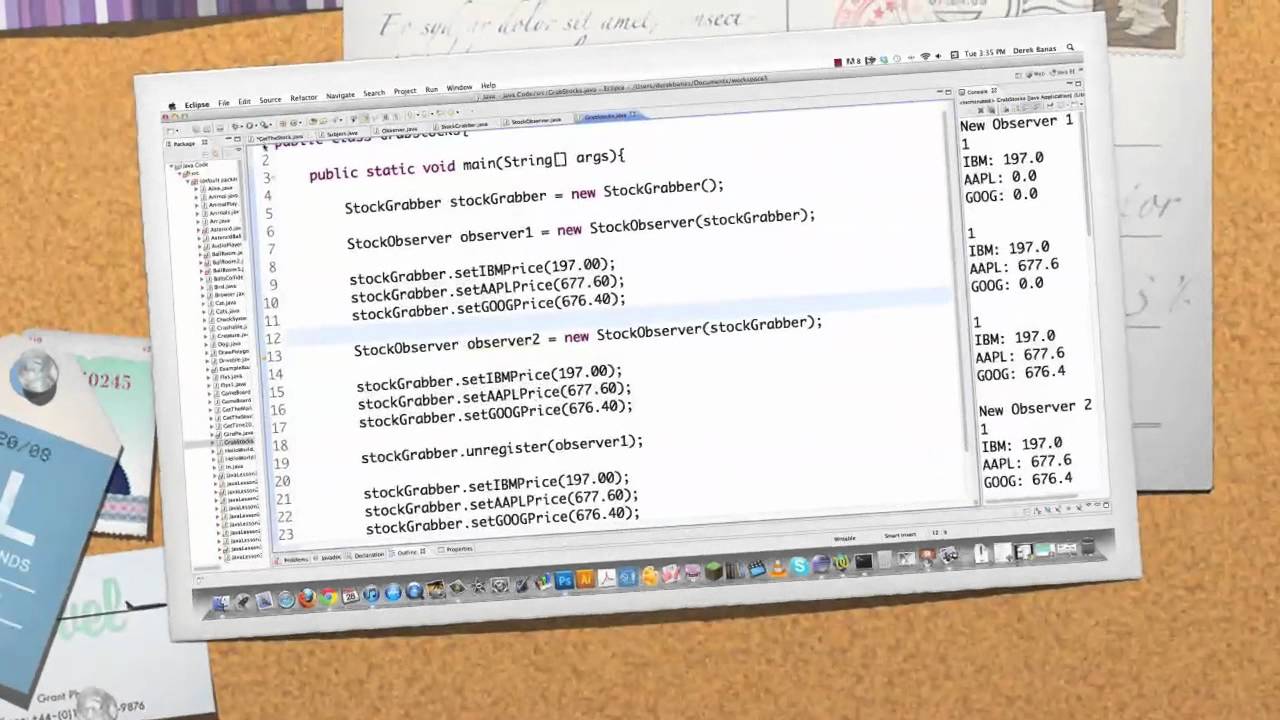
The Observer pattern establishes a one-to-many dependency between objects. It allows multiple observer objects (listeners) to be notified and updated automatically when the observed object (subject) undergoes a change in state. This pattern is widely used in event-driven systems or scenarios requiring loose coupling between objects.
Factory
The Factory pattern provides an interface for creating objects without exposing the creation logic to the client. It centralizes object creation, allowing clients to use the factory interface to create objects based on specific criteria or conditions. This pattern promotes flexibility, decoupling, and abstraction in object creation.
Strategy
The Strategy pattern defines a family of algorithms and encapsulates each algorithm as a separate class. It allows clients to dynamically choose and switch between different algorithms at runtime. This pattern enables code reuse, promotes separation of concerns, and facilitates the "Open-Closed Principle" by allowing new algorithms to be added without modifying existing code.

MVC (Model-View-Controller)
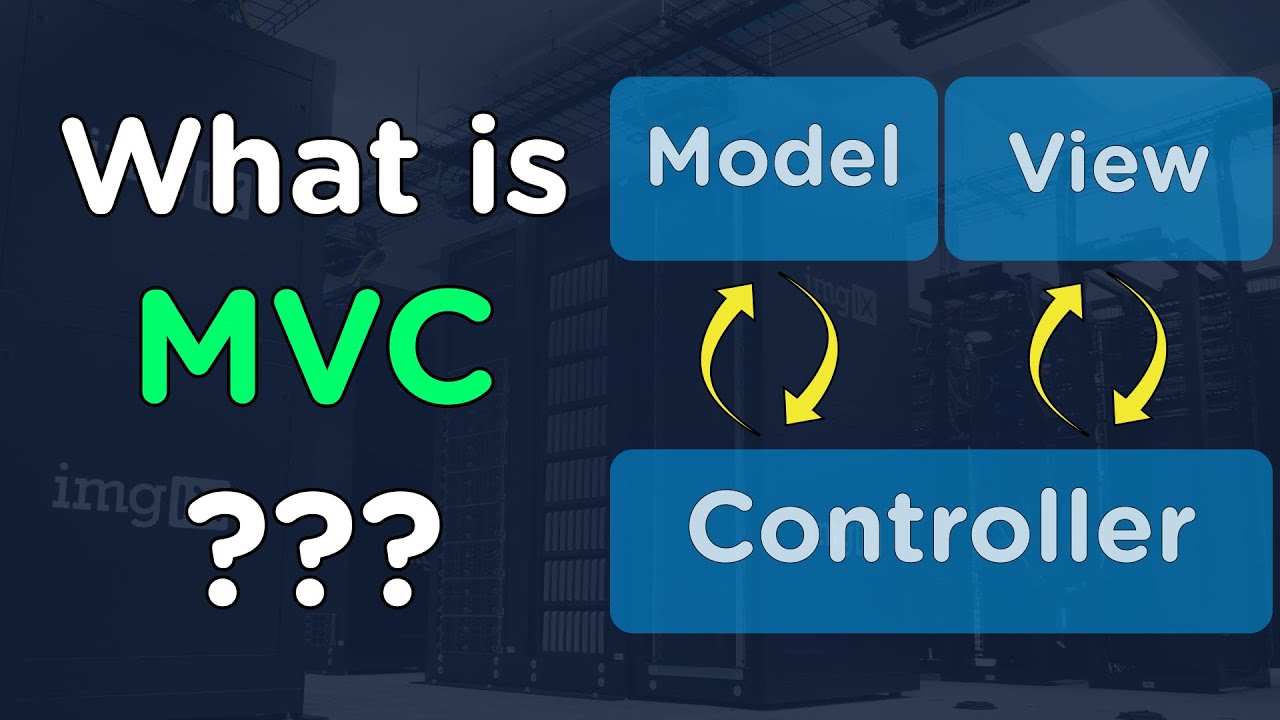
MVC is an architectural design pattern commonly used in user interface development. It separates an application into three interconnected components: the Model (data and business logic), the View (presentation and user interface), and the Controller (handles user input and updates the model). MVC promotes code organization, maintainability, and modularity.
| Pattern/Principle | Description | Use Case |
|---|---|---|
| SOLID Principles | A set of five principles: Single Responsibility, Open/Closed, Liskov Substitution, Interface Segregation, and Dependency Inversion. | Designing maintainable, scalable, and flexible code. |
| KISS Principle | "Keep It Simple, Stupid" - Encourages simplicity and avoiding unnecessary complexity in code. | Writing code that is easy to understand and maintain. |
| Singleton Pattern | Ensures a class has only one instance and provides a global point of access to that instance. | Managing shared resources or configurations. |
| Observer Pattern | Defines a one-to-many dependency between objects, so that when one object changes state, all its dependents are notified and updated automatically. | Implementing event handling and decoupling components. |
| Factory Pattern | A creational pattern that provides an interface for creating objects, but allows subclasses to alter the type of objects that will be created. | Creating objects without specifying the exact class. |
| Strategy Pattern | Allows selecting an algorithm or behavior during runtime by encapsulating each behavior in separate classes and making them interchangeable. | Implementing different algorithms for the same task. |
| MVC Pattern | Model-View-Controller: Separates an application into three components - the model (data and business logic), the view (user interface), and the controller (manages user input and updates the model and view). | Structuring applications for better maintainability and scalability. |
💯 Structures
| This section was written in conjunction with ChatGPT. |

Array
An array is a collection of elements stored in contiguous memory locations. It allows accessing elements using an index, making it efficient for random access. However, its size is fixed during initialization.
Here's an example:
#include <array>

// Defining an array
std::array<int, 5> myArray = {1, 2, 3, 4, 5};
List
A list is a linear data structure that supports fast insertion and deletion at any position. It does not provide random access but is efficient for frequent insertions and removals.
Here's an example:
#include <list>

// Defining an list
std::list<int> myList = {1, 2, 3, 4, 5};

myList.push_back(6);
myList.push_front(0);
Queue
A queue is a linear data structure that follows the First-In-First-Out (FIFO) principle. Elements are added to the back (enqueue) and removed from the front (dequeue).
Here's an example:
#include <queue>

// Defining an list
std::queue<int> myQueue;

myQueue.push(1);
myQueue.push(2);
myQueue.push(3);
Hash Set (Lookup table)
A hash set is a collection of unique elements, and it uses hashing to achieve fast insertion, deletion, and lookup operations.
Here's an example:
#include <unordered_set>

// Defining an list
std::unordered_set<int> myHashSet = {1, 2, 3, 4, 5};

myHashSet.insert(6);
Dictionary (Map)
A dictionary, also known as a map, is a collection of key-value pairs, where each key is unique. It provides fast access to values based on their keys.
Here's an example:
#include <map>

// Defining an list
std::map<std::string, int> myDictionary;

myDictionary["apple"] = 5;
myDictionary["banana"] = 3;
myDictionary["orange"] = 8;
Linked List
A linked list is a linear data structure where elements (nodes) are connected via pointers. It supports efficient insertion and deletion but requires more memory compared to arrays.
Note
Linked list structure doesn't exist in C++ standard library.
Here's an example:
struct Node
{
    int data;
    Node* next;
};

int main()
{
    Node* head = nullptr;
    Node* second = nullptr;
    Node* third = nullptr;

    head = new Node();
    second = new Node();
    third = new Node();

    head->data = 1;
    head->next = second;

    second->data = 2;
    second->next = third;

    third->data = 3;
    third->next = nullptr;

    Node* current = head;

    while (current != nullptr)
    {
        std::cout << current->data << " ";
        current = current->next;
    }

    std::cout << std::endl;

    delete head;
    delete second;
    delete third;

    return 0;
}
| Data Structure | Description | Use Case |
|---|---|---|
| Array | A fixed-size collection of elements of the same data type stored in contiguous memory locations. | Used when the size is known at compile time and constant-time access is required. |
| List | A dynamic collection of elements, usually implemented as a doubly-linked list or dynamic array. | Suitable when the size is unknown or frequently changes, offering efficient insertion and deletion. |
| Hash Set | A collection of unique elements, stored in a hash table based on their hash codes. | Ideal for maintaining a set of distinct items and performing fast membership checks. |
| Dictionary | Also known as a hash map, it stores key-value pairs and allows fast lookup of values based on keys. | Used when quick access to data based on keys is required, e.g., in associative arrays. |
| Linked List | A linear data structure where elements are stored in nodes, each containing a value and a reference to the next node. | Suitable when frequent insertion and deletion at any position are required. |
⏰ Time Complexity
| This section was written in conjunction with ChatGPT. |
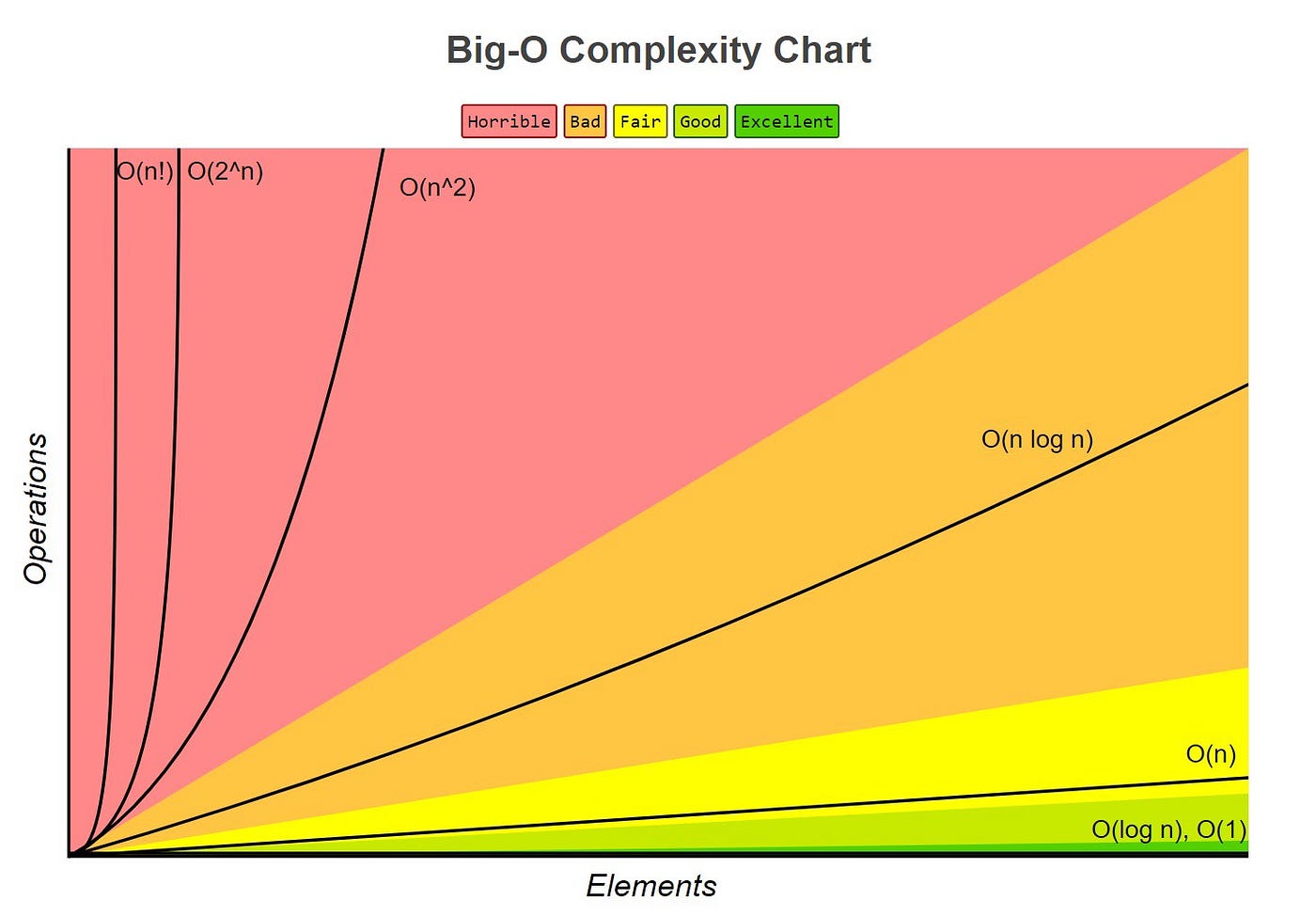
Time complexity is a measure of how the runtime of an algorithm grows with the size of the input data. It helps us understand how efficient an algorithm is and how it will scale when dealing with larger datasets.

Here is a graph of Time Complexity:
Constant
| Time complexity: `O(1)` |
An algorithm has constant time complexity if its runtime does not depend on the size of the input data. It performs the same number of operations regardless of the input size.
Here's an example:
#include <iostream>

void constantTimeExample(int num)
{
    std::cout << "This is a constant time example: " << num << std::endl;
}

int main()
{
    int num = 42;

    constantTimeExample(num);

    return 0;
}
Logarithmic
| Time complexity: `O(log n)` |
An algorithm has logarithmic time complexity if its runtime grows logarithmically with the size of the input. It divides the input data into smaller portions and discards a significant portion at each step.
Here's an example:
#include <iostream>

int binarySearch(int arr[], int size, int target)
{
    int left = 0;
    int right = size - 1;

    while (left <= right)
    {
        int mid = left + (right - left) / 2;

        if (arr[mid] == target)
            return mid;
        else if (arr[mid] < target)
            left = mid + 1;
        else
            right = mid - 1;
    }

    return -1;
}

int main()
{
    int arr[] = {1, 2, 3, 4, 5, 6, 7, 8, 9, 10};
    int target = 7;
    int size = sizeof(arr) / sizeof(arr[0]);

    int result = binarySearch(arr, size, target);
    std::cout << "Element found at index: " << result << std::endl;

    return 0;
}
Linear
| Time complexity: `O(n)` |
An algorithm has linear time complexity if its runtime grows linearly with the size of the input data. It performs an operation for each element in the input.
Here's an example:
#include <iostream>

void linearTimeExample(int arr[], int size)
{
    for (int i = 0; i < size; i++)
    {
        std::cout << arr[i] << " ";
    }

    std::cout << std::endl;
}

int main()
{
    int arr[] = {1, 2, 3, 4, 5};
    int size = sizeof(arr) / sizeof(arr[0]);

    linearTimeExample(arr, size);

    return 0;
}
Quadratic
| Time complexity: `O(n^2)` |
An algorithm has quadratic time complexity if its runtime grows with the square of the input size. It often involves nested loops, leading to multiple iterations over the input data.
Here's an example:
#include <iostream>

void quadraticTimeExample(int arr[], int size)
{
    for (int i = 0; i < size; i++)
    {
        for (int j = 0; j < size; j++)
        {
            std::cout << arr[i] * arr[j] << " ";
        }
    }

    std::cout << std::endl;
}

int main()
{
    int arr[] = {1, 2, 3, 4, 5};
    int size = sizeof(arr) / sizeof(arr[0]);

    quadraticTimeExample(arr, size);

    return 0;
}
Exponential
| Time complexity: `O(2^n)` |
An algorithm has exponential time complexity if its runtime grows exponentially with the size of the input data. It performs repeated operations that double with each increase in input size.
Here's an example:
#include <iostream>

int fibonacci(int n)
{
    if (n <= 1)
        return n;

    return fibonacci(n - 1) + fibonacci(n - 2);
}

int main()
{
    int n = 5;

    std::cout << "Fibonacci of " << n << " is: " << fibonacci(n) << std::endl;

    return 0;
}
Factorial
| Time complexity: `O(n!)` |
An algorithm has factorial time complexity if its runtime grows with the factorial of the input size. It is one of the slowest-growing time complexities and should be avoided for larger datasets.
Here's an example:
#include <iostream>

int factorial(int n)
{
    if (n == 0)
        return 1;

    return n * factorial(n - 1);
}

int main()
{
    int n = 5;

    std::cout << "Factorial of " << n << " is: " << factorial(n) << std::endl;

    return 0;
}
| Time Complexity | Description | Example | Characteristics |
|---|---|---|---|
| Constant (O(1)) | The time taken is constant, irrespective of the input size. | Accessing an element in an array with an index. | Fast and efficient, doesn't depend on input size. |
| Logarithmic (O(log n)) | The time grows logarithmically with the input size. | Binary search algorithm. | Efficient for large datasets, grows slowly with input. |
| Linear (O(n)) | The time grows linearly with the input size. | Linear search in an unsorted array. | Time increases linearly with input size. |
| Quadratic (O(n^2)) | The time grows quadratically with the input size. | Nested loops. | Becomes inefficient for large input, grows rapidly. |
| Exponential (O(2^n)) | The time grows exponentially with the input size. | Recursive Fibonacci. | Very slow, becomes impractical for even small inputs. |
| Factorial (O(n!)) | The time grows factorially with the input size. | Recursive permutation algorithm. | Extremely slow, highly impractical for most cases. |
📍 Footnotes
Footnotes
-
Keyword, also known as a Reserved word. ↩ ↩2 ↩3 ↩4
-
Python is a user-friendly, high-level language often used for scripting, data analysis, web development, and artificial intelligence applications. ↩ ↩2 ↩3
-
C# is a high-level, object-oriented programming language developed by Microsoft, widely used for building Windows applications and games using the .NET framework. ↩ ↩2
-
Java is a versatile, platform-independent language known for its "write once, run anywhere" capability, commonly used in web development and enterprise applications. ↩
-
ASCIIor American Standard Code for Information Interchange. A character encoding standard for representing English (Latin) characters and symbols. ↩ -
The Unreal Header Tool (UHT) is a powerful tool for managing dependencies between C++ files in an Unreal Engine project. The header tool is designed to work with the Unreal Build Tool (UBT), which is responsible for compiling the engine and all its modules. ↩ ↩2 ↩3