ONLYOFFICE DocSpace
August 5, 2026 · View on GitHub






Table of Contents
- What is DocSpace?
- Key Features
- Security
- Get DocSpace
- Integrations
- Repository Structure
- Technology Stack
- Building from Source
- Community & Support
💡 What is DocSpace?
Welcome to the official GitHub repository for ONLYOFFICE DocSpace!
DocSpace is a secure, collaborative platform that allows you to create flexible, room-based environments to store, share, and co-author documents of any kind.
Whether you're working with your team, clients, or partners, DocSpace provides the tools you need to get work done efficiently and securely.
This repository contains the source code for the backend and frontend components of DocSpace.
🚀 What makes DocSpace a must try!
1. 👥 Flexible, room-based collaboration
Create customizable rooms for any purpose. Each room comes with preset permissions and roles to streamline your workflows.
- Collaboration rooms: Invite users to co-author and edit documents in real-time.
- Public rooms: Share documents for view-only access with external users via a public link.
- Custom rooms: Define your own access permissions, whether it's for review, commenting, or form filling.
- Form filling rooms: Upload PDF forms from your device or template library. Invite users or share a public link to collect responses — automatically organized in a spreadsheet.
- Virtual data rooms: Automatically index and track all content. You can enable watermarks, set file lifetime, restrict downloading and copying.
2. 📝 Work with any content you have
DocSpace is integrated with our complete online office suite, allowing you to work with dozens of formats.
- Document Editor 📝
- Spreadsheet Editor 📊
- Presentation Editor 📽️
- PDF Editor ✂️
- Form Creator 📋
- Diagram Viewer 🖼️
- E-books reader 📖
- Markdown files 📁
- Multimedia 🎵
- Programming files and archives 🧑💻
3. 🤖 Work faster with AI agents
- Chat and search with AI
- Analyze files from your DocSpace
- Manage files and rooms
- Invite teammates for AI-powered collaboration
- Do even more with MCP server integration
- Enable AI assistants in your docs
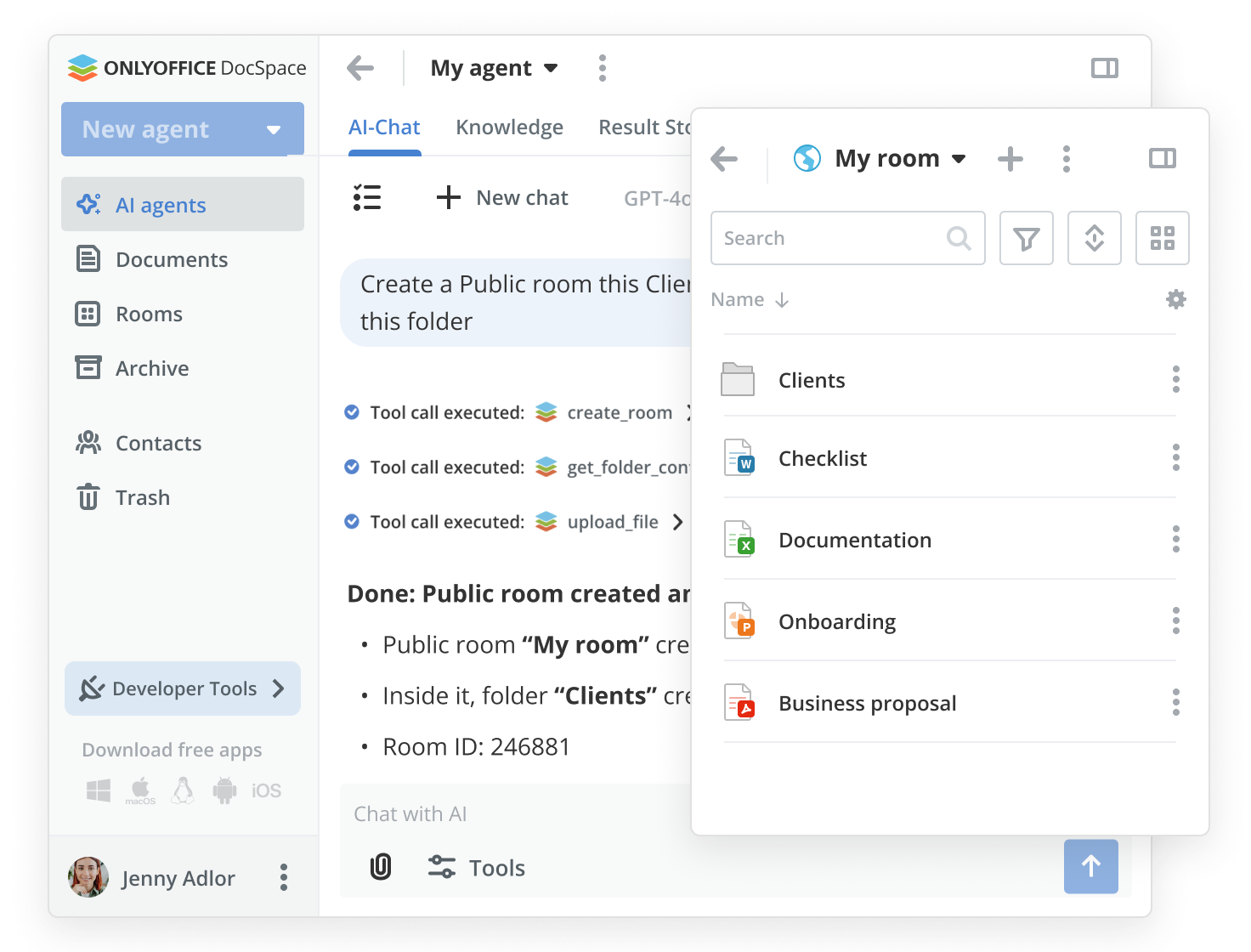
Learn more about the AI tools ↗.
4. 🧩 Make use of extra features
Easily extend DocSpace's functionality.
- Connect third-party services like Dropbox, Google Drive, Zoom, etc.
- Activate system plugins or add your own.
Discover plugins in the App Directory ↗.
🔒 How secure is my data?
Collaborate with peace of mind knowing your data is protected by multiple layers of security.
| Feature | Description |
|---|---|
| Compliance with standards | Our data security policy is fully compliant with GDPR standards. |
| Open source | We affirm transparency and reliability by opening the source code of all functional modules and tools. |
| Encryption | We use industry-leading AES-256 encryption for data at rest and HTTPS/TLS for data in transit. |
| Secure access & monitoring | Flexible access rights and JWT let you entirely control document access. Activity tracking and audit reporting provide traceability. |
📚 Learn more about all ONLYOFFICE security features ↗.
🌐 How can I get DocSpace?
Get started with DocSpace by choosing the solution that best suits your needs.
| Option | Description | Get started |
|---|---|---|
| 🏢 DocSpace Enterprise | Deploy DocSpace on your own server for total control over your documents. Highly scalable to grow with your business. | Get it now |
| ⚙️ DocSpace Developer | Bring your web app users a secure space for content storing and online document collaboration. | Get it now |
| ☁️ Business Cloud | A hassle-free cloud solution with bigger storage, enhanced security, and professional support. Pay for admins only and invite users for free. | Check prices |
| 🚀 Free cloud for startups | Create a free cloud space for your documents. Invite up to 3 admins and collaborate on docs anywhere. | Create now |
| 🎓 Free cloud for schools and non-profits | Create a free cloud space for your school or non-profit with 2 GB of storage and up to 20 admin accounts. | Submit request |
🔗 Using DocSpace inside your platform
Connect DocSpace to collaborate on office documents directly from your business platform: Zoom, Pipedrive, Drupal, WordPress, Moodle, monday.
Make use of Zapier integration to connect DocSpace with thousands of tools your team uses.
Discover all integrations ↗
🧱 Repository Structure
This repository is organized as a set of Git submodules:
| Folder | Description | README |
|---|---|---|
server | Backend: C# 14.0, .NET 10.0, ASP.NET Core, .NET Aspire, MySQL, Redis, RabbitMQ, OpenSearch | Server README |
client | Frontend: TypeScript 5.9, React 19, MobX 6, Webpack 5, Next.js, pnpm monorepo with Nx | Client README |
buildtools | Build scripts, Docker configurations, CI/CD pipelines, installation packages, app configuration | Build Tools README |
.github/workflows | GitHub Actions workflows for CI/CD and issue templates |
🛠️ Technology Stack
Backend: C# 14.0, .NET 10.0 / ASP.NET Core, .NET Aspire, MySQL 9.5, Redis, RabbitMQ, OpenSearch, OpenTelemetry
Frontend: TypeScript 5.9, React 19, MobX 6, Styled-Components, CSS/SASS, i18next, Webpack 5, Next.js
Infrastructure: Docker 28.5+, Nginx (OpenResty), pnpm 10.28+, Nx
🚀 Building from Source
Note: This creates a development/testing environment not suitable for production use. For production deployment, see How can I get DocSpace?
Prerequisites
| Tool | Version | Verification Command |
|---|---|---|
| Node.js | >= 24 | node --version |
| pnpm | >= 10.28.0 | pnpm --version |
| .NET SDK | 10.0 | dotnet --version |
| Docker | >= 28.5.0 | docker --version |
Minimum System Requirements
- CPU: Dual-core 2 GHz or higher
- RAM: 8 GB or more
- SSD: At least 40 GB of free space
- Swap file: At least 2 GB
- OS: macOS, Linux, or Windows with WSL2
Quick Start
1. Clone the repository with all submodules:
git clone --recurse-submodules https://github.com/ONLYOFFICE/DocSpace && \
cd DocSpace && \
git submodule foreach "git checkout master"
2. Start the preview:
cd server/common/ASC.AppHost
dotnet run --launch-profile preview
This will launch minimal Docker-based setup
More details: Server (launch profiles, backend architecture) · Client (frontend modes, packages) · Build Tools (Docker, CI/CD, installation)
4. Open the application:
| URL | Description |
|---|---|
| http://localhost:8092 | DocSpace Application |
| http://localhost:15208 | Aspire Dashboard (backend services monitoring) |
| http://localhost:8092/scalar/#ascfiles | API Documentation (Scalar) |
| http://localhost:56161 | DB Gate (database management) |
| http://localhost:56162 | Mailpit (email testing) |
Development
- Frontend (TypeScript/React): VSCode workspace with task buttons for one-click start — see Client README
- Backend (C#/.NET): VSCode with C# Dev Kit and .NET Aspire extensions — see Server README
Stopping Services
- Press
Ctrl+Cin the backend terminal to stop all Aspire-managed services - Press
Ctrl+Cin the frontend terminal to stop the dev server
To completely remove Docker artifacts, see the Server README.
The lightweight installation option
The lightweight build of ONLYOFFICE DocSpace Community is intended for quick evaluation and testing. Unlike the standard multi-container deployment, it combines all DocSpace services into a single container. Check the instructions ➡️
💡 Need help or have an idea?
We ❤️ community contributions!
- 🐞 Found a bug? Please report it by creating an issue.
- ❓ Have a question? Ask our community and developers on the ONLYOFFICE Forum.
- 🥷 Want to be a power user? Visit our YouTube channel and Help Center.
- 👨💻 Need help for developers? Check our API documentation.
- 💡 Want to suggest a feature? Share your ideas here.
Made with ❤️ by the ONLYOFFICE Team