Microsoft 365 Agents Toolkit Pre-release
May 21, 2025 · View on GitHub
Changelog
Note: This changelog only includes the changes for the pre-release versions of Microsoft 365 Agents Toolkit (evolved from Teams Toolkit). For the changelog of stable versions, please refer to the Microsoft 365 Agents Toolkit Changelog.
February 17, 2025
New Feature
-
Switch Tenant: Teams Toolkit now supports switching target tenant for users with multiple tenants in their Microsoft 365 or Azure account. A "Switch Tenant" button is located next to the account information, and the currently logged-in tenant is displayed alongside the account details.
-
GitHub Copilot Extension Walkthrough: To make it easier for users to get started with the GitHub Copilot Extension "@teamsapp," Teams Toolkit has added a walkthrough UI experience. This guide helps users understand how to install and use this helpful AI assistant to build Teams apps.
Enhancement
-
Declarative Agent API Key Authentication: API Key Authentication in the DA project was actually implemented using Bearer Tokens in the past. Recently, the Teams platform has added support for developers to specify the key name in the API request header or query URL. As a result, we have updated the corresponding templates to reflect this change.
-
Microsoft Entra Manifest: Teams Toolkit has updated Microsoft Entra app manifest to apply MS Graph format for better integration with platform.
-
Troubleshooting with GitHub Copilot Extension: Teams Toolkit now improve the troubleshooting experience with GitHub Copilot extension by adding a "Resolve with @teamsapp" button, click this button will ask Teams Toolkit to open the output channel in the editor. Then the GitHub Copilot Chat will use the output log as a reference for troubleshooting requests. Consequently, @teamsapp can read the log and perform troubleshooting.
-
Input OpenAI Key to Debug: Declarative Agent projects and some Custom Engine Agent projects require an OpenAI key for preview and debugging. Teams Toolkit now allows users to create these projects without inputting the OpenAI key. However, missing this value will definitely cause a failure in preview and debugging. Therefore, an input box will pop up before preview/debug to remind users of the required value.
-
Publish Teams App: Refine the "Publish Teams App" UI in Teams Toolkit to reduce confusion. Now there are two buttons: one for publishing the Teams app to your organization and the other for publishing your app to the Teams store. The latter will require users to go to the Teams Developer Portal to complete the publishing process.
-
Security Enhancement: Consolidate and standardize the Tab templates for quality and security. This involves ensuring consistency in the use of tools and dependencies, such as using npm packages instead of CDNs and updating the Teams JS version.
January 23, 2025
New Feature
- Develop Office Add-ins: Teams Toolkit now supports building add-ins for a broader range of Office applications, including Word, Excel, and PowerPoint, in addition to Outlook. You can now use Teams Toolkit to create task panes that seamlessly integrate across these Office applications.
January 14, 2025
Bug Fix
- Fixed an issue where creating a declartaive agent with an action using Microsoft Kiota might fail in some cases. #13038
January 07, 2025
New Features
-
Refreshed User Interface for Getting Started Experience: We have enhanced the user interface based on customer feedback:
- A streamlined navigation layout in the left panel to improve ease of access.
- An updated "Create New App" dialog with well-organized categories.
- Redesigned walkthrough guides for developing Teams bots and declarative agents, ensuring a seamless initiation process.
- A streamlined navigation layout in the left panel to improve ease of access.
-
Environment Variable Support for Localization Files: Using the
{{your_env_var}}syntax, developers can now incorporate environment variables into their localized JSON files. Teams Toolkit automatically resolves these variables during the local debug, provision, and publish phases, ensuring that your applications adapt dynamically to different deployment environments with ease. -
Integrated Debugging for Declarative Agents: Developers can now leverage the robust debugging capabilities within Visual Studio Code for their declarative agents. This feature allows for in-depth visualization of responses and stack traces from Microsoft 365 Copilot without exiting the Integrated Development Environment (IDE), enhancing both efficiency and ease of troubleshooting.
-
Regenerate Actions for Declarative Agent: Teams Toolkit now offers the ability to regenerate actions for declarative agents by integrating with Microsoft Kiota, enabling developers to refresh the agent's capabilities and ensure that it remains up-to-date with the latest features and enhancements.
Enhancements
-
Improved
scriptAction Output Using Native TTY Terminal UX: The output mechanism for thescriptaction has been enhanced to leverage the native TTY terminal user experience. This update addresses the occasional rendering issues that were previously experienced in the Visual Studio Code output channel, providing a more stable and reliable interaction interface for developers. -
Enhanced
teams-jsSDK with Treeshaking Support: Application templates are now equipped with the upgradedteams-jsSDK that includes support for the latest treeshaking feature. This advanced capability empowers developers to optimize their bundled packages by removing any unused TeamsJS function code, thus enhancing application performance and efficiency. -
Enhanced Authentication Actions for Declarative Agents: Several enhancements have been made to support creating actions that require authentication. Firstly, Teams Toolkit now supports generating actions that use API keys in headers or queries, in addition to bearer token authentication. Secondly, when registering OAuth configurations, Teams Toolkit supports updating identity URIs to
api://auth-{authGUID}. -
Updated Validation Rules for Action Generation: Following rules have been updated when generating actions:
- Removed nested object validation.
- Removed Post body is not JSON schema validation.
- Removed circular reference validation.
- Allowed http server url in OpenAPI description file.
- Allowed user to scaffold Declarative Agent project with unsupported Auth.
- Allowed user to select API with multiple Auth.
Bug Fixes
- Resolved an issue where bot may not respond during local debug. #12777
- Fixed an issue where sample details are not shown when open Teams Toolkit in GitHub Codespaces. #12715
November 26, 2024
New Features
-
AI-Assisted Development: We are excited to announce the latest AI-assisted development experience for Microsoft 365 developers: the GitHub Copilot extension for Teams Toolkit (
@teamsapp). Leveraging AI capabilities, this extension significantly simplifies Teams app development and enables customization of Microsoft 365 Copilot with chat features. It streamlines key development scenarios that previously required extensive documentation. With the GitHub Copilot extensionteamsapp, you can:- Explore Teams app or Microsoft 365 Copilot agent development by using prompts such as
What types of apps can I build for Teams?,How can I create a real-world Teams app?, orWhat’s the difference between declarative and custom agents?. - Provide details about your intended Teams app or Microsoft 365 Copilot agent to receive relevant samples or templates to get started, such as 'I want to create a ToDo Teams app.' or 'I want to build a Microsoft 365 Copilot agent.'.
- Resolve issues encountered during Teams app or Microsoft 365 agent development by seeking assistance with queries like
My Teams app doesn’t sideload when debugging with Teams Toolkit.orMy tab app SSO is not working on mobile platform..
- Explore Teams app or Microsoft 365 Copilot agent development by using prompts such as
Bug Fixes
- Resolved an issue where Teams Toolkit could fail to generate authentication actions when creating a declarative agent with an API plugin using Microsoft Kiota. #12764
January 23, 2025
New Feature
- Develop Office Add-ins: Teams Toolkit now supports building add-ins for a broader range of Office applications, including Word, Excel, and PowerPoint, in addition to Outlook. You can now use Teams Toolkit to create task panes that seamlessly integrate across these Office applications.
January 14, 2025
Bug Fix
- Fixed an issue where creating a declartaive agent with an action using Microsoft Kiota might fail in some cases. #13038
January 07, 2025
New Features
-
Refreshed User Interface for Getting Started Experience: We have enhanced the user interface based on customer feedback:
- A streamlined navigation layout in the left panel to improve ease of access.
- An updated "Create New App" dialog with well-organized categories.
- Redesigned walkthrough guides for developing Teams bots and declarative agents, ensuring a seamless initiation process.
- A streamlined navigation layout in the left panel to improve ease of access.
-
Environment Variable Support for Localization Files: Using the
{{your_env_var}}syntax, developers can now incorporate environment variables into their localized JSON files. Teams Toolkit automatically resolves these variables during the local debug, provision, and publish phases, ensuring that your applications adapt dynamically to different deployment environments with ease. -
Integrated Debugging for Declarative Agents: Developers can now leverage the robust debugging capabilities within Visual Studio Code for their declarative agents. This feature allows for in-depth visualization of responses and stack traces from Microsoft 365 Copilot without exiting the Integrated Development Environment (IDE), enhancing both efficiency and ease of troubleshooting.
-
Regenerate Actions for Declarative Agent: Teams Toolkit now offers the ability to regenerate actions for declarative agents by integrating with Microsoft Kiota, enabling developers to refresh the agent's capabilities and ensure that it remains up-to-date with the latest features and enhancements.
Enhancements
-
Improved
scriptAction Output Using Native TTY Terminal UX: The output mechanism for thescriptaction has been enhanced to leverage the native TTY terminal user experience. This update addresses the occasional rendering issues that were previously experienced in the Visual Studio Code output channel, providing a more stable and reliable interaction interface for developers. -
Enhanced
teams-jsSDK with Treeshaking Support: Application templates are now equipped with the upgradedteams-jsSDK that includes support for the latest treeshaking feature. This advanced capability empowers developers to optimize their bundled packages by removing any unused TeamsJS function code, thus enhancing application performance and efficiency. -
Enhanced Authentication Actions for Declarative Agents: Several enhancements have been made to support creating actions that require authentication. Firstly, Teams Toolkit now supports generating actions that use API keys in headers or queries, in addition to bearer token authentication. Secondly, when registering OAuth configurations, Teams Toolkit supports updating identity URIs to
api://auth-{authGUID}. -
Updated Validation Rules for Action Generation: Following rules have been updated when generating actions:
- Removed nested object validation.
- Removed Post body is not JSON schema validation.
- Removed circular reference validation.
- Allowed http server url in OpenAPI description file.
- Allowed user to scaffold Declarative Agent project with unsupported Auth.
- Allowed user to select API with multiple Auth.
Bug Fixes
- Resolved an issue where bot may not respond during local debug. #12777
- Fixed an issue where sample details are not shown when open Teams Toolkit in GitHub Codespaces. #12715
November 26, 2024
New Features
-
AI-Assisted Development: We are excited to announce the latest AI-assisted development experience for Microsoft 365 developers: the GitHub Copilot extension for Teams Toolkit (
@teamsapp). Leveraging AI capabilities, this extension significantly simplifies Teams app development and enables customization of Microsoft 365 Copilot with chat features. It streamlines key development scenarios that previously required extensive documentation. With the GitHub Copilot extensionteamsapp, you can:- Explore Teams app or Microsoft 365 Copilot agent development by using prompts such as
What types of apps can I build for Teams?,How can I create a real-world Teams app?, orWhat’s the difference between declarative and custom agents?. - Provide details about your intended Teams app or Microsoft 365 Copilot agent to receive relevant samples or templates to get started, such as 'I want to create a ToDo Teams app.' or 'I want to build a Microsoft 365 Copilot agent.'.
- Resolve issues encountered during Teams app or Microsoft 365 agent development by seeking assistance with queries like
My Teams app doesn’t sideload when debugging with Teams Toolkit.orMy tab app SSO is not working on mobile platform..
- Explore Teams app or Microsoft 365 Copilot agent development by using prompts such as
Bug Fixes
- Resolved an issue where Teams Toolkit could fail to generate authentication actions when creating a declarative agent with an API plugin using Microsoft Kiota. #12764
November 19, 2024
New Features
-
Added Local Authentication Support for API ME and API Plugin: We have introduced local authentication support for application templates of API-ME with Microsoft Entra auth and API Plugin application with OAuth. which eliminates the anonymous setup for APIs on local environment end to end and also helps developers verify the behavior when Teams and Microsoft 365 Copilot invokes an API without proper authorization. This feature includes built-in middleware that implements the token validation and a guided code tour explains how it works.
-
Process Termination For Port Conflict: Port conflict is a common pain point for developers when debugging bot applications. It happens when the processes are not fully terminated when debug session stops. Now Teams Toolkit has added additional support to help terminate those unkilled processes to release ports.
-
Integrated with Microsoft Kiota for API Plugin Generation: Now Teams Toolkit has integrated with Microsoft Kiota when adding API Plugins into Declarative Agent. With this integration, developers are enabled to create API Plugins by browsing public API catalogs and Microsoft Kiota is capable of handling large OpenAPI Description Document. This is an experimental feature, for early access make sure to turn on VSCode Settings with
Enable Microsoft Kiota. -
Using Assistant API on Azure OpenAI Service: We have previously announced the support for Assistant API on Azure OpenAI Services in Teams Toolkit for Python language, and now it has expanded to TypeScript and JavaScript.
-
Manifest Schema Validation Enhancement: Added support for manifest schema validation to cover localization files and default language files.
Enhancements
- Updated Bot application templates from
restifytoexpressserver for better support of Node.js 20. - Updated Tab application templates from
react-scriptstovitefor better performance and developer experience. - Updated application templates and pre-requisite checker for Node.js 20 support.
- Updated application templates to the latest stable App Manifest version v1.19.
Bug Fixes
- Update
@azure/storage-blobto avoid AbortSignal error when deploying withazureStorage/enableStaticWebsite. #12583 - Upgraded
path-to-regexpandbody-parserto fix vulnerability issues. #12610 - Fixed an issue where
teamsapp.ymlwhen adding an API Plugin to the declarative agent. #12656
September 17, 2024
Enhancement
- Updated terminology for creating
Copilot ExtensionandCustom Engine Copilotto enhance clarity. - Updated
Declarative AgentandAPI Pluginapp template to point to the latest manifest schema.
September 12, 2024
New Features
-
External File Support for Declarative Copilot Instructions: Developers now have the ability to use an external file to author instructions for their declarative copilots and reference it in the manifest file. This greatly improves the authoring experience for longer instructions compared to using JSON files.
-
Plugin Integration for Declarative Copilot: Teams Toolkit now allows developers to add a plugin as a skill to the declarative copilot. Developers can either add a new API plugin using an OpenAPI description document or reference an existing API plugin via its manifest file.
Bug Fixes:
- Upgraded the axios dependency used in Teams Toolkit to version 1.7.6 to fix a vulnerability issue. #12306
- Changed a string for better clarity when creating an
AI Agentwithout Assistant API. #12266
August 14, 2024
New Features
-
Enhanced App Validation: Developers can now evaluate their app packages using the same test cases Microsoft employs during app review. The Enhanced App Validation feature in Teams Toolkit identifies any errors or warnings within your app package and provides clear guidelines for resolution. For more details on Microsoft test cases, refer to the Teams Store validation guidelines and Commercial marketplace certification policies.
-
Generate an Intelligent Chatbot with Python: Following the release of support for building Custom Engine Copilot during Build 2024, which included the ability to "chat with" your own API, Teams Toolkit now extends this capability to the Python programming language.
-
Create Declarative Copilot: Teams Toolkit now allows you to build a declarative copilot, enabling you to customize Microsoft 365 Copilot by declaring specific instructions, actions, and knowledge. Declarative copilots run on the same orchestrator, foundation models, and trusted AI services that power Microsoft Copilot. You can learn more about declarative copilots here. The toolkit supports the creation of both basic declarative copilots and those with an API plugin.
-
Using Assistant API on Azure OpenAI Service: The Teams Toolkit has updated the
AI Agent(Python) app template to support the Assistant API on Azure OpenAI Service. You can now build your own AI Agents on Microsoft 365 using Python, with the option to use either Azure OpenAI Service or OpenAI directly. Support for TypeScript and JavaScript is forthcoming.
Enhancements
- Teams Toolkit will continue to update scaffold app templates to ensure compliance with Teams Store validation guidelines. The first round of updates focuses on bot templates, including:
- Teams Toolkit now prompts users to generate an API key before debugging API ME or API Plugin with API Key authentication templates.
- Secret values have been redacted from the Visual Studio Code output channel.
Bug Fixes
- Fixed vulnerability issues in TeamsFx SDK. #11973
- Resolved compatibility issues with
groupchatandgroupChatin the Teams app manifest. #12028 - Corrected an issue where the link redirection for the lifecycle
Provisionbutton was incorrect. #12120 - Fixed initialization failures of
publicClientApplicationin TeamsFx SDK. #12159 - Addressed issues when creating SharePoint Framework-based tab apps. #12173
July 17, 2024
New Features
-
Debug Apps in Teams Desktop Client: The Teams desktop client now offers a faster and more reliable way to debug your Teams applications, with the same capabilities available in the Teams web client, such as breakpoints and hot reload. This feature is now available for Custom Engine Copilots, Bots, and Message Extensions apps.
-
Use Managed Identity for Bot and Message Extension when deploying to Azure: The Teams Toolkit has transitioned from client ID and secret-based identity to user-assigned managed identity for Bot and Message Extension application templates, enhancing security. Learn more about the benefits of using managed identities for Azure resources.
-
Clean Up Resources Created After Development: You can now safely clean up resources created after application development by deleting the application registration in the Teams Developer Portal and Bot Framework Portal, and removing uploaded custom apps in Microsoft 365 applications. This can be done via the
teamsapp uninstallcommand, either by using the App ID in the Teams application manifest file or by specifying an environment if your project is managed by the Teams Toolkit. -
Integrated CodeTour Instructions for Using Graph Connector Data Source: The
Chat With Your Data - Microsoft 365app template in Teams Toolkit now includes interactive CodeTour instructions. By default, the app uses content uploaded to SharePoint, but with these instructions, you can easily switch to a Graph connector data source if you have external content. Learn more about using the Graph connector.
Enhancements
- Updated application templates to use the latest manifest schema version v1.17.
- Improved the readability of error messages generated by the Teams Toolkit.
Bug Fixes
- Resolved an issue where users still saw a pop-up window when logging into a Microsoft 365 account in non-interactive mode. #11978
- Fixed an issue where importing an SPFx project failed due to case-sensitive file systems on Ubuntu. #11972
- Addressed an issue where debugging an Outlook Add-in might fail with the error
Package is invalid. #11963 - Corrected unclear error messages for commands that only work for projects created by the Teams Toolkit. #11945
- Fixed a vulnerability issue with
wsaffected by a DoS when handling a request with many HTTP headers. #650 #11937
June 12, 2024
New Features
- Build AI Agent With Assistant API and Python: Previously we have included the AI Assistant Bot app template to help you get started with building a GPT-like chat bot with AI capabilities using
Teams AI Library. Now we have added a new AI Agent app template to help you build an AI agent with Assistant API and Python. This template showcases how to build an intelligent chat bot in Teams capable of helping users accomplish a specific task using natural language right in the Teams conversations, such as solving a math problem.
Bug Fixes
- Fixed an issue where sometimes you may not be able to scroll down in Teams Toolkit CLI. #11762
- Fixed an issue where Teams Toolkit generated Adaptive Cards may contain empty property. #11759
- Fixed an issue where you may need to press enter twice after selecting resource group during provision using Teams Toolkit CLI. #11724
- Fixed an issue to enable shell option in Windows platform to avoid command injection via args parameters. #11699
- Fixed an issue where provision summary logs are printed twice. #11658
April 18, 2024
New Features
-
Create API based Message Extensions using auth-protected API
Teams Toolkit supports two types of API authentication protection in your API based Message Extension app:
- API-Key: you can either add the API key of your existing API, or if you don't have an API, Teams Toolkit will generate one to show how authentication works.
- Microsoft Entra (Azure AD): Teams Toolkit can help you create Microsoft Entra ID to authenticate your new API.
-
Debug Message Extensions in Teams App Test Tool
Teams App Test Tool helps developers to debug and test in a web-based environment that emulates Microsoft Teams without using tunnels or Microsoft 365 account. In this version we add Teams App Test Tool support to search-based, action-based and link unfurling Message Extension app.The picture below shows search-based and action-based Message Extension app running in Teams App Test Tool:
-
Create intelligent chatbot with domain knowledge from custom data
Custom Copilot is an AI-powered chatbot with RAG capability that can understand natural language and retrieve domain data to answer domain-specific questions. Teams Toolkit now supports to access your custom data in Custome Copilot app.
When create the Custom Copilot app, you can select "Chat with your data" and then select the desired data source.
There are four kinds of data source for you to choose:
- Custom data source: you can add whatever data source you want to Custom Copilot app, for example file system or vector DB.
- Azure AI Search: your chatbot can access data on Azure AI search service and use it in conversation with users.
- Custom API: your chatbot can invoke the API defined in the OpenAPI description document to retrieve domain data from API service.
- Microsoft Graph + SharePoint: your chatbot can query M365 context data from Microsoft Graph Search API as data source in the conversation.
-
Develop Word, Excel and PowerPoint Add-ins in Teams Toolkit
Teams Toolkit now supports Microsoft Word, Excel, or PowerPoint JavaScript add-in development. Now you can see the above side pane offering a unified and centralized experience for checking dependencies, running and debugging add-ins, managing lifecycle, leveraging utility, getting help, and providing feedback.
Enhancements
- Users may encounter issues when creating Microsoft Entra client secrete due to tenant regulations. We smooth this experience by enabling users to customize parameters when creating Microsoft Entra client secret and provide help docs to easily resolve issues. The parameters user can specify in teamsapp.yml file are
clientSecretExpireDaysandclientSecretDescription.
March 19, 2024
New Features
- Build Your Own Copilots in Teams with Teams AI Library
We have enhanced the user experience for developers to create their custom copilots, an AI-powered intelligent chatbot for Teams, with the following improvements:
- Streamlined UX for scaffolding, including top-level entry points and easy configuration of LLM services and credentials during the scaffolding flow.
- New application templates allowing developers to build an AI Agent from scratch.
- Python language support for building a
Basic AI Chatbot.
Enhancements
- Updated the default app icon in the Teams Toolkit-generated app templates and samples with Microsoft 365 and Copilot-themed colors.
- Added
LLM.Descriptionin the app manifest for bot-based message extensions when used as copilot plugin for better reasoning with LLMs. To utilize this feature, please enable theDevelop Copilot Pluginfeature setting via Visual Studio Code in the User and Workspace Settings and create a new app viaCreate a New App->Message Extension->Custom Search Results->Start with Bot. - Improved Azure account authentication with a built-in Microsoft authentication provider in Visual Studio Code. This enhancement increases the reliability of Azure authentication, especially when using a proxy.
- Upgraded
Custom Search Results(Start with a New API) template to Azure Functions v4, the officially recommended version with better support. See more details for Azure Functions runtime versions overview. - Multiple parameters are now supported for API-based message extensions.
- Updated
Teams Chef Botsample to teams-ai repository.
Bug Fixes
- Fixed an issue where an empty env file path might appear in error messages. #11024
- Fixed an issue where
arm/deploy.UnhandledErrormight appear. #10911 - Fixed an issue with inconsistent capitalizations in the project creation dialog. #10792
- Fixed an issue with Teams Toolkit CLI where
Error: TeamsfxCLI.CannotDetectRunCommandmight appear when using theteamsapp previewcommand. #10808 - Fixed an issue with unclear error messages when sideloading the app using an unsupported file format. #10799
- Fixed an issue where an unexpected error might occur when executing
teamsapp account login azure. #11015 - Fixed broken links in README documentation. #10836, #10831
- Fixed an issue where featured samples are not shown in the full list. #10841
January 23, 2024
New Features
- Deploy Tab Apps to Static Web App: Azure Static Web Apps, an automatic service for building and deploying full-stack web apps to Azure from a code repository, is now the default solution for deploying Tab-based applications in Teams Toolkit. If you prefer the old way using Azure Storage, please refer to this sample.
Enhancements
-
Clean up
.deploymentFolder in between Deployments: Teams Toolkit now cleans up the.deploymentfolder in the build directory before each deployment, addressing a known issue and reducing deployment time. -
Optimized Dev Tunnel Expiration: Inactive Dev Tunnel instances will now be automatically cleaned up after an hour, mitigating Dev Tunnel instance limitation errors.
-
Log Level Settings: Added log level settings for controlling the verbosity of Teams Toolkit logs. You can find the settings in the User and Workspace Settings under the
Teams Toolkitsection. -
Richer Information in Sample App Details Page: The Sample app detail page now includes additional details from the project README file, such as the project description, prerequisites, and steps to run the project.
-
Improved Troubleshooting for Multi-tenant Scenario: Teams Toolkit now provides a troubleshooting guide for scenarios where
aadApp/updateaction fails with aHostNameNotOnVerifiedDomainerror in multi-tenant setups. -
Optimized SPFx Solution Version Handling: Teams Toolkit now compares the SPFx solution version between global installations and the one used by Teams Toolkit when developers add additional web parts. Developers will be prompted if there's a need to install or upgrade the solution version when differences are detected.
New Additions to the Sample App Gallery
- Format Reddit Link into Adaptive Card: This sample application demonstrates how to format a Reddit link into an Adaptive Card in Microsoft Teams conversations.
Teams Toolkit CLI (@microsoft/teamsapp-cli) v3.0.0@beta
Teams Toolkit CLI version 3 is now in public preview. Major changes include:
-
New Command Signature: Teams Toolkit CLI now starts with
teamsappas the root command signature for more clarity. We recommend changing your scripts to useteamsappas the command prefix. -
New Command Structure: Teams Toolkit CLI now has a new command structure that is more intuitive and easier to use. You can find the new command structure in the Teams Toolkit CLI Command Reference.
-
New Doctor Command:
teamsapp doctorcommand is a new command that helps diagnose and fix common issues with Teams Toolkit and Teams application development.
Bug Fixes
- Fixed an issue where you might see a
User cancelederror when canceling a new app creation. #10691 - Fixed an issue where the Node.js installation link redirects to a 404 page. #10587
- Fixed an issue with the accuracy of reflecting the latest Copilot Access status. #10555
- Fixed an issue where the debug profile name for Microsoft Teams is not accurately reflected in the debug configuration. #10478
- Fixed an issue where you might accidentally exceed the maximum length of application names without any warning messages. #10457
- Fixed an issue where
undefinedis printed in Teams application validation summary. #10445 - Fixed an issue where you might accidentally see the incorrect changelog file popped up. #10390
- Fixed an issue in Sample App Gallery where the multi-selection did not follow the order of the selection. #10364
- Fixed a number of issues in the Sample App Gallery UI. #10363
November 15, 2023
This is a hot fix version that contains a bug fix:
- Fixed an issue in Teams Toolkit CLI where an environment variable is unexpectedly shared between Teams Toolkit CLI and Teams Toolkit for Visual Studio Code.
November 14, 2023
New Features
-
AI Assistant Bot App Template: We have introduced a new AI Assistant Bot app template built on top of Teams AI library and OpenAI Assistants API. It showcases how to build an intelligent chat bot in Teams capable of helping users accomplish a specific task using natural language right in the Teams conversations, such as solving a math problem.
-
Debug Teams Bot Application in Teams App Test Tool: Teams App Test Tool is a component integrated in Teams Toolkit that helps developers to debug, test and iterate on the app design of a Teams bot application in a web-based chat environment that emulates the behavior, look and feel of Microsoft Teams without using tunnels or Microsoft 365 account.
-
Integrated Adaptive Card Previewer: We have integrated the Adaptive Card Previewer into Teams Toolkit to help you preview and edit Adaptive Cards in a more intuitive way.
-
Refreshed Look for Sample App Gallery: The sample app gallery in Teams Toolkit now has a refreshed look and feel to help you find the right sample app for your needs more easily. You can now:
- Filter sample apps by app type, app capability, and programming language.
- Checkout the
Featured Sampleson top. - Switch to a
List Viewthat fits more sample apps in one screen.
-
License Check for Copilot: We have added a helpful license check UI that detects if your account has been assigned Microsoft Copilot licenses before you started developing Copilot Plugins. To utilize this feature, please enable the
Develop Copilot Pluginfeature setting via Visual Studio Code in the User and Workspace Settings.
Enhancements
-
Recommended Regions in Provision: Now Teams Toolkit will display a list of recommended regions on top when provisioning cloud resources to Azure. You can still choose other regions from the dropdown list.
-
Automatic
npm installfor SPFx Tab App: We have added enhancement for SPFx Tab App to auto-executenpm installin the background after the project is scaffolded. Now developers can get code intellisense when developing after the project is created.
New Additions to the Sample App Gallery
-
Large Scale Notification Bot: This sample app demonstrates the architecture of a Teams notification bot app created by Teams Toolkit to send individual chat messages to a large number of users in a tenant.

-
Graph Connector Bot: This sample app showcases how to build a Teams command bot that queries custom data ingested into Microsoft Graph using Graph connector.
Develop Bots and Message Extensions using Python
We have added support for Python in Teams Toolkit. You can now create Teams bots and messages extensions using Python starting from the following samples:
- Teams Conversation Bot using Python
- Teams Messaging Extensions Search using Python
Teams Toolkit CLI (@microsoft/teamsfx-cli) v2.0.3@beta
- Updated
AADtoMicrosoft Entrain command descriptions, logs, and error messages. See more on Azure Active Directory rebranding. - Updated
teamsfx m365 sideloadingcommand with support to sideload a xml-based Outlook add-in project, example command:teamsfx m365 sideloading --xml-path manifest.xml. - Added an alias
teamsappas root command signature. Now you can use bothteamsfxandteamsappas command prefix. We recommend you to start changing your scripts to useteamsappas the command prefix.
TeamsFx React SDK (@microsoft/teamsfx-react) v3.1.0@beta
- Added loading parameter in
useTeamshook.
Bug Fixes
- Fixed an issue where you would see
No localized strings file founderror in Visual Studio Code output. (#10090) - Fixed an issue where you would see a falsh when selecting an option in quick pick. (#10100)
- Fixed a string typo in
Create a New Appdialog. (#10197)
October 10, 2023
New Features
-
API-Based Message Extension: We have introduced a whole new way to build search-based message extension - from a new API with Azure Functions or from your existing API with an OpenAPI description document. This is a great starting point for building a message extension that requires a backend to fetch data from a third-party API or a database.
-
Sample App Gallery Search: We have introduced the ability to search for sample apps within the Sample App Gallery.
-
Custom Search Results Template Optimization: We've optimized the
Custom Search Results(Using Bot Framework) project template to seamlessly integrate with Microsoft 365 Copilot. To utilize this feature, please enable theDevelop Copilot Pluginfeature setting via Visual Studio Code in the User and Workspace Settings and enroll in the Microsoft 365 Copilot Early Access Program.
New Additions to the Sample App Gallery
-
SSO Enabled Tab via APIM Proxy: This sample app showcases how to build a single-page web application with a single sign-on feature leveraging Azure API Management service as a proxy to perform on-behalf-of flow, eliminating the need for a dedicated backend.
-
Contoso Retail Dashboard: This sample app demonstrates how to build a dashboard for viewing different control layouts. It shows you how to create a Microsoft Teams personal app with SharePoint Framework, available in Teams, Outlook and the Microsoft 365 app.
Enhanced Sample App Contribution Process
In addition to these two new sample projects, we have set up a self-service process for any contributor to submit request to onboard new samples. You can now submit your sample app to the gallery by following the Teams Toolkit Sample App Contribution Guidelines. We are excited to see more sample apps from the community! 🥳
Teams Toolkit CLI (@microsoft/teamsfx-cli) v2.0.3@beta
In this beta release of Teams Toolkit CLI, we have implemented a number of usability improvements based on your valuable feedback.
-
Hierarchical Command Structure: Commands have been reorganized into a hierarchical structure.
-
Redesigned Help Command: The help command has been redesigned for improved readability, including vertical and column alignments for commands and their descriptions, refined subcommands, command options/arguments, and global options, support for option abbreviations, indicators of required options, and inclusion of example commands.
-
New
teamsfx listCommand: We've added theteamsfx listcommand for reviewing available project templates and samples. -
Enhanced Outputs and Streamlined Log Levels: Outputs have been refreshed, and log levels have been streamlined for clarity.
-
Improved Compatibility: Color issues for terminals with light-colored backgrounds have been fixed, and suggestions for misspelled commands have been added.
-
Global Config Commands Removal: The global config commands,
teamsfx config setandteamsfx config gethave been removed and are now incorporated into global options. -
Upload custom applications across Microsoft 365: We've added the ability to upload custom applications across Microsoft 365, including Teams, Outlook, and the Microsoft 365 app via
teamsfx m365commands.
TeamsFx SDK for .NET (Microsoft.TeamsFx) v2.2.0
- Deprecated
MsGraphAuthProviderswithGraphServiceClientsince token credentials are natively supported in Microsoft Graph SDK for .NET. - Added
validationEnabledparam togetPagedInstallationAsyncAPI for better performance to support the use case of sending notifications in large scale tenants.
Bug Fixes
- Fixed an issue where Teams Toolkit CLI always creates new project folder in a different directory than the current one. (#9586)
- Fixed an issue where Teams Toolkit CLI did not accept region choice in non-interactive mode when provisioning cloud resources to Azure. (#9604)
- Fixed an issue where the CodeLens
This file is auto-generated, click here to edit the manifest template fileinaad.local.jsonfile was not responding properly. (#9699) - Fixed an issue with build warnings in
TeamsFxSDK. (#9707) - Fixed an issue where the depency of
@microsoft/microsoft-graph-clientused in the@microsoft/teamsfxand@microsoft/teamsfx-reactSDK were not updated to the latest version. (#9720)
Aug 15, 2023
New features:
- A new app template
AI Chat Botto help you get started with building a GPT-like chat bot with AI capabilities usingTeams AI Library. - Onboarded a new sample
One Productivity Hub using Graph Toolkit with SPFxthat shows you how to build a tab for viewing your calendar events, to-do tasks and files by using Microsoft Graph Toolkit components and SharePoint provider. - Added CodeLens to the
teamsapp.ymlfile to help you run life-cycle commands easily after editing the file.
Enhancements:
- Simplified
Collect Form Input and Process Datatemplate to remove redundant code. - Updated
Custom Search Resulttemplate to use Adaptive Card for rendering search results. - Added a link to view similar issues when you encounter system errors using Teams Toolkit.
- Added a new property
additionalMetadata&sampleTagin the yml schema for tracking telemetry events when using Teams Toolkit.Note that the project created starting from this version of Teams Toolkit can operate in older versions.
- Added progress bar when importing an existing xml-based Outlook add-in project.
Teams Toolkit CLI (@microsoft/teamsfx-cli) v2.0.2@beta:
- Updated
teamsfx newcommand to start from choosing app templates. You can useteamsfx new template sample-app-nameto directly create a project from sample apps.
TeamsFx SDK (@microsoft/teamsfx) v2.2.3@beta:
- Deprecated
TeamsFxclass as it's no longer being used to construct credentials any more. - Deprecated
handleMessageExtensionQueryWithTokenAPI as it has been replaced byhandleMessageExtensionQueryWithSSO. - Deprecated
AuthenticationConfigurationinterface as it has been replaced byOnBehalfOfCredentialAuthConfigtype. - Deprecated
MsGraphAuthProviderclass asTokenCredentialAuthenticationhas been natively supported in Microsoft Graph Client Library since version 3.0.0.
Bug fixes:
- Fixed an issue in
teamsfx validatecommand where input arguments are ignored when setting--interactive false. (#9546) - Fixed an issue where
Get Started with Teams Toolkitdid not pop up for new users after installing Teams Toolkit. (#9526) - Fixed an issue in
teamsfx new template <sample-name>command whereTeams Chef Botoption was missing. (#9413) - Fixed an issue where the
Teams: Upgrade Teams Manifestcommand did not update the manifest to an expected version. (#9320) - Fixed an issue where severity vulnerability was reported when using Teams Toolkit CLI. (#9309)
July 18, 2023
New features:
- Import an existing SharePoint Framework solution and continue development with Teams Toolkit.
- A new link unfurling app template to help you get started with displaying rich content from links in Teams messages and Outlook emails.
Enhancement:
- Updated
React with Fluent UIapp template to use an On-Behalf-Of flow for Single Sign-on to improve the experience in mobile platforms. - Updated project scaffold success notification for Outlook Add-in.
TeamsFx SDK (@microsoft/teamsfx) v2.2.2:
- Renamed the internal class
ConversationReferenceStoretoDefaultConversationReferenceStore. - Deprecated the
NotificationStorageinterface. - Added
ConversationReferenceStorethat has support for pagination. - Added a new option to set a custom
ConversationReferenceStoreand deprecated the existing option forNotificationStorage.
Teams Toolkit CLI (@microsoft/teamsfx-cli) v2.0.2@beta:
- (Feature parity with Visual Studio Code) Import an existing SPFx solution and continue development with Teams Toolkit.
- (Feature parity with Visual Studio Code) Create a new link unfurling app with Teams Toolkit.
Bug fixes:
- Fixed an issue where CodeLens hints would only open an Adaptive Card if it was in an
adaptiveCardsfolder. (#9232) - Fixed an issue in Teams Toolkit CLI where we did not show correct error messages for invalid input for
teamsfx newcommand. (#9233)
Apr 18, 2023
New features:
-
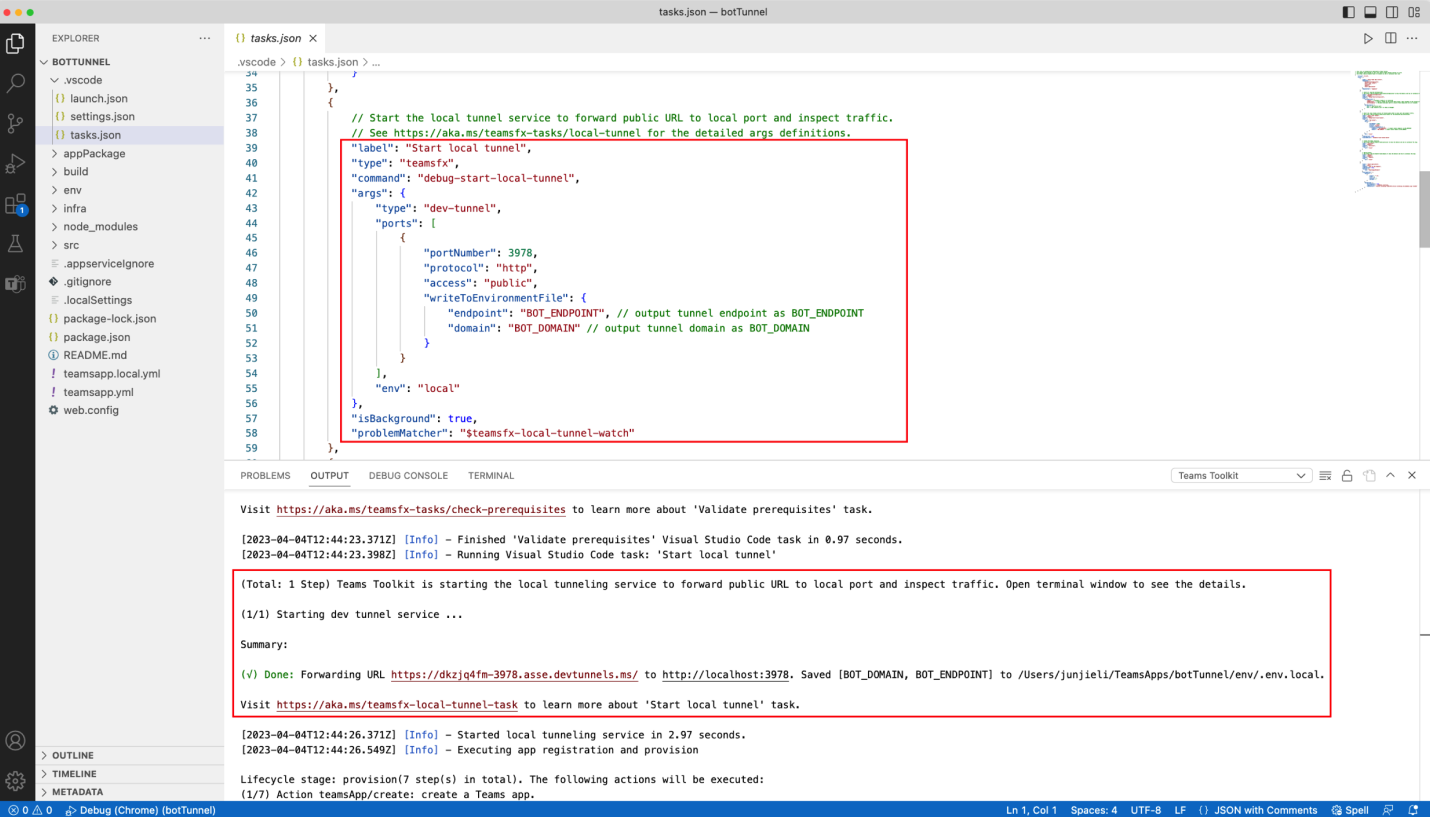
Run and debug Teams bot and message extension applications with dev tunnels in Visual Studio Code. Refer to this doc if you want to switch back to use ngrok.
-
Validate Applicationnow helps catch errors and warnings that would prevent a successful publish to Teams in addition to schema checks.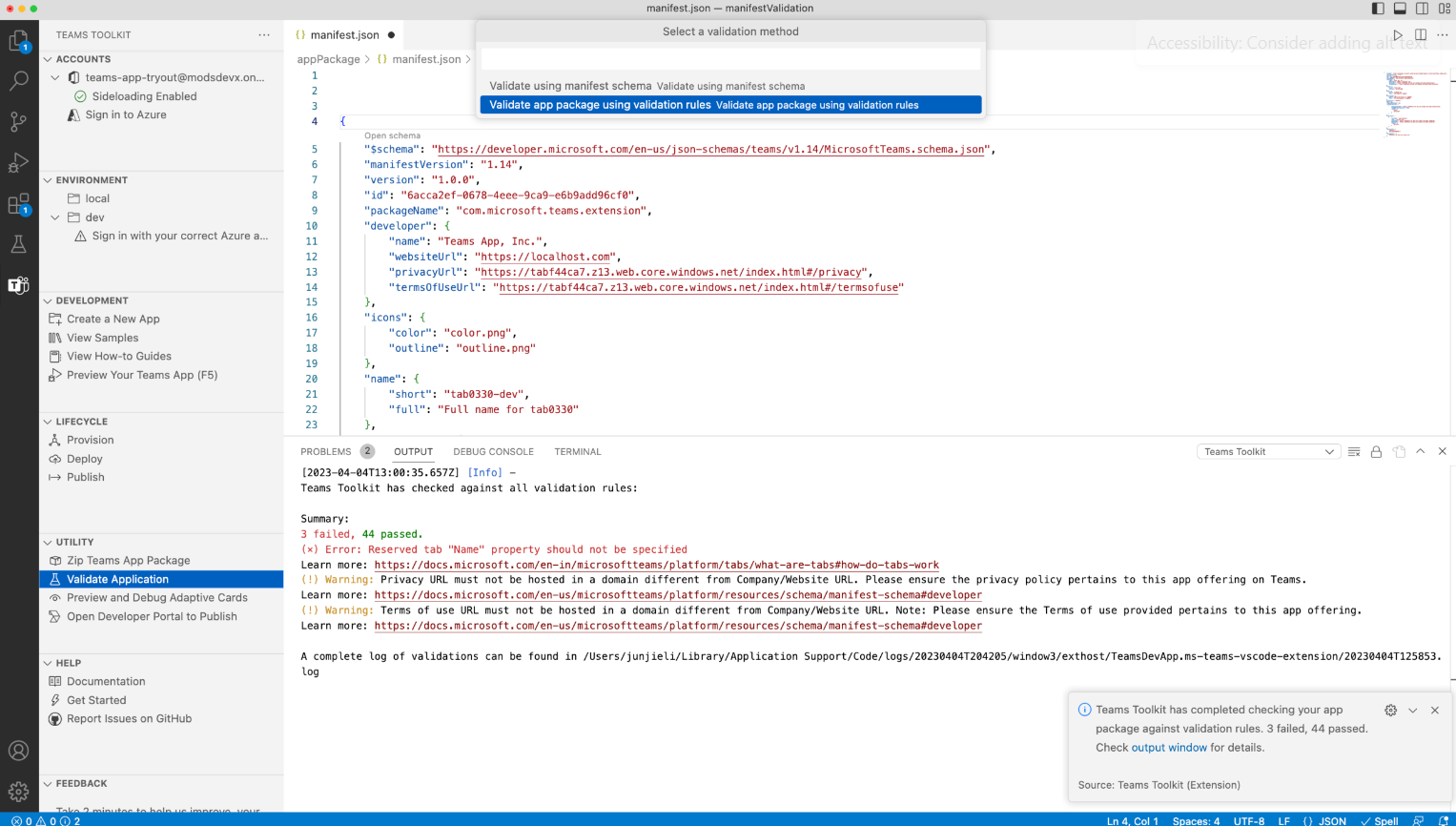
-
Auto-complete suggestions and descriptions when editing
teamsapp.ymlfiles.Note: Teams Toolkit for Visual Studio Code takes a new dependency on YAML extension which will be installed together with Teams Toolkit.
New getting started experience with GitHub Codespaces:
Start developing Teams applications instantly by opening Teams Toolkit samples in GitHub Codespaces. Try these samples today:
SharePoint Framework developer experience update:
- Automated the process to add multiple SPFx web parts as Teams Tab pages and configure the new web parts with Teams app.
- Choose which SharePoint Framework (SPFx) package version to use when creating a SPFx-based Teams tab app, either from a globally installed version or let Teams Toolkit install the latest version for you.
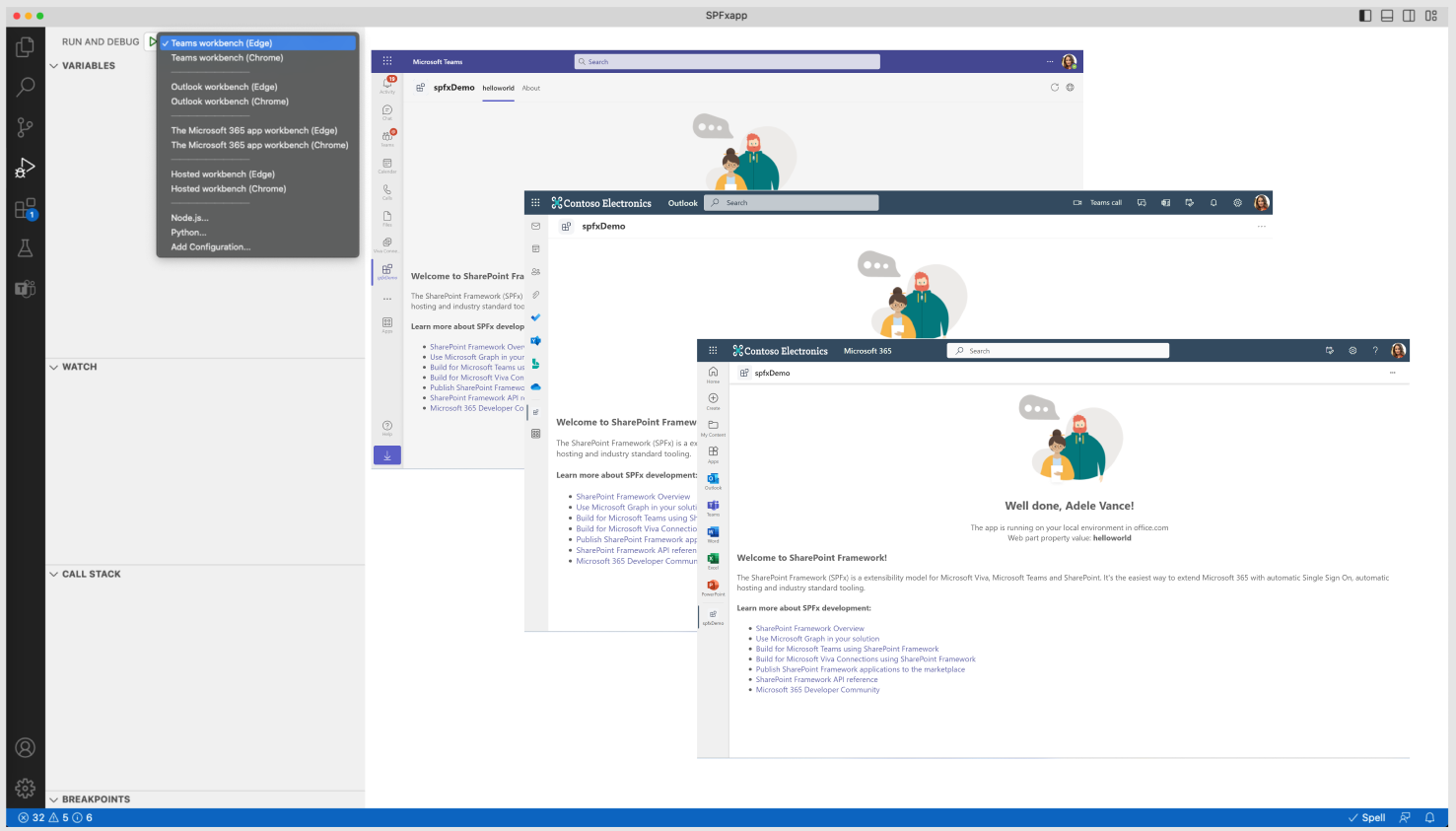
- Streamlined full stack debugging for SPFx based tab apps on Teams, Outlook and the Microsoft 365 app.
Teams Toolkit generated project file change:
- Simplified the default lifecycle steps in
teamsapp.ymlto be Provision, Deploy, and Publish. The ConfigureApp and RegisterApp steps are removed, and their actions are defaulted to the Provision step. - Added support for a new action,
uses: script, that can be used to run any script command. - Some actions now support a
writeToEnvironmentFileparameter to define generated environment variable names. .env.{envName}files now only contain non-sensitive information and are removed from.gitignore.- Added
.env.{envName}.userfiles to store sensitive information like password and are added to.gitignore.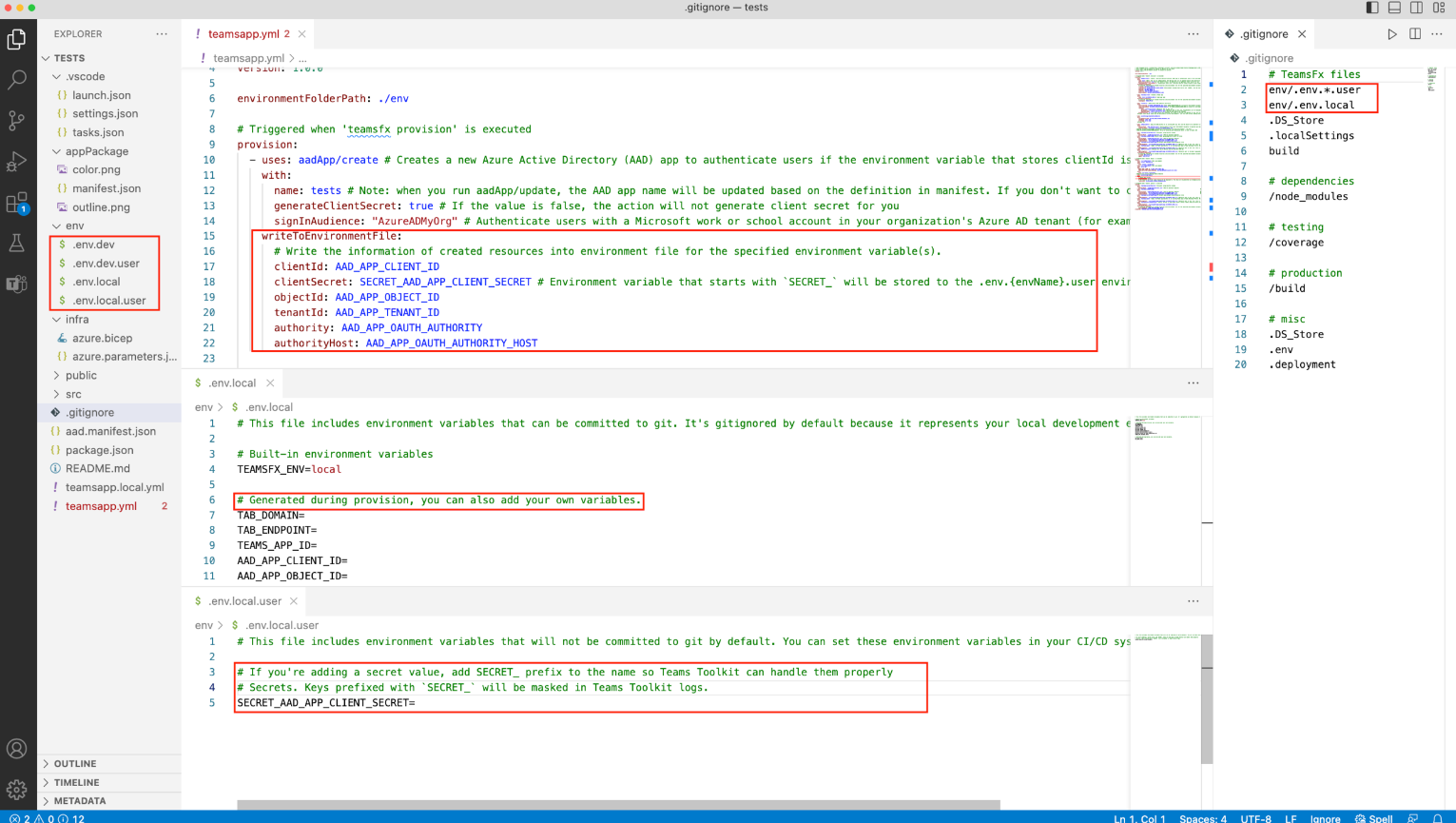
Teams Toolkit CLI (@microsoft/teamsfx-cli) v2.0.0@beta:
- Updated
teamsfx validatecommand to validate your app package against validation rules. - Updated
teamsfx newcommand to include a new parameter--spfx-install-latest-packageto specify whether to use the latest SPFx package or not. - Added
teamsfx add spfx-web-partcommand to add multiple web parts.
TeamsFx-React SDK (@microsoft/teamsfx-react) v3.0.0@beta:
- Added
BaseDashboardclass: A base component that provides basic functionality to create a dashboard. - Added
BaseWidgetclass: A base component that provides basic functionality to create a widget. - Added
IWidgetClassNamesInterface: A Interface for defining the class names of widget elements.
Enhancements:
-
Updated Teams Toolkit tree view user interface to streamline the development workflow:
- Added the
ENVIRONMENTsection back. - Renamed the
DEPLOYMENTsection toLIFECYCLE. - Renamed
Provision in the cloudtoProvision,Deploy to the cloudtoDeployandPublish to TeamstoPublish. NowProvision,DeployandPublishcommand will trigger the corresponding actions defined in theteamsapp.ymlfile. - Moved
Zip Teams App Package,Validate Application, andOpen Developer Portal to Publishcommands toUTILITYsection.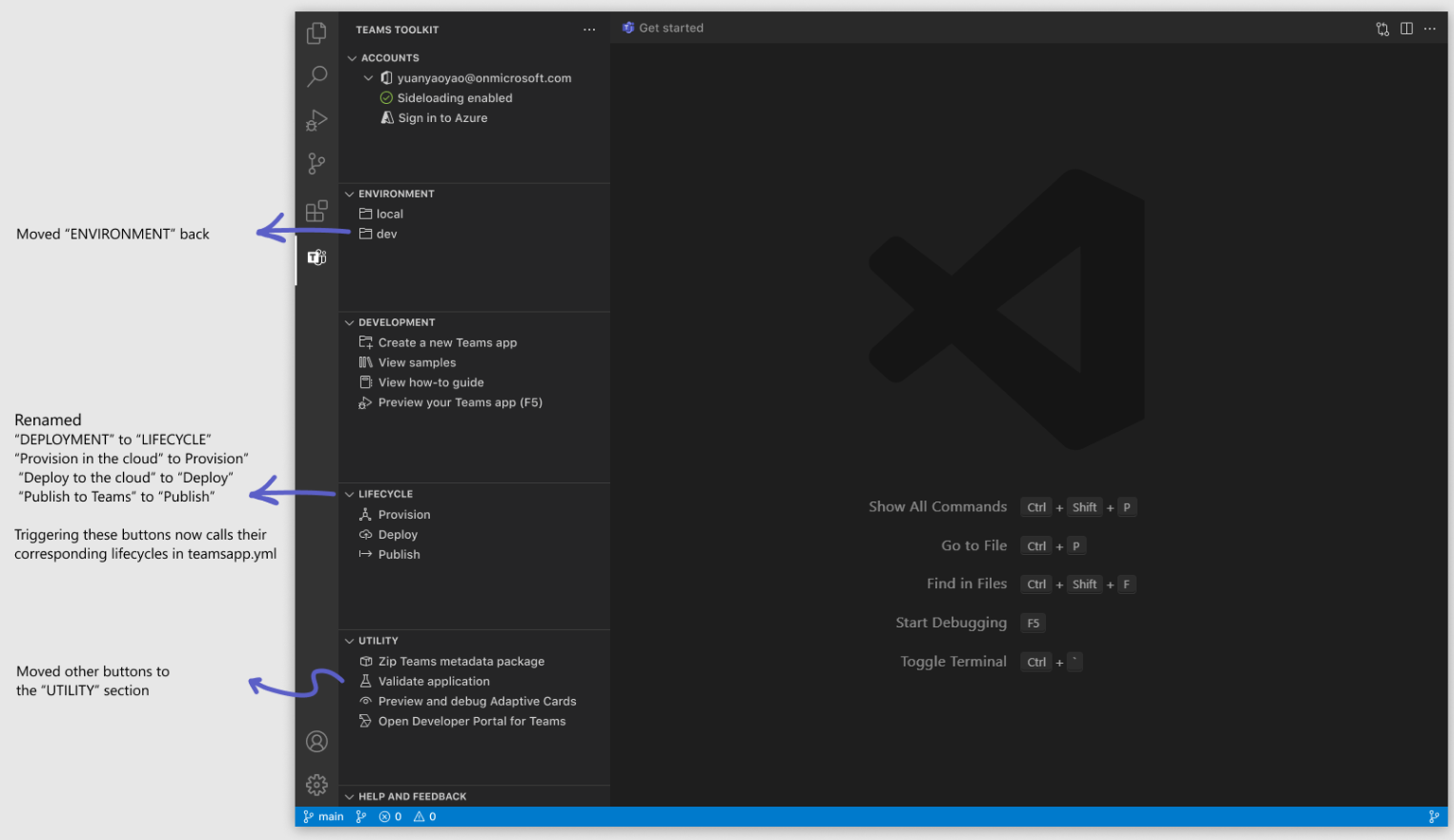
- Added the
-
Zip Teams App Package,Validate Application,Update Microsoft Entra App,Update Teams Appcommands will now ask for additional inputs likemanifest.jsonfile path and environment name so that you have the flexibility to arrange hose files. -
Simplified multiple progress notifications into a single one for provision, deploy and publish.
-
Sample: enabled app caching in "My First Meeting App" sample that improves subsequent launch time of the apps that are loaded in the meeting side panel.
-
Template: updated templates and samples to use Fluent UI V9 and React 18.
Bug fixes:
- Fixed an issue where we will only display relevant how-to guide for SPFx project. (#8083)
- Fixed an issue where the hyperlink is highlighted multiple colors from output channel. (#8239)
- Fixed an issue where you might see duplicate error messages. (#8213)
- Fixed an issue where you might see
Upload failed due to an invalid BotId in your manifestafter migrating your project with prerelease version. (#8127) - Fixed an issue where
teamsApp/updateaction will not create a new Teams app registration whenTEAMS_APP_IDdoesn't exist. (#8021)
Mar 23, 2023
Enhancement:
- Updated instruction for minimum required version of Outlook in Outlook add-in project template.
Mar 14, 2023
New features:
- Create, debug, and deploy an Outlook add-in project.
- Improved debug experience for personal tab and search-based message extension across Microsoft 365 that allows you to automatically run and debug your app in Outlook and the Microsoft 365 app.
- Disabled commands from tree view that doesn't allow concurrent executions. For example, when you execute
Provision in the cloudcommand, other commands in theDeploymentsection will be disabled to prevent concurrent execution error.
SDK updates:
- TeamsFx
v2.2.1@beta: Updated package dependency. - TeamsFx-React
v3.0.0@beta: Updated package to support React 18 anduseTeams,useTeamsFxanduseTeamsUserCredentialhooks to use@fluentui/react-componentsfrom Fluent UI v9.
Sample additions:
-
Developer Assist Dashboard: A dashboard that integrates with Azure DevOps, Github issues and Planner tasks and accelerates developer productivity.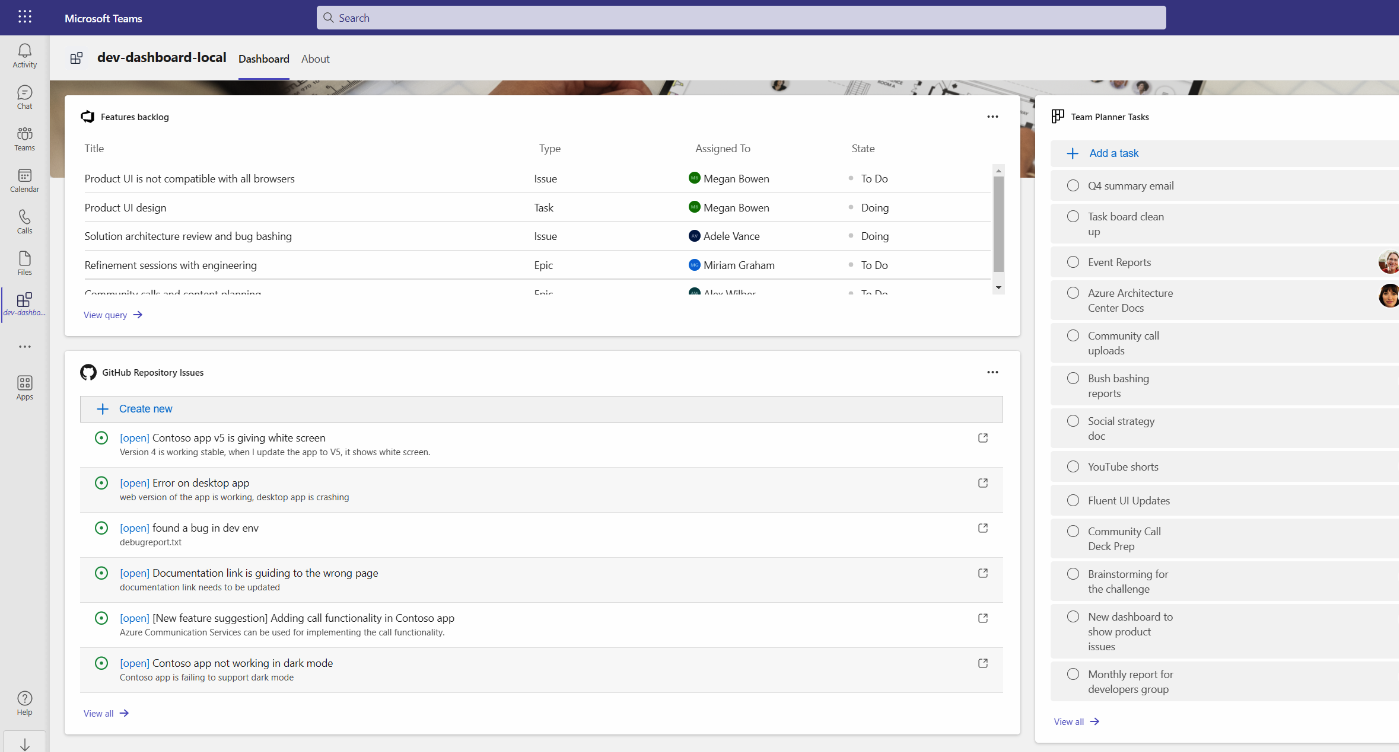
-
Hello World Teams Tab and Outlook add-in: A hello world project that contains both Teams Tab and Outlook add-in capability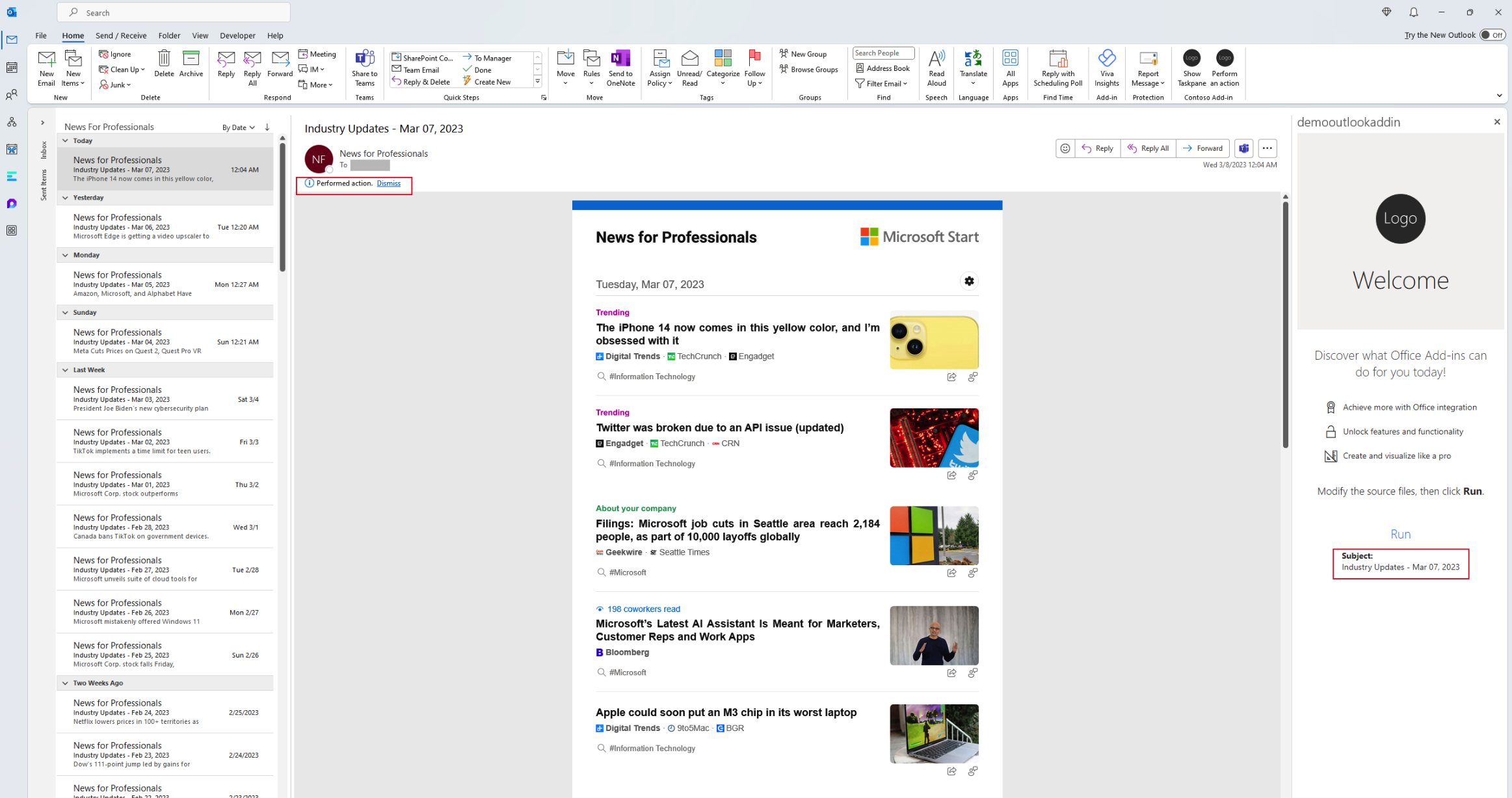
Bug fixes:
- Fixed an issue where you might see runtime errors on the Teams Toolkit extension page. (#7887)
- Fixed an issue where the app name is not shown properly on the scaffolding success message. (#7839)
- Fixed an issue for several how-to guides that don't point to pre-release compatible versions. (#7830)
- Fixed an issue 7410 where the
Deploy Teams app manifestoption is missing. (#7755)
Feb 22, 2023
New features:
Updated the fundamental design of Teams Toolkit to make it configurable and transparent as much as possible. The new design allows you to:
- Use existing infrastructure, resource groups, and more when provisioning.
- Use an existing Teams app ID.
- Use an existing Microsoft Entra app registration ID.
- Customizable tunneling solution.
- Add custom steps to debugging, provisioning, deploying, publishing, etc.
Enhancements:
- Removed subscriptions from the sidebar's "ACCOUNTS" section.
- Removed the "ENVIRONMENT" section from the sidebar.
- Removed the "Edit manifest file" button from the sidebar's "DEVELOPMENT" section.
- Added a "Add environment" button to the sidebar's "DEVELOPMENT" section.
- Added a "Manage collaborator" button to the sidebar's "DEVELOPMENT" section.
- Removed
.fxfolder from Teams Toolkit scaffolded templates. - Moved
template/appPackageto the root folder for templates. - Added an
envfolder to manage all.envfiles in template root folders. - Added an
infrafolder to organize bicep files in template root folders. - Added
teamsapp.ymlandteamsapp.local.ymlfiles to manage configuration and lifecycles in template root folders. - Flattened the source code file structure for templates. Application code is no longer organized by capability.
Sample addition:
-
Team Central Dashboard: A dashboard displaying data chats and content from Microsoft Graph to accelerate team collaboration and personal productivity.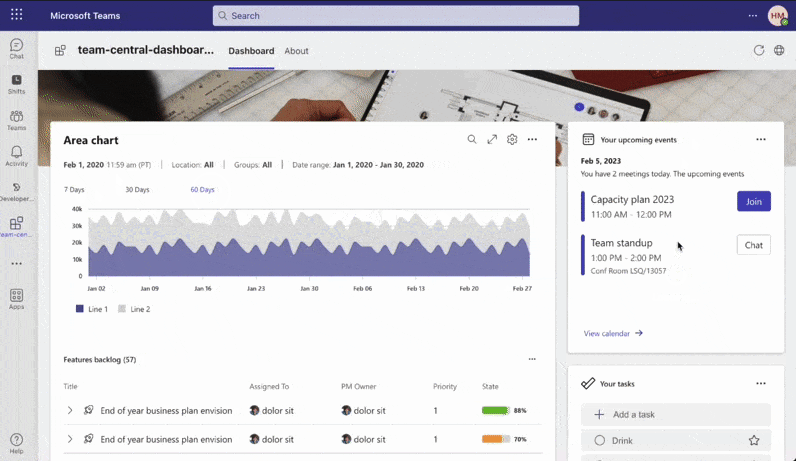
Frequently asked questions
What does pre-release mean
Pre-release is meant for those eager to try the latest Teams Toolkit features and fixes. Even though pre-releases are not intended for use in production, they are at a sufficient quality level for you to generally use and provide feedback. However, pre-release versions can and probably will change, and those changes could be significant.
What about my existing Teams Toolkit projects
The changes in this pre-release require upgrades to the TeamsFx configuration files. You can migrate by creating a new project and move your exiting code, or Teams Toolkit have also provided a way to automatically upgrade existing Teams apps that were created with a previous version of Teams Toolkit.
Learn more about the changes in this pre-release at https://aka.ms/teamsfx-v5.0-guide.