dbt-column-lineage
August 7, 2026 · View on GitHub
This is a tool to visualize the column level lineage of dbt models. It uses the manifest.json and catalog.json files generated by dbt to create a graph of the lineage of the models. It is a web application that uses a FastAPI backend and a Next.js frontend.





Demo
Trace a column across models, then expand more columns to grow the lineage interactively.
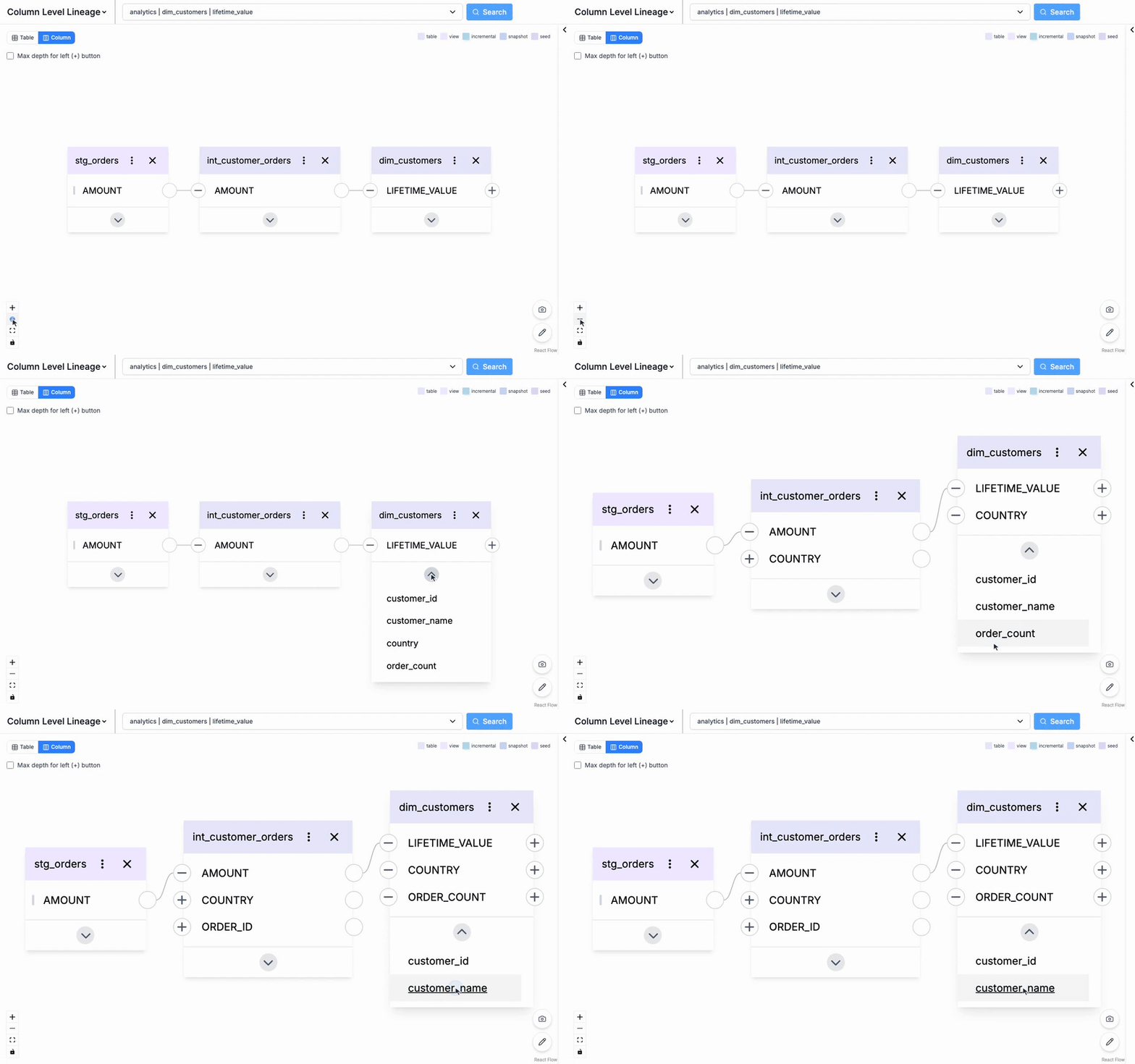
The demo runs on the synthetic dbt project under
demo/(no warehouse required). Regenerate itsmanifest.json/catalog.jsonwithpython demo/build_demo_manifest.py.
There's also an edit / design mode (pencil button, bottom-right): edit existing models or sketch new ones — name, columns, and materialization type (table/view/incremental/snapshot/seed) — then share the design as a URL or export it as JSON.
📖 See the UI guide for a tour of every operation — exploring the graph, the CTE page, edit / design mode, Looker mode, deep links, and the design-snapshot JSON spec for generating designs programmatically (e.g. from CI or an LLM agent).
quickstart
Install dbt-column-lineage using pip:
pip install dbt-column-lineage
Run the following command:
# go to your dbt project directory
cd your-dbt-project/

# edit your model file
vi models/test.sql

# generate the manifest.json and catalog.json files
dbt docs generate

# set the environment variable for the dialect you are using
export SQLGLOT_DIALECT=snowflake

# Launch dbt-column-lineage with test.sql as the initial model
dbt-column-lineage run-params
development
To develop the application, you will need to run the backend and frontend separately.
git clone git@github.com:Oisix/dbt-column-lineage.git
cd dbt-column-lineage
for backend
activate venv and run the following commands:
python3 -m venv venv
source venv/bin/activate

pip install --upgrade pip
pip install -e ".[dev]"

uvicorn --app-dir src dbt_column_lineage.main:app --port=5000 --reload
for frontend
run the following commands:
npm install
npm run dev
after the frontend is running, Let's access http://localhost:3000
for Looker integration (optional)
If you want to integrate with Looker, you can use the following commands:
# set the environment variables
export LOOKERSDK_CLIENT_ID=(your client id)
export LOOKERSDK_CLIENT_SECRET=(your client secret)
export LOOKERSDK_BASE_URL=(your looker base url)
export LOOKER_IGNORE_FOLDERS=(comma separated list of folders to ignore)
export LOOKER_IGNORE_ELEMENTS=(comma separated list of dashboard elements to ignore)

# it analyzes the looker models; target/looker_analysis.json will be created
python tools/looker_analyzer.py

# rerun the backend
uvicorn --app-dir src dbt_column_lineage.main:app --port=5000 --reload
for Google OAuth login test (optional)
If you want to test the OAuth login, you can use the following commands:
export GOOGLE_CLIENT_ID=(your client id)
export GOOGLE_CLIENT_SECRET=(your client secret)
# fixed session signing key (see note below)
export SESSION_SECRET=$(python3 -c "import secrets; print(secrets.token_hex(32))")
docker build -t test .
docker run -p 5000:5000 -e USE_OAUTH=true -e GOOGLE_CLIENT_ID=$GOOGLE_CLIENT_ID -e GOOGLE_CLIENT_SECRET=$GOOGLE_CLIENT_SECRET -e SESSION_SECRET=$SESSION_SECRET -e DEBUG_MODE=true test
SESSION_SECRET— The container runsuvicorn --workers 2(multiple processes), and a deployment may also scale out to multiple instances. Sessions are stored in a signed cookie, so every process must share the same signing key. WithUSE_OAUTH=true, set a fixedSESSION_SECRET(any stable random string) or sign-in breaks across workers (login loops / API401). If unset, each process generates its own random key (fine only for a single process). Without OAuth it is not needed.
CORS_ALLOW_ORIGINS— Comma-separated list of browser origins allowed to call the API cross-origin; defaults tohttp://localhost:3000(the frontend dev server). A normal deployment serves the frontend from the same origin as the API, so cross-origin requests never happen and this needs no change. Set it only if you host the frontend separately, and list the exact origins rather than*— the API allows credentials, so*would let any site read authenticated responses.
limiting heavy lineage queries (optional)
For very large projects a single request — e.g. reverse lineage of a hub column consumed by many models — can take a long time. Set MAX_LINEAGE_SECONDS to a wall-clock budget (seconds); when traversal exceeds it, the server stops and returns the partial result flagged truncated (the UI shows a banner) instead of hanging. Default -1 = unbounded. In a hosted deployment set it below your gateway's request timeout so you get 200 + truncated rather than a gateway timeout.
# example: cap lineage traversal at 100 seconds
export MAX_LINEAGE_SECONDS=100