gitty
April 19, 2026 · View on GitHub
gitty — Git CLI that speaks human
You know Git. But do you enjoy it?
gitty up — and your changes are live. That's it.





gitty — English
gitty is a single-binary CLI that wraps Git and GitHub into short, readable commands.
Before gitty:
git add . && git commit -m "update" && git push origin main
After gitty:
gitty up
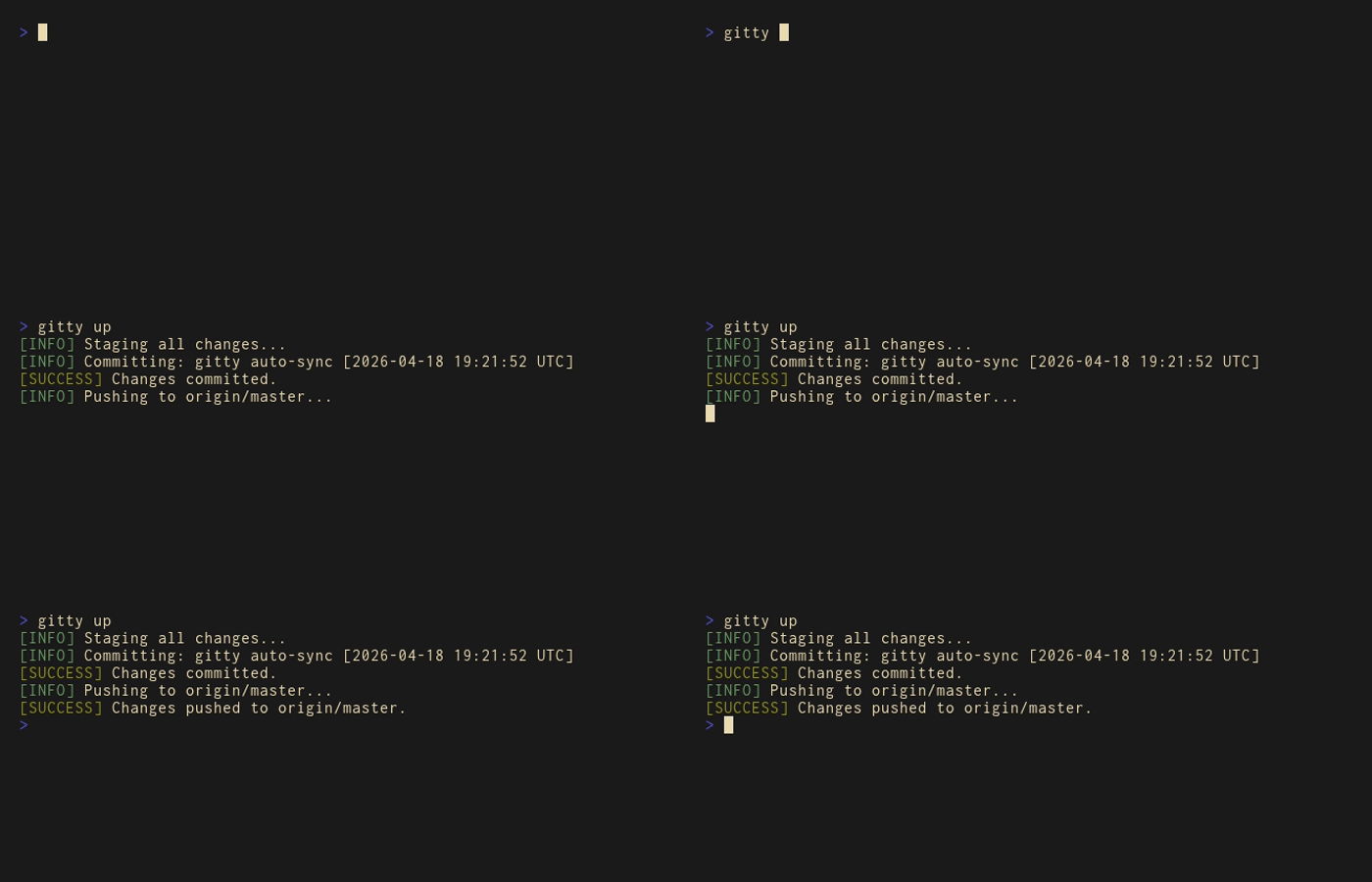
No runtime dependencies. No config files. No learning curve.
If gitty saves you time — a ⭐ on GitHub means a lot. It helps others find it too.
The problem gitty solves
Git's raw interface is powerful, but verbose. Every day you type the same sequences: stage, commit, push. Handle a conflict, restore a file, create a branch. Small friction, dozens of times a day. gitty collapses the most common workflows into commands that say exactly what they mean.
What makes gitty different
- Single binary — install and forget. No Node, no Python, no runtime deps
- Semantic shortcuts —
gitty push=main,gitty pull~main,gitty checkpoint "v1"*dev - Interactive conflict resolution —
gitty fix <file>walks you through merge markers in the terminal, no editor needed - Safe by default —
gitty pulladds only missing files; destructive ops require explicit flags - GitHub-native — create repos, push with sharing links, manage branches via
ghintegration - Chainable —
gitty up --commit "hotfix" and push=staging --share

Installation
Windows
winget install Omibranch.Gitty
Arch Linux (yay / paru)
yay -S gitty-cli
Binary name is
gitty. The AUR package isgitty-clibecause the namegittywas already taken by another project.
macOS / Linux — Homebrew
brew tap Omibranch/gitty
brew install gitty
Linux / macOS — install script
curl -fsSL https://raw.githubusercontent.com/Omibranch/gitty/master/install.sh | sh
Manual
- Download from Releases
- Put the binary in any folder on your
PATH
Quick start
# 1) Install git + gh if needed (safe to run multiple times)
gitty install

# 2) Login to GitHub once
gitty auth

# 3) Create and link a GitHub repo from current folder
gitty add repo "my-project"

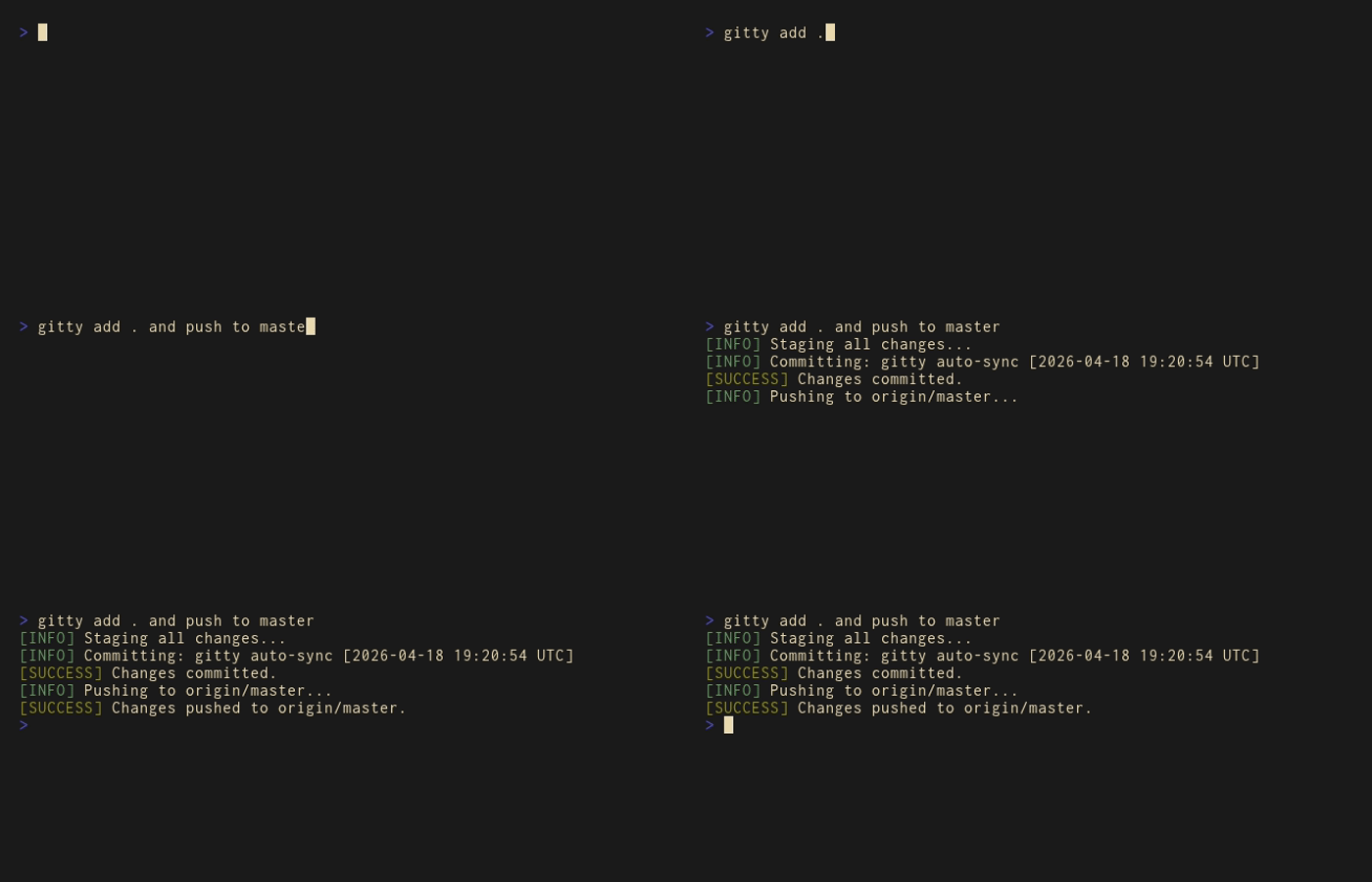
# 4) Stage + commit + push — all in one
gitty up

# 5) With a custom commit message
gitty up --commit "feat: initial CLI"
Syntax shortcuts
gitty supports semantic symbols so commands read like sentences:
| Symbol | Word | Meaning |
|---|---|---|
= | to | destination |
~ | from | source |
* | in | branch context |
gitty push=main               # push to main
gitty pull~main               # pull from main
gitty checkpoint "v1"*main    # tag in branch main
Words to, from, in are auto-converted — use whichever reads better to you.
Command reference
Setup and info
| Command | Description |
|---|---|
gitty help | Open full interactive manual (EN/RU picker) |
gitty install | Install missing git and gh, add gitty to PATH |
gitty auth | Run gh auth login |
gitty status | Show auth state, remote URL, current branch |
gitty state | Show commits + branches + file count for current repo |
gitty state <owner/repo> | Same stats for any public GitHub repo |
gitty state <url> --commits | Show only commit count |
gitty state --branches | Show only branches |
gitty state --files | Show only file count |
gitty gitignore | Interactive picker for official GitHub .gitignore templates |
gitty --version | Print version |
gitty clear | Clear terminal screen |
Repository and branch operations
| Command | Description |
|---|---|
gitty init "https://github.com/u/r.git" | Initialize git and set origin |
gitty clone "https://github.com/u/r.git" | Clone repository |
gitty clone "https://github.com/u/r.git" "folder" | Clone to custom folder |
gitty add repo "name" | Create private GitHub repo and link folder |
gitty add repo "name" --public | Create public GitHub repo |
gitty add branch "name" | Create local branch (stays on current branch) |
gitty switch to branch <name> | Switch to an existing branch |
gitty switch to repo <owner/repo> | Rewire folder to a different GitHub repo |
gitty rename branch "old"="new" | Rename branch locally and on remote |
gitty rename repo "new-name" | Rename the currently linked repo |
Daily workflow
| Command | Description |
|---|---|
gitty add . | Stage all + auto commit |
gitty add . --commit "msg" | Stage all + commit with custom message |
gitty up | add . + push current branch |
gitty up --commit "msg" | Same with custom commit message |
gitty push <branch> | Push branch |
gitty push <branch> --share | Push and copy GitHub link to clipboard |
gitty push <branch> --force | Force push |
gitty pull <branch> | Safe pull — adds only missing files |
gitty pull <branch> --hard | Pull and overwrite existing files |
gitty pull <branch> --hard-reset | Mirror remote exactly, delete local extras |
gitty undo | Soft reset last commit, keep staged changes |
History, checkpoints, conflict tools
| Command | Description |
|---|---|
gitty log | Pretty graph log (last 1 week by default) |
gitty log --6h | Last 6 hours |
gitty log --3day | Last 3 days |
gitty log --2week | Last 2 weeks |
gitty log --1month | Last month |
gitty checkpoint "name" | Create tag on current branch and push |
gitty checkpoint "name" in <branch> | Create tag on a specific branch |
gitty restore "name" | Restore working tree to tag (detached HEAD) |
gitty fix <file> | Resolve merge markers interactively and stage file |
gitty erase <path> | Remove file/folder from full git history |
gitty back <file> <N> | Restore file from N commits ago |
Advanced branch rewrite
| Command | Description |
|---|---|
gitty reset~<branch> | Wipe branch history and recreate it empty |
gitty migration <target>=<source> | Replace all files in target with source branch files |
Partial commit (line ranges)
| Command | Description |
|---|---|
gitty pick <file> 10-20 | Commit only lines 10–20 |
gitty pick <file> 10-* | Commit from line 10 to EOF |
gitty pick <file> start1-end1 | Commit between markers #gitty:start1 and #gitty:end1 |
Stage the file first with
gitty add .
Aliases (.gittyconf)
| Command | Description |
|---|---|
gitty alias | List configured aliases |
gitty alias save "up --commit" | Create or update alias |
gitty alias deploy "up and push=main" | Create chain alias |
gitty alias <name> "" | Remove alias |
gitty alias quick "add . and push=main"
gitty quick
Command chaining
Use and to run multiple commands in sequence:
gitty add . and push main
gitty up --commit "hotfix" and push=staging --share
Proxy (global flag)
gitty up --proxy "http://1.2.3.4:8080"
gitty install --proxy "http://user:pass@1.2.3.4:8080"
⚠️ Destructive commands
These rewrite history or delete data. Use only when you understand the impact:
gitty pull <branch> --hard-resetgitty reset~<branch>gitty migration <target>=<source>gitty erase <path>
Build from source
git clone https://github.com/Omibranch/gitty
cd gitty/source

# Windows
go build -ldflags="-s -w" -o ../gitty.exe .

# Linux / macOS
GOOS=linux GOARCH=amd64 go build -ldflags="-s -w" -o ../gitty .
Requires Go 1.21+.
gitty — Русский
gitty — однофайловый CLI для Git и GitHub с короткими, человекочитаемыми командами.
До gitty:
git add . && git commit -m "update" && git push origin main
После gitty:
gitty up
Никаких зависимостей. Никаких конфигов. Никакой кривой обучения.
Если gitty экономит тебе время — ⭐ на GitHub будет приятен и поможет другим найти проект.
Какую проблему решает gitty
Стандартный интерфейс Git мощный, но многословный. Каждый день — одни и те же последовательности: stage, commit, push. Разобрать конфликт, восстановить файл, создать ветку. Мелкое трение, десятки раз в день. gitty сворачивает самые частые сценарии в команды, которые говорят именно то, что делают.
Почему gitty, а не псевдонимы в .bashrc
- Один бинарник — поставил и забыл. Без Node, Python и прочих рантаймов
- Семантические сокращения —
gitty push=main,gitty pull~main,gitty checkpoint "v1"*dev - Интерактивное разрешение конфликтов —
gitty fix <файл>разбирает merge-маркеры прямо в терминале, без редактора - Безопасен по умолчанию —
gitty pullдобавляет только недостающие файлы; разрушительные операции требуют явных флагов - GitHub-native — создать репо, запушить со ссылкой, управлять ветками через
gh - Цепочки команд —
gitty up --commit "hotfix" and push=staging --share
Установка
Windows
winget install Omibranch.Gitty
Arch Linux (yay / paru)
yay -S gitty-cli
Бинарник называется
gitty. Пакет в AUR —gitty-cli, потому что имяgittyуже занято другим проектом.
macOS / Linux — Homebrew
brew tap Omibranch/gitty
brew install gitty
Linux / macOS — скрипт установки
curl -fsSL https://raw.githubusercontent.com/Omibranch/gitty/master/install.sh | sh
Вручную
- Скачайте из Releases
- Положите бинарник в каталог из
PATH
Быстрый старт
# 1) Установить git и gh, если их нет (безопасно запускать повторно)
gitty install

# 2) Авторизоваться в GitHub (один раз)
gitty auth

# 3) Создать и привязать репозиторий
gitty add repo "my-project"

# 4) Stage + commit + push — всё одной командой
gitty up

# 5) С явным сообщением коммита
gitty up --commit "feat: initial CLI"
Сокращения синтаксиса
gitty поддерживает семантические символы, чтобы команды читались как фразы:
| Символ | Слово | Значение |
|---|---|---|
= | to | куда |
~ | from | откуда |
* | in | в какой ветке |
gitty push=main               # push в main
gitty pull~main               # pull из main
gitty checkpoint "v1"*main    # тег в ветке main
Слова to, from, in конвертируются автоматически — используй то, что лучше читается.
Справочник команд
Установка и информация
| Команда | Что делает |
|---|---|
gitty help | Открыть полное интерактивное руководство (выбор EN/RU) |
gitty install | Поставить git и gh, добавить gitty в PATH |
gitty auth | Запустить gh auth login |
gitty status | Показать авторизацию, remote URL, текущую ветку |
gitty state | Коммиты + ветки + число файлов для текущего репо |
gitty state <owner/repo> | То же для любого публичного репозитория |
gitty state <url> --commits | Только число коммитов |
gitty state --branches | Только ветки |
gitty state --files | Только число файлов |
gitty gitignore | Интерактивный выбор шаблона .gitignore от GitHub |
gitty --version | Показать версию |
gitty clear | Очистить экран терминала |
Репозитории и ветки
| Команда | Что делает |
|---|---|
gitty init "https://github.com/u/r.git" | Инициализировать git и установить origin |
gitty clone "https://github.com/u/r.git" | Клонировать репозиторий |
gitty clone "https://github.com/u/r.git" "folder" | Клонировать в указанную папку |
gitty add repo "name" | Создать приватный репозиторий и привязать папку |
gitty add repo "name" --public | Создать публичный репозиторий |
gitty add branch "name" | Создать локальную ветку (без переключения) |
gitty switch to branch <имя> | Переключиться на существующую ветку |
gitty switch to repo <owner/repo> | Переключить папку на другой репозиторий |
gitty rename branch "old"="new" | Переименовать ветку локально и на remote |
gitty rename repo "new-name" | Переименовать текущий привязанный репозиторий |
Ежедневный workflow
| Команда | Что делает |
|---|---|
gitty add . | Stage все изменения + автокоммит |
gitty add . --commit "msg" | Stage + коммит с вашим сообщением |
gitty up | add . + push текущей ветки |
gitty up --commit "msg" | То же с вашим сообщением коммита |
gitty push <ветка> | Push ветки |
gitty push <ветка> --share | Push + скопировать ссылку GitHub в буфер |
gitty push <ветка> --force | Принудительный push |
gitty pull <ветка> | Безопасный pull — добавляет только недостающие файлы |
gitty pull <ветка> --hard | Pull с перезаписью существующих файлов |
gitty pull <ветка> --hard-reset | Полное зеркалирование с удалением лишних локальных файлов |
gitty undo | Мягкий откат последнего коммита, изменения остаются staged |
История, чекпоинты, конфликты
| Команда | Что делает |
|---|---|
gitty log | Граф-лог (по умолчанию последняя неделя) |
gitty log --6h | Последние 6 часов |
gitty log --3day | Последние 3 дня |
gitty log --2week | Последние 2 недели |
gitty log --1month | Последний месяц |
gitty checkpoint "name" | Создать тег в текущей ветке и запушить |
gitty checkpoint "name" in <ветка> | Создать тег в указанной ветке |
gitty restore "name" | Вернуть рабочее дерево к тегу (detached HEAD) |
gitty fix <файл> | Интерактивно разобрать merge-конфликт и застейджить файл |
gitty erase <путь> | Удалить файл/папку из всей истории git |
gitty back <файл> <N> | Вернуть файл к состоянию N коммитов назад |
Продвинутые команды перезаписи веток
| Команда | Что делает |
|---|---|
gitty reset~<ветка> | Полностью очистить ветку (контент и история), создать пустую |
gitty migration <target>=<source> | Заменить все файлы в target файлами из source |
Выборочный коммит по диапазону
| Команда | Что делает |
|---|---|
gitty pick <файл> 10-20 | Закоммитить только строки 10–20 |
gitty pick <файл> 10-* | Закоммитить строки с 10-й до конца файла |
gitty pick <файл> start1-end1 | Закоммитить участок по меткам #gitty:start1 и #gitty:end1 |
Сначала добавьте изменения в stage:
gitty add .
Система alias (.gittyconf)
| Команда | Что делает |
|---|---|
gitty alias | Показать список алиасов |
gitty alias save "up --commit" | Создать/обновить алиас |
gitty alias deploy "up and push=main" | Создать цепочку команд как алиас |
gitty alias <name> "" | Удалить алиас |
gitty alias quick "add . and push=main"
gitty quick
Цепочки команд
gitty add . and push main
gitty up --commit "hotfix" and push=staging --share
Прокси (глобальный флаг)
gitty up --proxy "http://1.2.3.4:8080"
gitty install --proxy "http://user:pass@1.2.3.4:8080"
⚠️ Деструктивные команды
Перезаписывают историю или удаляют данные. Используйте только если понимаете последствия:
gitty pull <ветка> --hard-resetgitty reset~<ветка>gitty migration <target>=<source>gitty erase <путь>
Сборка из исходников
git clone https://github.com/Omibranch/gitty
cd gitty/source

# Windows
go build -ldflags="-s -w" -o ../gitty.exe .

# Linux / macOS
GOOS=linux GOARCH=amd64 go build -ldflags="-s -w" -o ../gitty .
Требуется Go 1.21+.