README.md
February 3, 2025 · View on GitHub

Oryx MLLM: On-Demand Spatial-Temporal Understanding at Arbitrary Resolution
Zuyan Liu*,1,2 Yuhao Dong*,2,3 Ziwei Liu3 Winston Hu2 Jiwen Lu1,✉ Yongming Rao2,1,✉
1Tsinghua University 2Tencent 3S-Lab, NTU
* Equal Contribution ✉ Corresponding Author
Project Page:

arXiv Paper:

Demo by Gradio:

Model Checkpoints:

Oryx SFT Data:

📢 News
- [23/1/2025] 🎉Oryx has been accepted to ICLR 2025!
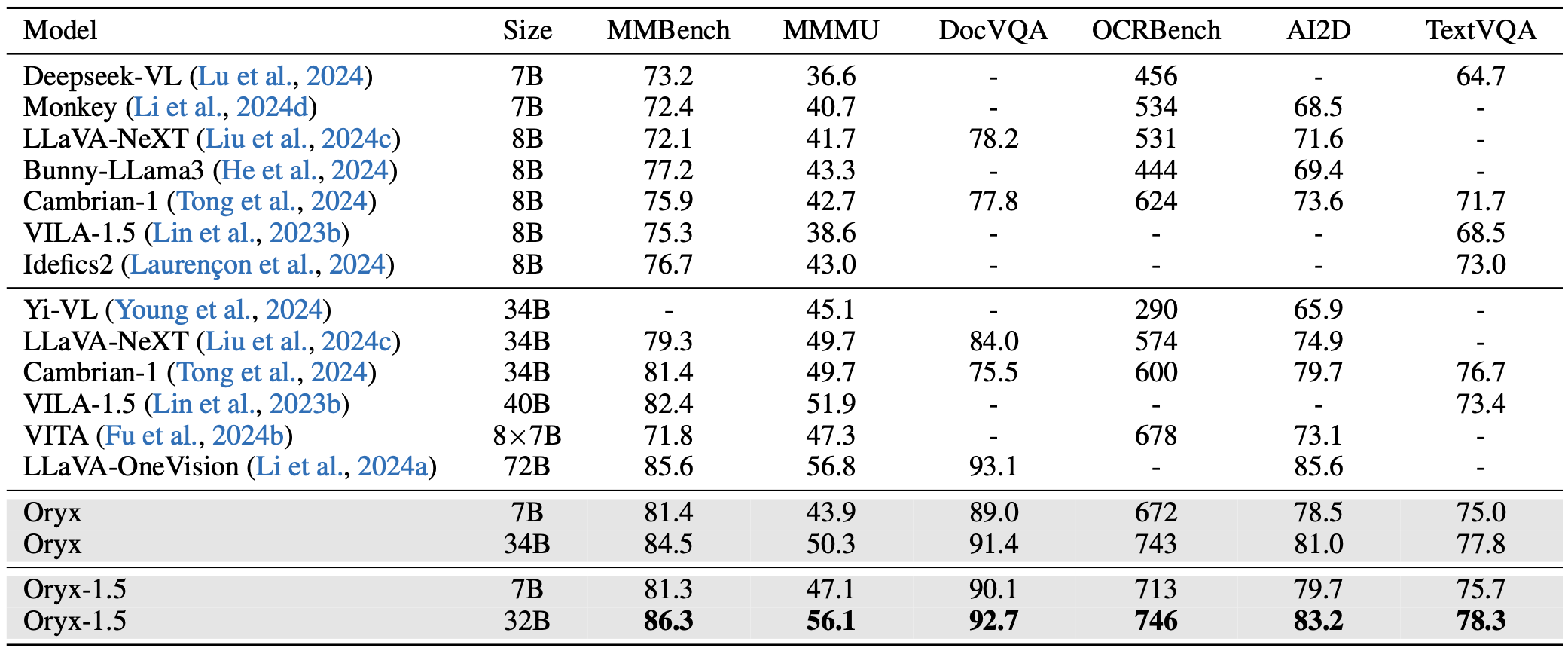
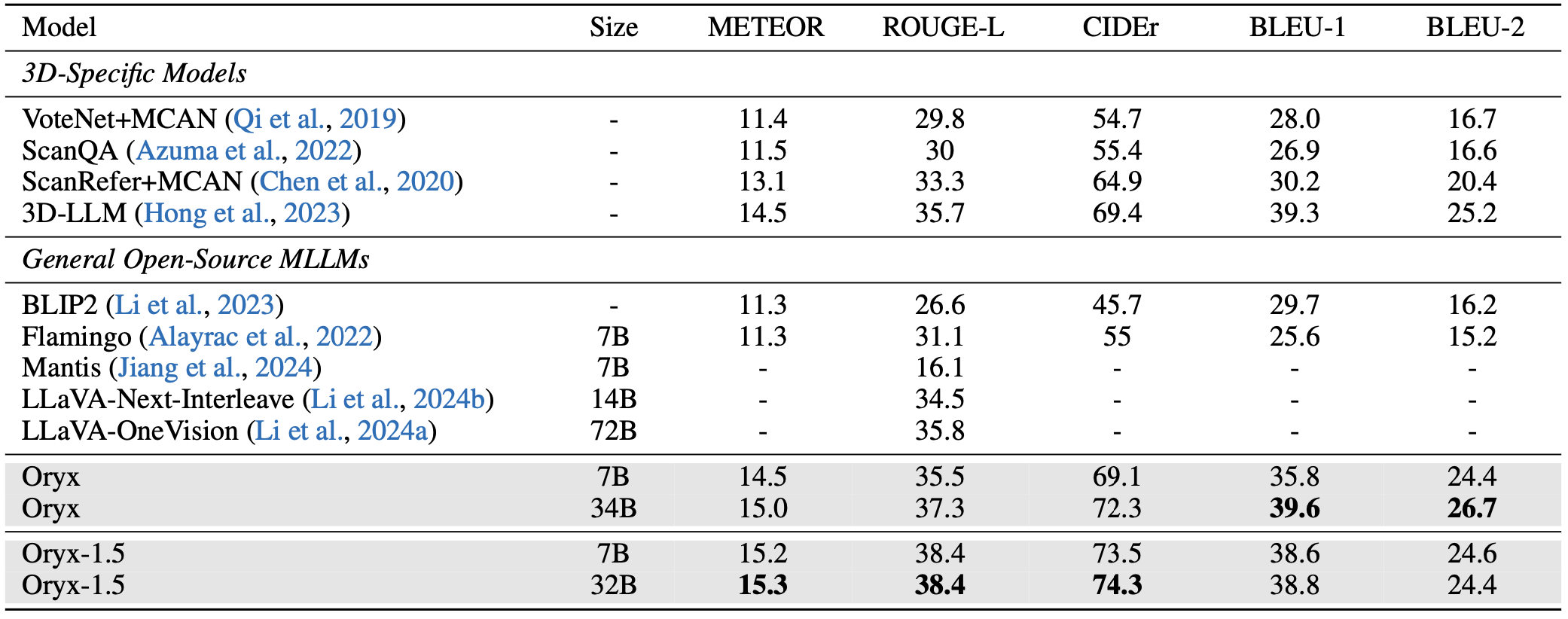
- [23/10/2024] 🎉Oryx-1.5 Series is released! Oryx-1.5 includes 7B and 32B variants. We achieve stronger performance on all the benchmarks! Check our results at VideoMME Leaderboard and the updated arXiv paper.
- [30/09/2024] 📊Oryx video data for SFT is released!
- [26/09/2024] 🎨Try out our online demo with Oryx-7B for image/video understanding!
- [24/09/2024] 🚀 Oryx-34B is now available at VideoMME Leaderboard, Oryx-34B achieves best accuracy among <40B MLLMs.
- [23/09/2024] 🔥 Oryx ranks 1st on MLVU, surpassing GPT-4o. Stay tuned for more results!
- [20/09/2024] 🔥 🚀Introducing Oryx! The Oryx models (7B/34B) support on-demand visual perception, achieve new state-of-the-art performance across image, video and 3D benchmarks, even surpassing advanced commercial models on some benchmarks.
- [Paper]: Detailed introduction of on-demand visual perception, including native resolution perception and dynamic compressor!
- [Checkpoints]: Try our advanced model on your own.
- [Scripts]: Start training models with customized data.
🐐 Introducing Oryx
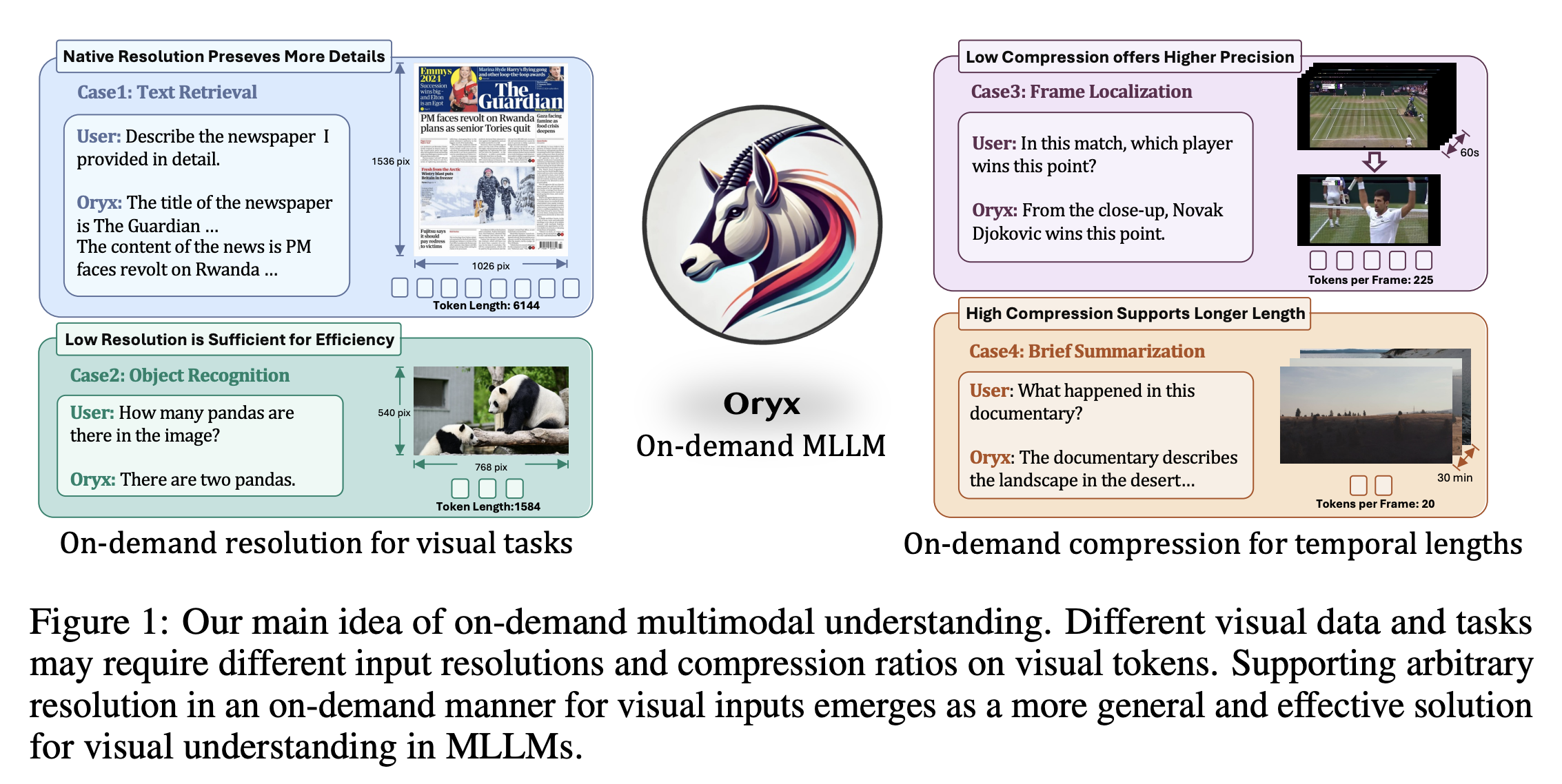
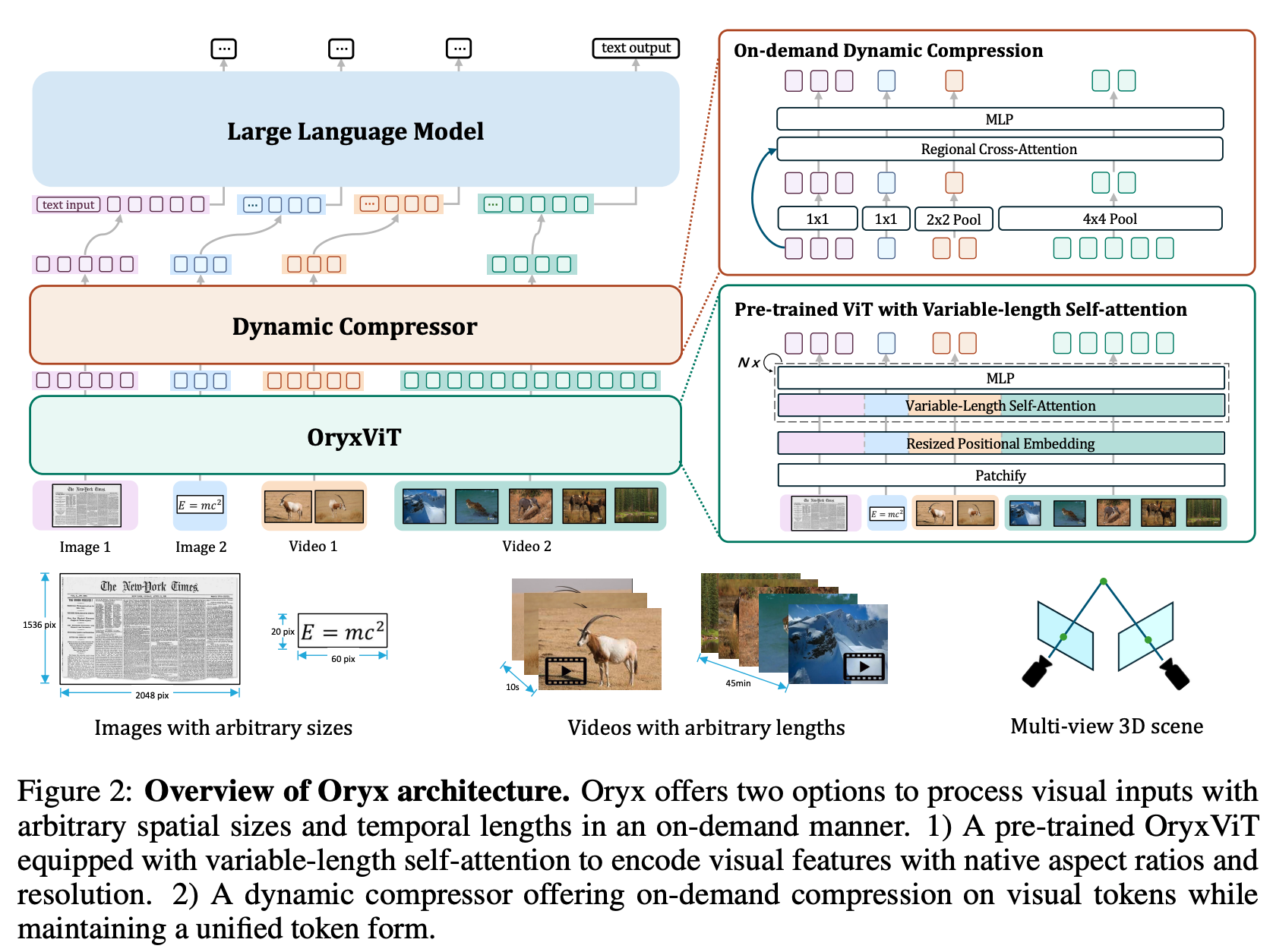
Oryx is a unified multimodal architecture for the spatial-temporal understanding of images, videos, and multi-view 3D scenes. Oryx offers an on-demand solution to seamlessly and efficiently process visual inputs with arbitrary spatial sizes and temporal lengths. Our model achieve strong capabilities in image, video, and 3D multimodal understanding simultaneously.
Main idea of On-Demand Multimodal Understanding
Overview of Oryx Architecture
✅ TODO List
- Release all the model weights.
- Release OryxViT model.
- Demo code for generation.
- All the training and inference code.
- Evaluation code for image, video and 3D multi-modal benchmark.
- Oryx SFT Data.
- Oryx Gradio chatbox.
- Enhanced Oryx model with latest LLM base models and better SFT data.
- Introducing our explorations for OryxViT.
📃 Main Results
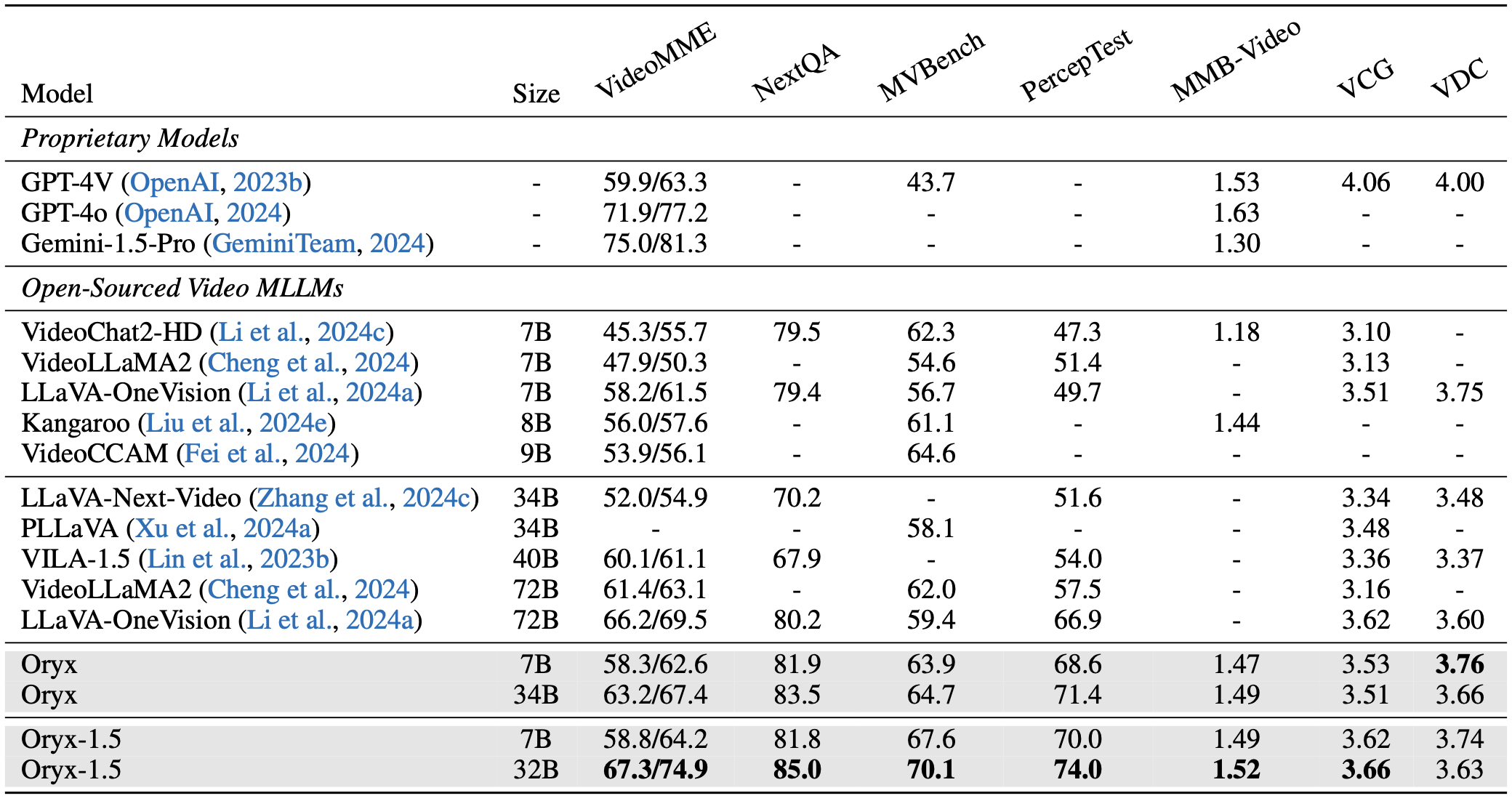
Results on General Temporal Understanding
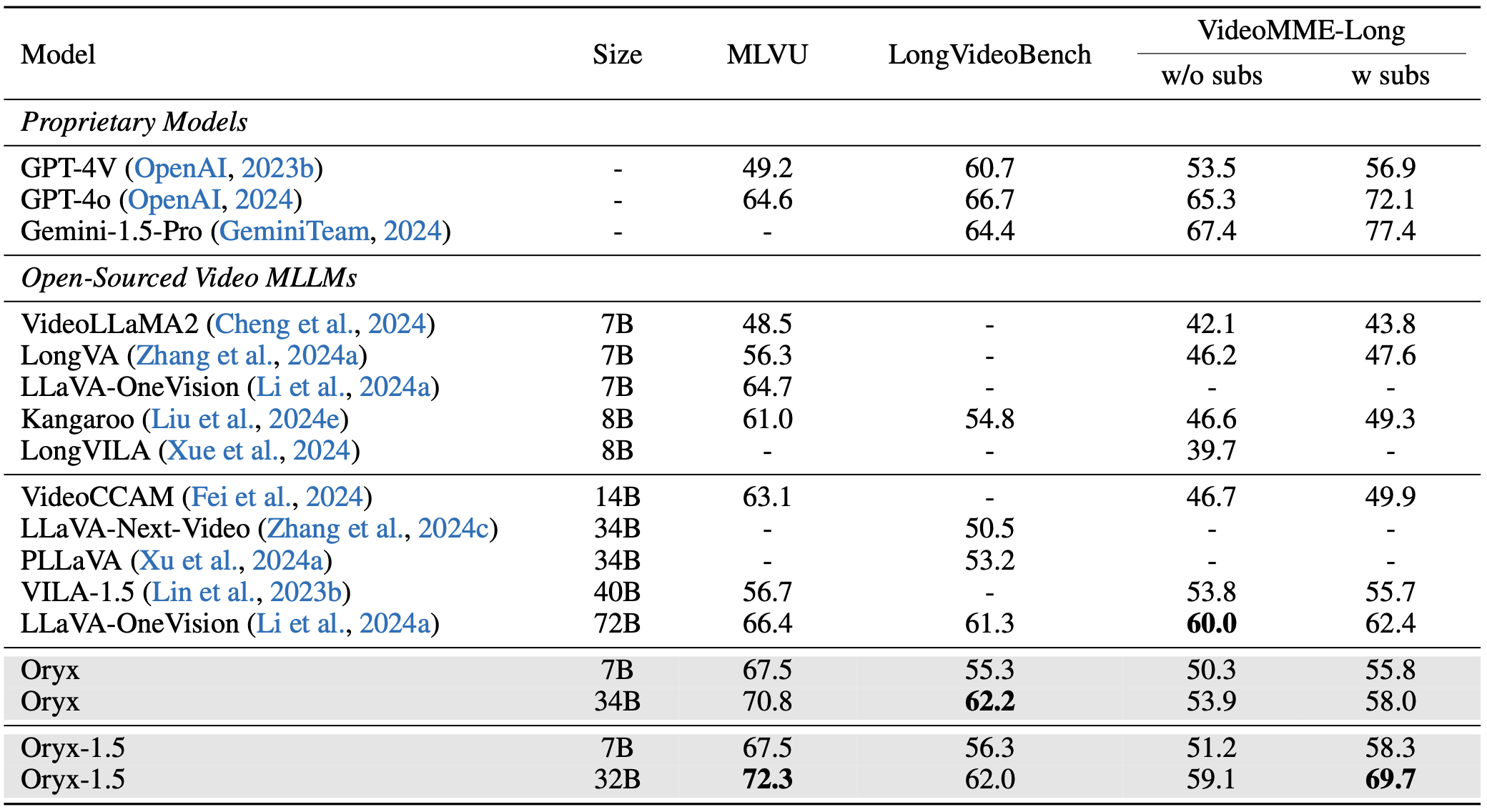
Results on Long-Form Temporal Understanding
Results on Image Understanding
Results on 3D Understanding
Model Zoo
We provide our checkpoints at Huggingface
| Model | Link | Size | Visual Encoder | LLM-Type | Intermediate Model |
|---|---|---|---|---|---|
| Oryx-7B | Huggingface | 7B | Oryx-ViT | Qwen-2-7B | Oryx-7B-Image |
| Oryx-34B | Huggingface | 34B | Oryx-ViT | Yi-1.5-34B | Oryx-34B-Image |
| Oryx-1.5-7B | Huggingface | 7B | Oryx-ViT | Qwen-2.5-7B | Oryx-1.5-7B-Image |
| Oryx-1.5-32B | Huggingface | 32B | Oryx-ViT | Qwen-2.5-32B | Oryx-1.5-32B-Image |
Generation Demo
You can try the generation results of our strong Oryx model with the following steps:
1. Download the Oryx model from our huggingface collections.
2. Download the Oryx-ViT vision encoder.
3. Replace the path for "mm_vision_tower" in the config.json with your local path for Oryx-ViT.
4. Modify the model path and run the inference script with your own video to test our model.
python inference.py
Evaluation
You can evaluate our model with the following steps:
1. Download the Oryx model from our huggingface collections.
2. Download the Oryx-ViT vision encoder.
3. Replace the path for "mm_vision_tower" in the config.json with your local path for Oryx-ViT.
4. Install the provided lmms-eval folder.
cd ./lmms-eval
pip install -e .
4. Modify the model path and run the evaluation script to test our model.
bash ./scripts/eval_image.sh
bash ./scripts/eval_video.sh
Training Instructions
Installation
1. Clone this repository:
git clone https://github.com/Oryx-mllm/oryx
cd oryx
2. Install the required package:
conda create -n oryx python=3.10 -y
conda activate oryx
pip install --upgrade pip
pip install -e .
Preparation
3. Prepare training data:
Please download training data from our huggingface.
Modify the DATA and FOLDER arguments in the training scripts to your save folder.
DATA="PATH/TO/Oryx-SFT-Data/data.json"
FOLDER="PATH/TO/Oryx-SFT-Data"
If you are interested in our long-form training data, you can download movienet_data.json and movienet_patch and mix appropriate quantity (we recommand 30k) with the main training data.
Training
4. Training your own model:
Modify the following lines in the scripts at your own environments:
export PYTHONPATH=/PATH/TO/oryx:$PYTHONPATH
VISION_TOWER='oryx_vit:PATH/TO/oryx_vit_new.pth'
DATA="PATH/TO/Oryx-SFT-DATA/data.json"
MODEL_NAME_OR_PATH="PATH/TO/7B_MODEL"
Scripts for training Oryx-7B
bash scripts/train_oryx_7b.sh
Scripts for training Oryx-34B
bash scripts/train_oryx_34b.sh
Citation
If you find it useful for your research and applications, please cite our paper using this BibTeX:
@article{liu2024oryx,
title={Oryx MLLM: On-Demand Spatial-Temporal Understanding at Arbitrary Resolution},
author={Liu, Zuyan and Dong, Yuhao and Liu, Ziwei and Hu, Winston and Lu, Jiwen and Rao, Yongming},
journal={arXiv preprint arXiv:2409.12961},
year={2024}
}