Wordle 游戏插件
April 3, 2026 · View on GitHub
基于原Wordle网页版的云崽Bot改版,参考的 https://wordle.org
由于当时是真的闲得慌,所以就用AI写了这个插件,第一次写大插件如有不足之处还请多多包涵哈
如果插件使用有问题请反馈!关于 canvas 问题的可以看这里
这个仓库我也不知道为什么搬到 Gitee 会被封库,有知道的可以提 issue
安装方法
1. 下载插件
 GitHub源
git clone --depth=1 https://github.com/Pimeng/wordle-plugin.git ./plugins/wordle-plugin
GitHub代理加速
git clone --depth=1 https://gh-proxy.com/https://github.com/Pimeng/wordle-plugin.git ./plugins/wordle-plugin
 Gitcode源(更新可能不及时)
git clone --depth=1 https://gitcode.com/Mirror-Yunzai/wordle-plugin.git ./plugins/wordle-plugin
2. 安装依赖(By 千奈千祁)
Linux安装
I. Ubuntu / Debian
sudo apt update
sudo apt install -y build-essential libcairo2-dev libpango1.0-dev libjpeg-dev libgif-dev librsvg2-dev
I. CentOS / RHEL
sudo yum install -y gcc-c++ cairo-devel pango-devel libjpeg-turbo-devel giflib-devel librsvg2-devel
II. 编译安装canvas
cd plugins/wordle-plugin
npm i
npm install canvas --build-from-source
Windows & Other
cd plugins/wordle-plugin
pnpm i
pnpm approve-builds
3. 重启云崽之后就可以食用啦
📚 常见问题
如果渲染报错,请尝试使用pnpm安装canvas依赖
pnpm i canvas
如果报错日志里面的有 canvas.node 字样请考虑安装完依赖之后运行安装脚本……
pnpm approve-builds
canvas还是有问题那就自己问AI自求多福吧……因为我也被canvas折磨好久才装上的……
🚀 使用方法
基本命令
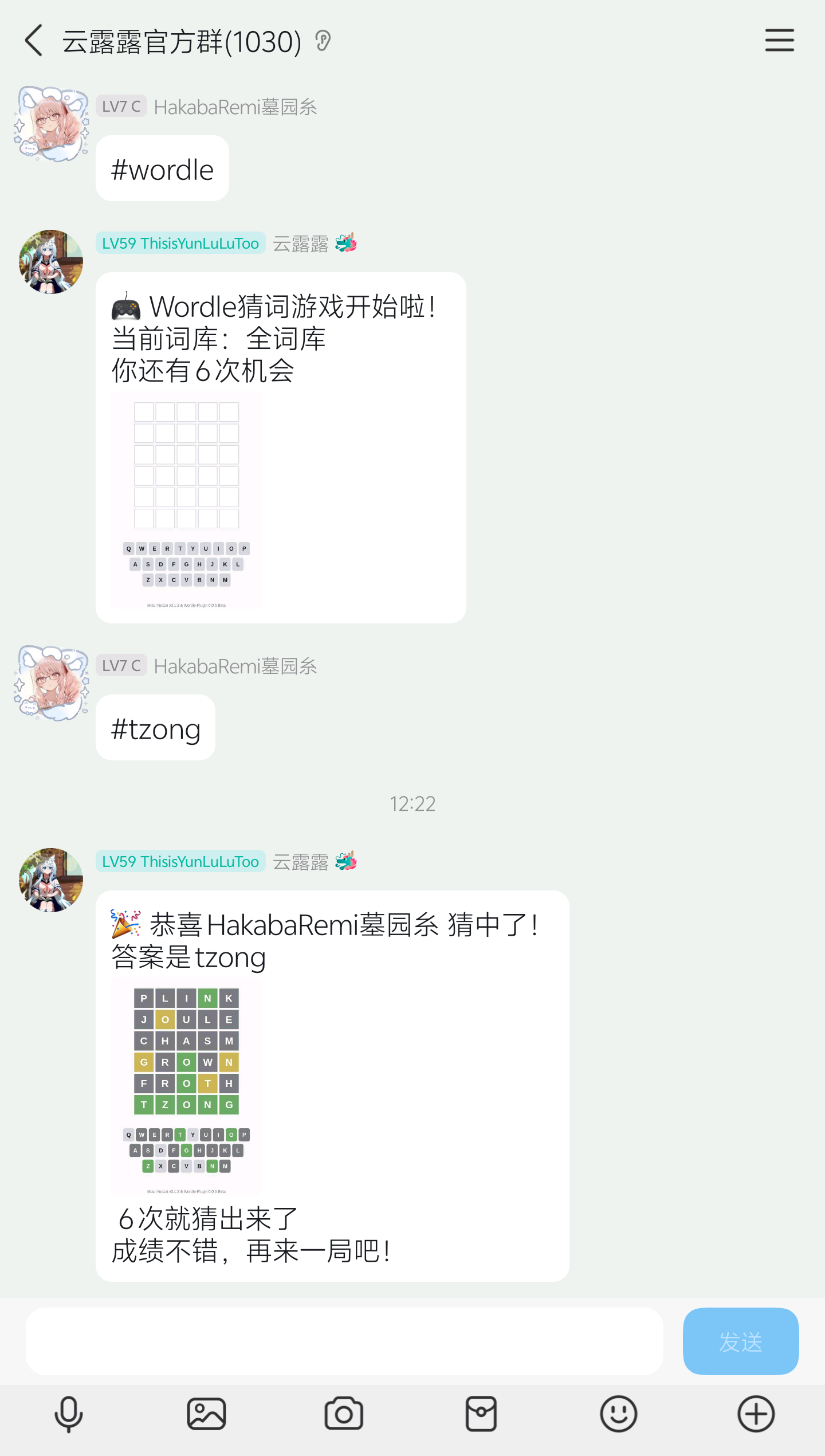
#wordle            # 开始常规游戏
#wordle 7          # 开始7字母游戏
#apple             # 使用前缀猜测
!apple             # 通过前缀猜词
#wordle 答案       # 结束游戏
#wordle 帮助       # 查看帮助
#wordle 词典       # 切换词典
#wordle 排行榜     # 查看群排行榜(可选:胜场/参与/胜率)
#wordle 总排行榜   # 查看全局排行榜(可选:胜场/参与/胜率)
#释义 access       # 查询单词释义
🎉 正在使用本插件的Bot
- 云露露 官方群
- 依涵
👀 插件效果预览
📝 更新日志
具体更新日志请查看 Commits
🤝 贡献
欢迎提交Issue和Pull Request来改进这个插件!
📄 许可证
本项目基于GPL-3.0许可证开源,您可以在遵守许可证条款的前提下自由使用、修改和分发本项目的代码。
🔗 联系我
https://github.com/Pimeng#%E8%81%94%E7%B3%BB%E6%96%B9%E5%BC%8F
本插件大量代码均由 Kimi-K2 & Gemini 3 Pro & GPT-5 & Claude 4.5 编写