Profile B: Voxtral HF + translation
August 30, 2026 · View on GitHub

WLK: Ultra-low-latency, self-hosted speech-to-text pipeline
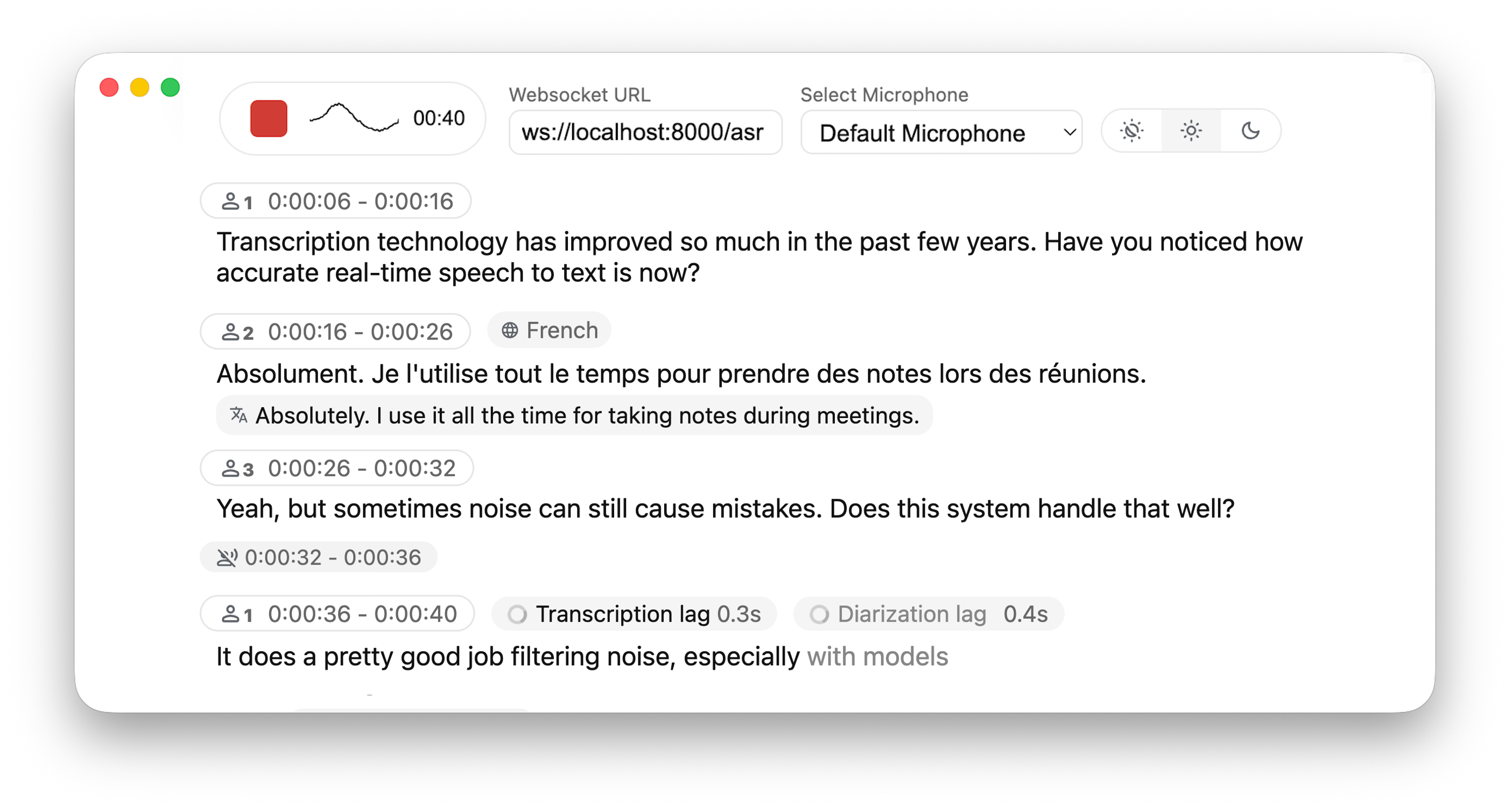





Powered by Leading Research:
- Simul-Whisper/Streaming (SOTA 2025) - Ultra-low latency transcription using AlignAtt policy.
- NLLW (2025), based on distilled NLLB (2022, 2024) - Simulatenous translation from & to 200 languages.
- WhisperStreaming (SOTA 2023) - Low latency transcription using LocalAgreement policy
- Streaming Sortformer (SOTA 2025) - Advanced real-time speaker diarization
- Qwen3-ASR-causal (2026) - Causal streaming audio encoder for Qwen3-ASR: each audio block is encoded exactly once, constant compute per audio second, append-only transcripts.
- AlignAtt4LLM (IWSLT 2026) - Simultaneous translation with decoder-only LLMs: attention-gated commits, append-only output.
Why not just run a simple Whisper model on every audio batch? Whisper is designed for complete utterances, not real-time chunks. Processing small segments loses context, cuts off words mid-syllable, and produces poor transcription. WhisperLiveKit uses state-of-the-art simultaneous speech research for intelligent buffering and incremental processing.
Architecture
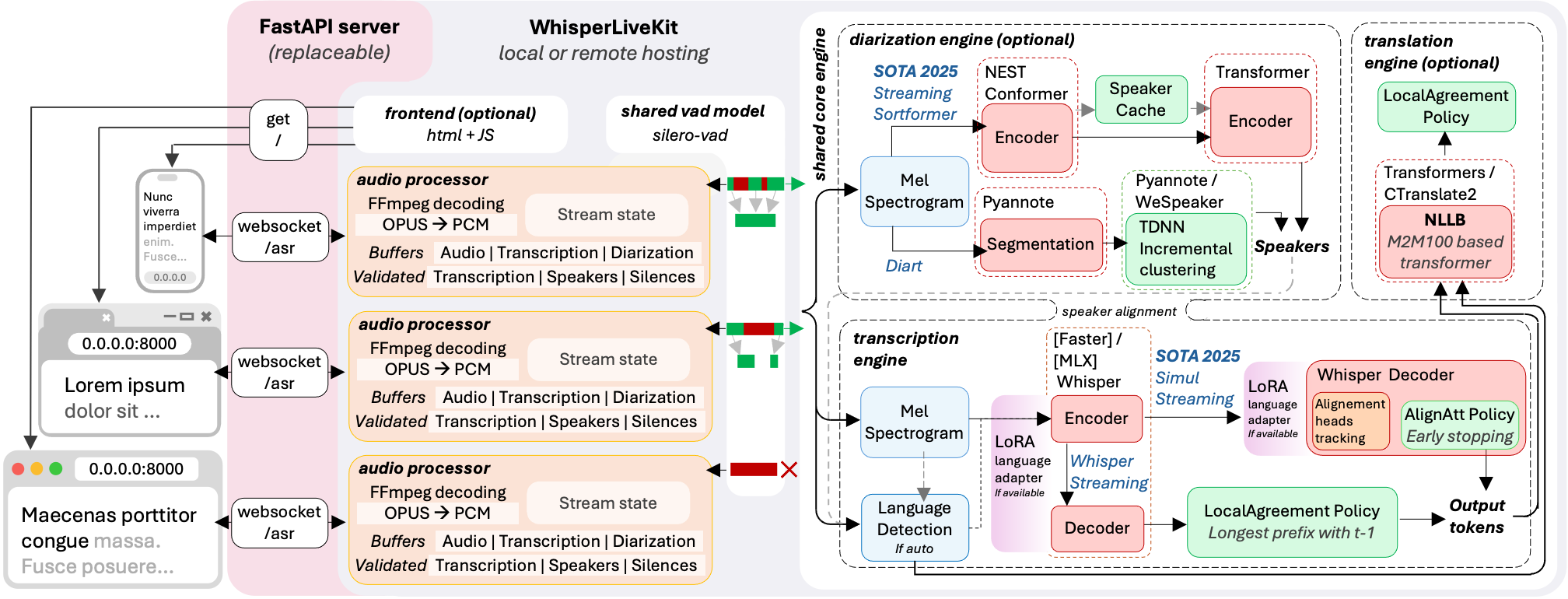
The backend supports multiple concurrent users. Voice Activity Detection reduces overhead when no voice is detected.
Installation & Quick Start
pip install whisperlivekit
Quick Start
# Start the server — open http://localhost:8000 and start talking
wlk --model base --language en


# Auto-pull model and start server
wlk run whisper:tiny

# Transcribe a file (no server needed)
wlk transcribe meeting.wav

# Generate subtitles
wlk transcribe --format srt podcast.mp3 -o podcast.srt

# Manage models
wlk models                             # See what's installed
wlk pull large-v3                      # Download a model
wlk rm large-v3                        # Delete a model

# Benchmark speed and accuracy
wlk bench
API Compatibility
WhisperLiveKit exposes compatibility-oriented subsets of popular APIs:
# OpenAI-compatible REST API
curl http://localhost:8000/v1/audio/transcriptions -F file=@audio.wav

# Works with the OpenAI Python SDK
client = OpenAI(base_url="http://localhost:8000/v1", api_key="unused")

# Deepgram-compatible WebSocket
# See docs/API.md for supported options and current SDK setup

# Native WebSocket for real-time streaming
ws://localhost:8000/asr
Per-session WebSocket query parameters:
| param | example | effect |
|---|---|---|
language | ?language=fr | transcription language for this session (one shared engine serves mixed-language sessions) |
target_language | ?target_language=de | translation target for this session (server must run with --target-language) |
context | ?context=WhisperLiveKit%2C+Qwen3-ASR | terminology, names, or phrase-list text used to condition this session; supported by Whisper-family and SimulStreaming backends |
mode | ?mode=diff | incremental snapshot/diff protocol instead of resending the full state (experimental, for integrators building their own client, see diff_protocol.py); the bundled web UI uses full |
token | ?token=... | API token when the server runs with --api-token (also accepted as an Authorization: Bearer header) |
See docs/API.md for the complete API reference. For a native SwiftUI macOS client, see macos/WhisperLiveKitMac.
- See here for the list of all available languages.
- Check the troubleshooting guide for step-by-step fixes collected from recent GPU setup/env issues.
- For HTTPS requirements, see the Parameters section for SSL configuration options.
Optional Dependencies
| Feature | uv sync | pip install -e |
|---|---|---|
| Apple Silicon MLX Whisper backend | uv sync --extra mlx-whisper | pip install -e ".[mlx-whisper]" |
| FunASR SenseVoiceSmall | uv sync --extra funasr | pip install -e ".[funasr]" |
| Voxtral (MLX backend, Apple Silicon) | uv sync --extra voxtral-mlx | pip install -e ".[voxtral-mlx]" |
| CPU PyTorch stack | uv sync --extra cpu | pip install -e ".[cpu]" |
| CUDA 12.9 PyTorch stack | uv sync --extra cu129 | pip install -e ".[cu129]" |
| Translation | uv sync --extra translation | pip install -e ".[translation]" |
| Sentence tokenizer | uv sync --extra sentence_tokenizer | pip install -e ".[sentence_tokenizer]" |
| Voxtral (HF backend) | uv sync --extra voxtral-hf | pip install -e ".[voxtral-hf]" |
| Qwen3-ASR vLLM (CUDA) | uv sync --extra qwen3-vllm | pip install -e ".[qwen3-vllm]" |
| Qwen3-ASR streaming (HF, CUDA/MPS/CPU) | uv sync --extra qwen3-streaming | pip install -e ".[qwen3-streaming]" |
| Qwen3-ASR vLLM Metal (Apple Silicon) | Install vLLM with the official vllm-metal script first, then uv sync --extra qwen3-vllm-metal | Install vLLM with the official vllm-metal script first, then pip install -e ".[qwen3-vllm-metal]" |
| Speaker diarization (Sortformer / NeMo 3) | uv sync --extra diarization-sortformer | pip install -e ".[diarization-sortformer]" |
| [Not recommended] Speaker diarization with Diart (Python 3.11 or 3.12) | uv sync --extra diarization-diart | pip install -e ".[diarization-diart]" |
| Canary-1b-v2 (NeMo, CUDA/CPU) | uv sync --extra canary | pip install -e ".[canary]" |
The Diart profile is limited to Python 3.11 and 3.12 because Diart 0.9.2 requires NumPy below 2. Use Sortformer for diarization on Python 3.13.
Supported GPU profiles:
# Profile A: Sortformer diarization
uv sync --extra cu129 --extra diarization-sortformer

# Profile B: Voxtral HF + translation
uv sync --extra cu129 --extra voxtral-hf --extra translation

# Profile C: Qwen3-ASR vLLM
uv sync --extra qwen3-vllm
qwen3-vllm uses vLLM's CUDA wheel stack and must be installed in a separate environment from cu129. Several heavy extras (voxtral-hf, qwen3-vllm-metal, and the vLLM stacks) intentionally conflict with one another and must be installed in separate environments; the authoritative list is [tool.uv].conflicts in pyproject.toml. The canary extra conflicts with voxtral-hf and qwen3-vllm-metal, but is compatible with diarization-sortformer (both pull nemo-toolkit[asr]).
See Parameters & Configuration below on how to use them.


Benchmarks use 6 minutes of public LibriVox audiobook recordings per language (30s + 60s + 120s + 180s), with ground truth from Project Gutenberg. The figures above were measured on an NVIDIA H100 (CUDA); the qwen3 causal tower is English-only, so it only appears on the English chart. Fully reproducible with python scripts/run_scatter_benchmark.py (the script picks a matching combo set on Apple Silicon: mlx-whisper and voxtral-mlx instead of the CUDA-only backends). Raw results: benchmarks/h100_scatter/.
We are actively looking for benchmark results on other hardware (different NVIDIA GPUs, Apple Silicon chips, cloud instances). If you run the benchmarks on your machine, please share your results via an issue or PR!
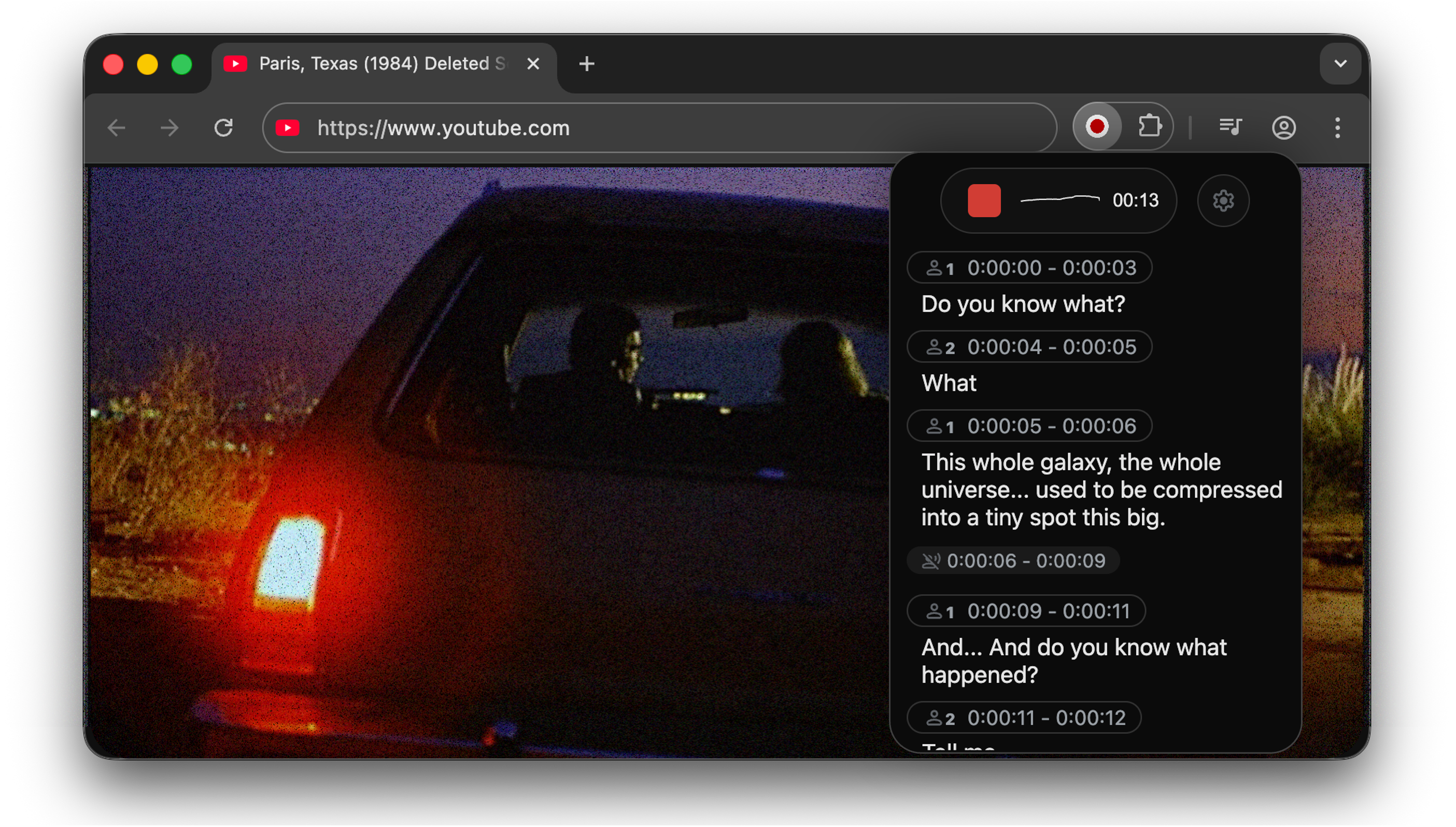
Use it to capture audio from web pages.
Go to chrome-extension for instructions.
Voxtral Backend
WhisperLiveKit supports Voxtral Mini,
a 4B-parameter speech model from Mistral AI that natively handles 100+ languages with automatic
language detection. Whisper also supports auto-detection (--language auto), but Voxtral's per-chunk
detection is more reliable and does not bias towards English.
# Apple Silicon (native MLX, recommended)
pip install -e ".[voxtral-mlx]"
wlk --backend voxtral-mlx

# Linux/GPU (HuggingFace transformers)
pip install transformers torch
wlk --backend voxtral
Voxtral uses its own streaming policy and does not use LocalAgreement or SimulStreaming. See BENCHMARK.md for performance numbers.
FunASR / SenseVoiceSmall
Install the optional backend and run SenseVoiceSmall through WLK's existing LocalAgreement and VAC/VAD pipeline:
pip install "whisperlivekit[funasr]"
wlk --backend funasr --language auto
Use a verified local model snapshot without executing remote model code:
wlk --backend funasr --model_dir /path/to/SenseVoiceSmall --language yue
The initial integration supports SenseVoiceSmall transcription in Mandarin
(zh), Cantonese (yue), English (en), Japanese (ja), Korean (ko), and
automatic detection. FunASR uses LocalAgreement only; selecting it with the
default policy switches that policy automatically. It does not support
--direct-english-translation, and WLK remains responsible for voice activity
control rather than enabling FunASR's internal VAD. This compatibility contract
does not cover arbitrary FunASR models. SenseVoiceSmall is distributed under
its model license.
Qwen3-ASR streaming (HF Transformers)
qwen3-streaming runs Qwen3-ASR through plain HF Transformers with a
bounded-recompute audio cache: the pretrained audio tower only re-encodes a
local window (default 12 s) per update, cached audio embeddings are
append-only, and text is committed with a stable-prefix rule. Works on CUDA,
Apple Silicon (MPS) and CPU, no vLLM required.
pip install -e ".[qwen3-streaming]"
wlk --backend qwen3-streaming --language en
Notes:
- An explicit
--languageis required (automatic detection switches language mid-stream on accented audio). - Word timestamps are interpolated estimates (~1 s precision): good enough
for lines and diarization alignment. Use
--backend qwen3-vllm(ForcedAligner) when exact word timing matters. - Decode pacing self-adjusts to the hardware; on GPUs slower than real time the update cadence grows instead of lagging. Plan one realtime session per GPU.
- Defaults encode the validated operating point (12 s left context, ~15 s
segments); see
--helpfor the--qwen3-streaming-*knobs.
Causal mode (minimum compute per chunk). The windowed default re-encodes up to 12 s of audio on every update. The causal mode runs an append-only causal-KV encoder instead: each ~2 s audio block is encoded exactly once, memory is bounded (15 s window + sentence-boundary segment resets), and per-chunk compute is constant in stream length:
wlk --backend qwen3-streaming --language en \
    --qwen3-streaming-audio-backend causal \
    --qwen3-streaming-tower-checkpoint qfuxa/qwen3-asr-0.6b-streaming
The fine-tuned tower (qfuxa/qwen3-asr-0.6b-streaming)
downloads automatically. The Qwen runtime, tests, experiments, benchmarks and
figures now live in Qwen3-ASR-causal,
which is consumed here through third_party/qwen3-asr-causal. WhisperLiveKit
keeps only the backend wiring and CLI flags.
Use causal mode for many concurrent streams, energy-constrained serving or unbounded session lengths; keep the windowed default for best accuracy. English only for now. Detailed WER/RTF results are in the Qwen3-ASR-causal repository.
Experimental vLLM Metal causal mode. On Apple Silicon, qwen3-vllm-metal
can also load the same causal tower and keep a rolling MLX decoder KV over the
[prompt + audio] prefix. New audio blocks are encoded once, and the decoder
replays only the new audio embeddings, prompt tail, and previous-hypothesis
draft:
wlk --backend qwen3-vllm-metal --language en \
    --qwen3-vllm-metal-audio-backend causal \
    --qwen3-vllm-metal-tower-checkpoint qfuxa/qwen3-asr-0.6b-streaming
This path has passed local short-form smoke tests and is useful for comparing
the Metal decoder path against the HF/MPS causal backend. It is still
experimental; use qwen3-streaming causal for the validated production stack.
Experimental vLLM CUDA causal mode. On NVIDIA GPUs, qwen3-vllm can load
the same causal tower, use vLLM for the text decoder, and keep vLLM
ForcedAligner timestamps:
WLK_QWEN3_VLLM_LIVE_MULTIPROCESSING=1 \
wlk --backend qwen3-vllm --language en \
    --qwen3-vllm-audio-backend causal \
    --qwen3-vllm-causal-decoder-backend vllm-live \
    --qwen3-vllm-tower-checkpoint qfuxa/qwen3-asr-0.6b-streaming
The vllm-text backend is the conservative fallback when you do not want the
live request-local append path; it still uses vLLM prefix caching but starts one
text-decoder request per chunk. The append-kv and rolling names remain as
compatibility aliases for the HF decoder path. Keep standard qwen3-vllm for
best current accuracy until the causal quality gate is fixed.
Canary Backend
WhisperLiveKit supports NVIDIA Canary-1b-v2
via NeMo, a 1B-parameter model covering 25 European
languages with native word-level timestamps. Automatic language detection uses NeMo's
AmberNet language-ID model when --language auto is set; the detected language is locked
in once enough audio has accumulated. Canary streams through the LocalAgreement policy.
pip install -e ".[canary]"
wlk --backend canary --language auto
Notes:
- Runs on CUDA and CPU. A GPU is strongly recommended: CPU works (see
scripts/smoke_canary.py) but is slow for a 1B-parameter model. On Apple Silicon, NeMo's current restore path uses CPU; this backend does not enable MPS device placement. NeMo is a heavy dependency (torch, Lightning, and friends). - Supports WhisperLiveKit's Python range, 3.11 through 3.13. The
canaryextra intentionally selectsnemo-toolkit[asr]>=3.0,<4, the NeMo line validated with Canary timestamps and Python 3.13. - Explicit
--language <code>skips language detection entirely. Tune detection with--canary-lid-min-sec(minimum audio before detecting) and--canary-lid-min-conf(confidence threshold to lock in the detected language). - Canary-1b-v2 is distributed under CC-BY-4.0. The separate AmberNet language-ID model is downloaded from NVIDIA NGC; review its model-card terms for your deployment.
Usage Examples
Command-line Interface: Start the transcription server with various options:
# Large model and translate from french to danish
wlk --model large-v3 --language fr --target-language da

# Diarization and server listening on */80
wlk --host 0.0.0.0 --port 80 --model medium --diarization --language fr

# Voxtral multilingual (auto-detects language)
wlk --backend voxtral-mlx
Python API Integration: Check basic_server for a more complete example of how to use the functions and classes.
import asyncio
from contextlib import asynccontextmanager

from fastapi import FastAPI, WebSocket, WebSocketDisconnect
from fastapi.responses import HTMLResponse

from whisperlivekit import AudioProcessor, TranscriptionEngine, parse_args

transcription_engine = None

@asynccontextmanager
async def lifespan(app: FastAPI):
    global transcription_engine
    transcription_engine = TranscriptionEngine(model_size="medium", diarization=True, lan="en")
    yield

app = FastAPI(lifespan=lifespan)

async def handle_websocket_results(websocket: WebSocket, results_generator):
    async for response in results_generator:
        await websocket.send_json(response)
    await websocket.send_json({"type": "ready_to_stop"})

@app.websocket("/asr")
async def websocket_endpoint(websocket: WebSocket):
    global transcription_engine

    # Create a new AudioProcessor for each connection, passing the shared engine
    audio_processor = AudioProcessor(transcription_engine=transcription_engine)
    results_generator = await audio_processor.create_tasks()
    results_task = asyncio.create_task(handle_websocket_results(websocket, results_generator))
    await websocket.accept()
    while True:
        message = await websocket.receive_bytes()
        await audio_processor.process_audio(message)
Frontend Implementation: The package includes an HTML/JavaScript implementation here. You can also import it using from whisperlivekit import get_inline_ui_html & page = get_inline_ui_html()
Parameters & Configuration
| Parameter | Description | Default |
|---|---|---|
--model | Whisper model size. List and recommandations here | small |
--model-path | Local .pt file/directory or Hugging Face repo ID containing the Whisper model. Overrides --model. Recommandations here | None |
--language | List here. If you use auto, the model attempts to detect the language automatically, but it tends to bias towards English. | auto |
--target-language | If sets, translates using NLLW. 200 languages available. If you want to translate to english, you can also use --direct-english-translation. The STT model will try to directly output the translation. | None |
--translation-backend | nllb (in-process, CPU-friendly) or alignatt: streaming LLM translation through an Alignatt4LLM sidecar, with attention-gated append-only commits. See docs/translation-alignatt.md. | nllb |
--diarization | Enable speaker identification | False |
--backend-policy | Streaming strategy: 1/simulstreaming uses AlignAtt SimulStreaming, 2/localagreement uses the LocalAgreement policy | simulstreaming |
--backend | ASR backend selector. auto picks MLX on macOS (if installed), otherwise Faster-Whisper, otherwise vanilla Whisper. Options: mlx-whisper, faster-whisper, whisper, openai-api (LocalAgreement only), funasr (SenseVoiceSmall, LocalAgreement only), voxtral-mlx (Apple Silicon), voxtral (HuggingFace), qwen3-vllm, qwen3-vllm-metal (Apple Silicon), qwen3-streaming (HuggingFace, CUDA/MPS/CPU), canary (NeMo, CUDA/CPU, LocalAgreement only) | auto |
--pause-segmentation-seconds | Create a stable transcript boundary when a VAD pause is longer than this many seconds. Use 0 to disable pause-based segmentation. | 5.0 |
--asr-coalesce-min-s | Defer an ASR call until this much new audio has accrued. Trades update cadence for fewer encoder passes; use 0 to disable. | 0 |
--no-vac | Disable Voice Activity Controller. NOT ADVISED | False |
--no-vad | Disable Voice Activity Detection. NOT ADVISED | False |
--warmup-file | Audio file path for model warmup | jfk.wav |
--host | Server host address | localhost |
--port | Server port | 8000 |
--ssl-certfile | Path to the SSL certificate file (for HTTPS support) | None |
--ssl-keyfile | Path to the SSL private key file (for HTTPS support) | None |
--forwarded-allow-ips | Ip or Ips allowed to reverse proxy the whisperlivekit-server. Supported types are IP Addresses (e.g. 127.0.0.1), IP Networks (e.g. 10.100.0.0/16), or Literals (e.g. /path/to/socket.sock) | None |
--cors-origins | Comma-separated list of allowed CORS origins. Empty disables CORS; use * to allow all origins. | empty |
--pcm-input | raw PCM (s16le) data is expected as input and FFmpeg will be bypassed. Frontend will use AudioWorklet instead of MediaRecorder | False |
--lora-path | Path or Hugging Face repo ID for LoRA adapter weights (e.g., qfuxa/whisper-base-french-lora). Only works with native Whisper backend (--backend whisper) | None |
| Translation options | Description | Default |
|---|---|---|
--nllb-backend | transformers or ctranslate2 | transformers |
--nllb-size | 600M or 1.3B | 600M |
| Diarization options | Description | Default |
|---|---|---|
--diarization-backend | diart or sortformer | sortformer |
--sortformer-model-path | Path to a local Sortformer .nemo file, a directory containing exactly one .nemo file, or a NeMo/Hugging Face model ID. | None |
--sortformer-max-speakers | Declare a known upper bound from 1 to 4 for a Sortformer session. The first N speaker channels are retained in arrival order. | all checkpoint channels (4 for the default model) |
--disable-punctuation-split | [NOT FUNCTIONAL IN 0.2.15 / 0.2.16] Disable punctuation based splits. See #214 | False |
--segmentation-model | Hugging Face model ID for Diart segmentation model. Available models | pyannote/segmentation-3.0 |
--embedding-model | Hugging Face model ID for Diart embedding model. Available models | pyannote/embedding |
--sortformer-max-speakers is an assertion about the audio, not speaker-count
estimation. Use it only when the session is known to contain at most N speakers.
If more speakers are present, later arrival-ordered channels are excluded and
those speakers can be attributed to a retained label. The default preserves the
full checkpoint output. Sortformer produces independent activity probabilities,
including overlapping activity, but WhisperLiveKit currently resolves each
diarization frame and ASR token to one speaker. This option does not add
simultaneous-speaker output.
Canary backend options (only used with --backend canary) | Description | Default |
|---|---|---|
--canary-model | HuggingFace/NGC model id or local .nemo path | nvidia/canary-1b-v2 |
--canary-default-lang | Fallback language used until auto-detection locks in. An explicit --language bypasses it. | en |
--canary-lid-model | NeMo language-ID model used for --language auto | langid_ambernet |
--canary-lid-min-sec | Non-negative minimum seconds of audio before attempting language detection | 2.0 |
--canary-lid-min-conf | Confidence threshold in [0, 1] to lock in the detected language | 0.5 |
| SimulStreaming backend options | Description | Default |
|---|---|---|
--disable-fast-encoder | Disable Faster Whisper or MLX Whisper backends for the encoder (if installed). Inference can be slower but helpful when GPU memory is limited | False |
--custom-alignment-heads | Use your own alignment heads, useful when --model-dir is used. Use scripts/determine_alignment_heads.py to extract them. | |
None | ||
--frame-threshold | AlignAtt frame threshold (lower = faster, higher = more accurate) | 25 |
--beams | Number of beams for beam search (1 = greedy decoding) | 1 |
--decoder | Force decoder type (beam or greedy) | auto |
--audio-max-len | Maximum audio buffer length (seconds) | 30.0 |
--audio-min-len | Minimum audio length to process (seconds) | 0.0 |
--cif-ckpt-path | Path to CIF model for word boundary detection | None |
--never-fire | Never truncate incomplete words | False |
--init-prompt | Initial prompt for the model | None |
--static-init-prompt | Static prompt that doesn't scroll | None |
--max-context-tokens | Maximum context tokens | Depends on model used, but usually 448. |
| WhisperStreaming backend options | Description | Default |
|---|---|---|
--confidence-validation | Use confidence scores for faster validation | False |
--buffer_trimming | Buffer trimming strategy (sentence or segment) | segment |
For diarization using Diart, you need to accept user conditions here for the
pyannote/segmentationmodel, here for thepyannote/segmentation-3.0model and here for thepyannote/embeddingmodel. Then, login to HuggingFace:huggingface-cli login
🚀 Deployment Guide
To deploy WhisperLiveKit in production:
-
Server Setup: Install production ASGI server & launch with multiple workers
pip install uvicorn gunicorn gunicorn -k uvicorn.workers.UvicornWorker -w 4 your_app:app -
Frontend: Host your customized version of the
htmlexample & ensure WebSocket connection points correctly -
Nginx Configuration (recommended for production):
server { listen 80; server_name your-domain.com; location / { proxy_pass http://localhost:8000; proxy_set_header Upgrade $http_upgrade; proxy_set_header Connection "upgrade"; proxy_set_header Host $host; }} -
HTTPS Support: For secure deployments, use "wss://" instead of "ws://" in WebSocket URL
🐋 Docker
Deploy the application easily using Docker with GPU or CPU support.
Prerequisites
- Docker installed on your system
- For GPU support: NVIDIA Docker runtime installed
Quick Start
With GPU acceleration (recommended):
docker build -t wlk .
docker run --gpus all -p 8000:8000 --name wlk wlk
CPU only:
docker build -f Dockerfile.cpu -t wlk --build-arg EXTRAS="cpu" .
docker run -p 8000:8000 --name wlk wlk
Advanced Usage
Custom configuration:
# Example with custom model and language
docker run --gpus all -p 8000:8000 --name wlk wlk --model large-v3 --language fr
Compose (recommended for cache + token wiring):
# GPU Sortformer profile
docker compose up --build wlk-gpu-sortformer

# GPU Voxtral profile
docker compose up --build wlk-gpu-voxtral

# CPU service
docker compose up --build wlk-cpu
Memory Requirements
- Large models: Ensure your Docker runtime has sufficient memory allocated
Customization
--build-argOptions:EXTRAS="cu129,diarization-sortformer"- GPU Sortformer profile extras.EXTRAS="cu129,voxtral-hf,translation"- GPU Voxtral profile extras.EXTRAS="cpu,diarization-diart,translation"- CPU profile extras.- Hugging Face cache + token are configured in
compose.ymlusing a named volume andHF_TKN_FILE(default:./token).
Testing & Benchmarks
# Quick benchmark with the CLI
wlk bench
wlk bench --backend faster-whisper --model large-v3
wlk bench --languages all --json results.json

# Install test dependencies for full suite
pip install -e ".[test]"

# Run unit tests (no model download required)
pytest tests/ -v

# Speed vs Accuracy scatter plot (all backends, compute-aware + unaware)
python scripts/create_long_samples.py        # generate ~90s test samples (cached)
python scripts/run_scatter_benchmark.py      # English (both modes)
python scripts/run_scatter_benchmark.py --lang fr  # French
Use Cases
Capture discussions in real-time for meeting transcription, help hearing-impaired users follow conversations through accessibility tools, transcribe podcasts or videos automatically for content creation, transcribe support calls with speaker identification for customer service...