styles.md
August 22, 2026 · View on GitHub
Styles
defstyle
Use defstyle for static reusable styles, and combine it with :class-name on elements.
📚 Documentation Index
- ← Back to README
- Beginner Guide
- API Reference
- All Guides: Why Respo | Base Components | Virtual DOM | Component States
Styles are represented in HashMap so it's very trival to extend with merge and if:
def style-a $ {}
  :line-height 1.6
  :color (respo.util.format/hsl 0 0 80)

def style-b $ merge style-a
  {}
    :font-size "|16px"
  if (> size 0)
    {}
      :font-weight "|bold"
The keys have to be keywords, the values can be either of keywords, numbers or strings.
Also I prepared a function called hsl as a helper.
In Respo, style updates are defined with direct accessing to el.style:
defn add-style (target op)
  let
      style-name (dashed->camel (name (key op)))
      style-value (val op)
    aset (.-style target) style-name style-value

defn rm-style (target op)
  let
      style-name (dashed->camel (name op))
    aset (.-style target) style-name nil

defn replace-style (target op)
  let
      style-name (dashed->camel (name (key op)))
      style-value (val op)
    aset (.-style target) style-name style-value
For convenience, I collected my frequent used styles in a package called respo-ui. You can find more in the source code.
Static Styles
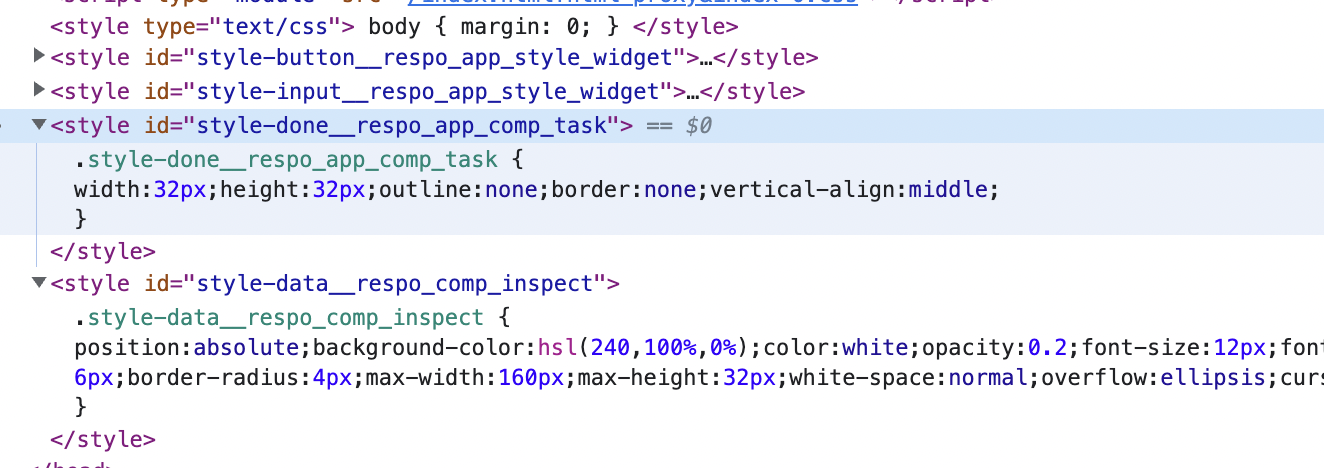
A macro respo.css/defstyle has been added for add <style>...</style> referred with :class-name. It's less dynamic, which means you cannot pass parameters to styles in this way. It will insert into <head>...</head> a <style>...</style> element. It runs before main! and reload!.
define style:
; ns app.demo
  :require
    respo.css :refer $ defstyle

respo.css/defstyle style-input $ {}
  |& $ {} (:font-size |16px)
    :line-height |24px
    :padding "|0px 8px"
    :outline :none
    :min-width |300px
    :background-color "|#f0f0f0"
    :border :none
Use string selectors such as |&, |&:hover, or |input&. Avoid writing bare symbol & as the selector key in defstyle.
When to use defstyle
defstyle works best for static styles: fixed font sizes, colors, gaps, borders, paddings, hover rules, and reusable layout rules.
Keep runtime-dependent values in :style, for example dynamic width, position, height, or values computed from state.
defstyle style-card $ {}
  |& $ {} (:padding |12px 16px)
    :border-radius |12px
    :background-color $ respo.util.format/hsl 0 0 100

div $ {}
  :class-name style-card
  :style $ {}
    :width $ &max 200
      + 24 $ text-width title 16 |BlinkMacSystemFont
text-width returns 0 when Canvas is unavailable, so the same immutable style calculation is safe during SSR and Node.js tests. A nil inline style value is normalized to an empty string, which clears the CSS declaration without serializing nil into DOM or HTML output.
Extract from :style
When moving an inline style map into defstyle, keep the change mechanical:
- locate the target props node;
- extract only the static style map;
- wrap the extracted map with
defstyleusing|&as the selector key; - replace the original
:styleusage with:class-name.
div $ {}
  :class-name $ str-spaced css/row style-preview-row
defstyle style-preview-row $ {}
  |& $ {} (:gap |8px) (:flex-wrap :wrap)
    :align-items :flex-start
Be careful with string values like |4px 10px, |1px solid , or long text literals. If the code is generated or transformed by CLI tools, prefer the exact serialized form that the tool prints, instead of hand-editing token boundaries.
Calcit CLI workflow
When the source is stored in calcit.cirru, a stable workflow is:
# 1. locate the inline style leaf
calcit query search ':style' --filter app.comp.container/comp-env-card

# 2. inspect the surrounding props and find the actual style map path
calcit tree show app.comp.container/comp-env-card --path '3.2.4.2'

# 3. extract the style map itself, not the :style leaf
calcit edit split-def app.comp.container/comp-env-card --path '3.2.4.2.1.2.1' --name style-env-card-preview
After extraction, the new definition is often still a raw map. Wrap it into a defstyle definition:
calcit query def app.comp.container/style-env-card-preview
If the style contains tricky string values, prefer a snippet file instead of shell inline code:
calcit edit def app.comp.container/style-env-card-preview --overwrite --file .calcit-snippets/style-env-card-preview.cirru
Then switch the original node from :style to :class-name:
calcit tree replace app.comp.container/comp-env-card --path '3.2.4.2.1' --code 'quote $ {}
  :class-name $ str-spaced css/row-middle css/gap8 style-env-card-preview'
Validate the extraction after each batch:
calcit query search ':style' --filter app.comp.container/comp-env-card
calcit js
|& will be replace by a string of className. So if you want to add rules for :hover, use the string selector |&:hover.
input $ {} (:placeholder "|Text")
  :value $ :draft state
  :class-name style-input
  :style $ {}
    :width $ &max 200
      + 24 $ text-width (:draft state) 16 |BlinkMacSystemFont
Internally, a definition of respo.app.comp.task/style-done generates className as style-done__respo_app_comp_task(with help of a new API &get-calcit-running-mode), so it's still unique across files and modules. During hot code swapping, the hashmap will be compared to previous hashmap to decide whether or not update.
Since it's not a GC-based solution, <style>..</style> created before hot code swapping remains in the DOM tree and will alway occupy memory. This solution is far from perfect, but it's supposed to cover current needs in Respo.
Node.js rendering
During HTML rendering in Node.js , styles are collected in a list in respo.css/*style-list-in-nodejs. It's an unstable design but you can get styles from it.