🏆 Profile Badges for Contributors
August 1, 2025 · View on GitHub
Welcome to the Go Interview Practice profile badges system! This guide shows you how to showcase your coding achievements using beautiful badges on your GitHub profile, LinkedIn, personal website, or anywhere you want to demonstrate your Go programming skills.
✨ All badges are clickable! When users click your badge, they'll be taken directly to the Go Interview Practice repository, helping you promote the project while showcasing your achievements.
📚 Quick Navigation
- 🎯 Quick Start - Get your badges in 3 steps
- 🎨 Badge Types & Usage - Full overview of available badges
- ✨ Examples - See badges in action
- 📱 Usage Examples - GitHub, LinkedIn, website integration
- 🚀 Getting Your Badges - Step-by-step process
🎯 Quick Start
Step 1: Find Your Badge Collection
After contributing to the repository, find your personalized badges:
badges/YOUR_USERNAME_badges.md    ← Your complete badge collection (start here!)
badges/YOUR_USERNAME.svg          ← Full-size card badge
badges/YOUR_USERNAME_compact.svg  ← Compact horizontal badge
Step 2: Copy & Paste
- Open
badges/YOUR_USERNAME_badges.md - Copy the markdown for your preferred badge style
- Paste into your GitHub profile README, website, or portfolio
Step 3: Show Off Your Skills! 🚀
Your badges automatically update as you solve more challenges - no manual work needed!
🎨 Badge Types & Usage
1. Dynamic Badges ⭐ Recommended
These badges automatically update when you solve more challenges:
Example for user odelbos:

Your Dynamic Badge (Clickable):
[](https://github.com/RezaSi/go-interview-practice)
2. Custom SVG Badges
Beautiful custom-designed badges with gradients and achievement levels:
✨ Badge Examples
Beautiful Modern Designs with Progress Bars:
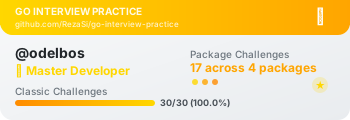
🏆 Master Level (Gold) - odelbos with 28/30 challenges:
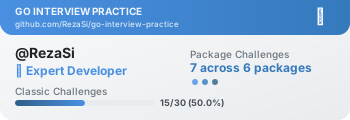
⚡ Advanced Level (Orange) - RezaSi with 14/30 challenges:
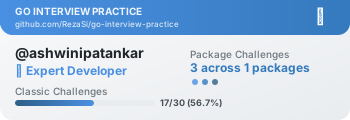
🎯 Expert Level (Blue) - ashwinipatankar with 17/30 challenges:
⚡ Compact Horizontal Style:

Your SVG Badge (Clickable):
[](https://github.com/RezaSi/go-interview-practice)
3. Static Badges
Simple badges that anyone can use regardless of their progress:

[](https://github.com/RezaSi/go-interview-practice)
🏅 Achievement System
Your badge automatically reflects your achievement level:
| Level | Requirements | Badge Color | Emoji |
|---|---|---|---|
| 🌱 Beginner | 1+ challenges | Green | 🌱 |
| ⚡ Advanced | 10+ challenges (30%+ completion) | Orange | ⚡ |
| 🎯 Expert | 15+ challenges (50%+ completion) | Blue | 🎯 |
| 🏆 Master | 20+ challenges (65%+ completion) | Gold | 🏆 |
🎨 Customization Options
Badge Styles
Change the style parameter for different looks:
for-the-badge- Large, professional (recommended for profiles)flat- Minimal, cleanflat-square- Square cornersplastic- Glossy looksocial- Social media style
Colors
Available colors for static badges:
brightgreen,green,yellowgreen,yellow,orange,redlightgrey,blue,purple,pink- Custom hex colors:
#ff69b4
📋 Usage Examples
GitHub Profile README
## 🏆 My Go Interview Practice Journey
[](https://github.com/RezaSi/go-interview-practice)
I've been practicing Go programming through the [Go Interview Practice](https://github.com/RezaSi/go-interview-practice) repository, where I've solved multiple coding challenges and improved my algorithmic thinking skills.
Personal Portfolio Website
<div class="badges">
  <h3>My Coding Achievements</h3>
  <img src="https://raw.githubusercontent.com/RezaSi/go-interview-practice/main/badges/YOUR_USERNAME.svg"
       alt="Go Interview Practice Achievement" />
  <p>Completed multiple Go programming challenges</p>
</div>
LinkedIn Profile
- Download your SVG badge as an image (screenshot or convert to PNG)
- Upload as a "License & Certification" or in your summary section
- Link back to the repository:
https://github.com/RezaSi/go-interview-practice
CV/Resume
Include the badge image and mention:
- "Completed X/30 Go programming challenges"
- "Achieved [Your Level] level in algorithmic problem solving"
- "Active contributor to open-source Go learning project"
🔄 Auto-Updates
When Badges Update
Your dynamic badges automatically refresh when:
- ✅ You solve new challenges
- ✅ Your achievement level increases
- ✅ Scoreboard data is regenerated
- ✅ New challenges are added to the repository
Update Frequency
- Badges are regenerated when scoreboards change
- GitHub Actions automatically run the badge generator
- Changes appear within minutes of scoreboard updates
🎯 Professional Tips
For Job Applications
## Technical Skills Demonstration
I actively practice algorithmic problem-solving through structured challenges:
[](https://github.com/RezaSi/go-interview-practice)
**Repository**: [Go Interview Practice](https://github.com/RezaSi/go-interview-practice)
**My Solutions**: [View my submissions](https://github.com/RezaSi/go-interview-practice/tree/main/challenge-*/submissions/YOUR_USERNAME)
For Networking
Use badges in:
- GitHub profile README
- Dev.to articles about your learning journey
- Twitter/LinkedIn posts about your progress
- Personal blog posts about Go programming
- Conference speaker bio slides
🚀 Getting Started
Step 1: Contribute
- Fork the Go Interview Practice repository
- Solve at least one challenge
- Submit your solution via pull request
Step 2: Get Your Badge
- Wait for your solution to be merged
- Badges are auto-generated after merges
- Find your badge files in the
badges/directory
Step 3: Show Off Your Achievement
- Copy the markdown from
badges/YOUR_USERNAME_badges.md - Paste into your GitHub profile README
- Share your progress with the community!
🎊 Badge Examples
Here are some real examples from our top contributors:
Master Level (20+ challenges)
Expert Level (15+ challenges)

Advanced Level (10+ challenges)

📞 Need Help?
Troubleshooting
- Badge not found? Make sure you've submitted at least one solution
- Badge not updating? Wait a few minutes for GitHub's CDN to refresh
- Want different style? Modify the
styleparameter in the URL
Contact
- 📧 Email: rezashiri88@gmail.com
- 🐙 GitHub: @RezaSi
- 💬 Issues: Repository Issues
Start your Go journey today! 🚀
Join Go Interview Practice →
Show the world your coding skills with beautiful, automatically-updating achievement badges!