Why Everest?
October 3, 2018 · View on GitHub

Everest (formerly RESTaurant) is an upcoming REST API testing client written in JavaFX.
 Everest running on Windows 10.
Why Everest?
-
Everest is written in Java. Thus, it is significantly lighter on resources and more responsive than its Electron-based alternatives like Postman. It aims to provide the same level of functionality in a lighter, native but equally slick package.
-
Aesthetic is very important. With a gorgeous, flat design, Everest is a pleasure to look at and to work with. It is also entirely theme-able.
I want you to want to use it!
-
Being a Java application, Everest is inherently cross-platform. It will run anywhere there's a JVM.
-
Everest will offer cloud synchronization of your projects powered by Summit. It will be available as a cloud service early next year or you may also choose to self-host it.
Live Features 🔥
All of the most common requests
GET, POST, PUT, DELETE and PATCH requests. HEAD and OPTIONS coming soon.
Comprehensive Request Builder
- Add request headers.
- Append query parameters. (with live preview)
- Syntax highlighting for JSON and XML, powered by RichTextFX.
- Quickly add key-value pairs for URL-encoded and multipart-form bodies.
View Response Details
- HTTP status code, content type, elapsed time, body size.
- Visualizer to view JSON responses graphically. (Aesthetic improvements coming with Alpha 1.4)
- View response headers.
 Making a GET request with Everest.
API Authentication
- Basic Auth
- Digest Auth
Custom Themes
Everest is entirely theme-able via CSS. For more details, refer this guide.
Efficient multi-tabbing
Everest utilizes a technique called pseudo tab-switching to maintain a low memory footprint even when heavy multi-tabbing. I have written a highly technical piece about this on my dev.to.
Bonus: The '+' button for adding new tabs is finally live!
History
Everest maintains the history of all the requests made by you. You can search with any of the request's components: the target, the headers, the method, the body or even the files added to the request. Everest will intelligently rank the results based on their relevance.
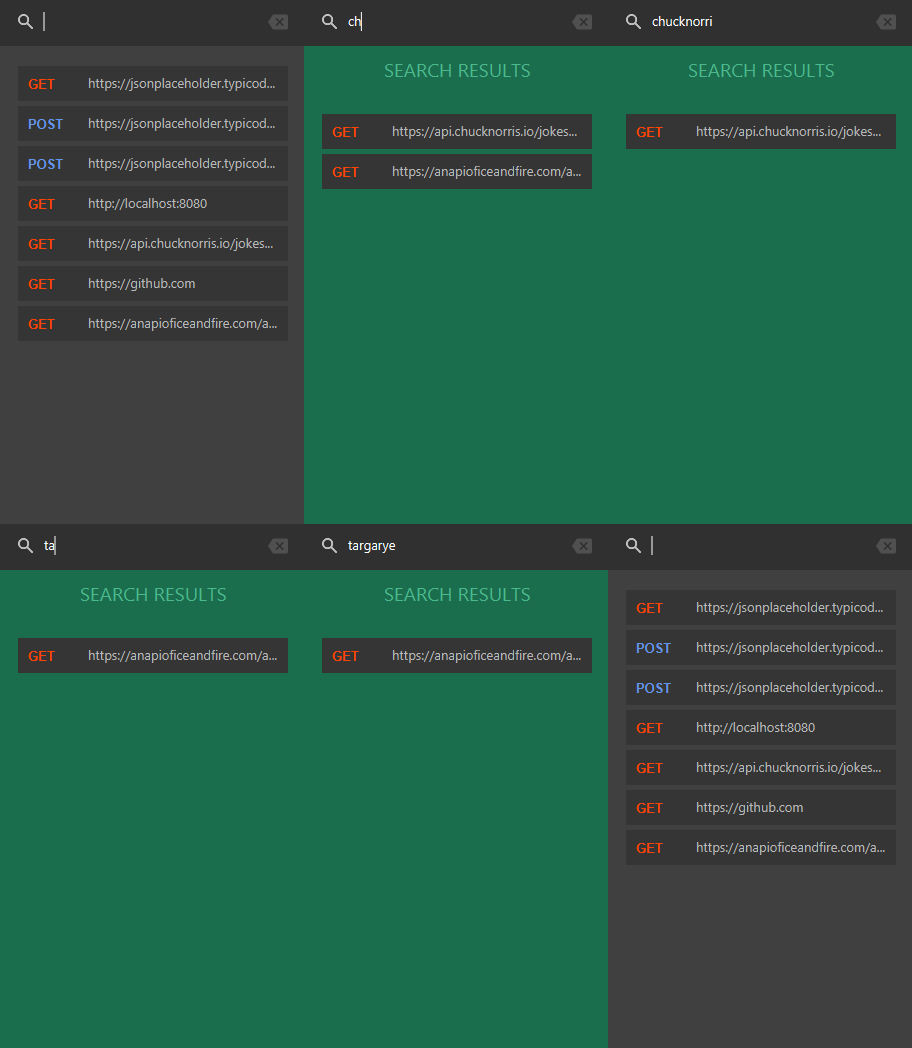
Everest's search feature in action.
Upcoming features ⏳
OAuth Support
Everest will fully support both of the OAuth standards. Work on OAuth 2.0 is in progress right now and will be available with Alpha 1.4. OAuth 1.0 will follow next.
Everest Project
- This will be Everest's equivalent of Postman's Collection or Insomnia's Workspace.
- Will house named-requests.
- Will support environment variables. Every request can have its own.
- Can be exported/imported.
Summit

- Summit is the synchronization server for Everest.
- It will allow for synchronization of your Everest Projects across multiple devices and other members of your team.
- It will use a Node.js-powered RESTful API and Socket.IO.
- It will be available early next year as a service. You may also choose to self-host Summit.
Extension API
This will allow developers to create extensions for Everest which can for example, sync to Google Drive, or visualize the response bodies in a certain fashion or summon Batman.
Mock Server
This local server can be used to quickly create a mock REST-ful service with the endpoints of your choice, producing the output of your choice.
Keymap ⌨️
| Shortcut | Task |
|---|---|
| Ctrl + T | New Tab |
| Ctrl + W | Close tab |
| Ctrl + H | Toggle History |
| Ctrl + Enter | Send request |
| Ctrl + L | Focus address bar |
| Ctrl + M | Select HTTP method |
| Ctrl + F | Focus history search bar |
| Alt + P | Focus Query Params tab |
| Alt + A | Focus Authentication tab |
| Alt + H | Focus Headers tab |
| Alt + B | Focus Body tab |
Releases 🚀
Everest is under active development and you can get the latest alpha build from Releases. Make sure you read the release notes to understand what works and what doesn't, how to report issues and how to run the binary.
Building from source 🔨
Everest uses Maven, so building from the source code is very simple. You need to have a minimum of JDK 8 (9 should also work) installed, along with Maven and Git. If you're using OpenJDK, you will need to install OpenJFX separately. Once you have everything set up, follow these simple steps:
- Clone the repository:
git clone https://github.com/RohitAwate/Everest.git - Enter the repository:
cd Everest - Build a binary:
mvn package - Run the binary:
mvn exec:java
For JDK 10 and above: JavaFX has been decoupled from the JDK and will need to be installed separately.
License ⚖️
Everest is licensed under the Apache 2.0 License.
Suggestions and improvements
Use these options to reach me:
- Open a GitHub issue.
- Email me at rohitawate121@gmail.com.
- Tweet me @TheRohitAwate.